
@pristine-machine/ui
v0.2.0
Published
Pristine Machine — a plum-blossom and blueprint inspired design system.
Downloads
242


Readme
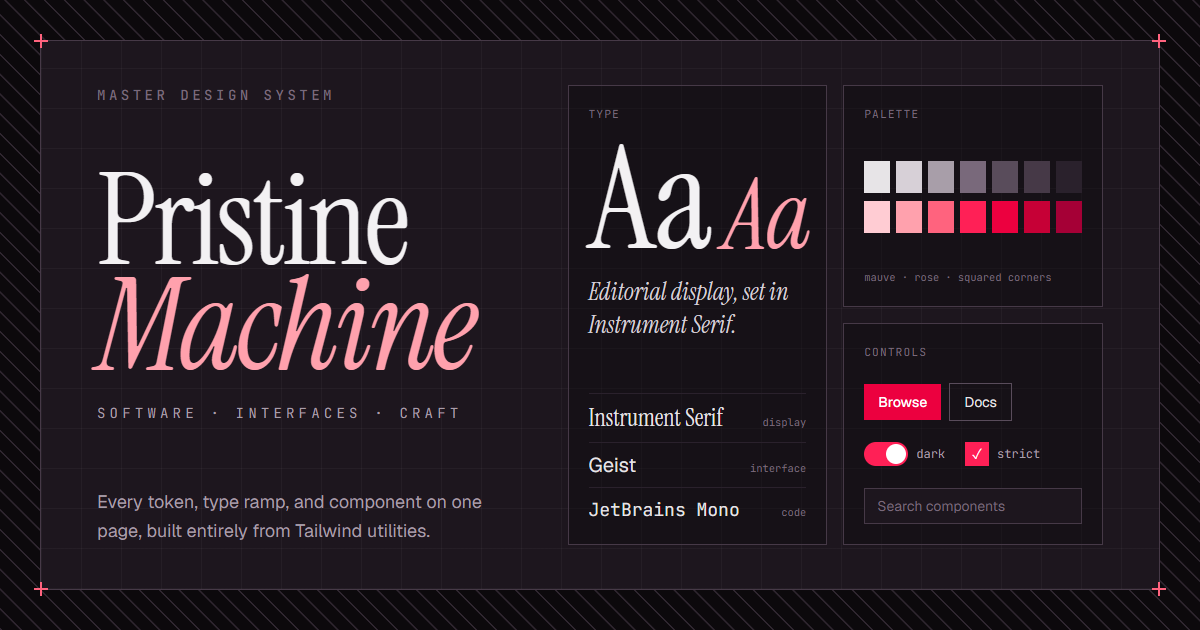
Pristine Machine
A master design system and live showcase — a plum-blossom (梅花) take on a draughtsman's blueprint. Editorial serif display, Geist UI text, JetBrains Mono annotations, squared corners, structural line-work, plum-tinted everything, and first-class light and dark modes.
The repository contains two things:
- The design system — a catalog of reusable, accessibly-built React components (buttons, forms, overlays, disclosure, navigation, feedback, brand marks) authored entirely with Tailwind utilities and built on top of Base UI primitives.
- The showcase — a single-page live preview site that documents the foundations (color, typography, scale), demonstrates every component, and assembles them into real interfaces (a deploy console, pricing page, data table, and product page).
Looking for the deep reference?
docs/design-system.mdis the comprehensive source of truth — design philosophy, full foundations, the complete component catalog, and the rationale behind every decision. This README stays high level.
Tech stack
| Layer | Choice | | --------------- | ---------------------------------------------------------------- | | Build tool | Vite | | Language | TypeScript · TSX | | UI runtime | React (with the React Compiler) | | Component base | Base UI — unstyled, accessible primitives | | Styling | Tailwind CSS — utility classes only | | Icons | lucide-react | | Lint / format | oxlint · oxfmt | | Package manager | pnpm |
Styling is intentionally constrained: components are composed from native Tailwind v4.3 utilities (the mauve and rose ramps do the heavy lifting) with no custom CSS, no inline styles, and no design tokens beyond three font families.
Quick start
Requires pnpm.
pnpm install # install dependencies
pnpm dev     # start the Vite dev server → http://localhost:5173
Using the library
Install the package and its peers (React 19+ (react and react-dom) and Tailwind CSS v4.3+):
npm install @pristine-machine/uiWire the preset and source-scan into your Tailwind entry CSS:
@import 'tailwindcss';
@import '@pristine-machine/ui/preset.css';
@source '../node_modules/@pristine-machine/ui';
The @source path is relative to your CSS entry file; use ./node_modules/... instead if that file sits at your project root.
Load the three fonts (Geist, Instrument Serif, JetBrains Mono), for example via Google Fonts, then import components:
import { Button, Card } from '@pristine-machine/ui'Project layout
src/
  components/   reusable design-system components, grouped by category
    core/       Button, IconButton, Badge, Card, Kbd, CodeBlock, Avatar, Separator, ScrollArea
    forms/      Input, Select, Switch, Checkbox, Radio, Slider, NumberField
    feedback/   Callout, Tooltip, Spinner, Toast, Progress, Meter
    navigation/ Tabs, SegmentedControl, SideNav, Sidebar, Navbar, Drawer, Toolbar
    overlays/   Dialog, AlertDialog, Popover, Menu, PreviewCard
    disclosure/ Accordion, Collapsible
    brand/      Wordmark, Blueprint frame primitives
  lib/          shared class fragments (focus rings, eyebrow labels, semantic tone ramp)
  showcase/     the live preview site (not part of the component library)
  App.tsx       composes the showcase inside a blueprint frame
See docs/design-system.md for the full design reference.