
@profullstack/hqtui
v0.11.1
Published
High Quality Terminal UI for TypeScript. btop-grade dashboards with a one-import API, dark by default, zero runtime dependencies.


Readme
Why
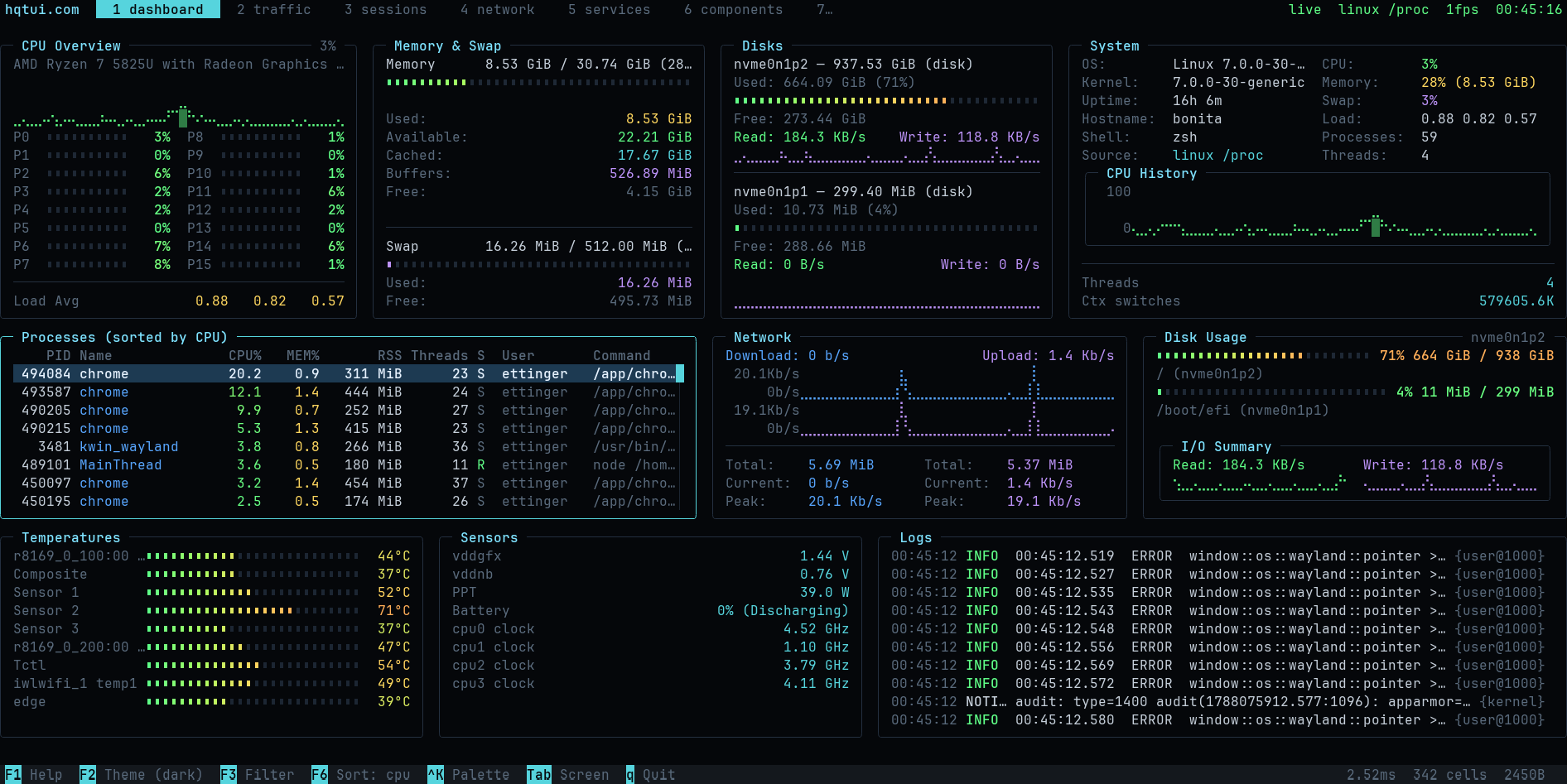
Terminal apps do not have to look like 1990s ncurses software. HQTUI owns the terminal directly — ANSI/VT sequences, a typed-array framebuffer, differential rendering, Braille graphics and truecolor — so a dashboard written in TypeScript can look and feel like a modern desktop app while starting instantly and running fine over SSH.
No ncurses. No browser DOM. No React. No native addon. No network access. Ever.
Install
bun add @profullstack/hqtui     # Bun is the default runtime
npm  add @profullstack/hqtui    # Node 22.6+ works too
Hello, terminal
import { createApp } from "@profullstack/hqtui";

const app = await createApp();

app.render(({ ui }) => {
  ui.panel({ title: "Hello" }, (panel) => {
    panel.text("Hello, terminal.");
  });
});

await app.start();
That is the whole API surface you need to start. createApp() already gives you a dark
theme, truecolor with automatic 256/16-colour fallback, mouse tracking, the alternate
screen, resize handling, 30fps adaptive rendering (15 over SSH), and a terminal that is
restored no matter how the process dies — Ctrl+C, SIGTERM, or an uncaught exception.
A real dashboard
import { createApp } from "@profullstack/hqtui";

const app = await createApp({ fps: 30 });

app.render(({ ui, theme }) => {
  ui.grid({ columns: ["2fr", "1fr"], rows: [14, "1fr"], gap: 1 }, (grid) => {
    grid.panel({ title: "CPU" }, (p) => {
      p.graph({ values: cpuHistory, min: 0, max: 100, fill: true });
      p.meters(cores.map((value, i) => ({ label: `P${i}`, value })), { columns: 2 });
    });

    grid.panel({ title: "Memory" }, (p) => {
      p.meter({ label: "Used", value: 0.42, text: "6.7 GiB" });
      p.keyValues([{ label: "Cached", value: "4.0 GiB" }]);
    });

    grid.panel({ title: "Processes", colSpan: 2 }, (p) => {
      p.table({
        rows: processes,
        columns: [
          { key: "pid", title: "PID", width: 7, align: "right" },
          { key: "name", title: "Name" },
          { key: "cpu", title: "CPU%", width: 6, align: "right" },
        ],
      });
    });
  });
});

await app.start();
See it running
bunx @profullstack/hqtui-demo          # your real machine
bunx @profullstack/hqtui-demo --sim    # deterministic simulation
hqtui doctor                           # what your terminal supports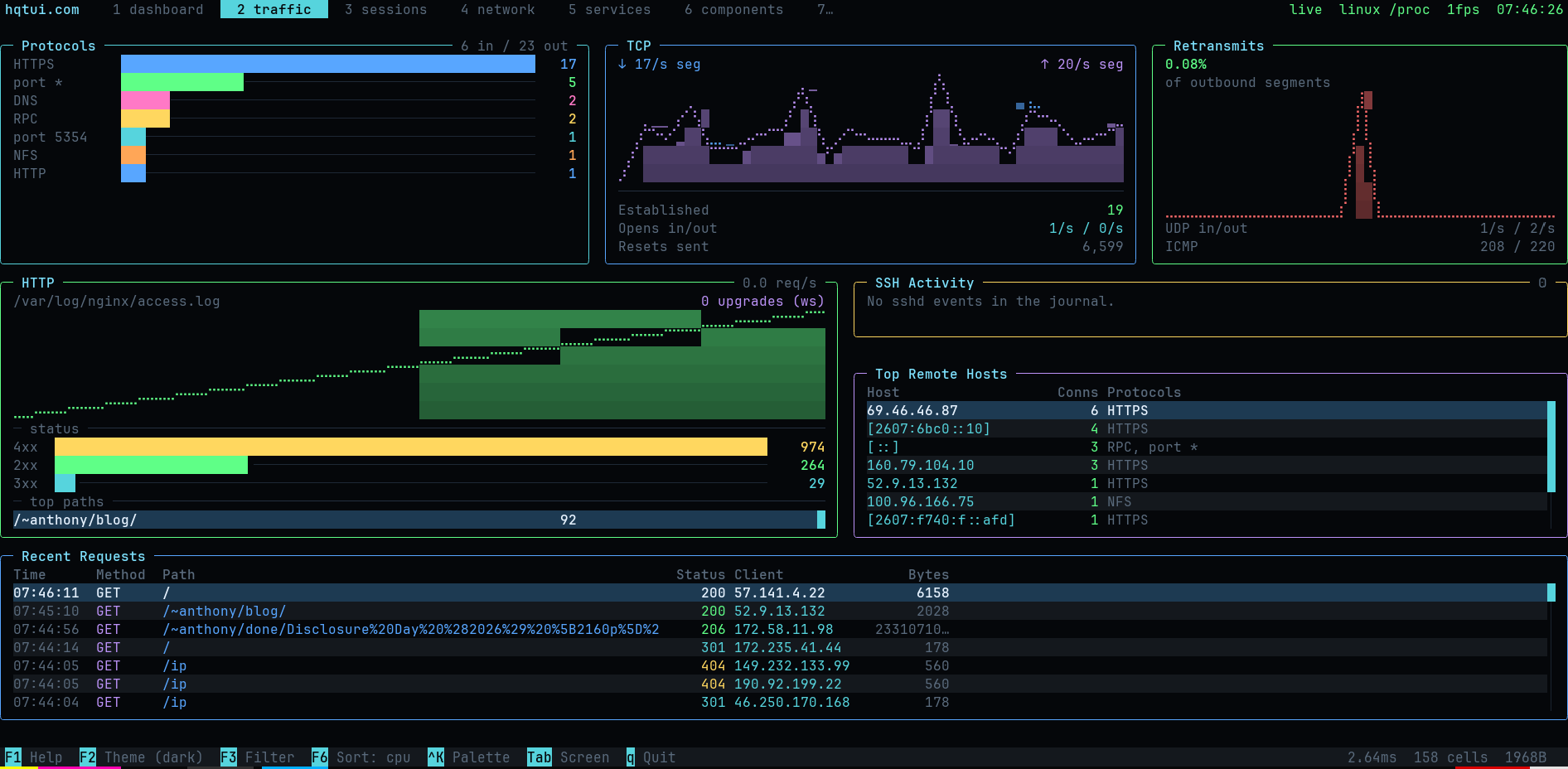
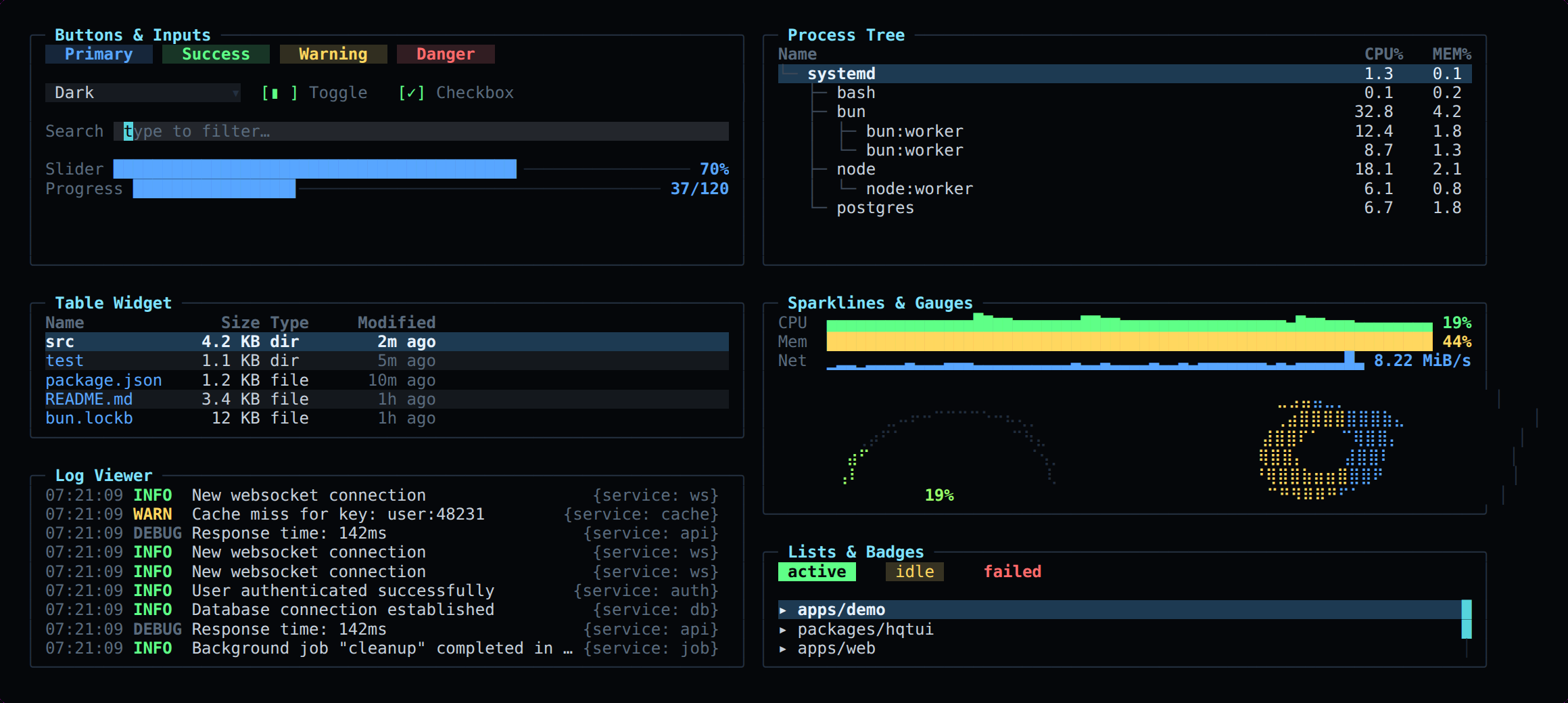
Ten screens covering system metrics, network traffic by protocol, HTTP requests, SSH activity, sessions, services and the full widget catalogue.
What is in the box
| | |
|---|---|
| Layout | rows, columns, grid with spans, "40%", "2fr", auto, min/max, padding, gaps, clipping, responsive breakpoints |
| Widgets | panel, table, data grid, tree, list, log viewer, key/values, meter, gauge, donut, progress, sparkline, line/area/multi-series graph, histogram, heat bar, tabs, status bar, button, checkbox, toggle, radio, select, text input, modal, command palette, tooltip, badge, spinner, divider |
| Graphics | Braille canvas (2×4 pixels per cell), block/half-block/quadrant/ASCII modes, gradients, software alpha blending |
| Color | 24-bit truecolor, automatic 256 and 16-colour quantization, NO_COLOR, monochrome and high-contrast modes |
| Themes | dark (default), dracula, nord, tokyo night, gruvbox, matrix, monochrome, high contrast, light — plus defineTheme() |
| Input | normalized keys with modifiers, SGR mouse (click, drag, scroll, move), bracketed paste, focus events, Tab focus traversal |
| Testing | headless renderer: renderToText, renderToScreen, renderToAnsi, renderToHtml — no TTY required |
Data grid
table fits every column into the width. A data grid keeps each column readable
and scrolls on both axes instead: a frozen header, a row-number gutter, a cell cursor,
a sort marker, and arrows when columns are off to either side. It is the widget a CSV
viewer, a query result or a wide log needs.
ui.dataGrid({
  columns: header.map((title) => ({ title })),
  rows,                        // string[][], parsed however you like
  order,                       // optional: row indices, sorted/filtered, never copied
  selectedRow, selectedColumn, // the cursor; the grid scrolls to keep it on screen
  sort: { column: 2, descending: true },
  onSelectCell: (row, column) => { selectedRow = row; selectedColumn = column; },
  onHeaderClick: (column) => toggleSort(column),
  onScroll: (delta) => { selectedRow += delta * 3; },
});
The grid only draws: parsing, sorting and filtering stay with the caller, which keeps
the library free of dependencies. onLayout reports what fit (capacity, visible
columns) so page keys move by a real screenful. dataGridWidths, dataGridLayout and
dataGridCellAt are exported for callers that draw their own.
Icons
The OpenIcon pack is built in and on by
default: 370 icons, each with a Nerd Font glyph, a Unicode symbol and an ASCII
spelling. icon() returns the best one this terminal can draw.
import { icon, setIconMode } from "@profullstack/hqtui";
ui.text(`${icon("mail")} Inbox ${icon("git-branch")} main`);
// Inbox main with a Nerd Font
// ✉ Inbox ⎇ main in a UTF-8 terminal
// @ Inbox Y main anywhere elseThe HQ (full colour) style of a few of them:
A Nerd Font is never assumed, because it cannot be detected from inside the
terminal: set NERD_FONT=1, OPENICON_GLYPHS=nerd|unicode|ascii, or call
setIconMode(). Aliases resolve (icon("email")), an icon Nerd Fonts lacks
falls back to Unicode, and an unknown name draws nothing. useIconPack() swaps
in any other OpenIcon set. The table is generated from the set by
scripts/generate-icons.ts, for this library and the Rust, Go and Python ports.
Emoji
The OpenEmoji pack is built in and on by
default: every standard emoji (3,963 in Emoji 18.0) with its CLDR name, an
oe_ shortcode and search keywords. emoji() is the emoji where the terminal
draws emoji and readable text where it cannot.
import { emoji, emojify, emojiSearch } from "@profullstack/hqtui";

ui.text(`${emoji("rocket")} shipped`);      // 🚀 shipped    ([rocket] shipped as text)
ui.text(emojify("deploy :tada: :+1:"));      // deploy 🎉 👍   (deploy [party popper] +1)
emoji("thumbs_up_t3");                        // 👍🏽  skin tones are _t1 … _t5
emojiSearch("lol")[0].char;                   // 😂  CLDR keywords
A few of the set:
A name can be the shortcode (fire, oe_fire, :fire:), the CLDR name, a
common alias (thumbsup, +1, heart) or the emoji itself. Text mode is an
emoticon where one fits (:), <3, :D) and the name in brackets elsewhere;
it is chosen with setEmojiMode(), HQTUI_EMOJI=emoji|text, or detected (the
Linux console gets text). stringWidth counts every emoji as two columns,
skin tones, flags, keycaps and ZWJ sequences included, so tables and borders
stay aligned. The Rust, Go and Python ports carry the same table.
Our artwork in your terminal. A TUI cannot pick the terminal's font, so
hqtui fonts install installs the OpenEmoji colour font and makes it the
emoji fallback: fontconfig on Linux (Alacritty, foot, GNOME Terminal, Konsole
and others follow it; Kitty and WezTerm get a one-line snippet), and
~/Library/Fonts on macOS, where Kitty, WezTerm and iTerm2 can use it and
Terminal.app cannot. hqtui fonts status checks it, and hqtui fonts remove
undoes everything, restoring any file it replaced. Nothing is installed except
by that command.
Inline artwork. In terminals that show images, await emojiImage("rocket")
returns the escape sequence that draws the OpenEmoji PNG two cells wide: the
Kitty graphics protocol in Kitty and Ghostty, iTerm2 inline images in iTerm2
and WezTerm. It is off unless HQTUI_EMOJI_ART=1 (or { art: true }); the PNG
is picked from 128, 256 and 512 px at twice the cell height
(queryCellSize() or HQTUI_CELL_PX=10x20) and cached under
~/.cache/hqtui/openemoji. Everywhere else it returns the emoji character.
HD images inside your app. emojiImage is a one-off write; for a running
app, use the image store. Each OpenEmoji or OpenIcon PNG is uploaded once as a
Kitty Unicode placeholder image, then drawn as ordinary cells, so redraws,
scrolling and tmux all keep it:
const images = createImageStore({ write: (s) => app.terminal.write(s), onReady: () => app.invalidate() });
// in a draw callback:
drawRichText(surface, x, y, "ship it 🚀", { fg }, images); // the rocket is the PNG once loaded
drawIcon(surface, x, y, "lock", images, "🔒");              // OpenIcon, or the fallback text
Kitty and Ghostty use placeholders. WezTerm and iTerm2, which do not support
them, get iTerm2 inline images drawn after each frame: add
images.attach(app) once. Local terminals are detected; over SSH or in tmux
(with set -g allow-passthrough on) set HQTUI_IMAGES=1 for Kitty/Ghostty or
HQTUI_IMAGES=wezterm for WezTerm/iTerm2. HQTUI_IMAGES=0 turns it off.
Behind mosh images are always off (mosh syncs only text and drops image
escapes), so emoji stay characters; use plain SSH or WezTerm's multiplexer
(wezterm connect) for images. HQTUI_MOSH=0|1 overrides the detection.
Elsewhere it draws the text, so the calls are always safe.
In a browser terminal (xterm.js), load the set's stylesheet and name the family, so emoji draw with the same art:
<link rel="stylesheet" href="https://raw.githubusercontent.com/profullstack/openemoji/main/openemoji.css">
<script>new Terminal({ fontFamily: '"JetBrains Mono", OpenEmoji, monospace' })</script>
Testing your TUI
Terminal apps are usually untestable. Here they are not:
import { renderToScreen } from "@profullstack/hqtui";

const screen = renderToScreen(({ ui }) => ui.panel({ title: "CPU" }, (p) => p.text("72%")), {
  width: 40,
  height: 6,
});

expect(screen.contains("72%")).toBe(true);
expect(screen.cell(2, 0).fg).toBe(theme.title);
Performance
The screen is one grid of cells in four typed arrays — no object is allocated per cell. Each frame is diffed against the previous one and only the changed runs are written, with a model of the terminal's pen so no redundant escape sequence is emitted.
Changing CPU 72% to CPU 73% writes a single character, not a screen.
bun run benchRuntimes
Bun is the default. Node 22.6+ runs everything unchanged (it strips TypeScript natively). Deno support is best-effort. Tested on Linux, macOS and Windows Terminal; degrades gracefully on limited terminals (no mouse, quantized color, ASCII instead of Braille).
License
MIT.
Copy summaries as Markdown
Enable copy icons for summary panes throughout an app:
const app = await createApp({
  copyMarkdown: true,
  markdownContext: () => `Host: ${hostname}\nReporting period: ${period}`,
});

app.render(({ ui }) => {
  ui.panel({ title: "Status" }, (p) => {
    p.keyValues([{ label: "Connection", value: "Ready" }]);
  });
  ui.copyButton({ markdown: () => "## Status\n\nReady\n", width: 6 });
});
Click ⧉ MD, or Tab / Shift+Tab to focus a control and Enter / Space to copy.
Other navigation keys return focus to the app. ASCII terminals display C MD;
narrow panes show only the icon. A short notice confirms the clipboard request.
Automatic exports include the pane title, subtitle, context, text, labeled values, meters, progress, and graph summaries (latest/min/max/sample count). Values are captured before wrapping and clipping. Tables, lists, logs, trees, input fields, and raw drawing callbacks are excluded. Panels containing only data rows have no copy icon. Layout branches that the app does not build cannot be exported.
Set copyMarkdown: true on one panel or modal to enable it individually,
copyMarkdown: false to exclude it (including from parent exports), or provide
a Markdown string/callback for a custom summary. ui.copyButton() places the
same control in a status strip or custom layout. Custom Markdown is copied as
provided; markdownText(value) escapes plain values for interpolation.
The default clipboard writer uses OSC 52 through the terminal, including over
SSH, and wraps the sequence for tmux. Terminal clipboard support must be enabled;
“Markdown copy sent” confirms delivery of the request, since terminals do not
acknowledge clipboard writes. Oversized exports fail explicitly instead of being
truncated. Supply clipboard: (text) => ... on createApp() to use another writer.
No shell command is run. renderToScreen() records copies in screen.copied for
interaction tests without changing the clipboard.