
@pspdfkit/pdf-to-markdown
v0.5.1
Published
Standalone CLI for Nutrient's document extractors — PDF to Markdown, PDF to text, and ranked query over extracted files


Readme
Nutrient PDF to Markdown





Stop wasting your context window on PDF extraction.
Fast, accurate Markdown from PDFs — locally, with no cleanup required. Built for Claude, Codex, RAG pipelines, and document-heavy automation where noisy extraction burns tokens and makes downstream results less reliable.
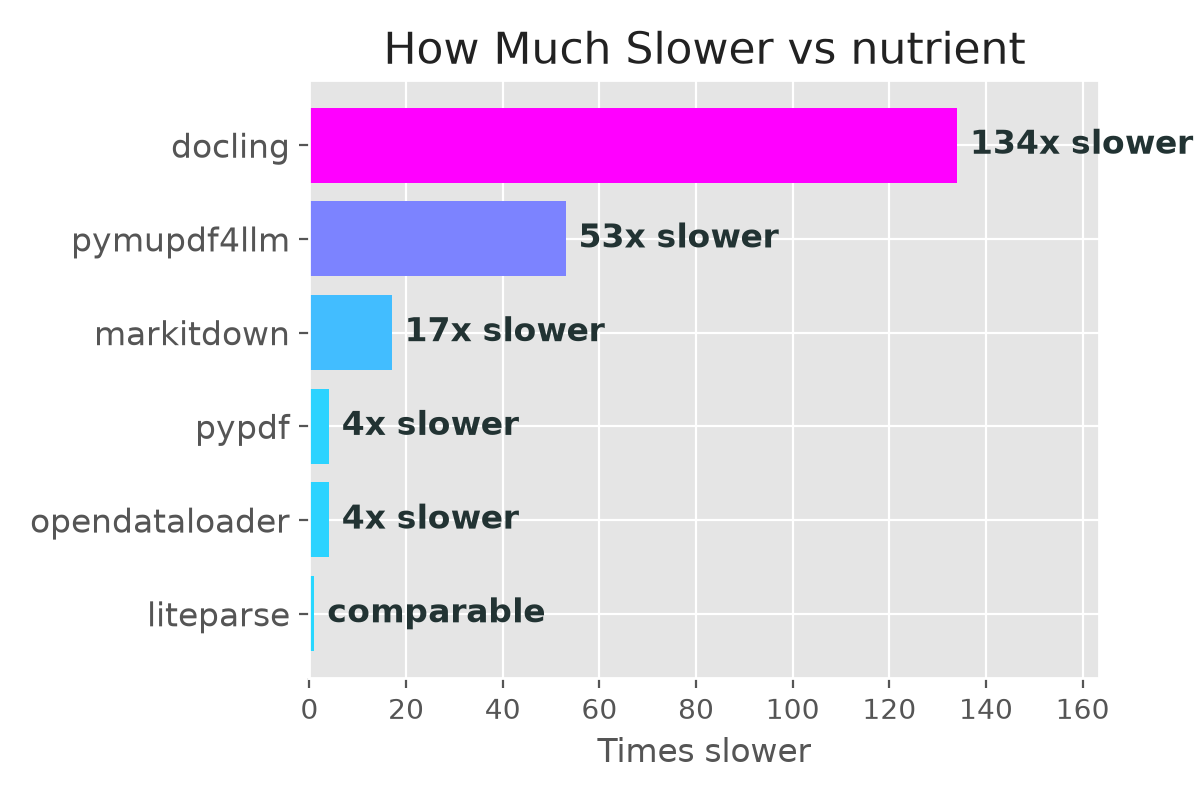
- How fast is it? — 0.004s per page. 134x faster than docling, 53x faster than pymupdf4llm. (benchmarks)
- How accurate is it? — 0.93 reading order (best in class), 0.89 overall extraction accuracy, 0.82 heading detection. (benchmarks)
- NEW:
--visiontier — a licensed machine-vision ICR pipeline that tops every accuracy metric, including tables (0.94 TEDS), handles scanned and handwritten documents — and still runs faster than docling (0.35s per page). (benchmarks) - Three tools, one binary —
pdf-to-markdownfor structured Markdown,pdf-to-textfor layout-preserving plain text, andqueryfor ranked search over an extracted file. Pick by what the downstream consumer needs. (the Nutrient document CLI) - NEW: Image export —
--enable-image-exportextracts images alongside Markdown for vision-capable LLMs. (usage) - Where do my PDFs go? — Nowhere. The CLI runs locally. Your documents are not uploaded to Nutrient. (trust & licensing)
- What does it cost? — Free for up to 1,000 documents per calendar month. No license key, no signup, no API token. (license)
The Nutrient document CLI
pdf-to-markdown is one verb of a single signed binary that turns digital-born PDFs into agent-ready output — locally, deterministically, on the same generous free tier. Convert once, then work against the result:
| Command | What it does | Reach for it when |
| --- | --- | --- |
| pdf-to-markdown | PDF → clean Markdown (headings, lists, tables, reading order) | The consumer benefits from structure — most RAG and LLM-context pipelines |
| pdf-to-text | PDF → layout-preserving plain text (columns and tabular alignment survive) | The consumer is plain-text only — a non-Markdown model, a grep/awk pipeline, a column-sensitive table reader |
| query | Ranked BM-25 search over an already-extracted file, returning only the top line windows | You have a large conversion and want one fact or clause without reading the whole thing back into context — parse once, query many |
All three install together from this package (and from the Nutrient Skills marketplace), and share one binary in ~/.local/share/nutrient/cli/.
Scanned or photographed documents? The default engine is built for digital-born PDFs (a real text layer). For scanned, handwritten, or otherwise image-only documents you have two options: the licensed
--visiontier runs a machine-vision ICR pipeline locally on the same binary, and the Nutrient Data Extraction API adds schema-level structured extraction with per-value coordinates and confidence in the cloud.
Install
Agent skill (recommended)
If you use Claude Code, Codex, Pi, Cursor, or Gemini CLI, install the Nutrient Skills plugin — the extraction runs automatically when your agent needs to read a PDF. Add whichever of the three skills you want (they share one binary, so any of them installs it):
npx skills add pspdfkit-labs/nutrient-skills --skill pdf-to-markdown
npx skills add pspdfkit-labs/nutrient-skills --skill pdf-to-text
npx skills add pspdfkit-labs/nutrient-skills --skill query
Or with marketplace/plugin flows (Claude Code, Codex):
/plugin marketplace add pspdfkit-labs/nutrient-skills
/plugin install pdf-to-markdown@nutrient-skills
/plugin install pdf-to-text@nutrient-skills
/plugin install query@nutrient-skills
With Pi:
pi install git:github.com/PSPDFKit-labs/nutrient-skillsOnce installed, just reference a PDF in your prompt — no extra commands needed:
"Extract the pricing table from proposal.pdf"
The skill invokes the CLI transparently and passes the resulting Markdown into your agent context.
Standalone CLI
For use outside an agent, install the published npm package:
npm install -g @pspdfkit/pdf-to-markdownOr run it without a global install:
npx @pspdfkit/pdf-to-markdown --helpThe package supports Node 18+ on macOS Apple Silicon, Linux x86_64, Linux arm64, and Windows (x64 and arm64). On Windows the commands run under Git Bash, which ships with Git for Windows and is what agent tools like Claude Code already use for their shell.
If you prefer a shell installer, keep the curl fallback:
curl -fsSL https://raw.githubusercontent.com/PSPDFKit/pdf-to-markdown/main/install.sh | shThis installs pdf-to-markdown into ~/.local/bin by default.
You can also install from a clone:
git clone https://github.com/PSPDFKit/pdf-to-markdown.git
cd pdf-to-markdown
./install.sh            # or: npm install -g .
Quick Check
After install, verify the commands are available:
pdf-to-markdown --help
pdf-to-text --help
query --help
Usage
Single PDF
pdf-to-markdown input.pdf output.mdIf output.md is omitted, Markdown is written to stdout.
Batch directory
pdf-to-markdown ./input-pdfs ./output-markdownWhen both arguments are directories, the CLI converts every PDF in the input directory and writes matching Markdown files into the output directory.
Image export
pdf-to-markdown --enable-image-export input.pdf output.mdExtracts images from the PDF and saves them to output_resources/, referenced as standard Markdown image links in the output. Useful when feeding results to vision-capable LLMs or when image context improves downstream accuracy. Off by default because it increases processing time for image-heavy documents.
Plain text (pdf-to-text)
pdf-to-text input.pdf output.txtProduces layout-preserving plain text: each word is placed on a character grid that mirrors its position on the page, so columns, indentation, and tabular alignment survive the conversion. As with pdf-to-markdown, omit the output path to write to stdout, and pass two directories to batch-convert in parallel:
pdf-to-text input.pdf            # write to stdout
pdf-to-text ./input-pdfs ./output-text
Choosing pdf-to-markdown vs pdf-to-text
Both commands are backed by the same local binary; pick by what the downstream consumer needs:
- Use
pdf-to-markdownwhen the consumer benefits from semantic structure — headings, lists, tables, and reading order. Most RAG and LLM-context pipelines fall here. - Use
pdf-to-textwhen the consumer is plain-text only — a non-Markdown model, agrep/awkpipeline, or a column-aligned table reader that cares about spatial layout rather than Markdown markup.
Search a converted document (query)
A converted document can run to tens of thousands of lines and will blow out your context window if you read it back. query runs ranked BM-25 search over the extracted file and returns only the handful of line windows that matter — parse once, query many:
query text output.md "what is the total contract value?"Each result is a Lines A–B window with global line numbers, so you can re-read the exact range for full context. query is a two-level command — query text INPUT "QUERY" — leaving room for more query types over time.
Updates
The wrapper keeps the bundled binary current on its own: it checks the Nutrient CDN for a newer build at most once every six hours and updates in place. No manual update step is required. (The binary also ships a self-update capability, but you don't need to invoke it through these commands.)
Platform Support
- macOS Apple Silicon (
Darwin/arm64) - Linux x86_64
- Linux arm64
- Windows x64
- Windows arm64
macOS Intel and Rosetta shells are unsupported; npm may allow installation, but the commands refuse to run.
Windows binaries are Authenticode-signed and run under Git Bash (MINGW/MSYS/Cygwin environments), bundled with Git for Windows. An x64 Git Bash on Windows-on-ARM detects as x86_64 and fetches the x64 binary, which runs fine under Windows emulation.
Benchmarks
Nutrient is built for digital-born PDF extraction, so we benchmark it against the open-source parsers you'd otherwise reach for.
Benchmark results from 200 PDF documents with hand-annotated Markdown ground truth, evaluated using NID (reading order), TEDS (table structure), and MHS (heading hierarchy) metrics. All competitor libraries pinned to their latest versions as of 2026-07-06, run on an Apple M3 Ultra (no discrete GPU).
Visual Snapshot
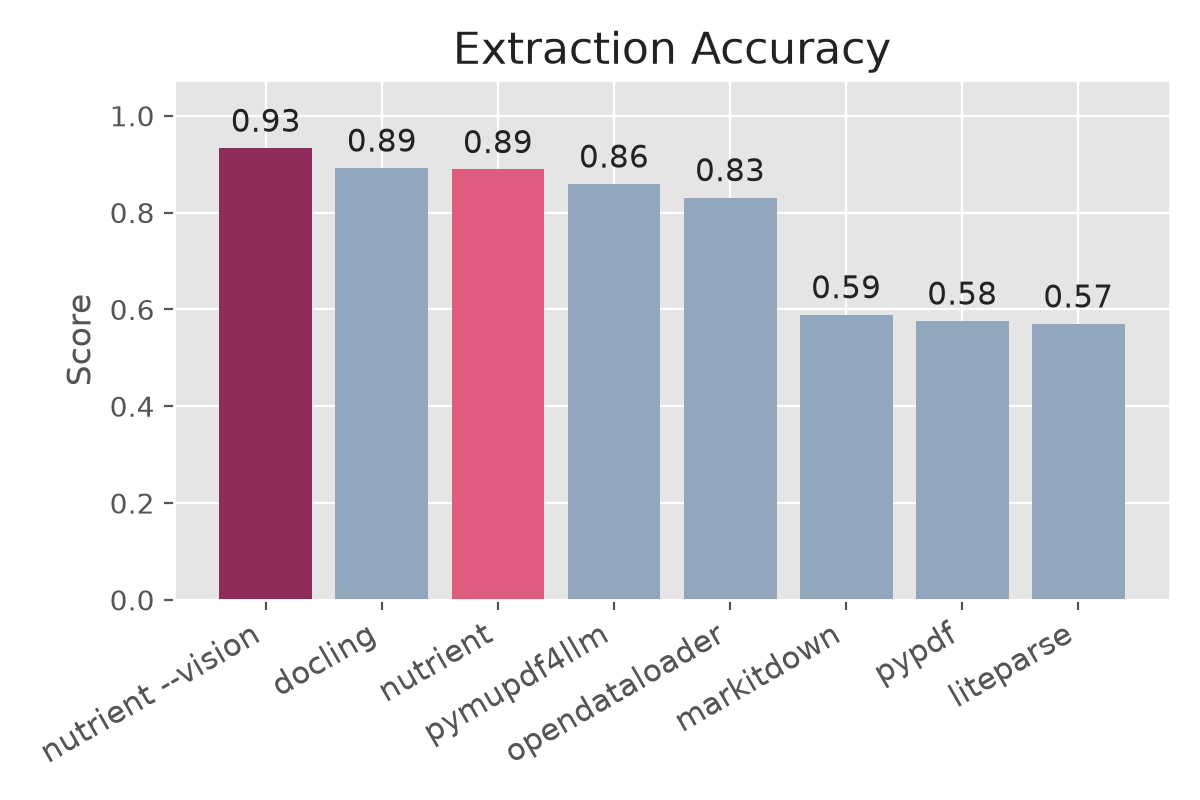
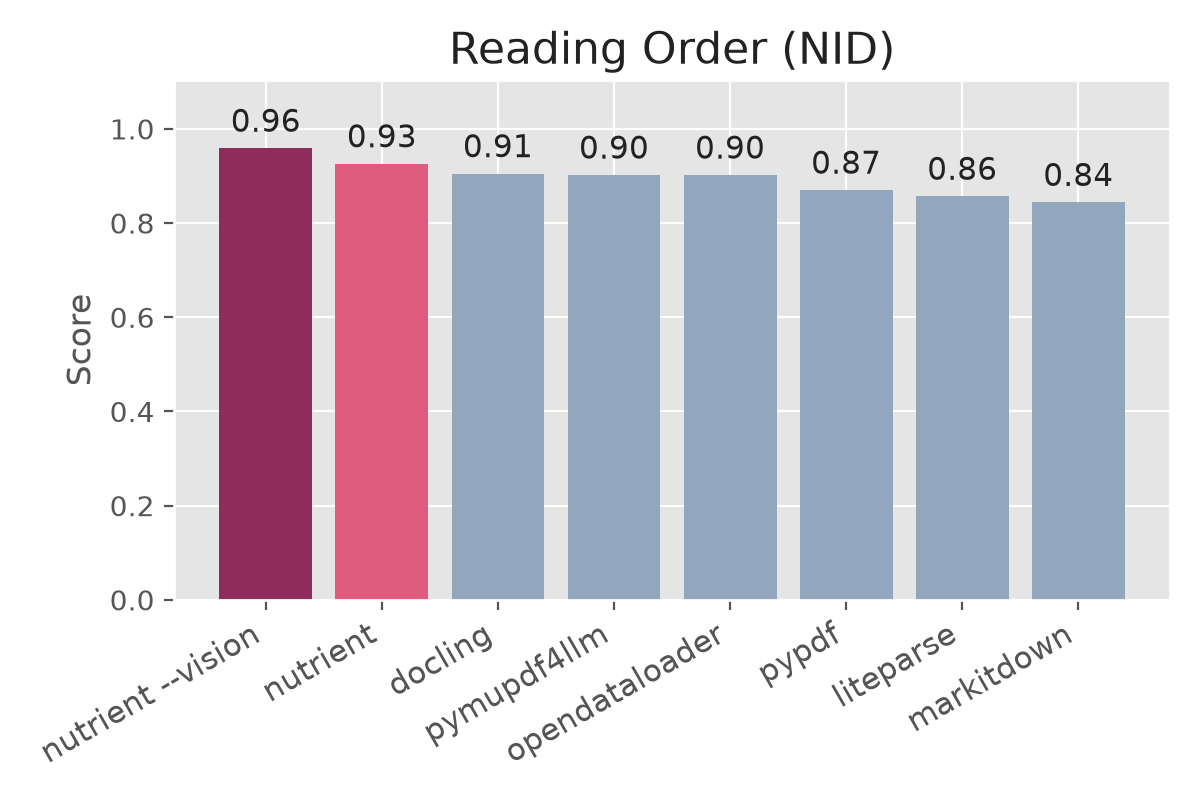
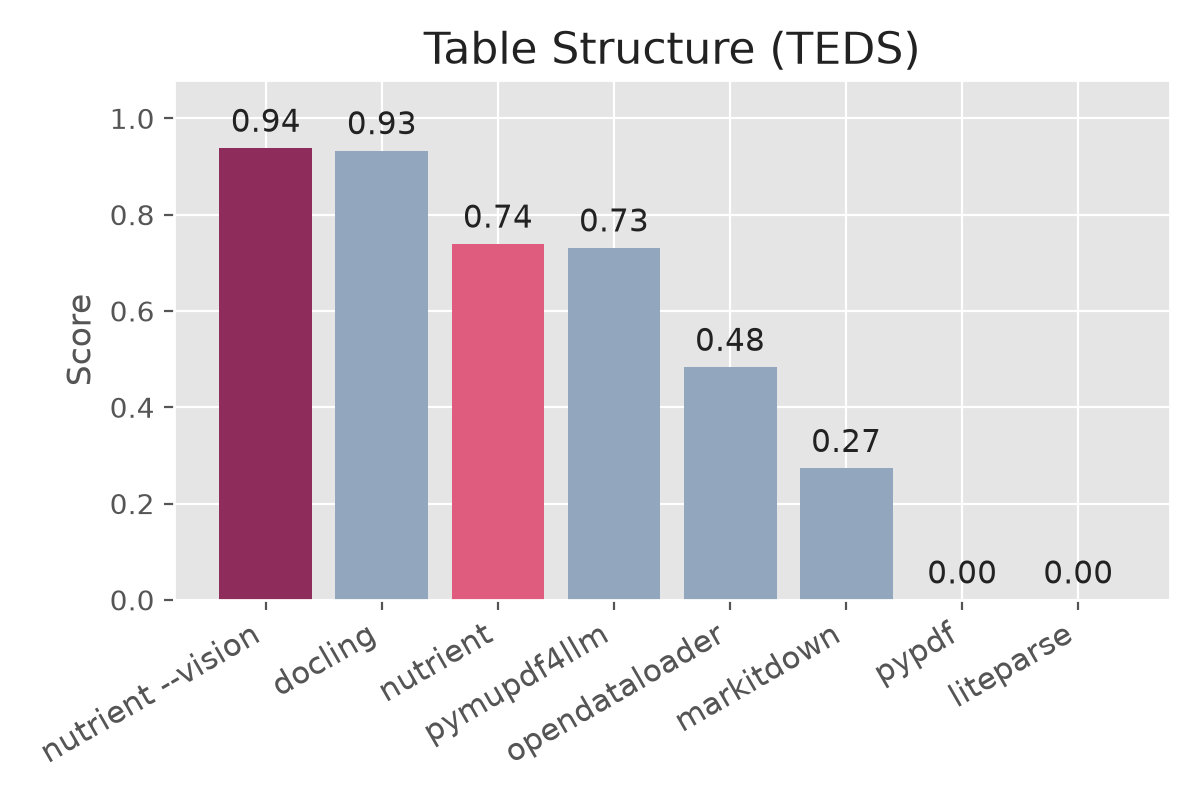
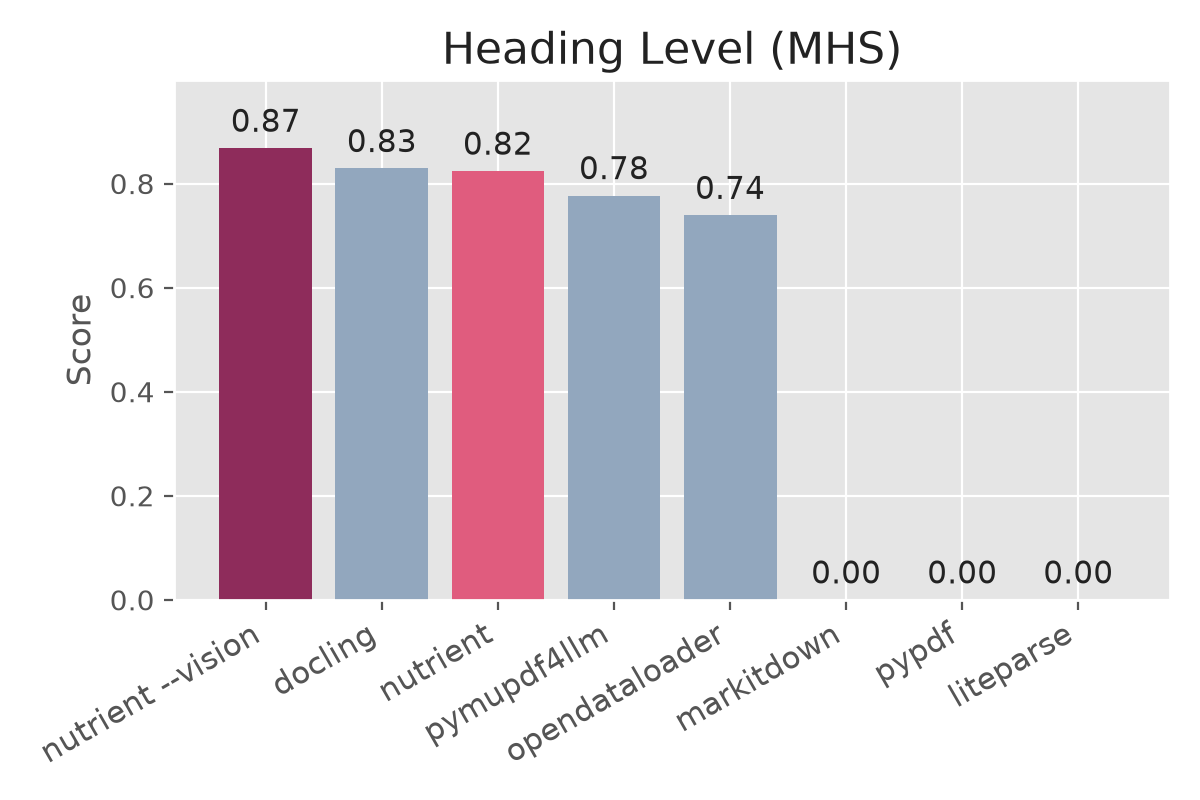
Accuracy
| Solution | Version | Overall | Reading Order (NID) | Table Structure (TEDS) | Heading Level (MHS) |
| --- | --- | ---: | ---: | ---: | ---: |
| Nutrient --vision † | 1.3.1 | 0.93 | 0.96 | 0.94 | 0.87 |
| Nutrient | 1.3.0 | 0.89 | 0.93 | 0.74 | 0.82 |
| docling | 2.110.0 | 0.89 | 0.91 | 0.93 | 0.83 |
| pymupdf4llm | 1.28.0 | 0.86 | 0.90 | 0.73 | 0.78 |
| opendataloader | 2.4.7 | 0.83 | 0.90 | 0.48 | 0.74 |
| markitdown | 0.1.6 | 0.59 | 0.84 | 0.27 | 0.00 |
| pypdf | 6.14.2 | 0.58 | 0.87 | 0.00 | 0.00 |
| liteparse | 2.4.1 | 0.57 | 0.86 | 0.00 | 0.00 |
Among the default (non-vision) engines: Nutrient has the best reading order; docling 2.110 has the best table structure and a hair's-width overall edge at the third decimal (0.892 vs 0.889) — at 134× the runtime. The --vision tier tops every metric outright, including tables — while running faster than docling. The opendataloader-hybrid variant was not re-run (it requires a separate docling backend service); its last published numbers were 0.87 overall.
Speed
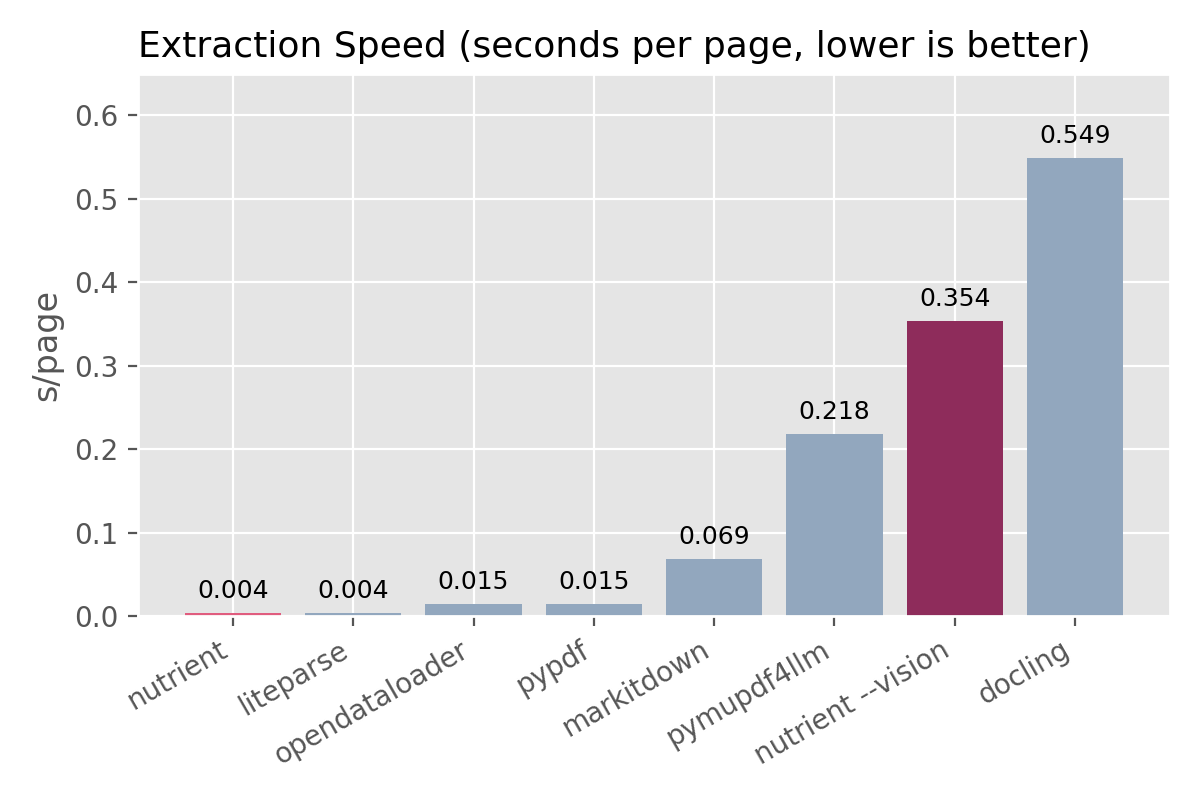
| Solution | Seconds per page |
| --- | ---: |
| Nutrient | 0.004 |
| liteparse | 0.004 |
| opendataloader | 0.015 |
| pypdf | 0.015 |
| markitdown | 0.069 |
| pymupdf4llm | 0.218 |
| Nutrient --vision † | 0.354 |
| docling | 0.549 |
Nutrient and liteparse run batch-parallel; the other engines process sequentially in-process. Nutrient is the fastest structure-preserving parser by a wide margin — only liteparse (which preserves no table/heading structure) matches its throughput.
Faster with Nutrient
134xfaster thandocling53xfaster thanpymupdf4llm17xfaster thanmarkitdown4xfaster thanpypdf4xfaster thanopendataloader
The --vision tier
† Nutrient 1.3.0 added a machine-vision ICR pipeline behind the --vision flag: layout analysis, table reconstruction, formulas, and handwriting, running locally with GPU-hybrid inference (--provider auto; falls back to CPU). In this benchmark (1.3.1) it tops every accuracy metric — including table structure, where it beats docling outright — and at 0.35 s/page it is also faster than docling. There is no speed-for-accuracy trade against the open-source field.
The first --vision run downloads the vision models (several hundred MB, cached locally afterward). Vision is a licensed capability: it requires a license key (--license-key) and is not part of the free tier. The default engine above remains free for up to 1,000 documents per calendar month. Contact [email protected] for a vision license.
For the full comparison table, see docs/benchmarks.md.
Trust and Licensing
- Free for up to
1,000documents per calendar month - PDFs stay local — your documents are not uploaded to Nutrient by this extractor
- A commercial license is required for processing more than
1,000documents per month - The
--visionICR tier requires a separate license key (--license-key); without one,--visionrefuses to run - The extraction engine is delivered as a signed platform binary; the repo contains only the wrapper and documentation
- The license is non-transferable — you may not redistribute the binary standalone or sublicense it to third parties; embedding it in your own application is permitted under the free tier terms
See LICENSE.md for the full terms and docs/distribution-model.md for details on what ships in this repo vs. the binary.
FAQ
What makes this different from other PDF extractors?
Speed and accuracy should not be a tradeoff. Most extractors are either fast but lose structure (markitdown, pymupdf4llm) or accurate but slow (docling). Nutrient extracts at 0.011s per page with the best reading order score (0.93), strong heading and table preservation — less cleanup, fewer wasted tokens, and more reliable downstream results.
What about scanned or handwritten documents?
The default engine is built for digital-born PDFs that already contain a text layer and does not OCR. The licensed --vision tier (nutrient 1.3.0+) handles scanned, photographed, and handwritten documents locally with a machine-vision ICR pipeline — see the --vision tier. For schema-level structured extraction with per-value coordinates and confidence scores, use the Nutrient Data Extraction API.
Do my documents leave my machine?
No. The CLI processes PDFs locally. Nothing is uploaded to Nutrient. Note that if you feed the extracted Markdown into Claude, Codex, or another model provider, their own data policies apply.
Do I need a license key or API token?
Not for the default engine. There is no signup, no license key, and no API token — install the CLI and start converting. The free tier (up to 1,000 documents per calendar month) is enforced via the license terms, not a technical gate. The one exception is the --vision tier, which requires a license key. For vision licensing or processing more than 1,000 documents per month, contact [email protected].
Why is the extraction engine closed-source?
The repo is designed to be reviewable — you can read the wrapper, the installer, and the documentation. The extraction engine is distributed as a signed binary to protect the implementation while keeping the CLI surface fully transparent.