
@puge/details
v1.0.0
Published
展开收缩


Readme
@puge/highlight
SVG动画效果选择框.
安装 及 使用
$ npm install --save @puge/details使用组件
<template>
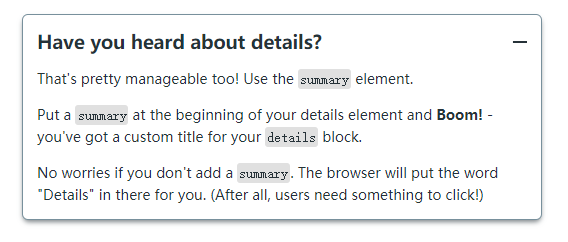
  <Details title="Have you heard about details?">
    <p>That's pretty manageable too! Use the <code>summary</code> element.</p>
    <p>Put a <code>summary</code> at the beginning of your details element and <b>Boom!</b> - you've got a custom title for your <code>details</code> block.</p>
    <p>No worries if you don't add a <code>summary</code>. The browser will put the word "Details" in there for you. (After all, users need something to click!)</p>
  </Details>
</template>

<script>
  import Details from '@puge/details'
  export default {
    components: {
      Details
    }
  }
</script>
效果:
<template>
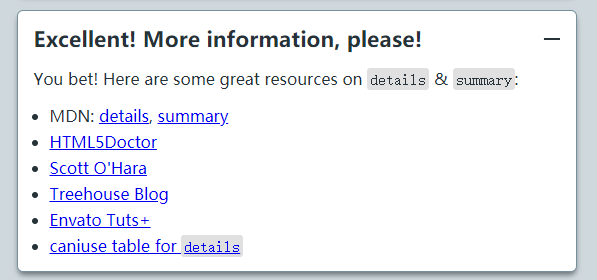
<Details title="Have you heard about details?">
<p>You bet! Here are some great resources on <code>details</code> & <code>summary</code>:</p>
<ul>
<li>MDN: <a href="https://developer.mozilla.org/en-US/docs/Web/HTML/Element/details" target="_blank" rel="noopener">details</a>, <a href="https://developer.mozilla.org/en-US/docs/Web/HTML/Element/summary" target="_blank" rel="noopener">summary</a></li>
<li><a href="http://html5 doctor.com/the-details-and-summary-elements/" target="_blank" rel="noopener">HTML5Doctor</a></li>
<li><a href="https://www.scottohara.me/blog/2018/09/03/details-and-summary.html" target="_blank" rel="noopener">Scott O'Hara</a></li>
<li><a href="https://blog.teamtreehouse.com/use-details-summary-elements" target="_blank" rel="noopener">Treehouse Blog</a></li>
<li><a href="https://webdesign.tutsplus.com/tutorials/explaining-the-details-and-summary-elements--cms-21999" target="_blank" rel="noopener">Envato Tuts+</a></li>
<li><a href="https://caniuse.com/#feat=details" target="_blank" rel="noopener">caniuse table for <code>details</code></a></li>
</ul>
</Details>
</template>
<script>
import Details from '@puge/details'
export default {
components: {
Details
}
}
</script>效果:
参数
title
类型: String
必要性: false
默认值:
标题