
@qodalis/cli-server-dashboard
v1.0.0-beta.5
Published
Admin dashboard SPA for [Qodalis CLI](https://github.com/qodalis-solutions/web-cli) servers. Provides a web-based administration interface for monitoring and managing CLI server instances.


Readme
@qodalis/cli-server-dashboard
Admin dashboard SPA for Qodalis CLI servers. Provides a web-based administration interface for monitoring and managing CLI server instances.
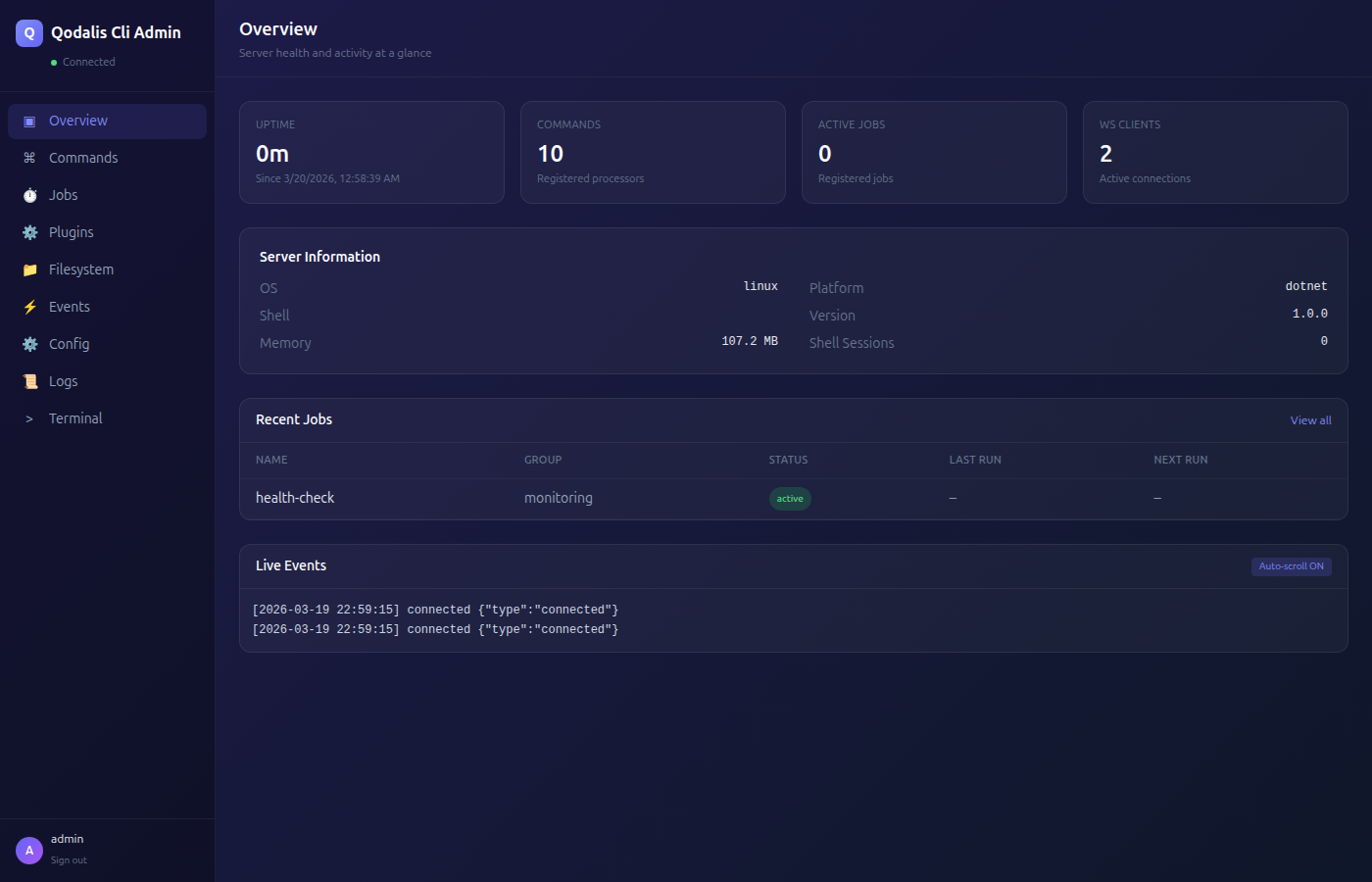
Features
- Overview — Server health, uptime, memory usage, active connections
- Commands — Browse and inspect registered command processors
- Plugins — View installed plugins, toggle modules, inspect registered commands
- Terminal — Embedded CLI terminal powered by
@qodalis/react-cli - Jobs — Monitor background job status, history, and scheduling
- Filesystem — Browse and manage the virtual filesystem
- Events — Real-time WebSocket event stream and connected client monitoring
- Config — View and update server configuration (structured sections with mutable/read-only settings)
- Logs — Live log viewer with level filtering and search
Installation
npm install @qodalis/cli-server-dashboardUsage
Node.js Server
import { createCliServer } from '@qodalis/cli-server-node';
import { CliAdminBuilder } from '@qodalis/cli-server-plugin-admin';

const { app, registry, builder, eventSocketManager } = createCliServer({ ... });

const adminPlugin = new CliAdminBuilder()
    .setCredentials('admin', 'secure-password')
    .build({ registry, eventSocketManager, builder, broadcastFn: (msg) => { ... } });

app.use('/api/v1/qcli', adminPlugin.router);
app.use('/qcli/admin', adminPlugin.dashboardRouter);
The Node server automatically resolves the dashboard from node_modules/@qodalis/cli-server-dashboard/dist.
.NET Server
builder.Services.AddCli(cli => {
    cli.AddAdmin();
});

app.UseQodalisAdmin();
Python Server
from qodalis_cli_admin import CliAdminBuilder

admin = CliAdminBuilder() \
    .set_credentials("admin", "secure-password") \
    .build(registry=registry, event_socket_manager=event_socket_manager, builder=builder)

app.include_router(admin.router, prefix="/api/v1/qcli")
app.mount("/qcli/admin", admin.dashboard_app)
Configuration
Credentials and JWT settings can be configured via environment variables:
| Variable | Default | Description |
|----------|---------|-------------|
| QCLI_ADMIN_USERNAME | admin | Admin login username |
| QCLI_ADMIN_PASSWORD | admin | Admin login password |
| QCLI_ADMIN_JWT_SECRET | auto-generated | Secret for signing JWT tokens |
Warning: The server logs a warning at startup if default credentials are in use. Always set custom credentials for any non-local deployment.
Admin API
All endpoints are mounted at /api/v1/qcli and require JWT authentication (except login).
| Endpoint | Method | Description |
|----------|--------|-------------|
| /auth/login | POST | Authenticate with username/password, returns JWT |
| /auth/me | GET | Current user info |
| /status | GET | Server health, uptime, memory, connections, features |
| /config | GET | Structured configuration sections |
| /config | PUT | Update mutable settings |
| /plugins | GET | List registered modules with processors |
| /plugins/:id/toggle | POST | Enable/disable a module |
| /logs | GET | Query logs (supports level, search, limit, offset) |
| /ws/clients | GET | Active WebSocket connections |
Development
# Install dependencies
npm install

# Start dev server
npm run dev

# Build for production
npm run build

# Preview production build
npm run preview
Deploying to servers
After building, copy the dist/ contents to the admin plugin's static assets directory in each server:
- .NET:
plugins/admin/wwwroot/admin/ - Python:
plugins/admin/qodalis_cli_admin/dashboard/ - Node.js: Resolved automatically from
node_modules/@qodalis/cli-server-dashboard/dist
Tech Stack
- React 18 + TypeScript
- Vite (base path:
/qcli/admin/) - Tailwind CSS (dark theme)
- React Router
API Compatibility
The dashboard works with all three Qodalis CLI server implementations:
| Server | Package | Port | |--------|---------|------| | Node.js | @qodalis/cli-server-node | 8047 | | .NET | Qodalis.Cli | 8046 | | Python | qodalis-cli | 8048 |
License
MIT