
@qrlytics/mcp
v1.0.9
Published
Model Context Protocol server for QRlytics — create and manage trackable QR codes from Claude, Cursor, and any MCP-compatible AI assistant

Maintainers
 the.website.company
Readme
@qrlytics/mcp
[!IMPORTANT] A QRlytics Pro plan is required to use this MCP server.
This package connects your AI assistant to the QRlytics API. API access — including QR code creation, analytics, and management — is a Pro feature priced at $39/year.
The free plan gives you 3 QR codes and full access to the QRlytics dashboard, but it does not include API key generation or MCP access.
Create a free account and upgrade to Pro → qrlytics.app/signup
Model Context Protocol (MCP) server for QRlytics — create, manage, and analyse trackable QR codes directly from Claude Desktop, Cursor, VS Code Copilot, Windsurf, or any MCP-compatible AI assistant.
What it does
Once installed, your AI assistant gains 14 tools that cover everything in the QRlytics dashboard:
| Tool | What you can say |
|---|---|
| list_qr_codes | "Show me all my QR codes and their scan counts" |
| create_qr_code | "Create a QR code for our new product page, call it Launch Campaign" |
| get_qr_code | "Get details for QR code abc123" |
| update_qr_code | "Update the Summer Menu QR to point to the new PDF" |
| get_qr_analytics | "How many times was the restaurant menu scanned last week?" |
| get_analytics | "Which of my QR codes performed best this month?" |
| pause_all | "Pause all my QR codes" or "Pause everything in my Events folder" |
| resume_all | "Resume all paused codes" |
| compare_qr_codes | "Compare my top 4 campaigns over the last 14 days" |
| list_folders | "What folders do I have?" |
| create_folder | "Create a folder called Q2 Campaigns" |
| move_qr_to_folder | "Move the trade show QR into my Events folder" |
| check_destinations | "Check that all my QR code destinations are still working" |
| export_qr_images | "Export my QR code images so I can drop them into Canva" |
Every QR code created through the MCP is a full dynamic QR code with real-time scan tracking, device detection, city-level geolocation, UTM parameter capture, and referrer analytics — identical to codes created through the dashboard. QR images render inline in Claude Desktop.
Full web dashboard also available
You don't have to live entirely in Claude. QRlytics also comes with a complete web interface at qrlytics.app — useful when you want a visual overview, need to export a CSV, or prefer to point-and-click rather than describe things in natural language.
The MCP and the dashboard share the same data in real-time. Anything you create from Claude appears immediately in the dashboard, and vice versa.
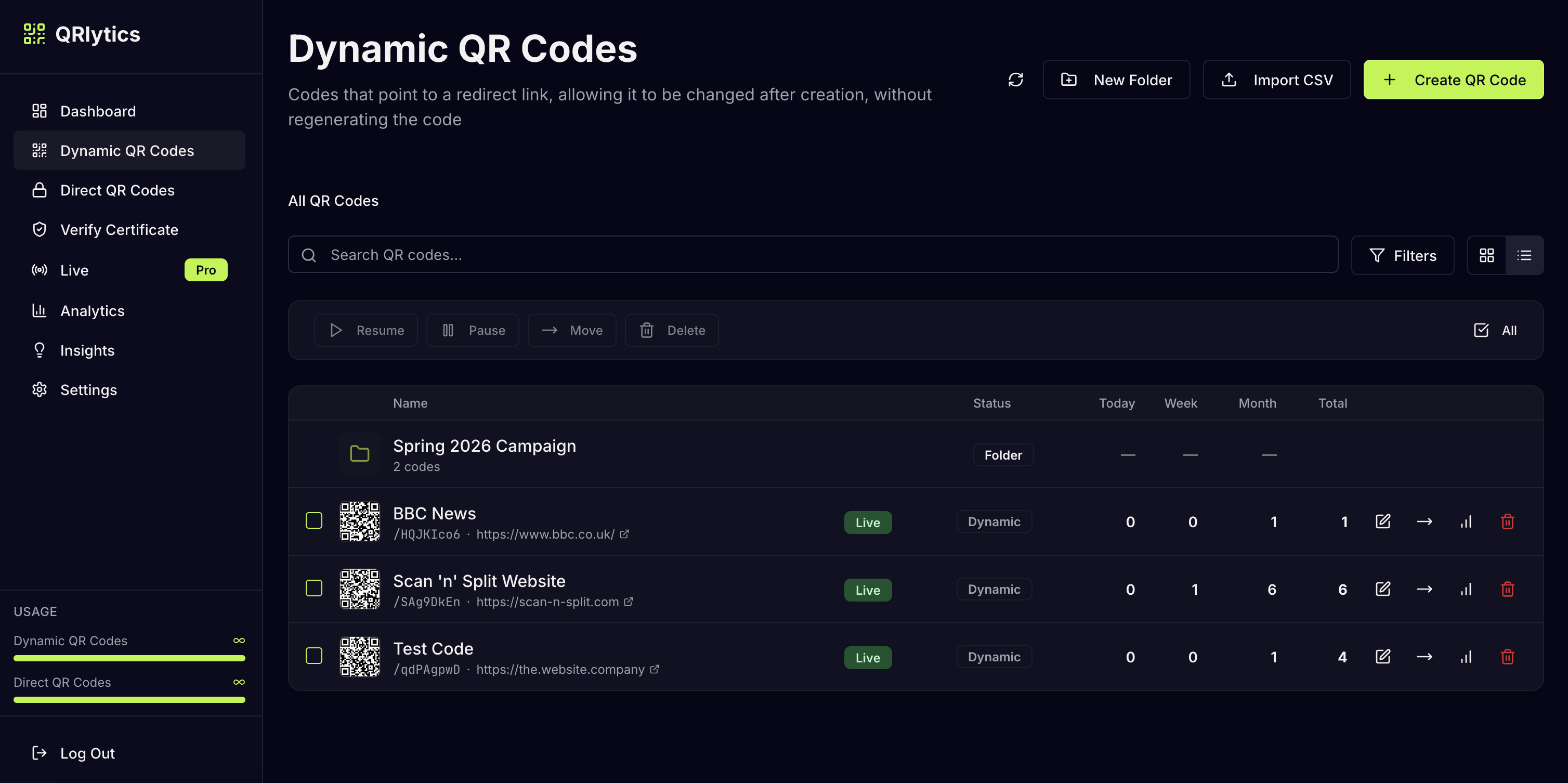
Manage and organise all your QR codes in one place:
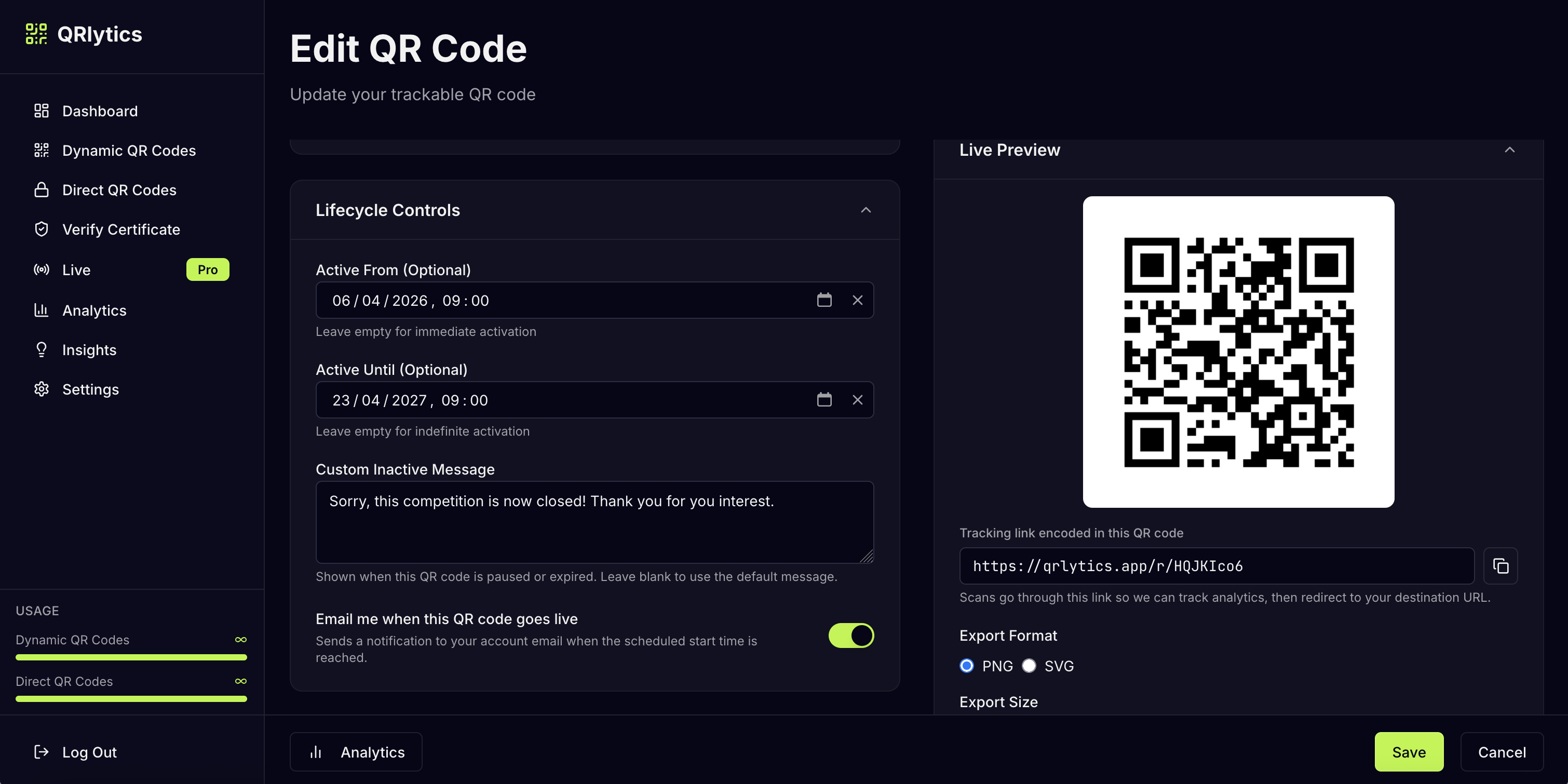
Edit lifecycle controls, custom messages, and download high-resolution QR images:
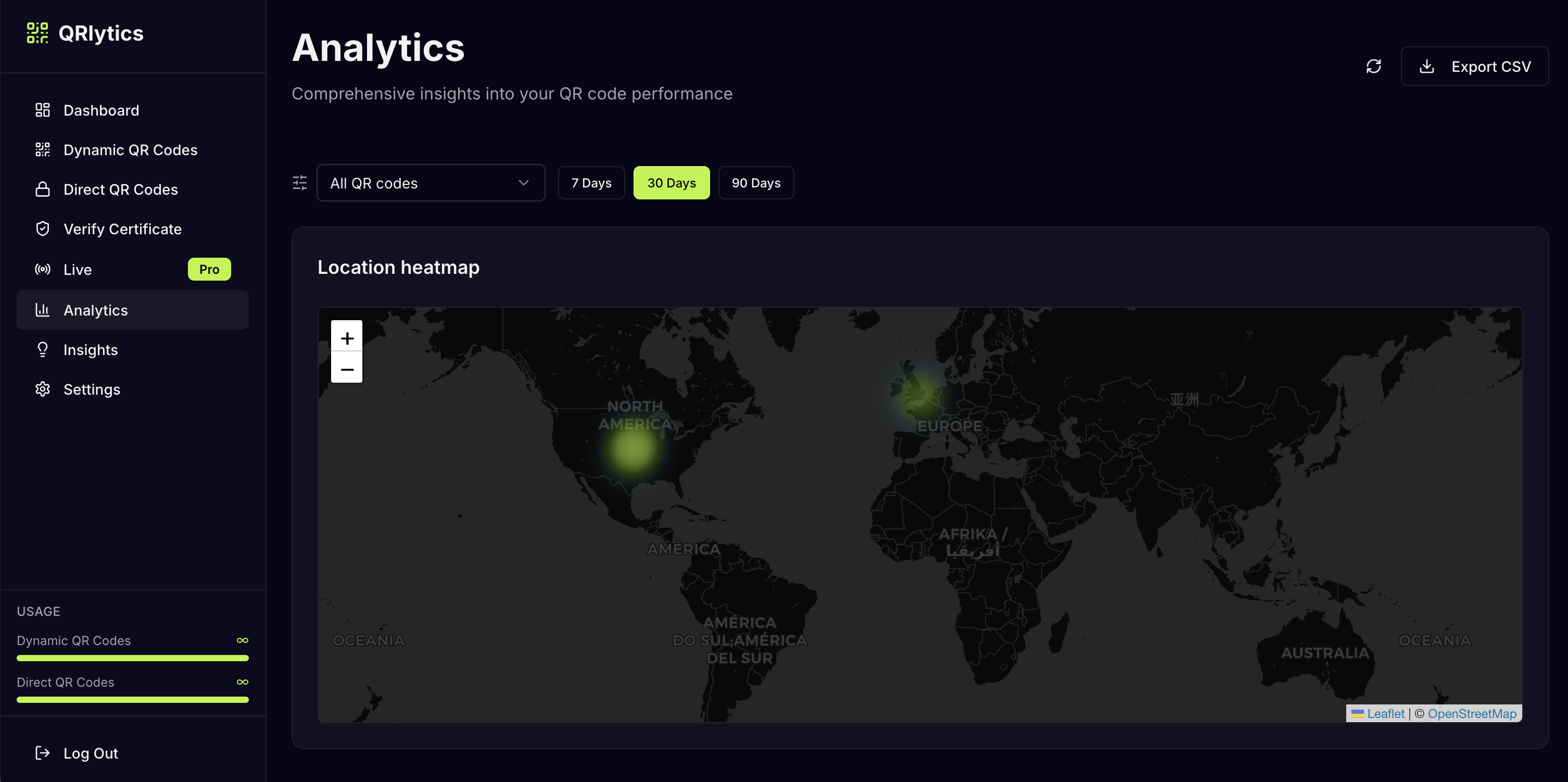
Visualise scan data with a global heatmap and export analytics as CSV:
Requirements
- Node.js 18 or later
- A QRlytics account with a Pro plan ($39/year)
- An API key generated from Settings → API Keys in the QRlytics dashboard
API key generation is a Pro feature. The free plan gives you 3 QR codes and full dashboard access, but MCP/API access requires Pro.
Installation
npm install -g @qrlytics/mcpConfiguration
Claude Desktop
Add the following to your claude_desktop_config.json:
- macOS:
~/Library/Application Support/Claude/claude_desktop_config.json - Windows:
%APPDATA%\Claude\claude_desktop_config.json
{
  "mcpServers": {
    "qrlytics": {
      "command": "qrlytics-mcp",
      "env": {
        "QRLYTICS_API_KEY": "your_api_key_here",
        "QRLYTICS_BASE_URL": "https://qrlytics.app"
      }
    }
  }
}
Restart Claude Desktop after saving. The QRlytics tools will appear in the tools panel.
Cursor
Add to your Cursor MCP configuration (~/.cursor/mcp.json or via Settings → MCP):
{
  "mcpServers": {
    "qrlytics": {
      "command": "qrlytics-mcp",
      "env": {
        "QRLYTICS_API_KEY": "your_api_key_here",
        "QRLYTICS_BASE_URL": "https://qrlytics.app"
      }
    }
  }
}
VS Code (GitHub Copilot)
Add to your VS Code settings.json:
{
  "github.copilot.chat.mcp.servers": {
    "qrlytics": {
      "command": "qrlytics-mcp",
      "env": {
        "QRLYTICS_API_KEY": "your_api_key_here",
        "QRLYTICS_BASE_URL": "https://qrlytics.app"
      }
    }
  }
}
Windsurf
Add to your Windsurf MCP configuration:
{
  "mcpServers": {
    "qrlytics": {
      "command": "qrlytics-mcp",
      "env": {
        "QRLYTICS_API_KEY": "your_api_key_here",
        "QRLYTICS_BASE_URL": "https://qrlytics.app"
      }
    }
  }
}
Environment variables
| Variable | Required | Default | Description |
|---|---|---|---|
| QRLYTICS_API_KEY | Yes | — | Your QRlytics API key |
| QRLYTICS_BASE_URL | No | https://qrlytics.app | Override for self-hosted or staging environments |
Example prompts
Creating QR codes
- "Create a QR code for https://example.com/menu called Summer Menu"
- "Make three QR codes for my product launch — one for Instagram, one for Twitter, one for email"
Updating and managing
- "Update the trade show QR code to point to our new landing page"
- "Rename the Christmas promo QR to 'Holiday 2025'"
- "Pause all my QR codes until the campaign relaunches next month"
- "Resume everything in my Events folder"
Folders
- "What folders do I have?"
- "Create a folder called Q2 Campaigns"
- "Move the Summer Menu QR into my Restaurants folder"
Analytics and comparisons
- "Show me all my QR codes ranked by scan count"
- "Which of my campaigns got the most scans this week?"
- "Compare my top 3 QR codes over the last 30 days"
- "How many times was the restaurant menu scanned in the last 7 days?"
- "Show me mobile vs desktop breakdown for all my codes"
Health checks
- "Check that all my QR code destinations are still working"
- "Are any of my QR codes pointing to broken links?"
Tool reference
list_qr_codes
Returns all QR codes in your account with their name, destination URL, scan count, status, and folder.
Parameters: none
create_qr_code
Creates a new dynamic trackable QR code. Returns a rendered QR image inline in Claude Desktop.
Parameters:
| Parameter | Type | Required | Description |
|---|---|---|---|
| name | string | Yes | Display name for the QR code |
| destinationUrl | string | Yes | The URL the QR code points to |
get_qr_code
Fetches details for a specific QR code by ID, including a rendered QR image.
Parameters:
| Parameter | Type | Required | Description |
|---|---|---|---|
| id | string | Yes | QR code ID |
update_qr_code
Updates a QR code's name, destination URL, or status. Dynamic QR codes can have their destination changed at any time without reprinting.
Parameters:
| Parameter | Type | Required | Description |
|---|---|---|---|
| id | string | Yes | QR code ID |
| name | string | No | New display name |
| destinationUrl | string | No | New destination URL |
| status | "active" | "paused" | No | New status |
get_qr_analytics
Returns scan analytics for a single QR code: daily scan counts, total scans, and device breakdown.
Parameters:
| Parameter | Type | Required | Description |
|---|---|---|---|
| id | string | Yes | QR code ID |
| days | number | No | Look-back window in days (default: 30) |
get_analytics
Returns aggregate analytics across all your QR codes: top performers by scan count, and device type breakdown.
Parameters:
| Parameter | Type | Required | Description |
|---|---|---|---|
| days | number | No | Look-back window in days (default: 30) |
pause_all
Pauses all QR codes at once, or all codes inside a specific folder. Paused codes redirect to a "code paused" page instead of their destination.
Parameters:
| Parameter | Type | Required | Description |
|---|---|---|---|
| folderId | string | No | Only pause codes in this folder. Omit to pause all codes. |
resume_all
Resumes (unpauses) all QR codes at once, or all codes inside a specific folder.
Parameters:
| Parameter | Type | Required | Description |
|---|---|---|---|
| folderId | string | No | Only resume codes in this folder. Omit to resume all codes. |
compare_qr_codes
Compares scan analytics for 2–10 QR codes side-by-side, ranked by total scans over the requested period.
Parameters:
| Parameter | Type | Required | Description |
|---|---|---|---|
| ids | string[] | Yes | Array of QR code IDs (2–10) |
| days | number | No | Look-back window in days (default: 30) |
list_folders
Lists all your QR code folders with their IDs and parent relationships.
Parameters: none
create_folder
Creates a new folder to organise your QR codes. Supports nested folders.
Parameters:
| Parameter | Type | Required | Description |
|---|---|---|---|
| name | string | Yes | Display name for the folder |
| parentId | string | No | Parent folder ID for nesting. Omit for a top-level folder. |
move_qr_to_folder
Moves a QR code into a folder, or back to the root (no folder).
Parameters:
| Parameter | Type | Required | Description |
|---|---|---|---|
| id | string | Yes | QR code ID |
| folderId | string | No | Target folder ID. Omit to move to root. |
check_destinations
Sends an HTTP HEAD request to each QR code's destination URL and reports whether it is reachable, redirecting, or returning an error. Useful for periodic link audits.
Parameters:
| Parameter | Type | Required | Description |
|---|---|---|---|
| ids | string[] | No | Specific QR code IDs to check. Omit to check all codes. |
export_qr_images
Exports QR code images as rendered PNGs that Claude can pass directly to other tools — design apps, document editors, image generators, and more. Returns up to 20 images per call; pass specific IDs to target a subset.
Parameters:
| Parameter | Type | Required | Description |
|---|---|---|---|
| ids | string[] | No | Specific QR code IDs to export. Omit to export all codes (max 20). |
Example prompts:
- "Export all my QR code images"
- "Export the images for my top 3 QR codes so I can use them in a presentation"
- "Give me the QR image for the Summer Menu code"
Links
License
MIT