
@qubiqlabs/webpilot
v1.2.8
Published
AI-native web automation on top of Playwright: natural language execution, codegen, healing, and reports

Maintainers
 qubiqlabs
Readme
WebPilot
AI-native web automation on top of Playwright, Selenium, Cypress, and WebdriverIO.
WebPilot lets teams describe browser and API workflows in natural language, run them through an autonomous browser agent, reuse learned site knowledge, generate deterministic test code for multiple frameworks, self-heal broken automation, and publish rich execution reports.
It is not trying to replace Playwright or Selenium. Those tools are the browser engines. WebPilot is the intelligent automation layer above them: generation, execution, healing, knowledge reuse, reporting, and CI-ready artifacts.
Why WebPilot?
Traditional browser automation is powerful, but teams still spend too much time writing boilerplate, maintaining selectors, diagnosing flaky failures, and explaining what happened in CI.
WebPilot focuses on the missing layer:
- Natural language to automation: write test intent as readable steps, not just code.
- Multi-framework codegen: generate TypeScript Playwright, Python Playwright, Java Selenium, Cypress, WebdriverIO, and C# (Selenium + Playwright) tests and page objects.
- Agentic execution: use Browser Use and Playwright to navigate real web pages when a flow is not yet known.
- Knowledge reuse: learn validated page capabilities so future runs can replay known steps more deterministically.
- Self-healing: recover from locator drift and persist healed behavior for future runs.
- Open reports: static HTML dashboards with screenshots, traces, videos, token usage, cost, trends, and AI analysis.
- API + UI coverage: automate browser flows and API scenarios from one CLI.
Quick Start
git clone https://github.com/javed0211/WebPilot.git
cd WebPilot

npm ci
npm run build
npx playwright install chromium
npm run setup

cp .env.example .env
Add provider credentials to .env or configure resources/config/llm.json, then run a sample scenario:
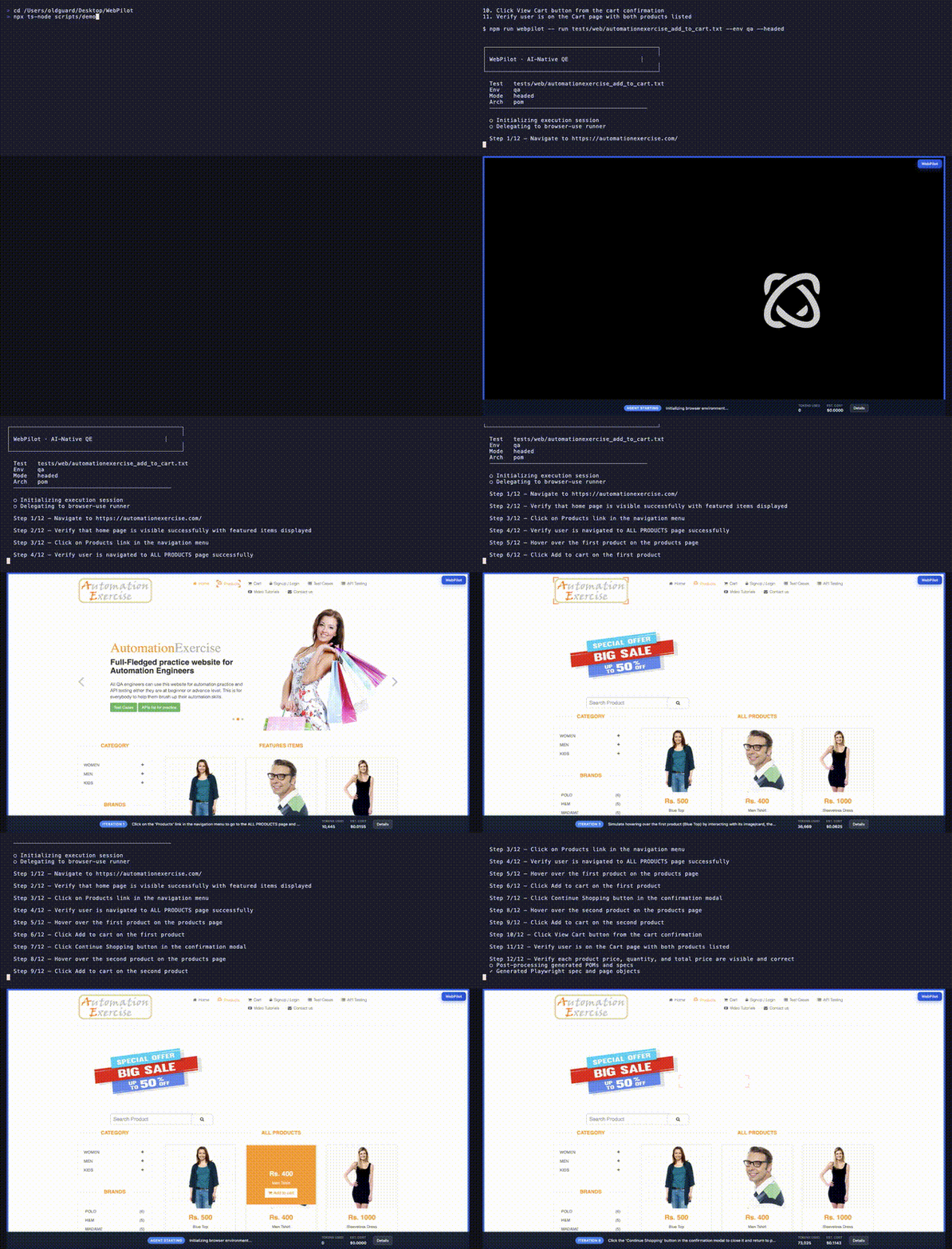
npm run webpilot -- run tests/web/automationexercise_add_to_cart.txt --env qa --headed --report
open runtime/reports/html/index.html
For global local development:
npm link
webpilot run tests/web/automationexercise_add_to_cart.txt --env qa --headed --report
A WebPilot Test
Natural language specs live in tests/web/ or tests/api/.
Test: Add Products in Cart

1. Navigate to https://automationexercise.com/
2. Verify that home page is visible successfully
3. Click Products in the navigation menu
4. Add the first product to the cart
5. Verify the product appears in the cart
WebPilot can execute that flow, collect runtime evidence, generate framework-specific test code, and write a report.
Reports
After each run, WebPilot writes a static report under runtime/reports/html/.
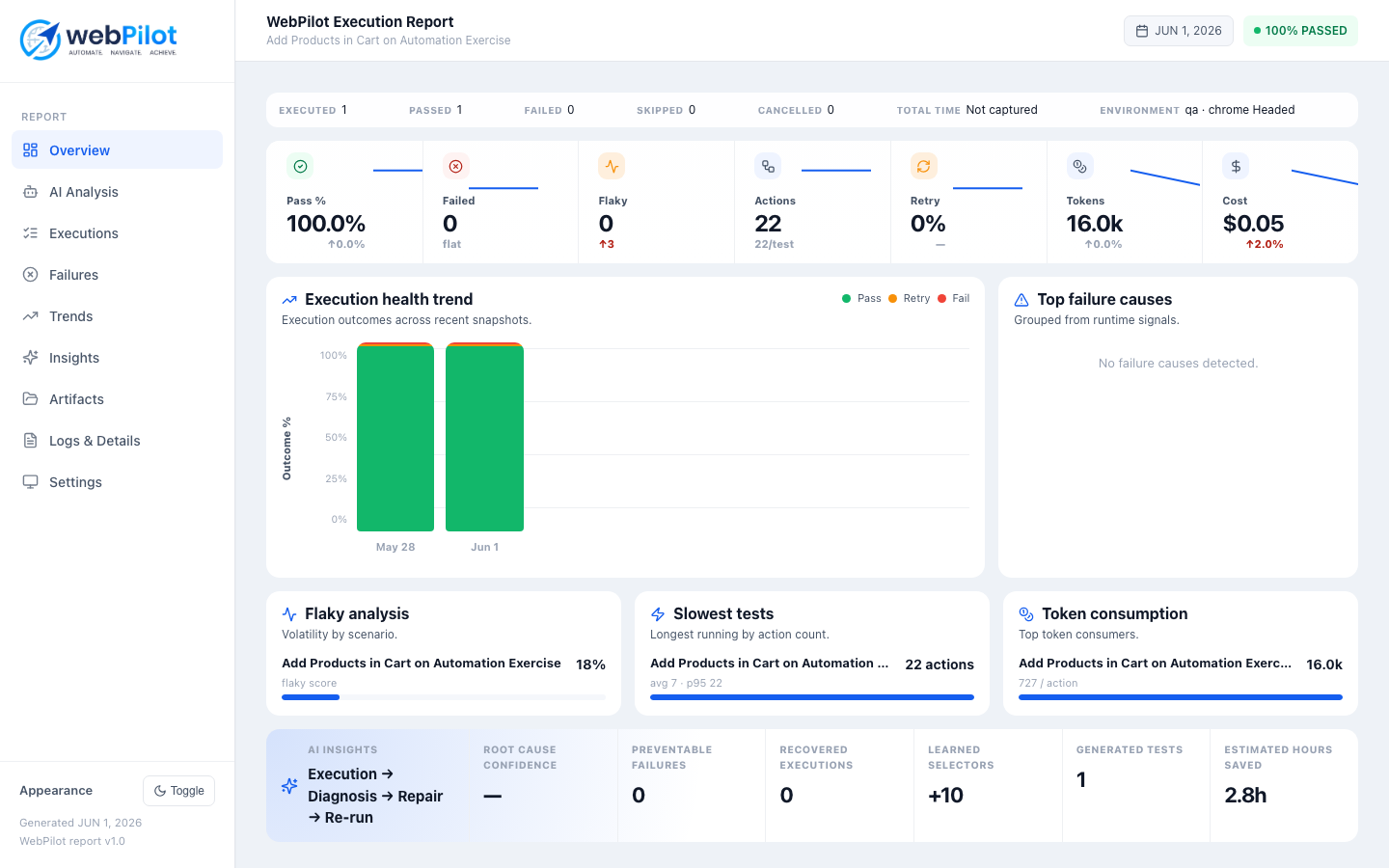
Sample reports:
The report includes pass/fail status, actions, runtime insights, LLM tokens, estimated cost, environment details, screenshots, videos, traces, historical trends, and optional AI analysis.
See docs/REPORTING.md.
Core Commands
webpilot init
webpilot setup
webpilot doctor
webpilot create test checkout --template checkout-flow
webpilot run tests/web/login.txt --env qa --headed --report
webpilot replay
webpilot report --html
webpilot ci init
webpilot ci run tests/web
webpilot reports-tidy
webpilot self-heal
During local development, prefix commands with npm run webpilot -- if you have not linked the CLI.
webpilot init starts an interactive project wizard. It records your LLM provider, model/deployment, automation target, generated-code language, automation tool, test runner, and framework pattern in resources/config/webpilot.yaml.
Supported codegen profiles (each with init scaffold, deterministic codegen, and profile-aware validation):
| Language | Tool | Output layout |
|----------|------|---------------|
| TypeScript | Playwright | packages/test-framework/ (full framework) |
| Python | Playwright | tests/generated/ |
| Java | Selenium | src/test/java/webpilot/generated/ |
| TypeScript | Cypress | cypress/e2e/generated/ |
| TypeScript | WebdriverIO | test/specs/generated/, test/pageobjects/ |
| C# | Selenium | tests/WebPilot.Tests/Generated/ |
| C# | Playwright | tests/WebPilot.Playwright.Tests/Generated/ |
Example init commands:
webpilot init --yes --language typescript --tool playwright --pattern pom
webpilot init --yes --language python --tool playwright --pattern pom
webpilot init --yes --language java --tool selenium --pattern pom
webpilot init --yes --language typescript --tool cypress --pattern simple
webpilot init --yes --language typescript --tool webdriverio --pattern pom
webpilot init --yes --language csharp --tool selenium --pattern pom
webpilot init --yes --language csharp --tool playwright --pattern pom
See Multi-Language Codegen for profile details.
Author tests from templates:
webpilot create test checkout --template checkout-flow
webpilot create api petstore
Scenario files can include metadata such as @smoke, target: web, baseUrl: ..., codegen: true, and report: true so the first run explains where reports, artifacts, and generated tests are written.
How It Works
Natural language spec
        |
        v
WebPilot CLI + Engine
        |
        +--> Browser Use agent for discovery and live navigation
        +--> Playwright for deterministic browser automation
        +--> Site knowledge for learned reusable actions
        +--> Codegen for specs and page objects (profile-aware)
        +--> Report service for static HTML dashboards and artifacts
The long-term goal is simple: make WebPilot the best open-source way to move from human-readable test intent to reliable, maintainable browser automation.
CI Mode
Add a GitHub Actions workflow with one command:
webpilot ci initRun with CI defaults and uploadable artifacts:
webpilot ci doctor --provider browser-use
webpilot ci run tests/web --provider browser-use
CI artifacts are written under runtime/reports/, including runtime/reports/artifact-manifest.json.
WebPilot vs Playwright, Selenium, and Cypress
WebPilot complements existing automation tools.
- Use Playwright/Selenium/Cypress when you want to hand-code browser automation directly.
- Use WebPilot when you want AI-assisted generation, autonomous execution, self-healing, knowledge reuse, and richer reports while still keeping Playwright-compatible output.
WebPilot should feel familiar to automation engineers, but useful to product engineers, QA teams, and SDETs who want faster test creation and better failure diagnosis.
Documentation
- Quick start and usage
- Multi-language codegen
- Framework guide
- Configuration
- Reporting
- Project structure
- Open-source roadmap
Open-Source Roadmap
WebPilot is being shaped into a serious open-source automation project. The roadmap focuses on:
- stable CLI and npm packaging
- clean example projects
- polished documentation
- deterministic multi-framework output
- report UI improvements
- self-healing and knowledge reuse
- CI integrations
- contributor-friendly architecture
Read the full roadmap in docs/OPEN_SOURCE_ROADMAP.md.
Contributing
Contributions are welcome. Start with CONTRIBUTING.md, then check the roadmap for the highest-impact areas.
Good first contribution areas:
- documentation examples
- sample tests against public demo sites
- report UI polish
- CLI error messages
- provider configuration docs
- deterministic replay improvements
Security
Do not commit real API keys, access tokens, session cookies, traces with private data, or customer screenshots. Use .env for secrets and review generated artifacts before sharing them publicly.
For vulnerability reporting, see SECURITY.md.
License
WebPilot is open source under the ISC License.