
@qzlcorp/typed-i18n
v1.1.0
Published
Type-safe i18n library with zero dependencies

Maintainers
 lengerrong
Readme
@qzlcorp/typed-i18n
A zero-dependency, TypeScript-first i18n library with module-based organization and compile-time type safety. Inspired by modern i18n libraries, designed for scalability and code-splitting.
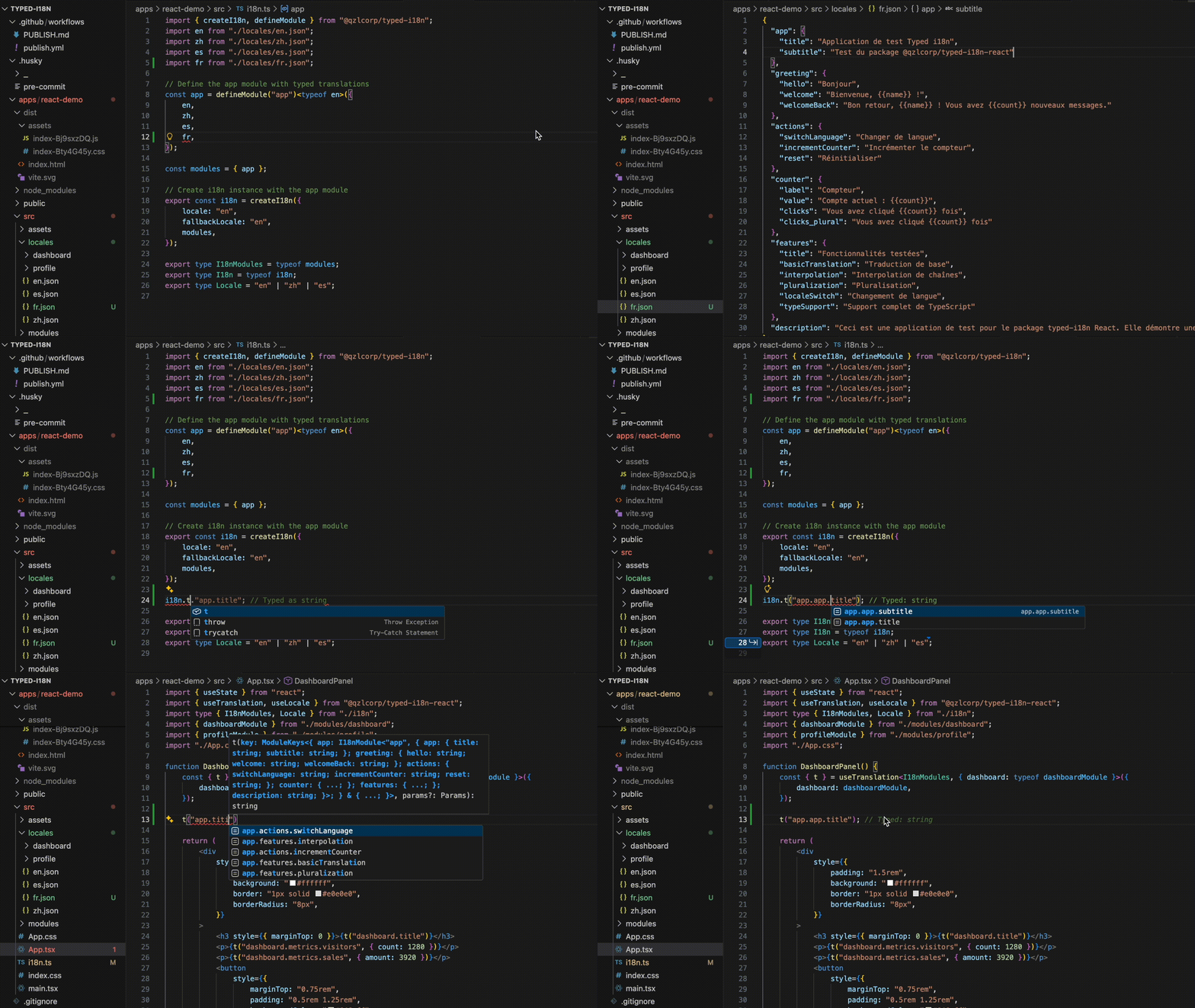
Watch how TypeScript catches translation key errors at compile time, ensuring type-safe i18n throughout your app.
Live Demo
🚀 View React Demo - Interactive demo showcasing dynamic module loading, locale switching, and type-safe translations.
Features
- Module-based architecture: Organize translations by feature/page for better code-splitting
- Compile-time type safety: All translation keys are validated at build time
- Shape validation: TypeScript enforces that all locale files match the same structure
- Modern API: Simple
t('key')syntax with namespace support - Mutable locale: Change language dynamically with
setLocale() - Fallback support: Automatic fallback to default locale for missing translations
- Zero runtime dependencies: Lightweight and performant
Installation
npm install @qzlcorp/typed-i18nQuick Start
1. Create translation files
// locales/common/en.json
{
  "hello": "Hello",
  "goodbye": "Goodbye"
}

// locales/common/fr.json
{
  "hello": "Bonjour",
  "goodbye": "Au revoir"
}
2. Define modules and create i18n instance
import { defineModule, createI18n } from '@qzlcorp/typed-i18n';
import commonEn from './locales/common/en.json';
import commonFr from './locales/common/fr.json';

// Define module with type validation - all locales must match structure
// ⚠️ IMPORTANT: You MUST provide the reference type explicitly
const common = defineModule('common')<typeof commonEn>({
  en: commonEn,
  fr: commonFr  // TypeScript validates this matches commonEn structure
});

const i18n = createI18n({
  locale: 'en',
  fallbackLocale: 'en',
  modules: { common }
});
3. Use translations
// Translate with namespace.key syntax
i18n.t('common.hello');  // "Hello"

// Change locale dynamically
i18n.setLocale('fr');
i18n.t('common.hello');  // "Bonjour"

// Interpolation
i18n.t('common.greeting', { name: 'John' });  // Supports {{name}} in JSON

// Get nested objects (i18next returnObjects compatible)
const messages = i18n.t('common.messages', { returnObjects: true });
// Returns the entire messages object instead of a string
Advanced Usage
Multiple Modules
Perfect for code-splitting by feature or route:
const common = defineModule('common')<typeof commonEn>({
  en: commonEn,
  fr: commonFr
});

const dashboard = defineModule('dashboard')<typeof dashboardEn>({
  en: dashboardEn,
  fr: dashboardFr
});

const i18n = createI18n({
  locale: 'en',
  modules: { common, dashboard }
});

i18n.t('common.hello');          // ✅ Typed
i18n.t('dashboard.title');       // ✅ Typed
i18n.t('dashboard.invalid');     // ❌ Type error!
Dynamic Module Loading (React/Code-Splitting)
For lazy-loading translations per route with full type safety:
// Load common translations upfront
const i18n = createI18n({
  locale: 'en',
  modules: { common }
});

// Later, dynamically load and add dashboard module
const dashboardModule = defineModule('dashboard')<typeof dashboardEn>({
  en: await import('./locales/dashboard/en.json'),
  fr: await import('./locales/dashboard/fr.json')
});

// addModule returns a NEW typed instance - use it!
const i18n2 = i18n.addModule(dashboardModule);

// ✅ Both modules are fully typed
i18n2.t('common.hello');         // Works
i18n2.t('dashboard.title');      // Fully typed!

// ⚠️ Original instance doesn't know about new module
i18n.t('dashboard.title'); // ❌ Type error (as expected)Important: Due to TypeScript limitations, you must use the returned instance to get updated types. The original instance still works at runtime but loses type safety for new modules.
Best practice for React: Store the i18n instance in React Context and update the context value when adding modules.
Nested Keys
{
  "dashboard": {
    "stats": {
      "clicks": "{{count}} clicks"
    }
  }
}
i18n.t('common.dashboard.stats.clicks', { count: 5 }); // "5 clicks"Get Available Locales
const locales = i18n.getLocales(); // ['en', 'fr']Fallback Locale
const i18n = createI18n({
  locale: 'de',  // German not available
  fallbackLocale: 'en',
  modules: { common }
});

i18n.t('common.hello');  // Falls back to "Hello" (English)
API Reference
defineModule(namespace)
Creates a typed translation module. Uses curried syntax for better type inference.
⚠️ CRITICAL: You MUST provide the reference type explicitly!
// ✅ CORRECT - Explicit reference type
const module = defineModule('namespace')<typeof referenceJson>({
  en: enJson,
  fr: frJson  // Validated against referenceJson at compile time
});

// ❌ WRONG - Missing reference type loses type safety
const module = defineModule('namespace')({
  en: enJson,
  fr: frJson  // No validation! Runtime warning will be shown
});
Why is this required?
- Without the explicit type parameter, TypeScript cannot validate that all locale files match
- You lose compile-time type safety for cross-locale validation
- Runtime warnings will alert you, but catching errors at build time is better
createI18n(options)
Creates an i18n instance.
Options:
locale: Current active localefallbackLocale?: Fallback when translation missingmodules: Object containing all translation modules
Returns:
t(key, params?): Translate functiont(key, params): Legacy signature for simple parameter interpolationt(key, options): New signature supporting{ params?, returnObjects? }
setLocale(locale): Change current localegetLocale(): Get current localeaddModule(module): Add module dynamically, returns new typed instancegetLocales(): Get all available locales
Translation Options:
interface TranslateOptions {
  params?: Record<string, string | number | boolean>;
  returnObjects?: boolean;  // Return nested objects instead of strings
}

// Simple parameter interpolation
i18n.t('common.greeting', { name: 'World' });

// Return nested objects with FULL TYPE SAFETY (i18next compatible)
const stats = i18n.t('dashboard.stats', { returnObjects: true });
// TypeScript infers the exact type at that path!
// stats has type: { clicks: string; views: string }
console.log(stats.clicks); // ✅ Fully typed property access

// Get deeply nested objects
const config = i18n.t('app.config', { returnObjects: true });
// config has the exact type from your JSON structure

// Both params and returnObjects
const data = i18n.t('config.settings', {
  params: { count: 5 },
  returnObjects: false  // Returns string with interpolation
});
Type-safe returnObjects: When you use returnObjects: true, TypeScript automatically infers the exact type at that translation path. This means:
- ✅ No manual type assertions needed
- ✅ Full autocomplete for nested properties
- ✅ Compile-time errors if you access wrong properties
- ✅ Refactoring safety across your codebase
// Example with nested structure
const dashboard = i18n.t('dashboard', { returnObjects: true });
// dashboard is typed as: {
//   title: string;
//   stats: { clicks: string; views: string; }
//   settings: { theme: string; }
// }

dashboard.stats.clicks;   // ✅ Typed!
dashboard.stats.invalid; // ❌ Type error!Important: addModule() returns a new instance with updated types to preserve type safety:
const i18n = createI18n({ locale: 'en', modules: { common } });
const i18n2 = i18n.addModule(settingsModule);
i18n2.t('settings.key'); // ✅ Fully typed!
TypeScript Tips
⚠️ Always Provide the Reference Type
Due to TypeScript limitations, we cannot completely prevent type inference, but you must always provide the reference type explicitly:
// ✅ CORRECT - Explicit reference type ensures type safety
const common = defineModule('common')<typeof enJson>({
  en: enJson,
  fr: frJson  // ✓ Compile-time validation that fr matches enJson
});

// ❌ WRONG - Type inference loses cross-locale validation
const common = defineModule('common')({
  en: enJson,
  fr: frJson  // ✗ No compile-time check! Runtime warning only
});
What happens without explicit type?
- TypeScript infers a union type from all provided locales
- Mismatched structures can pass type checking
- You lose the main benefit of this library
- A runtime warning will be logged to console
Type Safety
All translation keys are typed:
i18n.t('common.hello');     // ✅ Valid
i18n.t('common.invalid');   // ❌ Type error
i18n.t('wrongNs.hello');    // ❌ Type error
Runtime Validation
When the reference type is omitted and locale structures don't match, you'll see a detailed warning:
// ❌ Missing reference type with mismatched structures
const example = defineModule('example')({
  en: { hello: "Hello", goodbye: "Goodbye" },
  fr: { hello: "Bonjour" }  // Missing 'goodbye'
});

// Console output:
// [defineModule] Warning: Module 'example' has structural differences between locales.
// Reference locale: 'en', comparing with: 'fr'
// Differences:
//   - Missing key in locale: goodbye
//
// To enable compile-time validation, provide an explicit reference type:
// defineModule('example')<typeof enJson>({ ... })
This helps catch structure mismatches even when compile-time checks are bypassed.
React Integration
Use @qzlcorp/typed-i18n-react for first-class React bindings:
// i18n.ts
const common = defineModule('common')<typeof enCommon>({ en: enCommon, fr: frCommon });
export const i18n = createI18n({ locale: 'en', fallbackLocale: 'en', modules: { common } });
export type I18nModules = { common: typeof common };

// App root
<I18nProvider i18n={i18n}>
  <App />
</I18nProvider>

// Component with strict key checking
const { t } = useTranslation<I18nModules>();
t('common.hello');      // ✅
t('common.oops');       // ❌ compile-time error

// Without generic (not recommended): keys become loose `${string}.${string}`
const { t: tLoose } = useTranslation();
tLoose('common.oops');  // ✅ compiles (no static safety)
Dynamic module loading returns a widened instance you should propagate via context/state for updated key unions:
const settings = defineModule('settings')<typeof enSettings>({ en: enSettings, fr: frSettings });
const i18n2 = i18n.addModule(settings); // new instance with settings.* keys typed
Support
License
MIT © Q.Z.L Corp.