
@rageshpikalmunde/rp-image-editor
v1.3.0
Published
Lightweight JavaScript image editor with crop, zoom, rotate, draw, text, shapes (circle / ellipse / square / arrow), callout annotations, eraser, undo/redo. Always-on drag with translucent ghost preview so panning and zooming never hide the underlying ima
Downloads
321

Maintainers
 rpragesh
Keywords
Readme
@rageshpikalmunde/rp-image-editor




A lightweight, framework-agnostic JavaScript image editor built on Fabric.js. Crop, zoom, rotate, draw, add text, shapes (circle / ellipse / square / arrow), callout annotations, erase, undo/redo — all in a beautiful modal UI with grouped toolbar. Always-on drag with a translucent ghost preview keeps the image visible while panning and zooming. Annotations are preserved across both crop and rotate (no drift past 360°), exports run at the image's native resolution by default, and themes auto-contrast so customized backgrounds always get a readable foreground. Works with Angular, React, Vue, Ionic, Capacitor, and plain JavaScript.
▶ Live Demo — Try it in your browser!
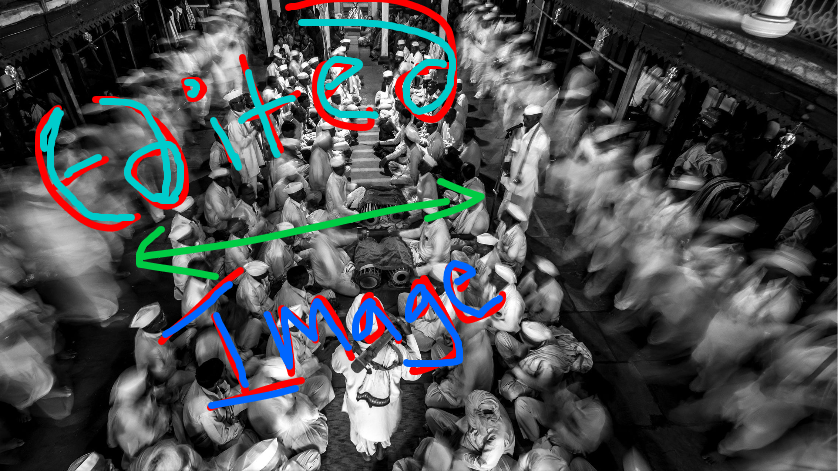
Features
| Feature | Description |
|---|---|
| ✂️ Crop | Free crop and aspect-ratio locked crop. Initial ratio chip matches the actual rectangle; switching ratios (e.g. 4:3 ↔ 16:9) refits into the same 80% image-bounds envelope so sizes stay consistent. Annotations are preserved across crops. |
| 🔍 Zoom | Zoom in/out with pinch-to-zoom gesture support |
| 🖐️ Pan/Drag | Always-on drag — no need to enable a tool. A translucent ghost preview of the image sits behind the canvas so the picture is never hidden while panning past its edges or zooming out. |
| 🔄 Rotate | Rotate left/right by 45° steps. Annotations are preserved across rotations and stay locked to the underlying pixels (no drift past 360°). Fast path skips PNG re-encoding so large 10–15 MB+ images rotate quickly; a loader overlay is shown during heavy renders. |
| ✏️ Freehand Draw | Configurable brush color & width |
| 🔤 Add Text | Inline editing with color and font size |
| ⭕ Shapes | Circle, Ellipse, Square and Arrow primitives with resize handles. Circle/Square stay proportional, Ellipse resizes freely, Arrow has draggable start/end endpoints |
| 💬 Callout | Editable label with draggable tail, min-resize clamping, text constraints (40 chars, word-wrap), mobile double-tap support. Live color update: picking a new color from the palette recolors the currently selected callout — same behaviour as shape/text/draw tools. |
| 🗑️ Delete | Delete selected callout/annotation via toolbar trash button |
| 🧹 Eraser | Remove annotations without affecting the image |
| ↩️ Undo/Redo | Configurable stack depth (default: 20) |
| 🔁 Reset | Reset to original image |
| 🎯 Native-resolution export | Output preserves the source image's intrinsic resolution; annotations stay sharp |
| 🎛️ Grouped Toolbar | Compact toolbar with flyout menus (Zoom, Transform, Annotate, Shapes) |
| 🚫 Disable Features | Hide individual tools or groups via disabledFeatures config |
| 📱 HEIC Support | Auto-converts iPhone HEIC photos to JPEG |
| 📐 EXIF Orientation | Auto-corrects rotated photos |
| ⚡ Smart Resolution | Auto-downscales on iOS to stay within Safari canvas limits |
| 👆 Touch Gestures | Pinch zoom, drag, tap on mobile |
| 🎨 Theming | Fully customizable colors for header, footer, buttons, toolbar. Auto-contrast: customized backgrounds without an explicit text/icon color get a readable foreground derived from luminance. |
| 📦 Output | Base64, Blob, and File object |
Installation
npm install @rageshpikalmunde/rp-image-editorQuick Start
Vanilla JavaScript / TypeScript
import { openEditorModal } from '@rageshpikalmunde/rp-image-editor';

const fileInput = document.querySelector<HTMLInputElement>('#fileInput');

fileInput.addEventListener('change', async (e) => {
  const file = (e.target as HTMLInputElement).files?.[0];
  if (!file) return;

  const result = await openEditorModal({
    image: file,
    config: {
      exportFormat: 'jpeg',
      exportQuality: 0.92,
      theme: {
        headerTitle: 'Edit Photo',
        applyButtonBackground: '#4a90d9',
      },
    },
  });

  if (result) {
    console.log(result.file);   // File object — upload via FormData
    console.log(result.base64); // data:image/jpeg;base64,...
    console.log(result.blob);   // Blob
  }
});
Angular / Ionic
import { openEditorModal } from '@rageshpikalmunde/rp-image-editor';

// Or use the ImageEditorService wrapper for centralized config:
// import { ImageEditorService } from './services/image-editor.service';

async onFileSelected(file: File) {
  const result = await openEditorModal({
    image: file,
    config: { exportFormat: 'jpeg', exportQuality: 0.92 },
  });

  if (result) {
    // Upload result.file to your backend
  }
}
React
import { openEditorModal } from '@rageshpikalmunde/rp-image-editor';

function ImageUploader() {
  const handleFile = async (e: React.ChangeEvent<HTMLInputElement>) => {
    const file = e.target.files?.[0];
    if (!file) return;

    const result = await openEditorModal({
      image: file,
      config: { exportFormat: 'jpeg' },
    });

    if (result) {
      // Use result.file, result.base64, or result.blob
    }
  };

  return <input type="file" accept="image/*" onChange={handleFile} />;
}
Programmatic API (Advanced)
import { RpImageEditor } from '@rageshpikalmunde/rp-image-editor';

const container = document.getElementById('editor-container');
const editor = new RpImageEditor(container, {
  exportFormat: 'png',
  maxUndoSteps: 30,
  defaultBrushColor: '#ff0000',
  showToolbar: true,
});

await editor.loadImage(file);

// Control the editor programmatically
editor.setMode('draw');
editor.zoomIn();
editor.rotate(90);

// Export
const result = await editor.getResult();
console.log(result.file);

// Clean up
editor.destroy();
Configuration
interface RpEditorConfig {
  maxResolution?: number | null;    // Max image resolution (auto-detect per platform)
  cropAspectRatios?: CropAspectRatio[];
  exportFormat?: 'png' | 'jpeg';   // Default: 'jpeg'
  exportQuality?: number;          // 0.0–1.0, Default: 0.92
  exportPixelRatio?: number;       // 1 = standard, 2 = retina. Default: 1
  exportAtNativeResolution?: boolean; // Render export at the source image's native resolution. Default: true
  maxUndoSteps?: number;           // Default: 20
  defaultBrushColor?: string;      // Default: '#ff0000'
  defaultBrushWidth?: number;      // Default: 3
  defaultTextColor?: string;       // Default: '#ff0000'
  defaultTextFontSize?: number;    // Default: 24
  defaultShapeColor?: string;      // Default: matches defaultBrushColor
  defaultShapeStrokeWidth?: number; // Default: 3
  colorPalette?: string[];
  showToolbar?: boolean;           // Default: true
  disabledFeatures?: string[];     // Default: [] — see below
  theme?: RpEditorTheme;
  locale?: string;
}
Disabling Features
Hide individual tools or entire groups from the toolbar:
const result = await openEditorModal({
  image: file,
  config: {
    // Hide individual tools
    disabledFeatures: ['eraser', 'reset'],

    // Or hide entire groups
    // disabledFeatures: ['zoom', 'transform'],
  },
});
Individual tool names: move, crop, zoomIn, zoomOut, rotateLeft, rotateRight, draw, text, callout, eraser, shape-circle, shape-ellipse, shape-square, shape-arrow, undo, redo, reset
Group names (disables all children): zoom (zoomIn + zoomOut), transform (rotateLeft + rotateRight), annotate (draw + text + callout + eraser), shapes (shape-circle + shape-ellipse + shape-square + shape-arrow)
Toolbar Layout
The toolbar is organized into compact items with flyout menus:
| Button | Type | Contains | |---|---|---| | Move | Standalone | Pan / drag mode | | Crop | Standalone | Free & aspect-ratio crop | | Zoom ▾ | Flyout | Zoom In, Zoom Out | | Transform ▾ | Flyout | Rotate Left, Rotate Right | | Annotate ▾ | Flyout | Draw, Text, Callout, Eraser | | Shapes ▾ | Flyout | Circle, Ellipse, Square, Arrow | | Undo | Standalone | Undo last action | | Redo | Standalone | Redo last undone action | | Reset | Standalone | Reset to original image |
Theming
All theme tokens are optional. When you customize a background (headerBackground,
toolbarBackground, toolbarActiveBackground, or footerBackground) but do not
set its paired foreground (headerTextColor, toolbarIconColor,
toolbarActiveTextColor, cancelButtonTextColor), the editor will automatically
derive a readable foreground from the background's WCAG relative luminance — dark
backgrounds get white text/icons, light backgrounds get dark. Explicit overrides
always win.
Use toolbarActiveBackground to control the highlight color of the currently
selected toolbar tool. Pick a color with strong contrast against
toolbarBackground so the active tool stands out clearly to the user.
const result = await openEditorModal({
  image: file,
  config: {
    theme: {
      headerBackground: '#1a1a2e',
      headerTextColor: '#ffffff',
      headerTitle: 'Edit Image',
      editorBackground: '#000000',
      toolbarBackground: '#1a1a2e',
      toolbarIconColor: '#cccccc',
      // Highlight color for the currently selected toolbar tool.
      // Choose a color with strong contrast against `toolbarBackground`.
      toolbarActiveBackground: '#4a90d9',
      toolbarActiveTextColor: '#ffffff',
      footerBackground: '#1a1a2e',
      applyButtonBackground: '#4a90d9',
      applyButtonTextColor: '#ffffff',
      cancelButtonBackground: 'transparent',
      cancelButtonTextColor: '#ffffff',
      modalBorderRadius: '12px',
      buttonBorderRadius: '6px',
    },
  },
});
Note: The older
toolbarActiveIconColorprop is still supported as an alias fortoolbarActiveBackgroundfor backward compatibility, but new code should prefer the semantically-namedtoolbarActiveBackground/toolbarActiveTextColorpair.
Browser Support
| Browser | Version | |---|---| | Chrome | 60+ | | Firefox | 60+ | | Safari | 12+ | | Edge | 79+ | | iOS Safari | 12+ | | Android Chrome | 60+ |
Contributing
Contributions are welcome! Please open an issue or submit a pull request on GitHub.