
@ramstack/chromalog
v1.1.0
Published
A small and simple library for log highlighting before printing text to the terminal
Downloads
16

Maintainers
 rameel
Readme
@ramstack/chromalog


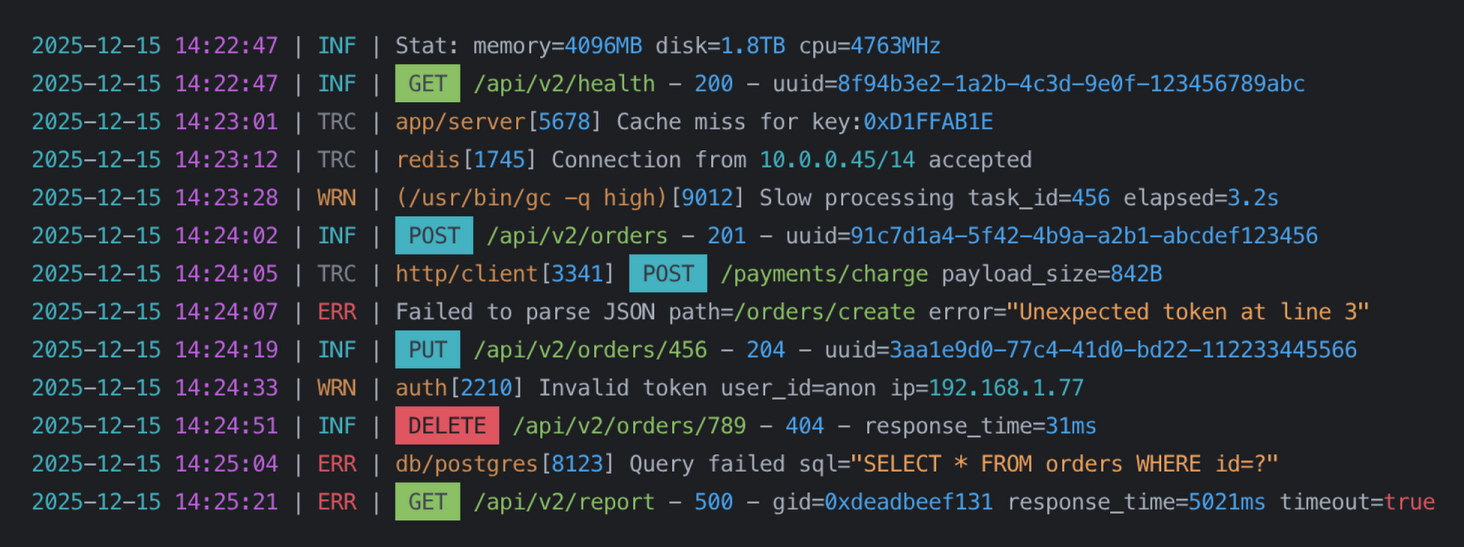
A small and simple library for log highlighting before printing text to the terminal.
Installation
npm install @ramstack/chromalogBasic usage
The simplest case is using the built-in rules.
import { highlight } from "@ramstack/chromalog";

console.log(
  highlight("INFO 2024-01-31 12:45:10 User logged in")
);
By default, @ramstack/chromalog highlights:
- dates and times
- ISO date-time strings
- numbers
- strings (single and double quoted)
- IPv4 addresses
- GUID / UUID values
- common keywords (log levels, HTTP methods, booleans)
- Unix and Windows paths
- Unix process names
Using custom rules
You can fully control what gets highlighted by passing your own rules.
import {
  createNumberHighlighter,
  createStringHighlighter,
  highlight
} from "@ramstack/chromalog";

const rules = [
  createNumberHighlighter(),
  createStringHighlighter()
];

console.log(
  highlight("value=42 name='test'", rules)
);
If rules are provided, the default rules are not used.
Customizing colors
Each highlighter accepts an optional apply function. It receives the matched text and must return a string.
Example with picocolors:
import pc from "picocolors";
import {
  highlight,
  createNumberHighlighter
} from "@ramstack/chromalog";

const rules = [
  createNumberHighlighter(value => pc.bgYellow(pc.black(value)))
];

console.log(highlight("price=199", rules));
You can use any coloring library or return plain text if needed.
Writing your own highlighter
A highlighter is just an object with three fields:
regex— global regular expressionapply— function that transforms the matchorder(optional) — conflict priority
Simple example
import pc from "picocolors";
import { highlight } from "@ramstack/chromalog";

const errorCodeHighlighter = {
  regex: /E\d{3}/g,
  apply: (value: string) => pc.red(value)
};

console.log(
  highlight("Error E404 occurred", [errorCodeHighlighter])
);
Rule priority (order)
Sometimes multiple rules can match the same fragment of text.
In such cases:
- Matches earlier in the string win
- Longer matches win over shorter ones
- If both are equal,
orderis used
Lower order values have higher priority.
Example:
const ruleA = { regex: /abc/g, apply: () => "A", order: 0 };
const ruleB = { regex: /abc/g, apply: () => "B", order: 5 };
ruleA will be applied.
Color support
@ramstack/chromalog respects terminal color support automatically.
Colors are disabled when:
- the terminal does not support colors
- Node.js is started with
--no-color NO_COLORenvironment variable is set
In these cases, the original text is returned without any modifications.
Colors can be forced when:
- Node.js is started with
--color FORCE_COLOR=trueenvironment variable is set
This behavior follows standard Node.js and ecosystem conventions.
Notes
[!NOTE]
- This package is Node.js only.
- Regular expressions must use the global (
/g) flag.- For performance reasons, built-in highlighters do not validate values. They only match patterns and intentionally use simple regular expressions.
Contributions
Bug reports and contributions are welcome.
License
This package is released as open source under the MIT License. See the LICENSE file for more details.