
@ramtinj95/opencode-tokenscope
v1.8.1
Published
OpenCode plugin for detailed token usage analysis with breakdowns by category, visual charts, and subagent cost tracking

Maintainers
 ramtinj95
Readme
OpenCode TokenScope

Token usage, cache, context, and cost analysis for OpenCode sessions.
TokenScope turns the telemetry OpenCode has persisted for a session into a readable report. It keeps recorded usage separate from local tokenization and explanatory estimates, so the output does not imply precision the source data cannot support.
Installation
Option 1: npm (Recommended)
Install globally:
npm install -g @ramtinj95/opencode-tokenscopeAdd the plugin to
opencode.json(in your project root or at~/.config/opencode/opencode.jsonfor global use):{ "$schema": "https://opencode.ai/config.json", "plugin": ["@ramtinj95/opencode-tokenscope"] }Create the
/tokenscopecommand at~/.config/opencode/command/tokenscope.md:mkdir -p ~/.config/opencode/command cat > ~/.config/opencode/command/tokenscope.md << 'EOF' --- description: Analyze token usage across the current session with detailed breakdowns by category --- Call the tokenscope tool directly without delegating to other agents. Leave sessionID unset unless the user explicitly asked to analyze a different session. Then read the exact unique report path returned by TokenScope. Return that file verbatim without additional text or formatting. EOFRestart OpenCode and run
/tokenscope.
To ask OpenCode's package resolver for the latest npm release, use @latest:
{
  "plugin": ["@ramtinj95/opencode-tokenscope@latest"]
}
Option 2: Install Script
curl -sSL https://raw.githubusercontent.com/ramtinJ95/opencode-tokenscope/main/plugin/install.sh | bashThe script installs the plugin and command into ~/.config/opencode. It requires Bash, curl, npm, and an existing OpenCode config directory. Restart OpenCode, then run /tokenscope.
See TokenScope in Action
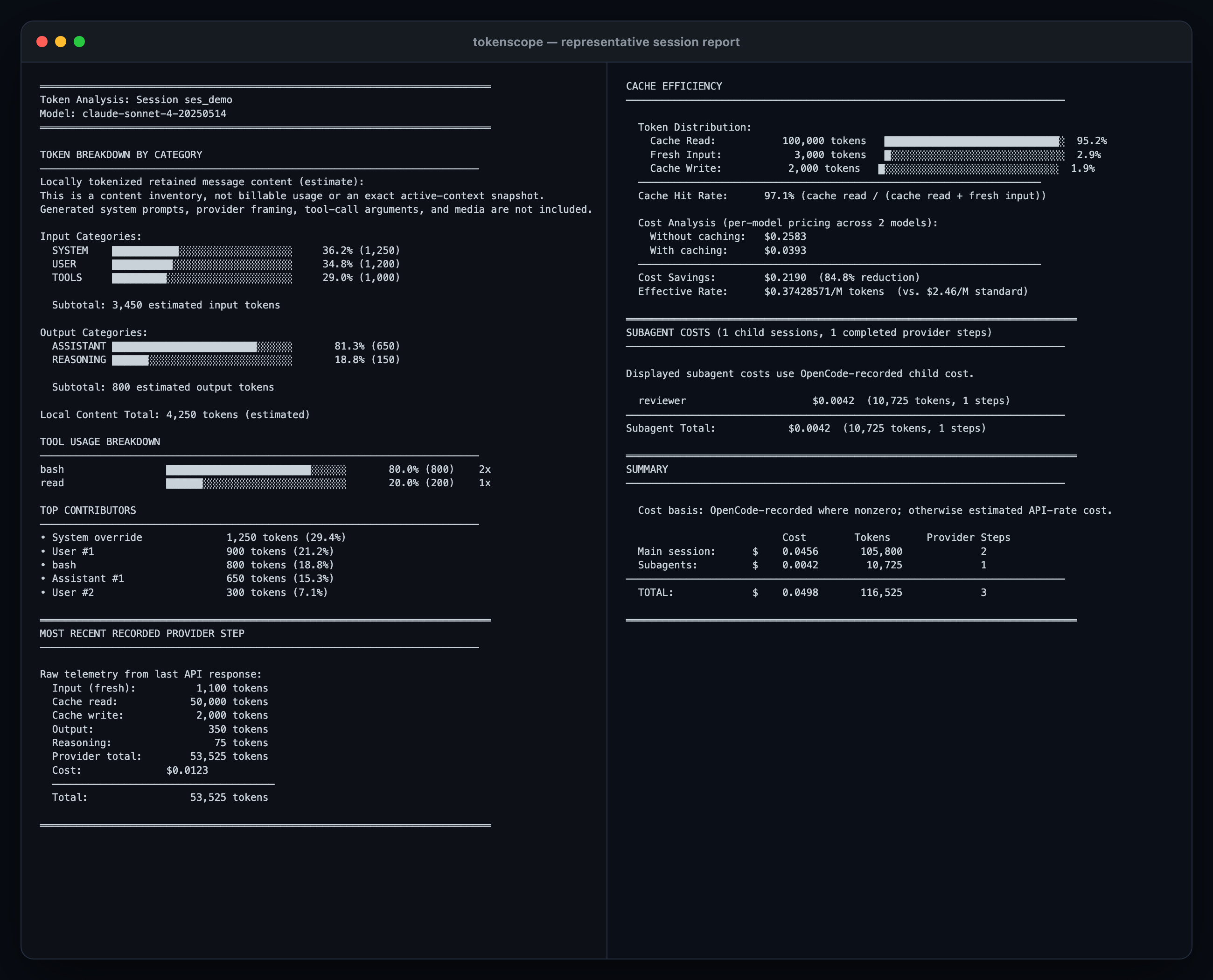
Representative report generated by TokenScope from the repository's deterministic sample session.
A report brings the session's main signals together:
- Recorded provider-step telemetry: fresh input, cache reads/writes, output, reasoning, completed steps, and OpenCode-recorded cost
- Retained content inventory: estimated tokens by system override, user, assistant, reasoning, and replayable tool output
- Cache analysis: hit rate, effective input rate, and estimated savings at public API prices
- Recursive subagent totals: child-session usage, cost, and provider steps, with an optional detailed bucket breakdown
- Context explanations: bounded estimates for tool definitions, environment context, custom instructions, skills, and available subagents
- Visible uncertainty: warnings identify missing pricing, tokenizer fallbacks, unavailable metadata, export failures, or incomplete child-session data
Compatibility
TokenScope supports @opencode-ai/plugin >=1.1.48. The accuracy contracts in this release were verified against OpenCode v1.17.18; older runtimes can differ in explanatory skill or tool formatting even when core telemetry remains available.
TokenScope is an OpenCode plugin and tool, not a standalone CLI or transcript-file analyzer. The runtime report path is cross-platform; the one-line install script is intended for Unix-like environments with Bash.
Usage
Run the installed prompt command:
/tokenscopeThe slash command is a small prompt file that invokes the plugin's tokenscope tool, reads the exact report path it returns, and prints the report verbatim. Agents can also call the tool directly.
Tool Options
| Option | Default | Behavior |
| --- | --- | --- |
| sessionID | current session | Analyze a specific session. Blank values use the current session. |
| limitMessages | 3 | Entries shown per category; integer from 1 to 10. |
| includeSubagents | true | Recursively include child-session usage and cost. |
Each invocation writes a unique report to a private directory under the operating system's temporary directory and returns its exact path. Reports are not written into the analyzed worktree, and concurrent invocations cannot overwrite one another. The OS owns eventual cleanup.
When the private report location is available, missing, empty, or inaccessible sessions produce a short report explaining the failure instead of polluting the project or silently returning partial output. If the location cannot be created or written, the tool returns an explicit inline error.
How to Read the Report
TokenScope deliberately separates three kinds of numbers:
- Recorded usage snapshot — persisted OpenCode
step-finishtelemetry, with an assistant-message aggregate fallback for older data. This is the strongest available source for fresh input, cache read/write, visible output, reasoning, recovered calls/steps, and OpenCode-recorded cost. - Local content inventory — tokenizer estimates over retained text and replayable tool output. These help identify contributors but are not billable usage or an exact reconstruction of the next provider request.
- Explanatory estimates — public API-rate cost, cache savings, cached-context attribution, tool schemas, and skill/subagent catalogs. These are labeled as estimates and kept out of recorded totals.
See the report reference for a section-by-section explanation of the calculations, exclusions, and reconstruction limits.
Snapshot Boundary
The provider step that invokes TokenScope is not included because OpenCode persists its step-finish only after the tool returns. The later report-reading and final-response steps are also outside that snapshot.
Compaction and active reverts can make the retained transcript differ from the next provider request. Deleted or reverted-away history cannot be reconstructed as lifetime spend from the session API.
Cost Boundary
OpenCode normally calculates recorded cost from normalized usage and model metadata; it is not necessarily a provider invoice. When recorded cost is zero, TokenScope shows a separately labeled public API-rate estimate instead. Per-call context pricing tiers and cache rates are applied before totals are aggregated.
Skills and Tools
TokenScope reports the available skill/subagent catalogs, loaded skill results, observed tool usage, and estimated tool-definition size. Repeated skill calls are counted cumulatively because each persisted result adds retained content. Full session compaction can still remove older content from active context.
Configuration
Create a stable user override at:
~/.config/opencode/tokenscope-config.jsonOn startup, TokenScope uses the user file when it is readable and contains valid JSON; otherwise it falls back to the bundled package config. Missing keys in the selected file are filled from in-code defaults. Only JSON syntax is validated, so use the documented boolean keys and values. Restart OpenCode after changing the file because config is loaded once per plugin process.
Default flags:
{
  "enableContextBreakdown": true,
  "enableToolSchemaEstimation": true,
  "enableCacheEfficiency": true,
  "enableSubagentAnalysis": true,
  "enableDetailedSubagentCostBreakdown": false,
  "enableSkillAnalysis": true
}
Example override:
{
  "enableDetailedSubagentCostBreakdown": true,
  "enableSkillAnalysis": false
}
Set a feature flag to false to hide that section. Detailed subagent costs expand each child with fresh input, cache read/write, output, reasoning, and estimated per-bucket costs. If OpenCode recorded a nonzero child cost, that value remains the displayed child total.
Pricing and Tokenizer Coverage
TokenScope asks the running OpenCode instance for provider/model pricing first, then falls back to the bundled models.dev-derived catalog. The catalog covers thousands of provider/model entries, including OpenAI, Anthropic, Google, DeepSeek, Llama, Mistral, Qwen, Kimi, GLM, Grok, and many others. Free models are represented with zero pricing when the metadata marks them that way.
Pricing coverage is broader than model-specific tokenizer coverage:
- OpenAI-family models use
js-tiktokenmappings where available. - Selected Claude, Llama, DeepSeek, and Mistral models use public Hugging Face tokenizer implementations.
- Unmapped or unavailable tokenizers use a visible approximate fallback.
The report names the pricing and tokenizer fallback it used, rather than presenting an approximation as exact.
Updating
npm installation
| Config in opencode.json | Behavior |
| --- | --- |
| "@ramtinj95/opencode-tokenscope" | Uses an unversioned package spec; cache and update behavior follows the OpenCode runtime. |
| "@ramtinj95/opencode-tokenscope@latest" | Requests npm's current latest tag when OpenCode resolves the package. |
| "@ramtinj95/[email protected]" | Requests the exact 1.8.1 release. |
Update a global installation manually:
npm update -g @ramtinj95/opencode-tokenscopeScript installation
Update an existing script installation:
bash ~/.config/opencode/plugin/install.sh --updateOr run the current remote installer:
curl -sSL https://raw.githubusercontent.com/ramtinJ95/opencode-tokenscope/main/plugin/install.sh | bash -s -- --updateThe --update flag refreshes dependencies from the downloaded package.json before rebuilding.
Troubleshooting
/tokenscope does not appear
Verify the command exists:
ls ~/.config/opencode/command/tokenscope.mdIf it is missing, repeat installation step 3.
Restart OpenCode completely.
Counts differ from the OpenCode TUI
- Current turn: the step that invokes TokenScope and later report-reading/final-response steps are outside the report snapshot.
- Approximate tokenizer warning: reinstall/update the plugin, then check whether the model has a model-specific mapping.
- Compaction or revert: retained content can differ from lifetime recorded usage and from the next provider request.
- Zero recorded cost: use the separately labeled API-rate estimate as an explanation, not as an invoice.
Privacy and Network Access
- Session content is analyzed locally and reports are written to owner-only temporary directories on Unix.
- TokenScope does not upload session text to an analytics service.
- Analysis communicates with the running OpenCode client/server to read session messages, child sessions, tools, and provider metadata.
- A mapped non-OpenAI tokenizer may download tokenizer files from Hugging Face at runtime; configured Hugging Face authorization may accompany that request.
- Live pricing and model metadata are obtained through the running OpenCode client. The bundled catalog is used when those metadata are unavailable.
Development
From plugin/:
npm test
npm run typecheck
npm run build
npm run test:dist
The test suite requires Bun; build and distribution checks require Node.js and npm.