
@ranger-testing/rangerwright
v0.0.32
Published
Browser automation session server and CLI for Rangerwright.


Readme
Rangerwright
Rangerwright is a small browser automation layer for agents and tools that need to use a real browser over many separate commands. It runs Playwright behind a persistent CLI and socket server, then returns compact JSON with enough page state for the next decision.
It is built on Playwright, and the interface is designed to minimize the number of tool calls needed to perform a task, even when that means returning more tokens per browser command. The reasoning comes from the findings described in The Hidden Cost of Fewer Tokens. Browser tools that are token efficient often require more total tool calls: the agent does an action, separately queries the page state, then decides on the next action. Those extra tool calls are the primary driver of runtime. They can also cost more because they repeatedly reingest the conversation, even at cached prices, and require more output tokens to define each tool call.
This analysis makes the Playwright MCP look dramatically faster than the Playwright CLI and agent-browser CLI, but the real difference is in the interface design, not the protocol.
That's where Rangerwright comes in: the action-and-state shape that made the MCP fast, in the form factor of a CLI.
Why use it instead of plain Playwright?
Plain Playwright is best when you are writing a test or script that already knows the sequence of actions. Rangerwright is for loops where a caller needs to inspect the page, decide what to do, act, inspect again, and keep going. It's particularly optimized for QA workflows where frequent screenshots and snapshots are required.
Rangerwright adds a few things that are awkward to rebuild around Playwright each time:
- Action commands that can take an action and return fresh page state in the same response, such as
click-and-inspectorfill-and-inspect. - A persistent browser session keyed by
--session, so separate commands reuse tabs, cookies, storage, dialogs, traces, and video. - JSON results with URL, title, headings, visible text, accessibility snapshot text, artifact paths, timings, console messages, network requests, storage, and errors in a predictable shape.
- Snapshot refs like
e37, so agents can click visible elements without generating selector code. - Built-in settling after actions, with navigation and network timing fields that make slow or flaky pages easier to understand.
- CLI and socket APIs, so it works both as a shell tool and as a library inside longer-running systems.
Performance & auto-research loop
Rangerwright has been improved with an auto-research loop that generates candidate variants, publishes alpha npm builds, runs them through Browser Trek benchmark scenarios, records results in Phoenix, and promotes the variant that improves correctness and runtime without wasting context.
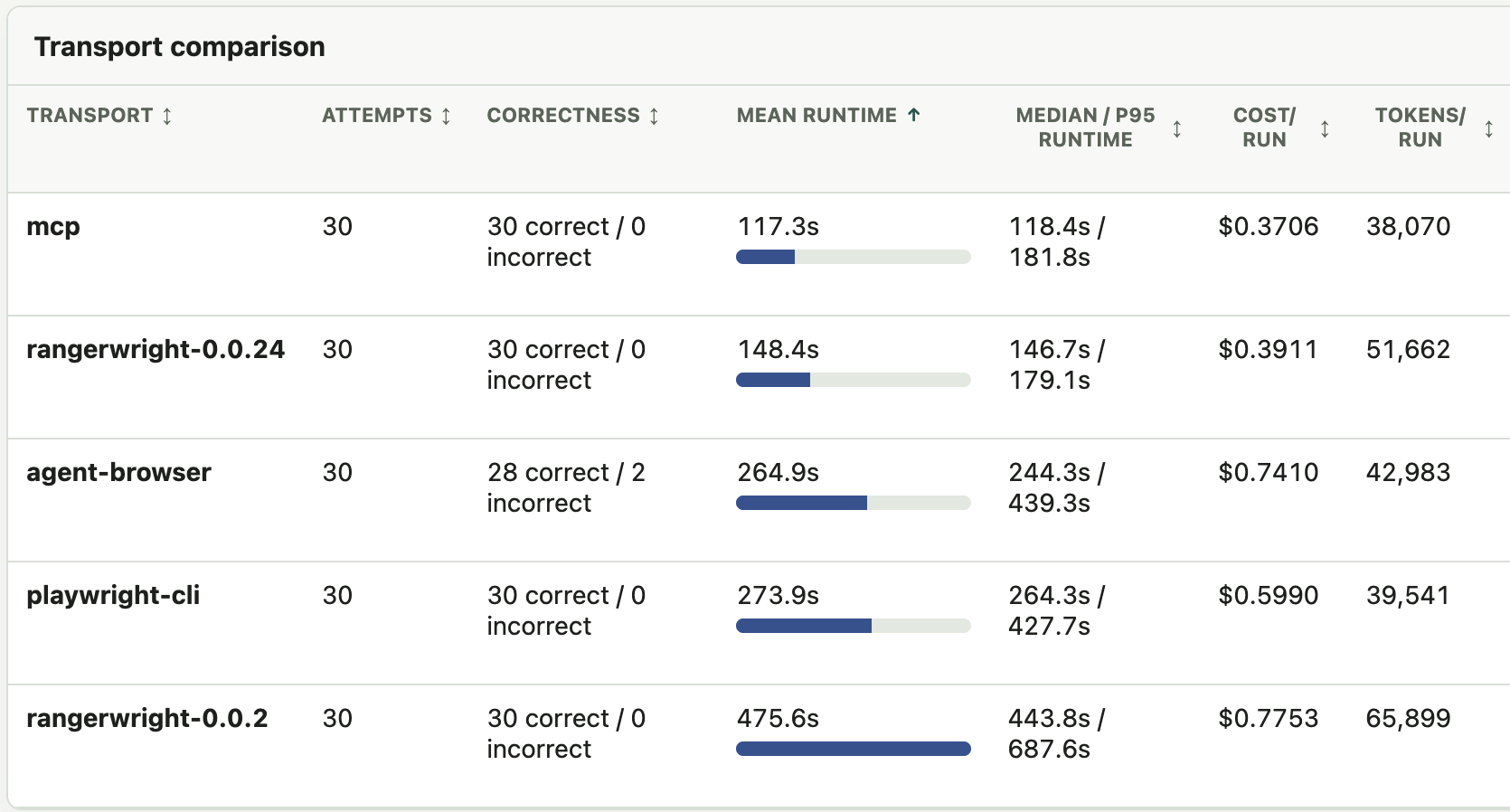
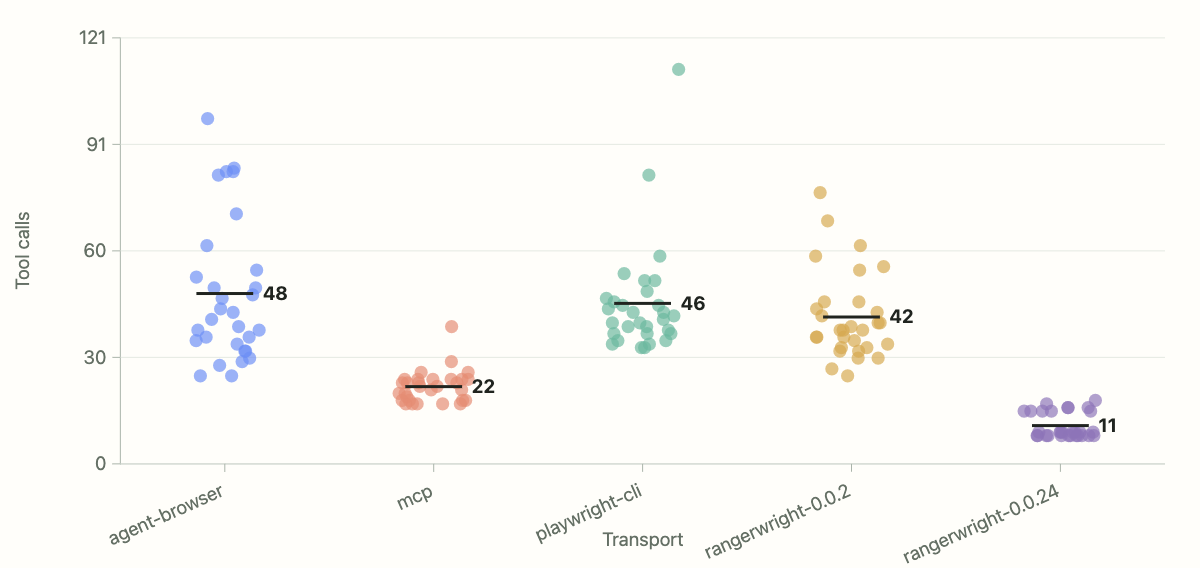
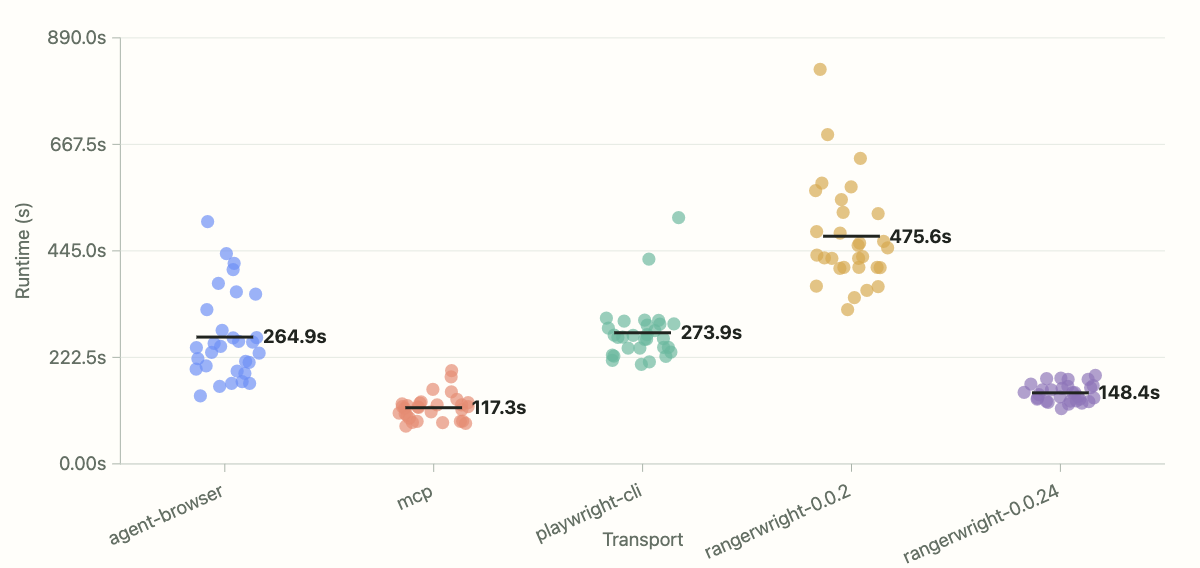
The loop is intentionally practical: make a small interface change, run it against real browser tasks, compare accuracy and speed, then keep the winner. The charts below show the gains from that work: rangerwright-0.0.24 uses fewer tool calls than the MCP baseline, and it is much faster than the early 0.0.2 transport while keeping the CLI/session shape that is easier to ship and debug.
Overall transport comparison across correctness, runtime, cost, and tokens.
Tool-call count by transport. Fewer calls mean fewer model round trips.
Fewer model round trips means faster overall performance.
See autoresearch/README.md for the benchmark workflow.
Install
npm install -g @ranger-testing/rangerwrightIf your environment does not already have Playwright browsers installed, install Chromium:
npx playwright install chromiumQuick start
Create rangerwright.json:
{
    "browser": {
        "browserName": "chromium",
        "launchOptions": {
            "headless": true
        }
    },
    "outputDir": "./output",
    "daemonIdleTimeoutMs": 1800000,
    "saveTrace": true,
    "saveVideo": false,
    "settle": {
        "navigationLoadTimeoutMs": 5000,
        "networkSettleTimeoutMs": 1500,
        "networkIdleWindowMs": 75,
        "postActionAnimationFrameCount": 1
    }
}
Run commands against the same session:
rangerwright --session demo --config rangerwright.json open-and-inspect https://example.com
rangerwright --session demo --config rangerwright.json click-and-inspect "text=More information"
rangerwright --session demo --config rangerwright.json screenshot ./output/example.png
rangerwright --session demo --config rangerwright.json close
Each command prints one JSON result.
Command groups
- Page flow:
open,inspect,get-url,get-text,screenshot,tab-list,tab-select - Actions:
click,fill,press,check,select, plus*-and-inspectvariants - Waiting:
wait-load,wait-url,wait-text - Storage:
state-save,state-load,cookie-*,localstorage-*,sessionstorage-* - Debugging:
console [error|warning|info|debug],network,dialog-accept,dialog-dismiss - Artifacts:
tracing-stop [path],video-stop [path]
Use inspect or an *-and-inspect command before using snapshot refs like e37. Refs are tied to the latest snapshot, so refresh them after navigation or page changes.
CLI flags
--session <id>: session name. Commands with the same session reuse one browser. The first command spawns a detached daemon for the session.--config <path>: path to the JSON config file.--artifact-dir <dir>: directory for per-command artifacts such as snapshots. Defaults to<outputDir>/rangerwright.--socket-path <path>: override the session socket path. Defaults to a per-session path under the system temp directory.--json: accepted for tool compatibility. Command results are JSON.--version: print the package version and exit.
You can also set RANGERWRIGHT_SESSION, RANGERWRIGHT_CONFIG, RANGERWRIGHT_ARTIFACT_DIR, and RANGERWRIGHT_SOCKET_PATH instead of passing those flags on every command.
Detached CLI daemons close after 30 minutes without commands by default. Set daemonIdleTimeoutMs in the config, or RANGERWRIGHT_DAEMON_IDLE_TIMEOUT_MS in the environment, to change it. Use 0 to disable the idle timeout.
API
import {
    createRangerwrightClient,
    startRangerwrightServer,
    type RangerwrightConfig,
} from '@ranger-testing/rangerwright';

const config: RangerwrightConfig = {
    browser: {
        browserName: 'chromium',
        launchOptions: {
            headless: true,
        },
    },
    outputDir: './output',
    settle: {
        navigationLoadTimeoutMs: 5000,
        networkSettleTimeoutMs: 1500,
        networkIdleWindowMs: 75,
        postActionAnimationFrameCount: 1,
    },
};

const server = await startRangerwrightServer(config, 'demo');
const client = createRangerwrightClient({
    sessionId: 'demo',
    socketPath: server.socketPath,
});

const result = await client.send({
    command: 'open-and-inspect',
    args: ['https://example.com'],
});

await server.close();