
@rawwee/interactive-mcp
v1.7.0
Published
[](https://www.npmjs.com/package/@rawwee/interactive-mcp) [](https://www.npmjs.com/package/@rawwee/interacti


Readme
@rawwee/interactive-mcp






Repository
- GitHub: https://github.com/josippapez/interactive-mcp-server
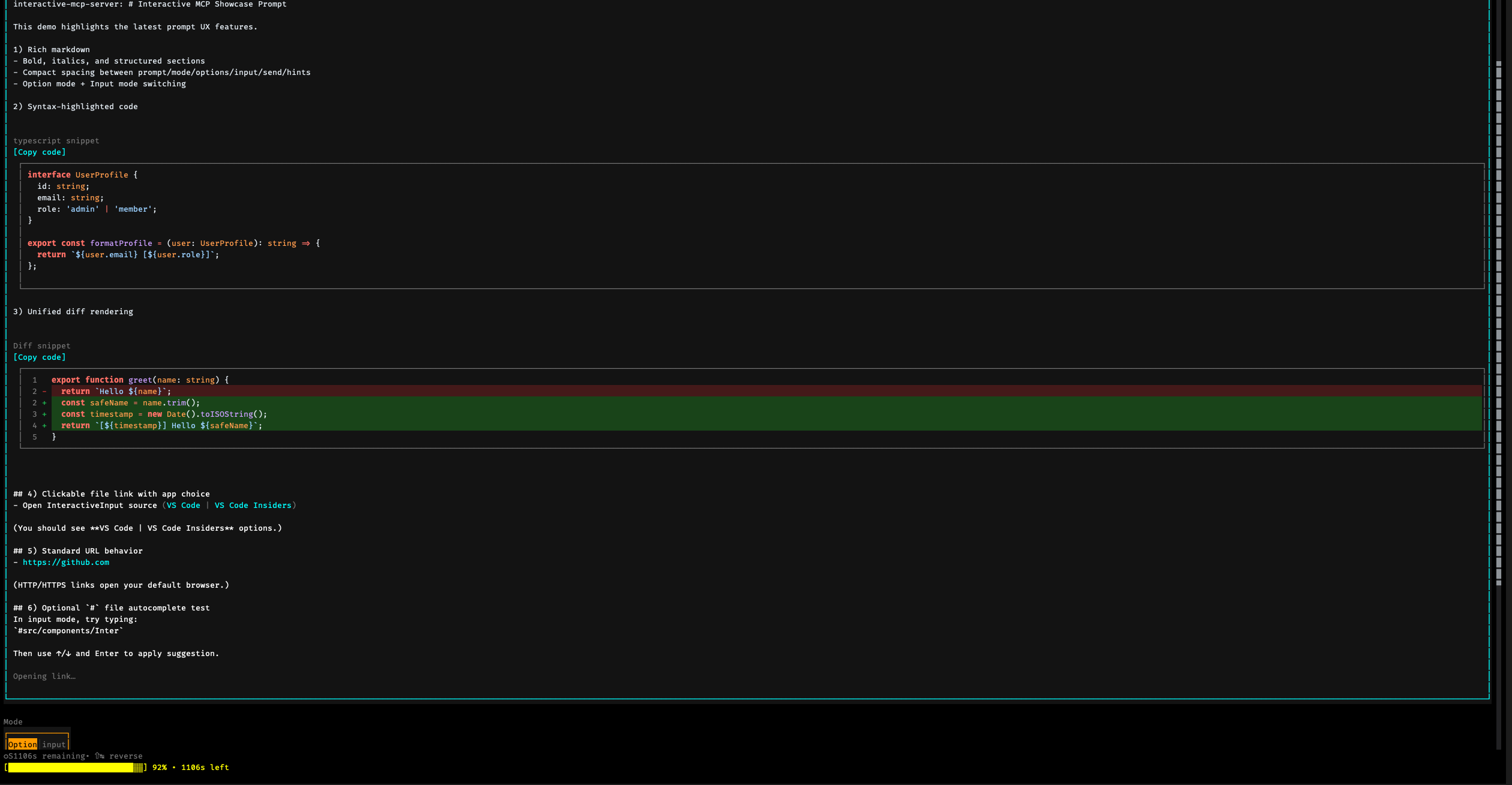
A MCP Server implemented in Node.js/TypeScript, facilitating interactive communication between LLMs and users. Note: This server is designed to run locally alongside the MCP client (e.g., Claude Desktop, VS Code), as it needs direct access to the user's operating system to display notifications and command-line prompts.
(Note: This project is in its early stages.)
Tools
This server exposes the following tools via the Model Context Protocol (MCP):
request_user_input: Asks the user a question and returns their answer. Can display predefined options.message_complete_notification: Sends a simple OS notification.start_intensive_chat: Initiates a persistent command-line chat session.ask_intensive_chat: Asks a question within an active intensive chat session.stop_intensive_chat: Closes an active intensive chat session.
Prompt UIs support markdown-friendly question text (including multiline prompts, fenced code blocks, and diff snippets). When useful, you can also include VS Code-style file links in prompt text (for example, vscode://file/<absolute-path>:<line>:<column>).
In TUI input mode, Cmd/Ctrl+C copies current input, Cmd/Ctrl+V supports clipboard text plus file/image includes from pasted paths, copied file objects, and copied images (platform support varies), and Cmd/Ctrl+Z / Cmd/Ctrl+Shift+Z provide undo/redo. Files are sent as path references rather than full contents to optimize token usage—the AI can then read files directly using its available tools.
Usage Scenarios
This server is ideal for scenarios where an LLM needs to interact directly with the user on their local machine, such as:
- Interactive setup or configuration processes.
- Gathering feedback during code generation or modification.
- Clarifying instructions or confirming actions in pair programming.
- Any workflow requiring user input or confirmation during LLM operation.
Client Configuration
This section explains how to configure MCP clients to use the @rawwee/interactive-mcp server package.
By default, user prompts will time out after 30 seconds. You can customize server options like timeout or disabled tools by adding command-line flags directly to the args array when configuring your client.
Please make sure you have the npx command available.
Usage with Claude Desktop / Cursor
Add the following minimal configuration to your claude_desktop_config.json (Claude Desktop) or mcp.json (Cursor):
{
  "mcpServers": {
    "interactive": {
      "command": "npx",
      "args": ["-y", "@rawwee/interactive-mcp"]
    }
  }
}
With specific version
{
  "mcpServers": {
    "interactive": {
      "command": "npx",
      "args": ["-y", "@rawwee/[email protected]"]
    }
  }
}
Example with Custom Timeout (30s):
{
  "mcpServers": {
    "interactive": {
      "command": "npx",
      "args": ["-y", "@rawwee/interactive-mcp", "-t", "30"]
    }
  }
}
Usage with VS Code
Add the following minimal configuration to your User Settings (JSON) file or .vscode/mcp.json:
{
  "mcp": {
    "servers": {
      "interactive-mcp": {
        "command": "npx",
        "args": ["-y", "@rawwee/interactive-mcp"]
      }
    }
  }
}
macOS Recommendations
For a smoother experience on macOS using the default Terminal.app, consider this profile setting:
- (Shell Tab): Under "When the shell exits" (Terminal > Settings > Profiles > [Your Profile] > Shell), select "Close if the shell exited cleanly" or "Close the window". This helps manage windows when the MCP server starts and stops.
Development Setup
This section is primarily for developers looking to modify or contribute to the server. If you just want to use the server with an MCP client, see the "Client Configuration" section above.
Prerequisites
- Node.js: Required for runtime execution, TypeScript tooling, and Node APIs used by the server.
- Bun (optional): Can be used as an alternative runtime or package manager. If you prefer Bun, set
INTERACTIVE_MCP_RUNTIME=<path-to-bun>or useINTERACTIVE_MCP_BUN_PATH(legacy alias) to point the server's terminal spawner at your Bun binary.
Prompt UI runtime fallback (important for npm users)
Interactive prompt UIs (OpenTUI) prefer Bun at runtime. When the MCP server is started with Node, terminal launch runtime is resolved in this order:
INTERACTIVE_MCP_RUNTIME(or legacyINTERACTIVE_MCP_BUN_PATH) if set.- Current process runtime if the server is already running on Bun.
bunfound on systemPATH.- Bundled local Bun binary from npm package
bun(installed with this package). - Final fallback to current process runtime (
process.execPath) with a warning.
This means npm users without a globally installed Bun can still launch prompt UIs via the bundled local Bun fallback.
Installation (Developers)
Clone the repository:
git clone https://github.com/josippapez/interactive-mcp-server
cd interactive-mcp-server
Install dependencies:
npm install
Running the Application (Developers)
npm run startOr directly with Node:
node dist/index.jsUI backend status
interactive-mcp currently runs with the OpenTUI terminal backend (@opentui/core, @opentui/react).
The VS Code extension and bridge runtime have been removed from the active feature set for now, and may be reconsidered in a future iteration.
Command-Line Options
The interactive-mcp server accepts the following command-line options. These should typically be configured in your MCP client's JSON settings by adding them directly to the args array (see "Client Configuration" examples).
| Option | Alias | Description |
| ----------------- | ----- | ----------------------------------------------------------------------------------------------------------------------------------------------------------------------------------------------------- |
| --timeout | -t | Sets the default timeout (in seconds) for user input prompts. |
| --disable-tools | -d | Disables specific tools or groups (comma-separated list). Prevents the server from advertising or registering them. Options: request_user_input, message_complete_notification, intensive_chat. |
Example: Setting multiple options in the client config args array:
// Example combining options in client config's "args":
"args": [
  "-y", "@rawwee/interactive-mcp",
  "-t", "30", // Set timeout to 30 seconds
  "--disable-tools", "message_complete_notification,intensive_chat" // Disable notifications and intensive chat
]
Copilot CLI Hook & Extension
The hooks/ and extensions/ directories contain a pair of Copilot CLI scripts that integrate the Interactive MCP Desktop app's session channel with the GitHub Copilot CLI agent lifecycle. Together they let you queue messages in the desktop app and have them automatically injected into the agent's context before the next tool call.
What they do
| File | Role |
| --------------------------------- | --------------------------------------------------------------------------------------------------------------------------- |
| hooks/session-lifecycle.mjs | Lifecycle hook — creates a session channel on session start, cleans it up on session end. |
| extensions/session-messages.mjs | Extension — drains queued messages from the desktop app before every tool call and injects them as additionalContext. |
Session file: /tmp/imcp-session.json
Contains { sessionId, port } written by the hook and read by the extension. It is created on onSessionStart and deleted on onSessionEnd (or on SIGTERM / SIGINT).
Desktop app REST API used:
| Method | Endpoint | Purpose |
| -------- | ---------------------------- | ---------------------------------------------- |
| POST | /api/sessions | Register a new session channel |
| GET | /api/sessions/:id/messages | Fetch unsent queued messages (marks them sent) |
| DELETE | /api/sessions/:id | Delete the session and all its messages |
Requirements
- The Interactive MCP Desktop app must be running on
localhost:3100. - The hook and extension work as a pair. If only the extension is installed, it will fail silently because
/tmp/imcp-session.jsonwon't be written.
Installation (Copilot CLI)
Copy both files into the .github/ directories of any repository you want them active in:
# Hook — runs at session start/end
cp hooks/session-lifecycle.mjs  /path/to/your-repo/.github/hooks/session-lifecycle.mjs

# Extension — injects queued messages before tool calls
mkdir -p /path/to/your-repo/.github/extensions/session-messages
cp extensions/session-messages.mjs  /path/to/your-repo/.github/extensions/session-messages/extension.mjs
The Copilot CLI automatically discovers and loads:
.github/hooks/*.mjsscripts as lifecycle hooks.github/extensions/*/extension.mjsscripts as extensions
Both files are ESM (import/export) and require Node.js 18+.
Development Commands
- Build:
npm run build - Lint:
npm run lint - Format:
npm run format - Tests:
bun test— unit tests currently use thebun:testrunner and require Bun as a dev tool.
Release & Publishing Workflow
Package releases are handled by GitHub Actions in .github/workflows/publish.yml (manual workflow_dispatch).
- Choose
release_typewhen running the workflow:stable→ releases frommainrc→ releases fromnext
- The workflow uses:
- Node.js 24 (
actions/setup-node)
- Node.js 24 (
- For semantic-release + trusted publishing, keep
actions/setup-nodewithoutregistry-urlto avoid npm auth conflicts (EINVALIDNPMTOKEN). - Release pipeline commands:
npm cinpm run buildnpx semantic-release
- npm publishing uses trusted publishing (OIDC) via GitHub Actions (
id-token: write), not a long-lived npm token.
Guiding Principles for Interaction
When interacting with this MCP server (e.g., as an LLM client), please adhere to the following principles to ensure clarity and reduce unexpected changes:
- Prioritize Interaction: Utilize the provided MCP tools (
request_user_input,start_intensive_chat, etc.) frequently to engage with the user when they are available and working. - Seek Clarification: If requirements, instructions, or context are unclear, always ask clarifying questions before proceeding. Do not make assumptions.
- Confirm Actions: Before performing significant actions (like modifying files, running complex commands, or making architectural decisions), confirm the plan with the user.
- Provide Options: Whenever possible, present the user with predefined options through the MCP tools to facilitate quick decisions.
- Fallback When Interactive Fails: If the user explicitly says interactive prompting does not work, or those tools are unavailable/failing, use the built-in questions tool instead of plain-text prompting until interactive tools work again.
You can provide these instructions to an LLM client like this:
# Interaction

- Please use the interactive MCP tools when they work
- If interactive prompting does not work, you may use the built-in questions tool instead of plain text
- Please provide options when the active question tool supports them

# Reduce Unexpected Changes

- Do not make assumption.
- Ask more questions before executing, until you think the requirement is clear enough.
Contributing
Contributions are welcome! Please follow standard development practices. (Further details can be added later).
License
MIT (See LICENSE file for details - if applicable, or specify license directly).