
@react-component-selector-mcp/cli
v2.0.2
Published
CLI and MCP server for react-component-selector-mcp

Maintainers
 zakstam
Readme
React Component Selector MCP

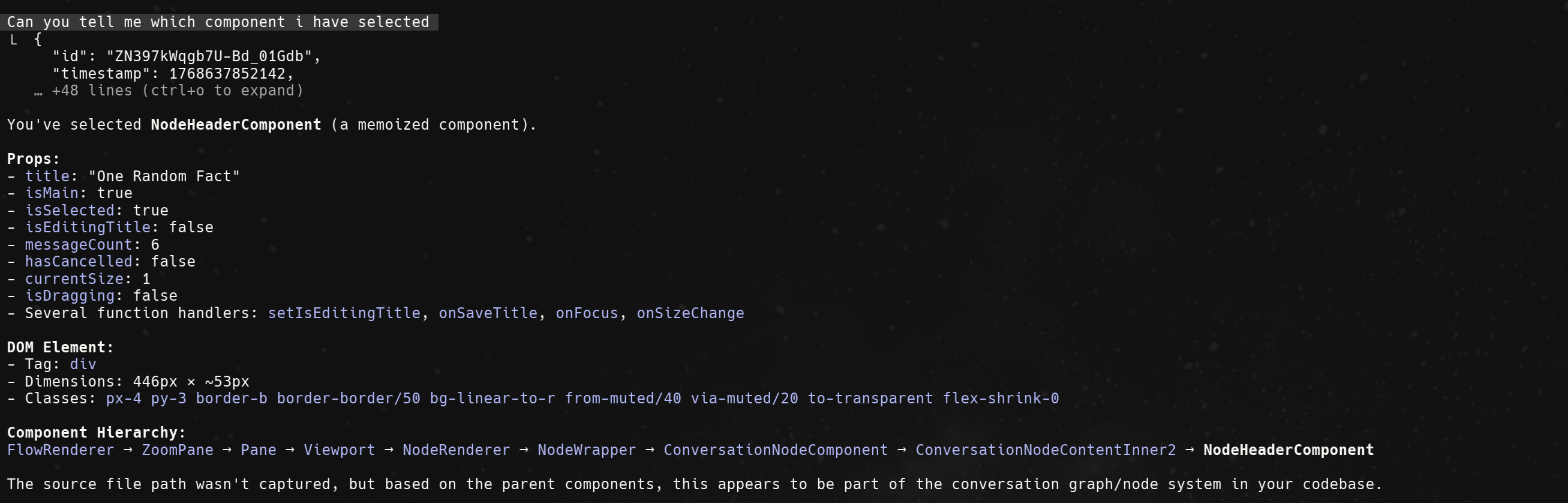
Select React components visually in the browser and expose selection data to Claude Code via MCP.
Quick Start
1. Install
npm install @react-component-selector-mcp/react2. Wrap Your App
// In your root layout (app/layout.tsx, _app.tsx, or main.tsx)
import { ComponentPicker } from "@react-component-selector-mcp/react";

export default function RootLayout({ children }) {
  return <ComponentPicker>{children}</ComponentPicker>;
}
3. Configure MCP
Create .mcp.json in your project root:
{
  "mcpServers": {
    "react-component-selector": {
      "command": "npx",
      "args": ["@react-component-selector-mcp/cli", "mcp"]
    }
  }
}
Restart Claude Code to load the MCP server.
Claude Code Setup
Copy this prompt to Claude Code to automate the setup:
Set up react-component-selector-mcp in this project:
1. Install @react-component-selector-mcp/react
2. Wrap the root layout with <ComponentPicker>{children}</ComponentPicker>
3. Create .mcp.json with: {"mcpServers":{"react-component-selector":{"command":"npx","args":["@react-component-selector-mcp/cli","mcp"]}}}
Usage
- Start your dev server and open the app in browser
- Press Ctrl+Alt+C (Windows/Linux) or Cmd+Option+C (Mac)
- Click any component to select it
- Ask Claude about the selected component
MCP Tools
| Tool | Description |
|------|-------------|
| get_selected_component | Returns the most recently selected component |
| wait_for_selection | Waits for user to select a component |
| get_selection_history | Returns recent selections |
Component not detected
- Ensure
ComponentPickerwraps your entire app - Verify React version is 18.0.0 or higher
MCP connection failed
- Check status:
npx @react-component-selector-mcp/cli status - Stop and restart:
npx @react-component-selector-mcp/cli stop - Restart Claude Code after changing MCP configuration
Source location not available
Source locations require development mode with @babel/plugin-transform-react-jsx-source (enabled by default in CRA, Next.js, Vite).
# Check daemon status
npx @react-component-selector-mcp/cli status

# Stop daemon
npx @react-component-selector-mcp/cli stop

# Custom ports (default: WebSocket 3333, API 3334)
npx @react-component-selector-mcp/cli mcp --ws-port 4444 --api-port 4445
When using custom ports, update the component to match:
<ComponentPicker port={4444}>{children}</ComponentPicker>Contributing
See CONTRIBUTING.md for development setup.