
@react-state-map/cli
v0.3.2
Published
Know where every prop comes from — MCP server for Claude Code, Cursor & Copilot, a CI check with GitHub annotations, one-command prop-drilling fixes, and an interactive React state graph.

Maintainers
 bugspray
Readme
@react-state-map/cli
Know where every prop comes from — in your AI agent, in CI, and in the terminal.
React State Map follows state through React and Next.js code — across files, renames, {...props} spreads, barrels and path aliases — and answers the questions that are hard to grep: where does this value come from, what breaks if I change it, and where is it drilled for no reason?
🤖 Give your coding agent X-ray vision
claude mcp add react-state-map -- npx -y @react-state-map/cli mcp .Claude Code, Cursor, Copilot and any MCP client get tools like trace_prop, get_impact and plan_fix — exact answers in one call instead of grepping through five files. The analysis stays warm and updates as files change. Setup for every client →
✅ Keep new problems out of main
npx @react-state-map/cli check --base origin/mainHooks in Server Components, functions passed to Client Components, prop drilling and more — reported as GitHub annotations, SARIF or JSON, and only the issues your branch introduced. Or drop in the GitHub Action.
🛠 Fix prop drilling from the terminal
npx @react-state-map/cli fix --list
npx @react-state-map/cli fix 1 --write
Lifts a drilled value into a typed context + hook across every file in the chain — only when it's provably safe. Prints a clean patch by default.
🗺 And the map
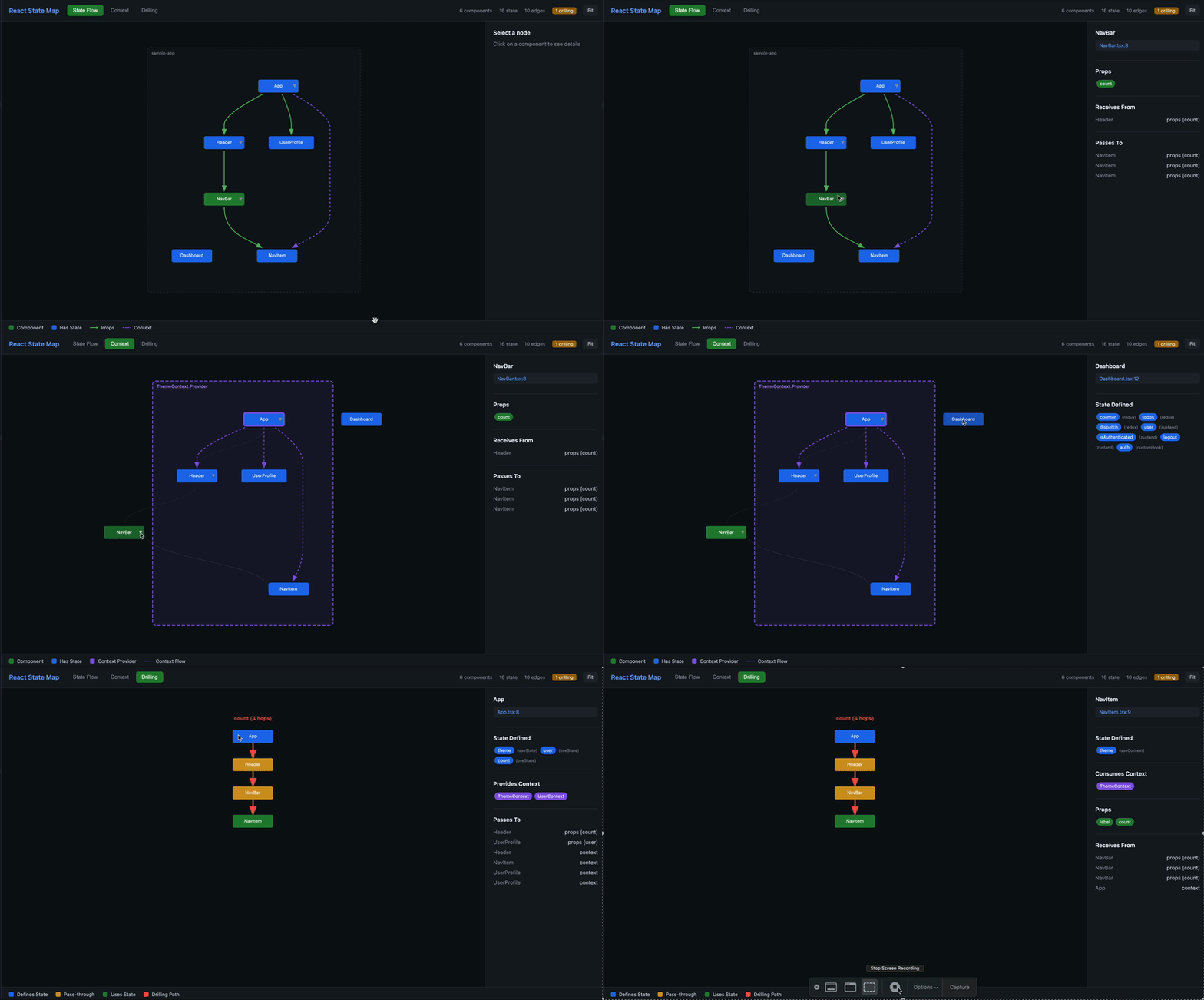
npx @react-state-map/cli ./srcAn interactive HTML graph of your components, state, contexts and drilling chains.
Prefer your editor? The VS Code extension shows the same answers on hover, as CodeLens and as one-click quick fixes.
| Command | What it does |
|---------|--------------|
| react-state-map mcp [dir] | MCP server for Claude Code, Cursor, VS Code/Copilot and other agents |
| react-state-map check [dir] | CI gate: annotations, SARIF, job summary, only-new-issues mode |
| react-state-map fix [dir] [id] | Preview or apply automatic refactors (lift drilled state into a context, remove unused props) |
| react-state-map [dir] | Interactive HTML graph (or JSON export) |
Installation
# Run directly with npx (no install required)
npx @react-state-map/cli ./src

# Or install globally
npm install -g @react-state-map/cli
Requires Node.js 18 or newer.
Which files are analyzed
When neither --include nor --exclude is given, the defaults are:
- include:
**/*.tsx,**/*.jsx,**/*.ts,**/*.js,**/*.mts,**/*.mjs - exclude:
node_modules,dist,build,out,.next,.turbo,coverage,storybook-static,*.d.ts,*.test.*,*.spec.*,*.stories.*,*.bundle.js,*.min.js
Passing --include or --exclude replaces the corresponding default list. Patterns are relative to the analyzed directory. Path aliases from tsconfig.json/jsconfig.json are resolved, and Next.js App Router projects (Server vs. Client Components) and the React major version are detected from package.json.
Interactive graph (default command)
react-state-map                     # analyze ., write state-map.html and open it
react-state-map ./src               # analyze a specific directory
react-state-map ./src -o map.html   # custom output file
react-state-map ./src -f json -o state.json   # JSON export of the full graph
react-state-map ./src --watch       # regenerate on file changes (incremental)
react-state-map ./src --no-open     # don't open the browser
react-state-map ./src -t 4          # prop-drilling threshold
react-state-map ./src -i "**/*.tsx" -e "**/legacy/**"
| Option | Short | Default | Description |
|--------|-------|---------|-------------|
| --output <file> | -o | state-map.html | Output file path |
| --format <format> | -f | html | html or json |
| --watch | -w | off | Watch files; only changed files are re-parsed |
| --threshold <n> | -t | 3 | Number of components a value must pass through to count as prop drilling |
| --no-open | | | Don't open the HTML file in the browser |
| --include <patterns...> | -i | see above | Glob patterns to include |
| --exclude <patterns...> | -e | see above | Glob patterns to exclude |
HTML
A standalone, interactive page:
- ELK.js layout + Cytoscape.js canvas rendering — handles hundreds of components
- Semantic zoom — directory overview when zoomed out, full component detail up close
- Fuzzy search, path finding between two components, focus mode
- Layers panel — toggle Props, Context, Hierarchy and Drilling edges
- Sidebar — state, props, contexts and prop metrics (consumer / passthrough / transformer / mixed) per component
- Drilling chains, context boundaries, collapsible subtrees
JSON
-f json writes the serialized graph: components, stateNodes, edges (props/context/hook flows), renders (parent → child JSX sites with props), contextBoundaries, propDrillingPaths, componentMetrics, bundles, contextLeaks, propChains, insights and meta (rootDir, filesAnalyzed, durationMs, frameworks, drillingThreshold).
Check (CI)
react-state-map check [dir] [options]Analyzes the project and reports issues ("insights"). Exit codes:
| Code | Meaning |
|------|---------|
| 0 | No reported issue at or above --fail-on |
| 1 | At least one reported issue at or above --fail-on |
| 2 | Usage error, missing directory, git error, unreadable baseline |
| Option | Default | Description |
|--------|---------|-------------|
| --format <format> | text (github when GITHUB_ACTIONS=true) | text, json, github, sarif or markdown |
| --fail-on <severity> | error | error, warning, info or none |
| --min-severity <severity> | info | Lowest severity reported. hint adds PROP_PASSTHROUGH (one entry per forwarding component of a drilling chain) |
| -t, --threshold <n> | 3 | Prop-drilling threshold |
| -i, --include <patterns...> | | Glob patterns to include |
| -e, --exclude <patterns...> | | Glob patterns to exclude |
| --base <git-ref> | | Report only issues that are new compared to this ref; also counts issues fixed since the base |
| --baseline <file> | | JSON array of accepted insight ids to ignore |
| --write-baseline <file> | | Write the ids of all current insights to <file> and exit 0 |
| --max-issues <n> | | Maximum issues printed in text output |
| -o, --output <file> | stdout | Write the report to a file (progress messages always go to stderr) |
| --no-summary | | Don't append the job summary to $GITHUB_STEP_SUMMARY |
Colors in text output are disabled when stdout is not a TTY or NO_COLOR is set; FORCE_COLOR=1 forces them.
Only new issues: --base
react-state-map check ./web --base origin/mainThe base ref is checked out into a temporary detached git worktree (removed afterwards), the same relative directory is analyzed with the same options, and insights are compared by their id. Insight ids are fingerprints without line numbers, so moving code around does not create "new" issues. If the ref is not available locally, git fetch --depth=1 origin <ref> is tried first; if that fails too, the command exits with 2 and explains that the checkout needs history (fetch-depth: 0).
Accepting existing issues: baselines
react-state-map check --write-baseline .react-state-map-baseline.json   # accept everything that exists today
react-state-map check --baseline .react-state-map-baseline.json         # report only what's not in the baseline
The baseline is a JSON array of insight ids ({"ids": [...]} is accepted as well).
Output formats
text (default)
src/app/bad/page.tsx
  4:29    error   useState only works in Client Components, but BadPage is rendered as a Server Component. Add "use client" at the top of the file, or move the stateful part into a Client Component.  SERVER_COMPONENT_HOOK

src/components/Shell.tsx
  17:27   warning "selectedId" and "setSelectedId" are drilled through 2 components that only forward them: Shell → Layout → Sidebar → UserMenu  PROP_DRILLING

✖ 2 issues (1 error, 1 warning) · 4 below --min-severity info
18 files analyzed in 340ms (next-app-router, react-19); fail-on: error
With --base: ✖ 1 new issue (1 warning) · 3 already on origin/main · 1 fixed since base.
github — workflow commands that show up as inline annotations on the pull request (error → ::error, warning → ::warning, info/hint → ::notice; columns are converted to 1-based). File paths are relative to the git repository root. When $GITHUB_STEP_SUMMARY is set, the markdown report is appended to the job summary.
::warning file=web/src/components/Shell.tsx,line=17,col=27,title=React State Map%3A State is drilled through components that only forward it (PROP_DRILLING)::"selectedId" and "setSelectedId" are drilled through 2 components that only forward them: Shell → Layout → Sidebar → UserMenu
React State Map: 1 new issue (1 warning), 0 fixed since base
markdown — the job-summary report: pass/fail line, table of (new) issues, the largest prop-drilling chains, and the issues fixed since the base.
sarif — SARIF 2.1.0 with one rule per issue code, partialFingerprints set to the insight id, and paths relative to the repository root (SRCROOT). Upload it to GitHub code scanning:
- run: npx --yes @react-state-map/cli check . --format sarif --fail-on none -o react-state-map.sarif
- uses: github/codeql-action/upload-sarif@v3
  with:
    sarif_file: react-state-map.sarif
json
{
  "meta": { "rootDir": "…", "filesAnalyzed": 18, "durationMs": 267, "frameworks": ["next-app-router", "react-19"], "drillingThreshold": 3, "version": "0.3.0" },
  "summary": { "reported": 3, "total": 7, "bySeverity": { "error": 2, "warning": 1, "info": 0, "hint": 0 }, "baselineSuppressed": 0, "belowMinSeverity": 4, "minSeverity": "info", "failOn": "error", "failed": true, "parseErrors": 0 },
  "insights": [
    { "id": "SERVER_COMPONENT_HOOK:c:src/app/bad/page.tsx#BadPage:useState", "code": "SERVER_COMPONENT_HOOK", "severity": "error", "message": "…", "filePath": "/abs/path/src/app/bad/page.tsx", "relativePath": "src/app/bad/page.tsx", "line": 4, "column": 28, "componentId": "c:src/app/bad/page.tsx#BadPage" }
  ],
  "base": { "ref": "origin/main", "sha": "…", "existing": 3 },
  "newSinceBase": ["…insight ids…"],
  "fixedSinceBase": [ { "…": "insight" } ]
}
line is 1-based and column 0-based in JSON. base, newSinceBase and fixedSinceBase are present only with --base.
Rules
| Code | Default severity | Meaning | Automatic fix |
|------|------------------|---------|---------------|
| SERVER_COMPONENT_HOOK | error | A client-only hook (useState, useEffect, …) is used in a component rendered as a Server Component | — |
| SERVER_TO_CLIENT_FUNCTION_PROP | error | A function prop is passed from a Server Component to a Client Component (only Server Actions can cross) | — |
| PROP_DRILLING | warning | A state value (and/or its setter) is passed through components that only forward it | Lift into a context |
| CONTEXT_LEAK | info | A component reads a context and re-passes its values as props | — |
| PROP_BUNDLE | info | A large object is passed as a single prop | — |
| UNUSED_PROP | hint | A prop is destructured but never used (reported with --min-severity hint) | Remove from destructuring |
| PROP_PASSTHROUGH | hint | One forwarding component in a drilling chain (reported with --min-severity hint) | Lift into a context |
GitHub Action
The repository root contains a composite action that runs check --format github and, on pull requests, reports only issues introduced by the PR.
# .github/workflows/react-state-map.yml
name: React State Map
on:
  pull_request:
  push:
    branches: [main]

jobs:
  state-map:
    runs-on: ubuntu-latest
    steps:
      - uses: actions/checkout@v4
        with:
          fetch-depth: 0          # history for --base (the PR base commit)
      - uses: actions/setup-node@v4
        with:
          node-version: 20
      - uses: olafglad/react-state-map@main   # or pin a release tag / commit sha
        with:
          path: .                 # directory to analyze (relative to the repo root)
          fail-on: error          # error | warning | info | none
          threshold: 3
          # base defaults to the pull request base sha; on push it is empty → full check
          # version: latest       # @react-state-map/cli version to run
| Input | Default | Description |
|-------|---------|-------------|
| path | . | Directory to analyze |
| fail-on | error | Fail the job when a reported issue has this severity or higher |
| threshold | 3 | Prop-drilling threshold |
| base | ${{ github.event.pull_request.base.sha }} | Only report issues new since this ref; empty runs a full check |
| version | latest | @react-state-map/cli version (npm version or dist-tag) |
The action needs Node.js on the runner (GitHub-hosted runners have it; use actions/setup-node to pick a version). With a shallow checkout the base commit is fetched on demand (git fetch --depth=1 origin <sha>), but fetch-depth: 0 is the most reliable setup. Inputs are passed to the script through environment variables, never interpolated into the shell command.
Fix (automatic refactors)
react-state-map fix [dir] --list           # list fixable items
react-state-map fix [dir] <number|id>      # print a unified diff (nothing is written)
react-state-map fix [dir] <number|id> --write- Lift drilled state into a context — one entry per
PROP_DRILLINGissue. Creates<Name>Context.tswith ause<Name>()hook, wraps the owner's JSX in the provider (memoizing object values), removes the forwarded props from the intermediate components and their prop types, and reads the value with the hook in the consumer. Value and setter that travel the same route are lifted together. - Remove an unused prop — one entry per
UNUSED_PROPissue; only the destructuring changes.
<id> may be the 1-based number from --list, a drilling path id (drill:…), or an insight id (PROP_DRILLING:…, PROP_PASSTHROUGH:…, UNUSED_PROP:…). A single argument that is an existing directory is treated as the directory; use -C <dir> to be explicit.
| Option | Description |
|--------|-------------|
| -l, --list | List fixable prop-drilling routes and unused props |
| --write | Apply the change. Refuses to touch files that changed since they were analyzed, or to overwrite an existing file |
| --react19 / --no-react19 | Force <Ctx value> (React 19) or <Ctx.Provider value>; auto-detected from package.json by default |
| -C, --dir <dir> | Directory to analyze |
| -t, -i, -e | Same as for check |
$ react-state-map fix --list
1. Lift "selectedId", "setSelectedId" into a context
   chain: Shell → Layout → Sidebar → UserMenu
   at: src/components/Shell.tsx:17
   id: drill:s:src/components/Shell.tsx#Shell.selectedId>c:src/components/Layout.tsx#Layout.selectedId>…

$ react-state-map fix 1 | git apply      # same result as: react-state-map fix 1 --write
The diff goes to stdout and messages to stderr, so fix <id> > change.patch produces a clean patch. When a fix is not safely applicable (for example a class component in the chain), the reasons are printed and the exit code is 1.
MCP server for AI coding agents
react-state-map mcp [dir]Runs a Model Context Protocol server over stdio. The project is analyzed once at startup and kept up to date by a file watcher (only changed files are re-parsed), so agents get answers in milliseconds. stdout carries only protocol messages; logs go to stderr.
| Option | Description |
|--------|-------------|
| -t, --threshold <n> | Prop-drilling threshold |
| -i, -e | Include / exclude patterns |
| --no-watch | Analyze once, don't watch files |
Setup
Claude Code
claude mcp add react-state-map -- npx -y @react-state-map/cli mcp .Cursor (.cursor/mcp.json) and other clients using the mcpServers format:
{
  "mcpServers": {
    "react-state-map": {
      "command": "npx",
      "args": ["-y", "@react-state-map/cli", "mcp", "."]
    }
  }
}
VS Code / GitHub Copilot (.vscode/mcp.json):
{
  "servers": {
    "react-state-map": {
      "type": "stdio",
      "command": "npx",
      "args": ["-y", "@react-state-map/cli", "mcp", "${workspaceFolder}"]
    }
  }
}
Use an absolute path instead of . if your client does not start servers in the project directory. For a monorepo, point it at the app (mcp ./apps/web).
Tools
All tools are read-only. Locations are path:line, relative to the analyzed directory. Components can be referenced by name (UserMenu), by path#Name (components/UserMenu.tsx#UserMenu) or by id (c:src/components/UserMenu.tsx#UserMenu).
| Tool | Arguments | Returns |
|------|-----------|---------|
| get_overview | — | Counts, frameworks, top issues by severity, largest drilling chains (with ids), contexts with provider and consumer counts |
| find_components | query, limit? | Matching components with file:line, kind, Server/Client environment, id |
| get_component | component | Props (type, used, origin state + hops), declared state (type/library/store), state from ancestors, contexts consumed/provided, rendered by / renders (with call-site props), drilling involvement, issues |
| trace_prop | component, prop | Origin chains back to the owning state, hop by hop with locations, plus every call site and the value passed there |
| get_impact | component | state (+ optional owning component) | context | Components affected by a change, grouped by reason (callers, receives via props, subscribers, re-renders, consumers, subtree) |
| find_render_path | from, to | Shortest render chain with the JSX call site and props at each step (checks the reverse direction too) |
| list_issues | code?, severity? (minimum), file?, limit? | Issues sorted by severity with ids and fix hints |
| plan_fix | drilling_path_id? | insight_id? | The fix as unified diffs plus caveats — never writes files; the agent applies the diff itself |
Resources: react-state-map://overview and react-state-map://issues (same text as the tools).
Example (trace_prop with { "component": "UserMenu", "prop": "onSelect" }):
# Prop "onSelect" of UserMenu (src/components/UserMenu.tsx:7)
Declared as (id: string) => void.

## Origins (1)
1. setter of state "selectedId" [useState] declared in Shell at src/components/Shell.tsx:13
   Shell → Layout as "onSelect" at src/components/Shell.tsx:17
   Layout → Sidebar as "onSelect" at src/components/Layout.tsx:7
   Sidebar → UserMenu as "onSelect" (via spread) at src/components/Sidebar.tsx:15
   state id: s:src/components/Shell.tsx#Shell.selectedId

## Call sites (1)
- Sidebar at src/components/Sidebar.tsx:15: onSelect={(via spread)}
Example (get_impact with { "state": "selectedId" }):
# Impact of changing state selectedId
State selectedId [useState] at src/components/Shell.tsx:13
4 components affected (3 direct, 1 below)

## Receives the value via props (3)
- Layout (src/components/Layout.tsx:4) — receives it as "selectedId"
- Sidebar (src/components/Sidebar.tsx:11) — receives it as "selectedId" (2 hops)
- UserMenu (src/components/UserMenu.tsx:7) — receives it as "selectedId" (3 hops)

## Re-renders with Shell (1)
- Button (src/components/ui/Button.tsx:1) — rendered below the owner
When a name is ambiguous (two Button components, two states called theme), the tools list the candidates with their ids instead of guessing.
What it detects
| Source | Detection |
|--------|-----------|
| React | useState, useReducer, useContext, use(Context), use(promise), useActionState, useOptimistic, useSyncExternalStore, useFormStatus |
| Context | createContext, providers (<Ctx.Provider> and React 19 <Ctx>), consumers, custom hooks wrapping useContext |
| Stores | Redux (useSelector, useDispatch, RTK Query), Zustand, Jotai, Recoil, Valtio, XState |
| Server state | TanStack Query, SWR, Apollo |
| Other | React Hook Form, router hooks (React Router, Next.js, TanStack Router), custom hooks |
| Next.js | App Router Server/Client Components ("use client", "use server", app/ directory) |
VS Code extension
The same analysis lives in your editor: prop origins on hover, CodeLens, one-click quick fixes, impact analysis, Next.js checks as you type, Copilot agent tools and the interactive graph. Get it on the Marketplace.
License
MIT