
@readystack/hex-image-audit
v1.0.8
Published
Recomputes every checksum in a .hex or .srec image and maps every address it writes, before the image reaches the programmer.

Maintainers
 readystack
Readme
Intel HEX & S-record Image Audit
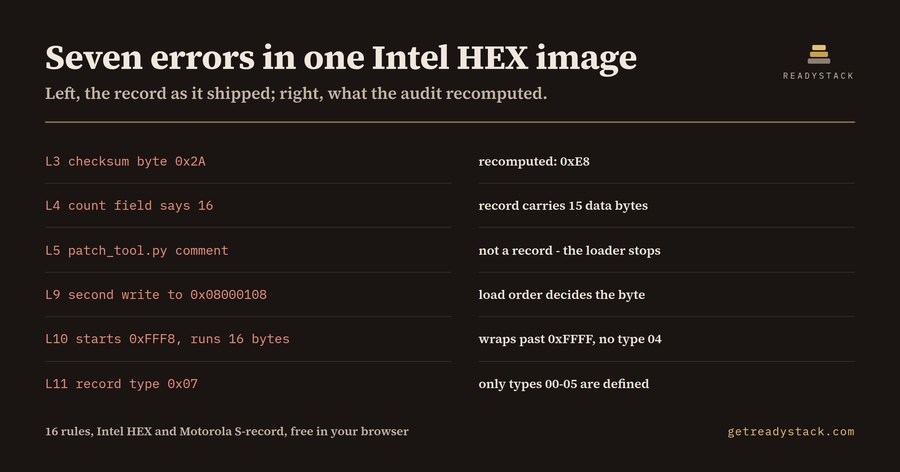
Recomputes every checksum in a .hex or .srec image and maps every address it writes, before the image reaches the programmer.
Install
npx @readystack/hex-image-audit fileNode 18+. The same 17 rules as the VS Code extension, from a terminal or CI.
Free
- Audit one firmware image against all 17 checks — every Intel HEX and Motorola S-record checksum recomputed byte by byte, every byte-count field, every overlap, gap, page-straddling block and entry point — reported at the exact line, in the editor or in the browser, with no key and nothing truncated.
--ruleslists every rule
With a licence ($29 once)
- Sweep every image in the build folder in one pass and keep the dated Markdown audit report as a file you own — the per-image release evidence a technical documentation file is made of. A different axis: scope (one file to the whole folder) and ownership (a report you keep), never a limit on the checks themselves.
@readystack/hex-image-audit --dir ./templates --report html --out report.htmlFreelance embedded software engineers average $104 an hour and firmware consultants $105 (contractrates.fyi, crowdsourced rates, June 2026). One hour of one of them re-reading one image costs more than this licence.
Use from an AI agent (MCP)
Claude Code · Cursor · Windsurf · any MCP client - add to your MCP config:
{ "mcpServers": { "hex-image-audit": { "command": "npx", "args": ["-y", "@readystack/hex-image-audit", "--mcp"] } } }Tools: check_text and check_file (free) · check_dir (licence). The agent gets every finding with the line number.
Use in CI
- name: Intel HEX & S-record Image Audit
  run: npx -y @readystack/hex-image-audit --dir . --ci
(container: docker run --rm -v "$PWD:/work" getreadystack/hex-image-audit --dir /work --ci)
The folder sweep, reports and CI mode need one licence — one payment, no subscription. Set READYSTACK_LICENSE=<key> or run --license <key> once.