
@reallexi/rmai
v1.5.122
Published
Standalone Real Memory AI Agent CLI for project chat, coding workflows, provider configuration, and safe Git operations.

Maintainers
 reallexi
Readme
rmai CLI
The standalone Real Memory AI Agent command-line client. It does not require the VS Code, Chrome, or Edge extensions.
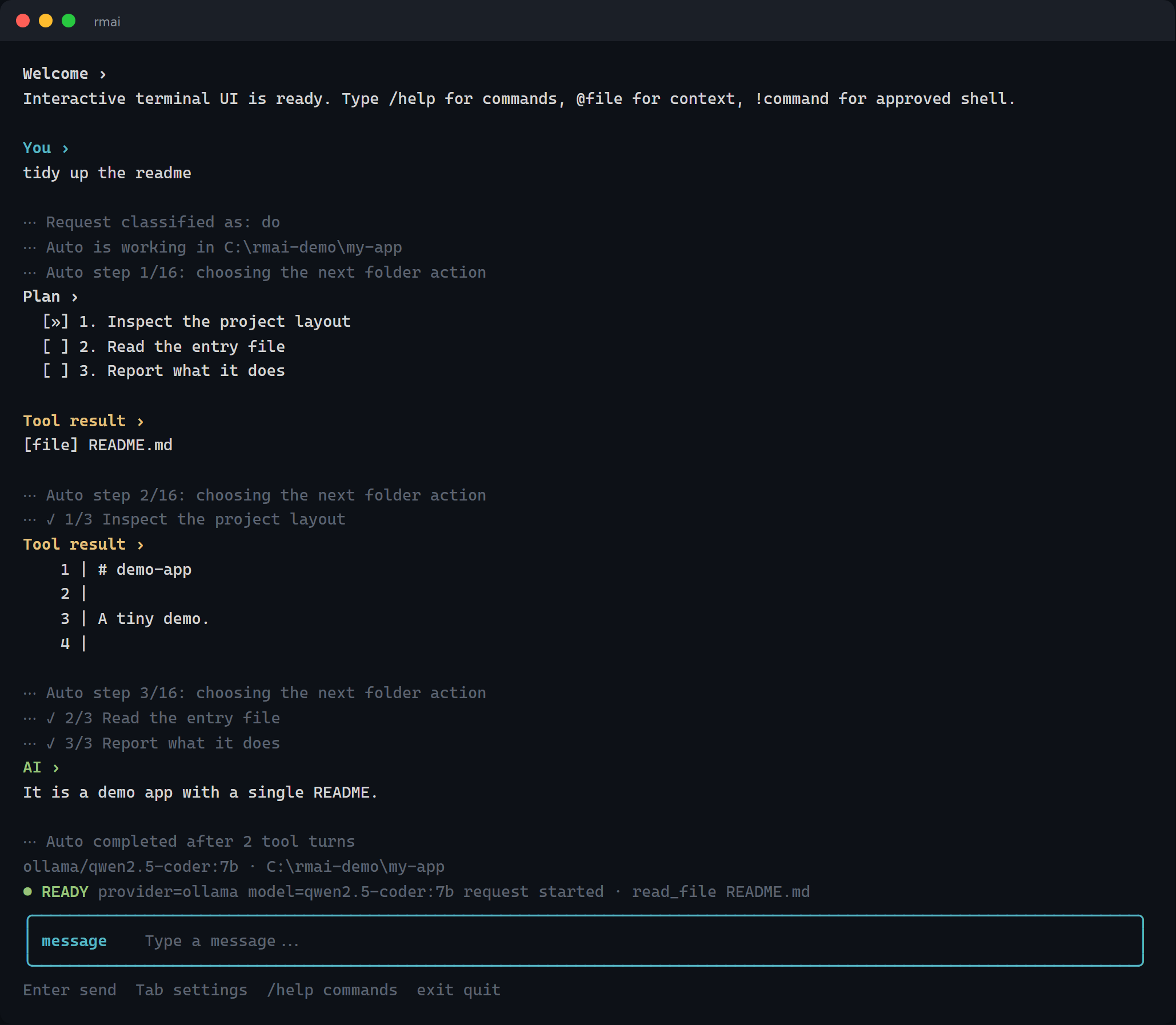
The conversation is ordinary terminal output, so your terminal still owns it: select and copy any part of it with the mouse, scroll back through it natively, and search it with the tools you already use. Nothing is truncated — long answers are read by scrolling, not cut off. Dim ⋯ lines record what the agent did (how it classified the request, each Auto step, which model answered and how long it took) so a run can be reviewed afterwards instead of scrolling past in a status line. Only the status, approval prompt, and composer at the bottom redraw. Talking to a local Ollama model here, but NVIDIA, OpenAI, OpenRouter, and any OpenAI-compatible endpoint work the same way.
Install globally
npm install --global @reallexi/rmai
rmai --help
You can also install a downloaded package artifact directly:
npm install --global ./reallexi-rmai-x.y.z.tgz
rmai --version
Node.js 18 or newer is required. The package is a self-contained JavaScript CLI with no runtime npm dependencies.
Start
rmai
rmai settings
rmai chat --project .
rmai ask "Explain this project"
rmai ask "What does the auth middleware do?"
rmai run "Fix the failing tests" --dry-run
rmai run "Fix the failing tests" --yes
rmai run "Run the test suite" --yes --allow-shell
The CLI always shows and uses the exact folder where it was launched (or the exact --project folder). A Git repository or package.json is not required.
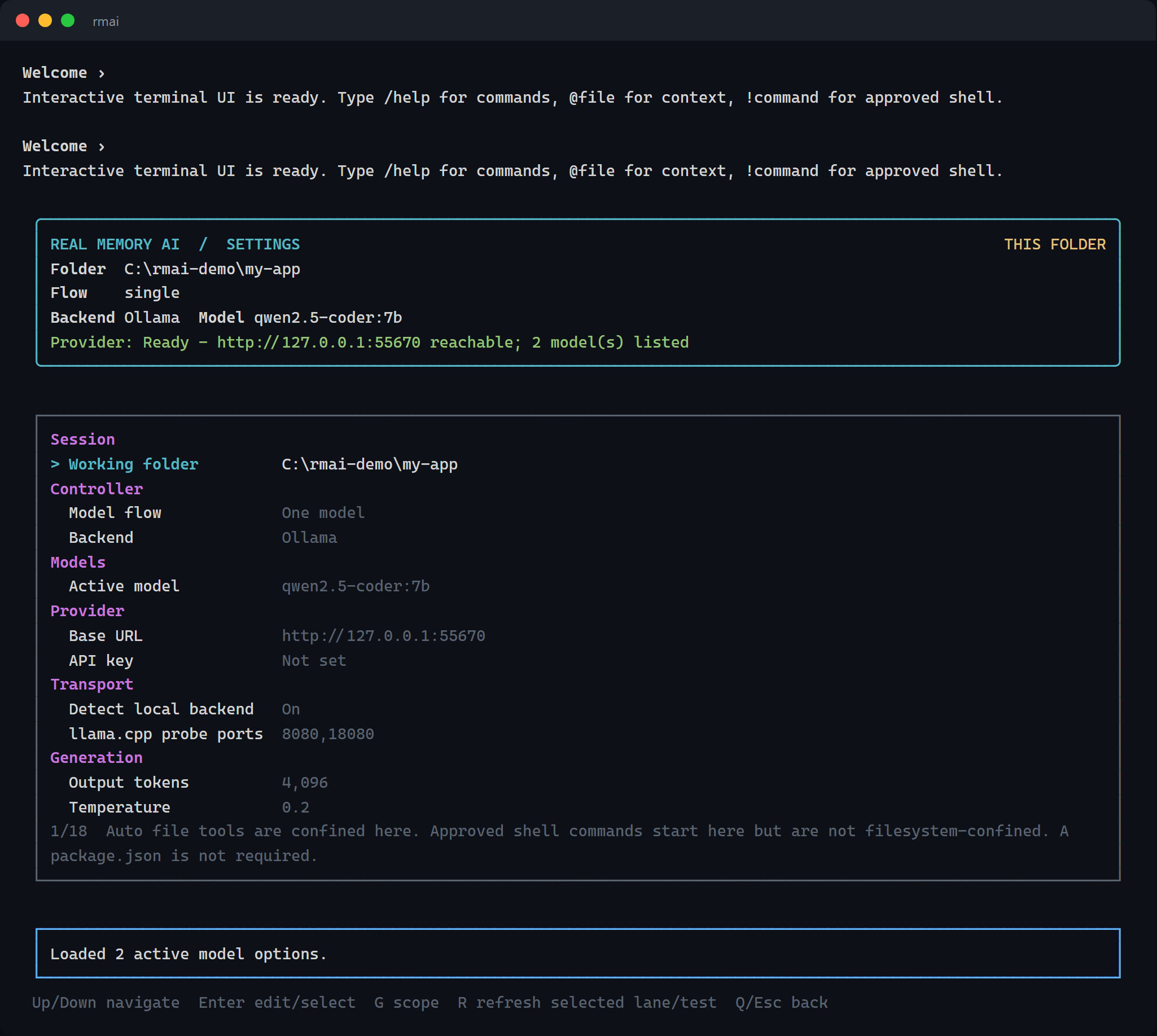
Open rmai settings or press Tab in chat for the full settings page: backend, model flow, discovered model, token limits, endpoint, and workflow controls. Arrow keys navigate; Enter selects or edits; G switches between global and current-folder scope.
Multi-step work prints a checklist and ticks steps off as they finish:
Plan ›
  [x] 1. Inspect the failing test
  [»] 2. Read the module under test
  [ ] 3. Apply the fix
  [ ] 4. Run the test suite
The steps are the model's own declared plan, and a step is only marked done when the model advances past it — nothing is inferred from which tools happened to run. A request that genuinely takes one step shows no checklist rather than an invented one. The step in progress also stays on the status line while it runs.
In Auto flow, natural coding requests use a bounded folder-agent loop: list/read/search/file-write tools are confined to that exact folder, while file writes and shell commands pause for explicit approval. For a one-shot command, --yes preapproves folder-confined writes only. Shell commands start in the selected folder but are not a filesystem sandbox, so one-shot shell execution requires the separate, explicit --yes --allow-shell combination; --sandbox keeps every mutation gate enabled. Greetings and plain exit/quit never run workspace classification.
Configuration precedence
Settings can also be automated through rmai config --show, rmai set-setting, or environment variables. Values are resolved lowest to highest:
| Source | Notes |
|---|---|
| Built-in and package.json defaults | |
| VS Code realMemoryAgent.* settings | Read only if present; the CLI never requires the extension. |
| Shared vendor variables | NVIDIA_API_KEY, OPENAI_API_KEY, OPENROUTER_API_KEY, OLLAMA_HOST, OLLAMA_BASE_URL, … |
| rmai settings / rmai set-setting | Saved per folder, or globally with -g. |
| RMAI_* / REAL_MEMORY_AGENT_* variables | For example RMAI_NVIDIA_API_KEY, RMAI_BACKEND, RMAI_MODEL. |
| Command-line flags | --provider, --model, --project, --set key=value. |
A vendor variable such as NVIDIA_API_KEY is ambient — anything on the machine may have exported it — so it acts as a convenient default but a key you deliberately save through rmai settings takes priority. An RMAI_/REAL_MEMORY_AGENT_-prefixed variable names this tool explicitly, so it still overrides a saved value, which is what makes CI and scripted runs work without rewriting your settings file.
Paste API keys with no surrounding quotes. Values copied from a .env line or a shell export often carry " characters, which would otherwise be sent as part of the credential; the CLI strips a matched wrapping pair on save and on read.
Run rmai info for the complete command list and interactive slash commands.