
@redflow/client
v0.1.26
Published
Redis-backed workflow runtime for Bun.


Readme
redflow
Redis-backed workflow runtime for Bun.
Deep internal details: INTERNALS.md
Warning
This project is still in early alpha stage.
Dashboard
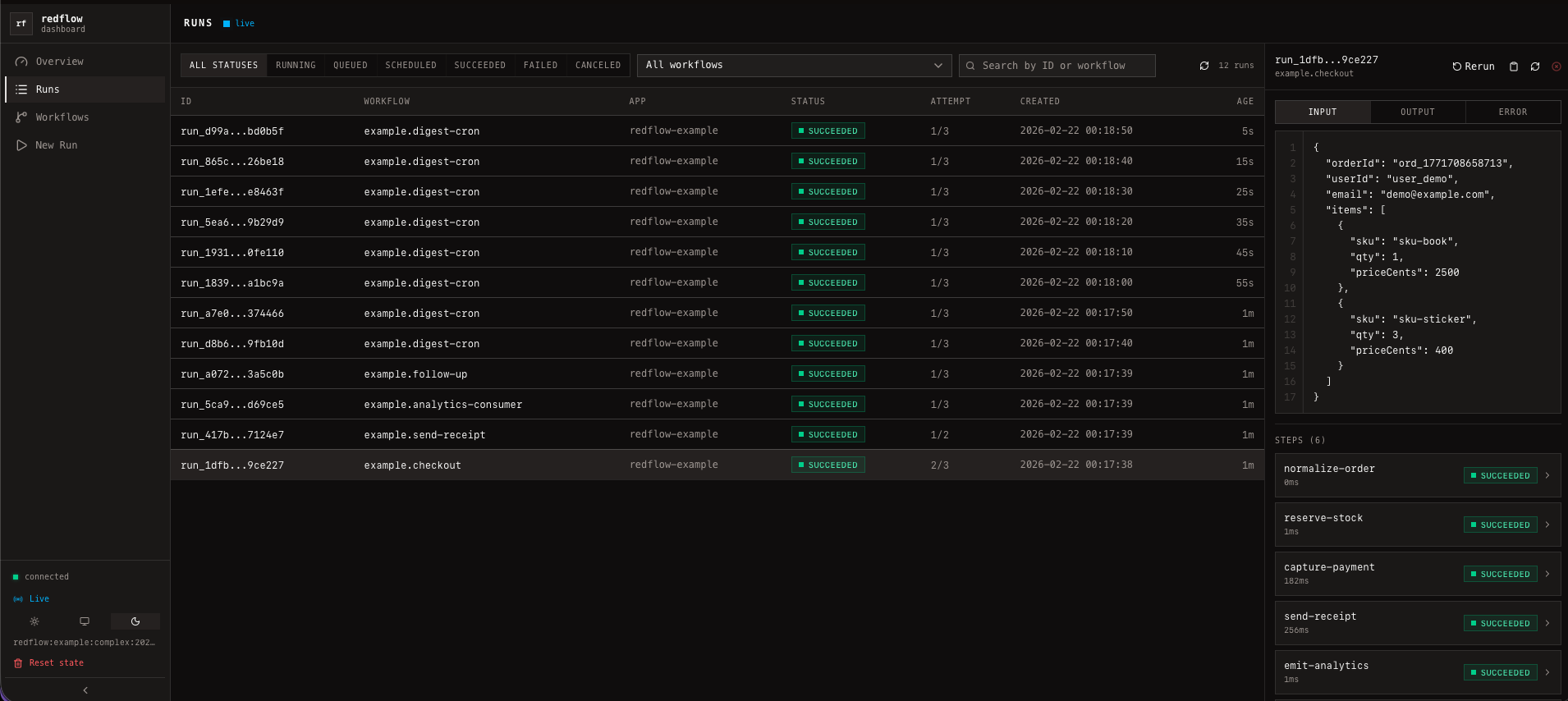
Run locally with CLI (npm package):
bun add -g @redflow/cli -E
# or with REDIS_URL in the env
redflow dashboard --redis redis://127.0.0.1:6379 --port 3667
Run in production via the dashboard container from GHCR (published by CI):
docker run --rm -p 3000:3000 \
  -e HOST=0.0.0.0 \
  -e PORT=3000 \
  -e REDIS_URL=redis://<redis-host>:6379 \
  -e REDFLOW_PREFIX=redflow:prod \
  ghcr.io/loomatech/redflow-dashboard:latest
Install
bun add @redflow/client -EEnvironment
REDFLOW_RUN_RETENTION_DAYS- terminal run history retention window in days (default:30).
Most users start here: defineWorkflow
schema accepts any Standard Schema compatible validator (e.g. Zod, Valibot, ArkType).
import { defineWorkflow } from "@redflow/client";
import { z } from "zod";

export const sendWelcomeEmail = defineWorkflow(
  "send-welcome-email",
  {
    schema: z.object({ userId: z.string().min(1) }),
  },
  async ({ input, step }) => {
    const user = await step.run({ name: "fetch-user" }, async () => {
      return { id: input.userId, email: "[email protected]" };
    });

    await step.run({ name: "send-email" }, async () => {
      return { ok: true, to: user.email };
    });

    return { sent: true };
  },
);
Handler context gives you:
input— validated input (ifschemais provided)run— run metadata (id,workflow,queue,attempt,maxAttempts)signal— cancellation signalstep— durable step API
Step API (inside workflow handlers)
1) step.run
Use for durable, cached units of work.
const payment = await step.run(
  { name: "capture-payment", timeoutMs: 4_000 },
  async ({ signal }) => {
    // pass signal to external APIs when supported
    return { chargeId: "ch_123" };
  },
);
2) step.runWorkflow
Use when parent workflow must wait for child workflow output.
const receipt = await step.runWorkflow(
  {
    name: "send-receipt",
    timeoutMs: 20_000,
    runAt: new Date(Date.now() + 500),
    idempotencyTtl: 60 * 60 * 24,
    idempotencyKey: `receipt:${input.orderId}`,
  },
  sendReceiptWorkflow,
  {
    orderId: input.orderId,
    email: input.email,
    totalCents: input.totalCents,
  },
);
step.runWorkflow waits for child completion until the step is canceled.
Set timeoutMs to cap total waiting time.
3) step.waitFor
Use for durable delays inside a workflow.
await step.waitFor(
  { name: "cooldown", timeoutMs: 60_000 },
  15_000,
);

await step.waitFor(
  { name: "remind-later" },
  "5m",
);

await step.waitFor(
  { name: "resume-at" },
  new Date(Date.now() + 5 * 60_000),
);
When waiting, the current run is moved back to scheduled, so it does not hold
the worker slot and does not consume a retry attempt. A numeric target is treated
as relative milliseconds from the first time the step is reached; a string target
supports ms, s, m, h, d units like 75s or 1d; a Date is an
absolute wake-up time.
4) step.emitWorkflow
Use to trigger child workflow and keep only child run id.
const analyticsRunId = await step.emitWorkflow(
  {
    name: "emit-analytics",
    runAt: new Date(Date.now() + 2_000),
    idempotencyTtl: 60 * 60,
    idempotencyKey: `analytics:${input.orderId}`,
  },
  analyticsWorkflow,
  {
    orderId: input.orderId,
    totalCents: input.totalCents,
  },
);
You can also pass a workflow name string:
const analyticsRunId = await step.emitWorkflow(
  { name: "emit-analytics" },
  "analytics-consumer",
  { orderId: input.orderId, totalCents: input.totalCents },
);
5) step.emitEvent
Use to fan-out to all workflows subscribed to an event trigger.
const emittedRunIds = await step.emitEvent(
  {
    name: "publish-order-event",
    emitAt: new Date(Date.now() + 60_000),
  },
  "order.created",
  { orderId: input.orderId, totalCents: input.totalCents },
);
step.emitEvent returns child run ids for all matching subscribers.
When emitAt is in the future, fan-out happens later and the step returns []
immediately.
Run workflows
The object returned by defineWorkflow(...) has .run(...).
const handle = await sendWelcomeEmail.run(
  { userId: "user_123" },
  {
    idempotencyKey: "welcome:user_123",
    idempotencyTtl: 60 * 60,
  },
);

const output = await handle.result({ timeoutMs: 15_000 });
Delayed run:
const handle = await sendWelcomeEmail.run(
  { userId: "user_789" },
  {
    runAt: new Date(Date.now() + 60_000),
    idempotencyKey: "welcome:user_789:delayed",
  },
);

const output = await handle.result({ timeoutMs: 90_000 });
Start a worker
Import workflows, then run startWorker({ app: ... }).
import { startWorker } from "@redflow/client";
import "./workflows";

const worker = await startWorker({
  app: "billing-worker",
  url: process.env.REDIS_URL,
  prefix: "redflow:prod",
  concurrency: 4,
});
Explicit queues + runtime tuning:
const worker = await startWorker({
  app: "billing-worker",
  url: process.env.REDIS_URL,
  prefix: "redflow:prod",
  queues: ["critical", "io", "analytics"],
  concurrency: 8,
  runtime: {
    leaseMs: 5000,
    blmoveTimeoutSec: 1,
    reaperIntervalMs: 500,
    runHistoryCleanupIntervalMs: 60_000,
  },
});
await worker.stop() stops polling and releases local execution. It does not
cancel active runs: they remain in processing without a lease, and another
worker's reaper returns them to ready so unfinished durable steps can resume.
Use cancelRun(...) when a run should become terminally canceled.
Workflow options examples
maxConcurrency
maxConcurrency limits concurrent running runs per workflow. Default is 1.
defineWorkflow(
  "heavy-sync",
  {
    queue: "ops",
    maxConcurrency: 1,
  },
  async () => ({ ok: true }),
);
debounce
Use debounce when repeated triggers for the same derived key should collapse
into one pending run, and only the latest input should be executed.
defineWorkflow(
  "reindex-user",
  {
    queue: "search",
    debounce: {
      period: "5s",
      timeout: "30s",
      key: input => input.userId,
    },
  },
  async ({ input }) => ({ reindexed: input.userId }),
);
debounce.key may be a static string or a function that derives the key from
input.
debounce is trailing-edge. Each matching enqueue resets the debounce window.
While the run is still pending, the latest input wins and the returned handle
points to the same run id. If timeout is set, the run will execute no later
than first_enqueue + timeout, even if new events keep arriving.
When debounce.key is a function, it must be resolved in the enqueueing
process. Use workflow.run(...), or import the workflow definitions before
calling client.runByName(...) / emitEvent(...) when you rely on debounce
semantics. Static string keys do not require local workflow registration.
throttle / rateLimit
Use throttle to limit how often runs with the same derived key are allowed
to start.
defineWorkflow(
  "send-sms",
  {
    queue: "messaging",
    throttle: {
      limit: 1,
      period: "5s",
      key: input => input.phoneNumber,
    },
  },
  async ({ input }) => ({ sent: true, to: input.phoneNumber }),
);
throttle.key and rateLimit.key may be either static strings or functions.
Admission control happens before the attempt starts. If a run is delayed by
throttle, it is rescheduled and does not increment run.attempt.
Use rateLimit when exceeding the window should fail the run immediately
instead of rescheduling it.
defineWorkflow(
  "sync-contact",
  {
    queue: "crm",
    rateLimit: {
      limit: 10,
      period: "1m",
      key: input => input.workspaceId,
    },
  },
  async ({ input }) => ({ ok: true, workspaceId: input.workspaceId }),
);
When rateLimit is exceeded, the run fails before handler execution with a
RateLimitExceededError payload in run.error.
mutex
Use mutex when runs from different workflows must not be running at the same
time for the same derived key.
defineWorkflow(
  "tenant-rebuild",
  {
    queue: "ops",
    mutex: input => `tenant:${input.tenantId}`,
  },
  async ({ input }) => ({ rebuilt: input.tenantId }),
);
mutex may be either a static string or a function that derives the key from
input.
The mutex key is global within the current Redis prefix, so other workflows that
return the same mutex key will wait too, even if they use different queues. The
lock is held only while the run is actively running; it is released on success,
failure, retry scheduling, cancellation, and step.waitFor(...).
retries
Use retries for custom retry policy. retries.maxAttempts is equivalent to
top-level maxAttempts, but keeps the retry config in one place.
import { RetryAfterError } from "@redflow/client";

defineWorkflow(
  "contact-sync",
  {
    queue: "crm",
    retries: {
      maxAttempts: 5,
      shouldRetry: ({ error }) =>
        error instanceof Error && error.message !== "bad input",
      delay: ({ run }) => (run.attempt === 1 ? "500ms" : "5s"),
    },
  },
  async ({ run }) => {
    if (run.attempt === 1) {
      throw new RetryAfterError("Hit Twilio rate limit", "30s");
    }

    return { ok: true };
  },
);
RetryAfterError accepts a relative millisecond value, a duration string like
"30s", or a Date. When it is thrown, its delay overrides retries.delay
for that failure.
Cron
defineWorkflow(
  "digest-cron",
  {
    queue: "ops",
    cron: [
      { id: "digest-10s", expression: "*/10 * * * * *" },
      {
        expression: "0 */5 * * * *",
        timezone: "UTC",
        input: { source: "cron" },
      },
    ],
  },
  async ({ input }) => ({ tick: true, input }),
);
Cron respects maxConcurrency: if the limit is reached, that cron tick is skipped.
Event
defineWorkflow(
  "analytics-consumer",
  {
    queue: "analytics",
    event: [{ name: "order.created" }],
  },
  async ({ input }) => ({ handled: true, input }),
);
Trigger all subscribers with:
const runs = await client.emitEvent(
  "order.created",
  {
    orderId: "ord_42",
    totalCents: 1999,
  },
  {
    emitAt: new Date(Date.now() + 60_000),
  },
);
emitAt delays event processing until that time. If you emit into the future,
client.emitEvent(...) returns no child run ids until the event becomes due.
onFailure
import { NonRetriableError } from "@redflow/client";

defineWorkflow(
  "invoice-sync",
  {
    queue: "billing",
    retries: { maxAttempts: 4 },
    onFailure: async ({ error, run }) => {
      console.error("workflow failed", run.id, run.workflow, error);
    },
  },
  async () => {
    throw new NonRetriableError("invoice not found in upstream system");
  },
);
Client APIs (advanced)
Use this when you need manual triggering, inspection, registry sync, or custom client setup.
Setup
import { createClient, setDefaultClient } from "@redflow/client";

const client = createClient({
  url: process.env.REDIS_URL,
  prefix: "redflow:prod",
});

setDefaultClient(client);
Trigger by workflow name
const h1 = await client.runByName(
  "checkout",
  { orderId: "ord_2", totalCents: 1999 },
  {
    queueOverride: "critical",
    idempotencyKey: "checkout:ord_2",
  },
);

const h2 = await client.emitWorkflow(
  "send-welcome-email",
  { userId: "user_456" },
  { idempotencyKey: "welcome:user_456" },
);
Inspect and control runs
const run = await client.getRun("run_123");
const steps = await client.getRunSteps("run_123");

const recent = await client.listRuns({ limit: 50 });
const failedCheckout = await client.listRuns({
  workflow: "checkout",
  status: "failed",
  limit: 20,
});

const workflows = await client.listWorkflows();
const checkoutMeta = await client.getWorkflowMeta("checkout");

const canceled = await client.cancelRun("run_123", {
  reason: "requested by user",
});
RunHandle
const handle = await client.emitWorkflow("checkout", {
  orderId: "ord_3",
  totalCents: 2999,
});

const state = await handle.getState();
console.log(state?.status);

const output = await handle.result({ timeoutMs: 30_000 });
console.log(output);
Registry sync app id
import { getDefaultRegistry } from "@redflow/client";

await client.syncRegistry(getDefaultRegistry(), { app: "billing-service" });