
@redpenguinstudio/herbert
v1.0.1
Published
Console logger to narrate any JS/TS application activity

Maintainers
 awpeacock
Readme
Herbert
Console logger to narrate any JS/TS application activity. Named after Frank Herbert, the author of Dune.


Features
- Consistent styling for all Javascript/Typescript applications
- Logs titles/headings
- Logs standard progress plus success/warning/error messages
- Stores key/value pairs, and outputs them all upon request
Install
If using as part of your final "public" application, then install as a standard dependency:
npm install @redpenguinstudio/herbertIf using as part of an install/deploy script, then install as a dev dependency:
npm install -D @redpenguinstudio/herbertUsage
Import the narrator:
import { Narrator } from '@redpenguinstudio/herbert';Log the title of the application/process:
Narrator.title('Flux Capacitor');Log a heading for any subprocess/activity:
Narrator.heading('Reversing the polarity of the neutron flow');Log any step/progress:
Narrator.log('Accelerating...');Log any information (such as current state):
Narrator.info('Speed - 88mph');Log any success messages:
Narrator.success('Polarity reversed');Log any warning messages:
Narrator.warn('The Iranians are coming!');Log any error messages:
Narrator.error('Wormhole closed');Store, and output, variables:
Narrator.addVariable('Make', 'DeLorean');
Narrator.addVariable('Model', 'DMC-12');
Narrator.addVariable('Year', '1985');
Narrator.dumpVariables();
Example
import { Narrator } from '@redpenguinstudio/herbert';

Narrator.title('Flux Capacitor');
Narrator.heading('Preparing the DeLorean');
Narrator.addVariable('Make', 'DeLorean');
Narrator.addVariable('Model', 'DMC-12');
Narrator.addVariable('Year', '1985');
Narrator.log('Reversing the polarity of the neutron flow');
Narrator.info('Speed - 88mph');
Narrator.success('Polarity reversed');
Narrator.warn('The Iranians are coming!');
Narrator.error('Wormhole closed');
Narrator.dumpVariables();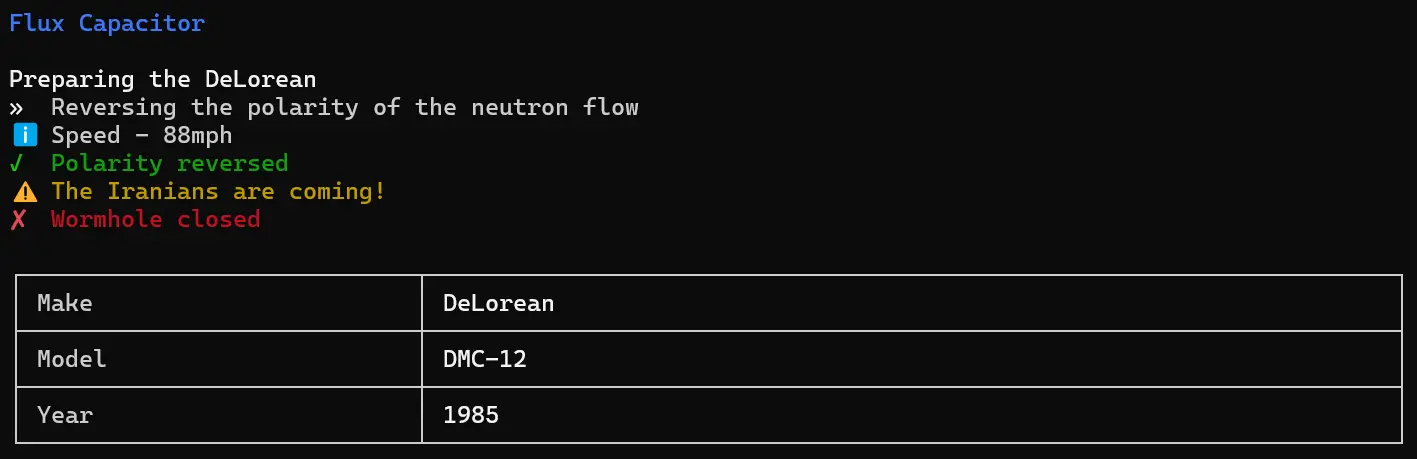
License
Apache 2.0 © awpeacock