npm package discovery and stats viewer.

Discover Tips

  • General search

    [free text search, go nuts!]

  • Package details

    pkg:[package-name]

  • User packages

    @[username]

Sponsor

Optimize Toolset

I’ve always been into building performant and accessible sites, but lately I’ve been taking it extremely seriously. So much so that I’ve been building a tool to help me optimize and monitor the sites that I build to make sure that I’m making an attempt to offer the best experience to those who visit them. If you’re into performant, accessible and SEO friendly sites, you might like it too! You can check it out at Optimize Toolset.

About

Hi, 👋, I’m Ryan Hefner  and I built this site for me, and you! The goal of this site was to provide an easy way for me to check the stats on my npm packages, both for prioritizing issues and updates, and to give me a little kick in the pants to keep up on stuff.

As I was building it, I realized that I was actually using the tool to build the tool, and figured I might as well put this out there and hopefully others will find it to be a fast and useful way to search and browse npm packages as I have.

If you’re interested in other things I’m working on, follow me on Twitter or check out the open source projects I’ve been publishing on GitHub.

I am also working on a Twitter bot for this site to tweet the most popular, newest, random packages from npm. Please follow that account now and it will start sending out packages soon–ish.

Open Software & Tools

This site wouldn’t be possible without the immense generosity and tireless efforts from the people who make contributions to the world and share their work via open source initiatives. Thank you 🙏

© 2026 – Pkg Stats / Ryan Hefner

@rendotdev/lgtm

v0.1.30

Published

Human approval for agent work, with code diff and Markdown review.

Readme

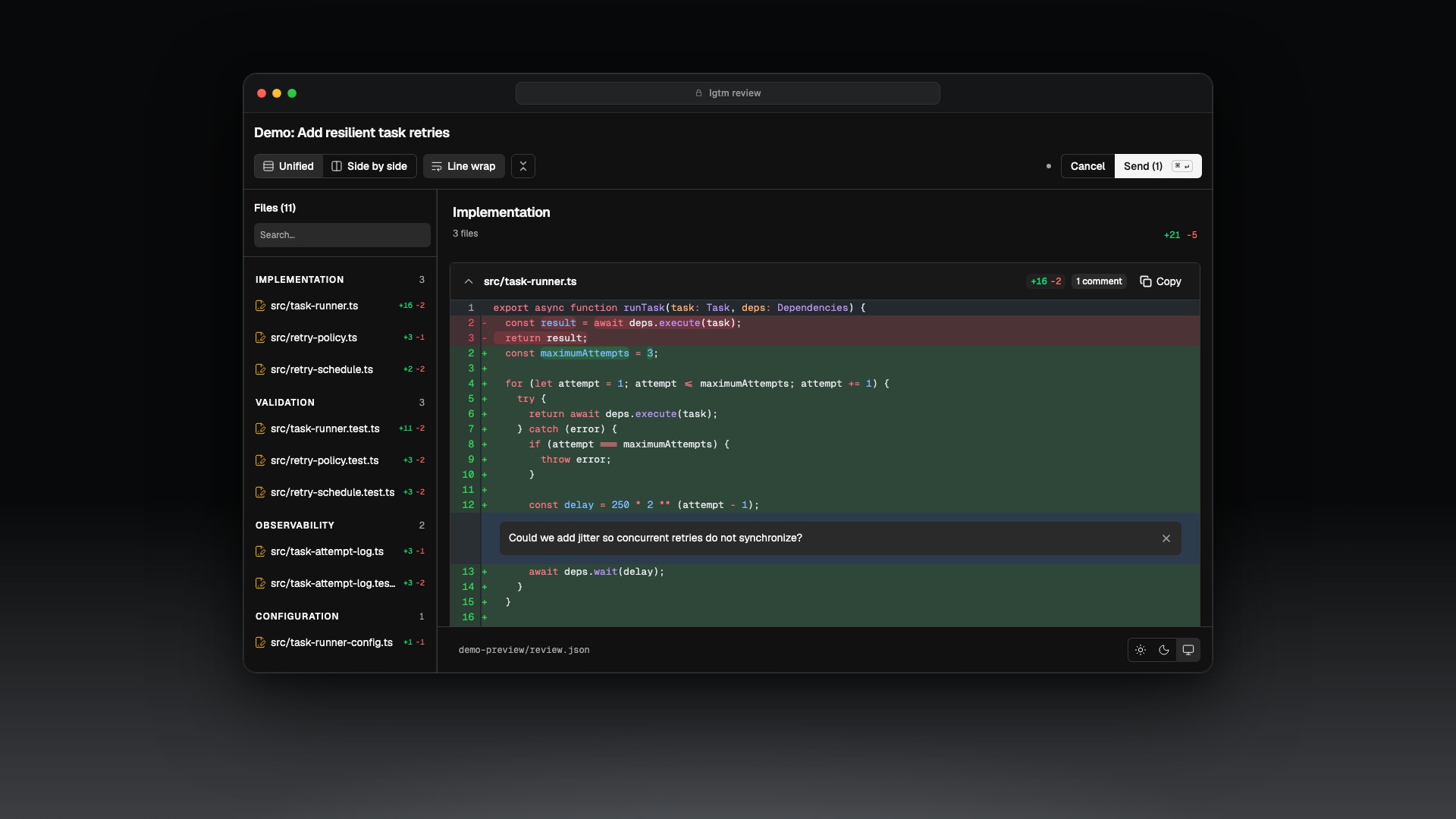
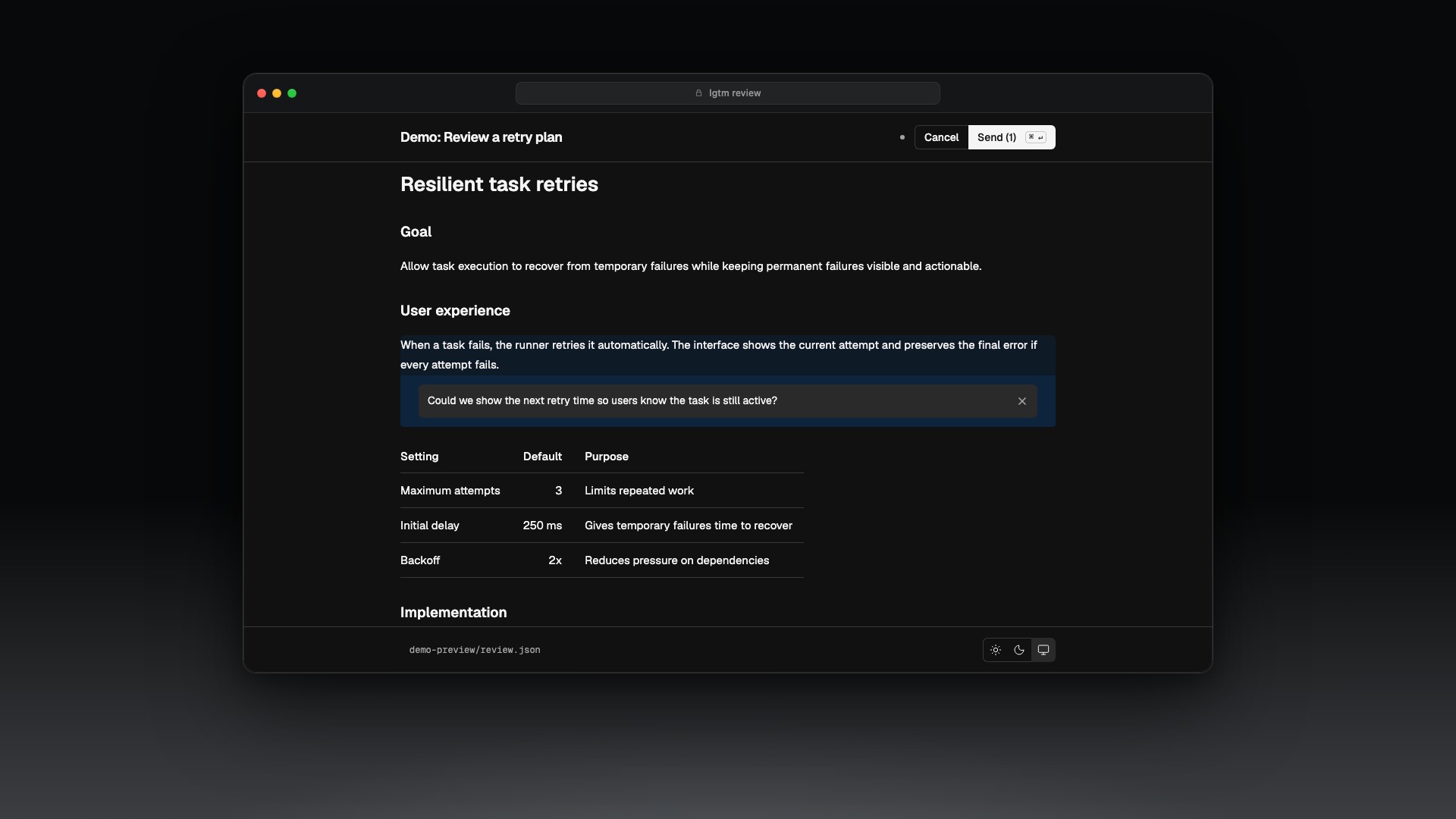
LGTM gives an agent's work a human checkpoint. It opens a local browser review of a Git diff or Markdown document, lets you leave comments on exact lines, and returns a decision the agent can act on: approved, changes_requested, or canceled.

lgtm reviewing and commenting on a TypeScript diff

Install

npm install --global @rendotdev/lgtm
lgtm setup

lgtm setup installs the LGTM plugin and skill for Pi, Claude Code, and Codex. To configure one integration only, pass --target pi, --target claude, or --target codex.

Agent integration lifecycle

LGTM uses the agent's integrated tools whenever they are available. The CLI remains available as a manual fallback.

| Agent | Integrated tools | Decision handoff | | ------------ | --------------------------- | ------------------------------------------------------------------------------------------------------- | | Pi | lgtm-open-*-review | The tool returns the review URL, then the decision starts a new Pi turn through an automatic follow-up. | | Claude Code | open_*_review through MCP | The tool call stays pending until the decision, then Claude continues with the result. | | Codex | open_*_review through MCP | The tool call stays pending until the decision, then Codex continues with the result. | | CLI fallback | lgtm review ... | The decision is saved locally. Return to the agent conversation afterward so it can recover the result. |

Reserve the CLI fallback for sessions where neither the native Pi tools nor the MCP tools are available. Claude Code may ask you to approve the plugin's MCP server the first time it loads; approve it and start a new session before opening a review.

Review Git changes

Open the current working tree:

lgtm review --name "Review current changes"

Arrange larger reviews into conceptual file groups authored by the agent:

lgtm review --name "Review current changes" --groups /tmp/lgtm-groups.json
{
  "groups": [
    { "title": "Runtime", "files": ["src/runtime.ts"] },
    { "title": "Tests", "files": ["src/runtime.test.ts"] }
  ]
}

Group and file order are preserved. Changed files omitted from the manifest remain visible under Other changes.

lgtm review git --name "Review current changes" is the equivalent explicit command.

After handling feedback, review only what has changed since the latest compatible completed LGTM diff review:

lgtm review --since-last --name "Review follow-up changes"

The earlier review's retained payload becomes the baseline. LGTM neither changes Git nor adds a marker. Open and canceled reviews are ignored; without a compatible completed review, LGTM falls back to a normal Git diff.

Review a repository over SSH

Read a working tree from another machine and open the review in the local browser:

lgtm review git \
  --remote build-mac \
  --remote-cwd /Users/ren/project \
  --name "Review build-mac changes"

--remote accepts an OpenSSH destination, including an alias from ~/.ssh/config, user@host, or ssh://user@host:port. --remote-cwd is the absolute repository path on that machine. Remote linked worktrees use the same reader:

lgtm review worktree /Users/ren/project-feature \
  --remote build-mac \
  --name "Review remote feature worktree"

The remote machine needs SSH, Git, and standard POSIX shell utilities. It does not need lgtm, Node, a browser, an exposed port, or writable temporary storage. lgtm runs read-only Git and file commands remotely; the review server, comments, checkpoints, preferences, and decisions stay local.

lgtm uses the system ssh executable and inherits SSH aliases, keys, agents, Keychain integration, SSH_AUTH_SOCK, ProxyJump, and host-key policy. Configure credentials in OpenSSH, then confirm ssh build-mac true succeeds before opening the review. Remote --since-last baselines match the resolved SSH user, host, port, and Git root.

The bundled MCP open_git_review tool accepts remote, remoteCwd, and sinceLast. Its open_worktree_review tool accepts remote with a remote absolute path. Pi's native Git and worktree review tools expose the same fields. Codex, Claude Code, and Pi run SSH locally and return the normal browser decision through their existing review lifecycle.

Features

  • Unified and side-by-side diffs. Choose the view that makes a change easiest to assess.
  • Line wrap. Keep long lines readable without horizontal scrolling.
  • Virtualized rendering. Keep large reviews responsive while you move between files.
  • Saved preferences. LGTM stores your chosen layout, line wrapping, sidebar width, and file expansion in .lgtm/lgtm.jsonc at the project root.
  • Independent reviews. Each review has its own server and directory, so reviews for multiple repositories, local or remote worktrees, and checkpoints can stay open at once.

Work through a review

LGTM opens the review in your browser. Read the diff, add line comments where needed, then approve it, send comments, or cancel. The agent receives that result and can continue from it.

Review source and comments remain available for browser refreshes for seven days. Reviews expire seven days after creation, even if they are still open; LGTM removes their files and stops their servers automatically.

Review other sources

lgtm reviewing and commenting on a rendered Markdown implementation plan

lgtm review worktree ../feature-worktree --name "Review feature worktree"
lgtm review document PLAN.md --name "Review implementation plan"
lgtm review json review.json --name "Review generated changes"
lgtm review result --review-path .lgtm/<review-id>/review.json
lgtm update

A JSON review supplies the before and after content directly:

{
  "name": "Review generated changes",
  "groups": [{ "title": "Runtime", "files": ["src/example.ts"] }],
  "files": [
    {
      "location": "src/example.ts",
      "oldContent": "export const answer = 41;",
      "newContent": "export const answer = 42;"
    }
  ]
}

lgtm review result requires the exact Review JSON path printed when the review opens. If that review is still open, the command leaves its server running. Once the result is approved, changes_requested, or canceled, it stops only that review's server.

lgtm update updates the CLI and every installed integration. Use --json for machine-readable output, --cwd <path> for another workspace, or --dry-run to see the install and update commands without running them.

Ask an agent to use LGTM

Request a review after the implementation and tests are complete:

Make the change, test it, then run `lgtm review --name "Review current changes"` so I can approve it or leave comments before you finish.

The package includes the CLI, browser app, agent integrations, MCP server, and the shared skill that tells agents which review to open and how to handle its result.

Manual agent setup

Use these commands only when you want to install an integration yourself instead of running lgtm setup.

Pi

pi install npm:@rendotdev/lgtm

Claude Code

claude plugin marketplace add https://github.com/rendotdev/lgtm
claude plugin install lgtm@rendotdev

Codex

codex plugin marketplace add rendotdev/lgtm
codex plugin add lgtm@rendotdev

Start a new agent session after installing a plugin so it can load LGTM.

Development

lgtm uses Vite+, Node, and Bun.

vp install
vp dev
vp check
vp run package
vp test
bun run demo:images
bun run lgtm --help

bun run demo:images regenerates the light and dark mocked diff and document JPEGs used in this README.

vp dev starts the browser app with hot reload and uses the current workspace for its temporary review API. Set LGTM_DEV_CWD=/path/to/repo to review another workspace.

The code has three tiers:

src/
  interfaces/  CLI, MCP, Pi, and web input and output
  domain/      Review state, rules, formatting, and dependency contracts
  platform/    Git, filesystem, process, HTTP, and browser integration

Run bun run metadata:sync after changing the package version. For a release, start from a clean worktree and use bun run release:patch, bun run release:minor, or bun run release:major. The release script validates the project, updates plugin metadata, creates the release commit, and adds the matching tag. Push the release with git push origin HEAD --follow-tags. The v* tag triggers .github/workflows/release-artifact.yml, which publishes to npm through trusted publishing and creates the GitHub release. Never run npm publish locally.