
@rentnerkev/toasts
v3.4.0
Published
Accessible, customizable toast notifications for React.

Maintainers
 rentnerkev
Readme
Accessible React notifications with status variants, progress, Markdown links, and customizable designs.
Installation
Requires React 19, React DOM 19, and Tailwind CSS 4. Motion and Lucide React are required peers, included below.
npm install @rentnerkev/toasts motion@^14 lucide-react@^1
# or with Bun
bun add @rentnerkev/toasts motion@^14 lucide-react@^1
Add to your application stylesheet:
@import 'tailwindcss';
@import '@rentnerkev/toasts/tailwind.css';
Quick start
'use client'

import { ToastProvider, toast } from '@rentnerkev/toasts'

export function App() {
    return (
        <ToastProvider locale="en" position="bottom-right">
            <button onClick={() => toast.success('Your changes were saved.')}>
                Save changes
            </button>
        </ToastProvider>
    )
}
Screenshots
| | |
| ----------------------------------------------------------------------------------------------------------------------------------------------------------------------------------------------------------------------------------------------------------------------------------------- | ----------------------------------------------------------------------------------------------------------------------------------------------------------------------------------------------------------------------------------------------------------------------------------------------------------- |
| Dark status stack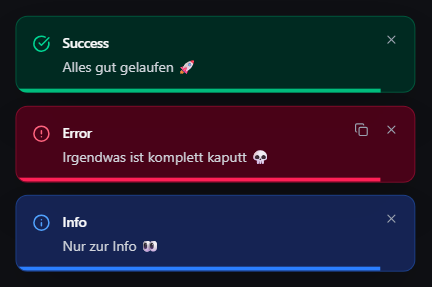 | Light Playground theme
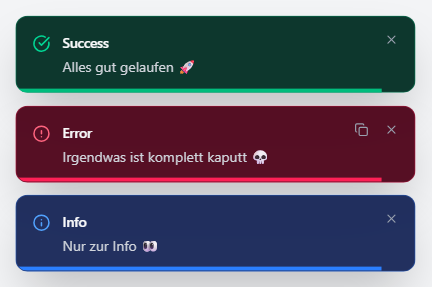 |
| Interactive Markdown link
|
| Interactive Markdown link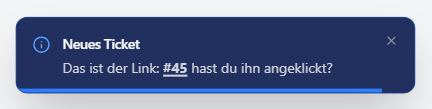 | Long messages and progress
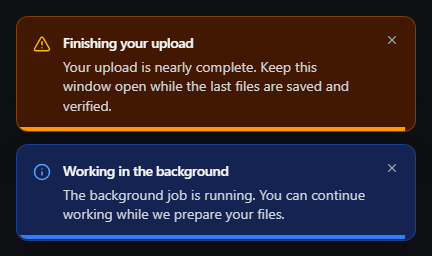 |
|
Run the local Playground from a repository checkout:
bun install --cwd playground
bun run playground:dev
Full API and usage guide · Local Playground · MIT license
AI and read-only MCP access
The separate @rentnerkev/toasts/ai entry is for Node.js and Bun tooling. It reads
only this installed package's manifest, README, usage guide, and built TypeScript
declarations. It does not import React, mount UI, run examples, perform network
requests, or require an MCP runtime. Keep it in server/tooling code.
import {
    getPackageInfo,
    getPackageApi,
    getPackageDocumentation,
    searchPackageDocumentation,
    getPackageExamples,
} from '@rentnerkev/toasts/ai'

const info = getPackageInfo()
const api = getPackageApi() // All public typed subpaths and dependent declarations
const usage = getPackageDocumentation('usage') // Full guide, including CSS and providers
const readme = getPackageDocumentation('readme')
const matches = searchPackageDocumentation('messages') // Literal, case-insensitive lines
const examples = getPackageExamples() // Fenced examples from the usage guide
getPackageApi({ subpath: '.', symbol: 'ToastProvider' }) validates the symbol
against the selected public entry and returns its complete declaration context.
Unknown subpaths or symbols throw an error. File paths are not accepted. The
./ai entry itself is excluded from this UI API context. The manifest's exports
map remains available through getPackageInfo().
Public website discovery is planned at
llms.txt and
the MCP endpoint. These addresses become
available after the website deployment; this documentation does not claim the
endpoint is already online. The website's read-only tools expose public package
information, API declarations, usage guides, examples, and search, without
accounts, write operations, or access to private project files. The installed
/ai entry works locally without that service. Always use the documentation and
declarations for the version installed in your project.