
@reslava/loom
v1.27.0
Published
**Your AI coding agent forgets everything every session. Loom is the memory it doesn't have.**


Readme
@reslava/loom
Your AI coding agent forgets everything every session. Loom is the memory it doesn't have.
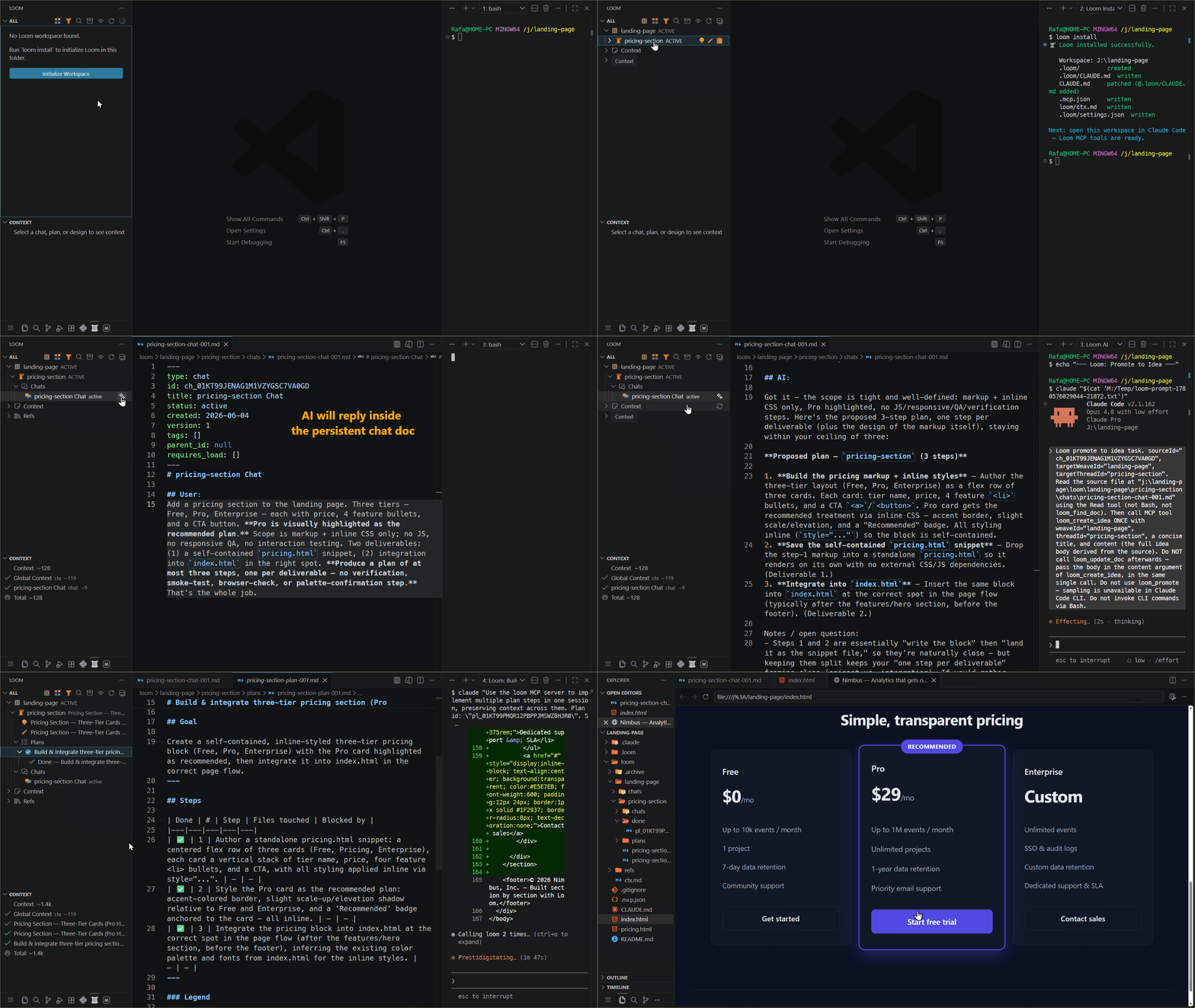
Loom is a document-driven, event-sourced workflow for AI-assisted development: Markdown files are the database, state is derived, and your AI collaborates step-by-step with human approval — rereading context at every action instead of starting each turn empty.
The CLI does not run the AI. It handles setup, inspection, and document CRUD. The thinking and implementation happen through an MCP-capable agent (Claude Code, Cursor, or any MCP client) connected to the Loom MCP server.
Prefer VS Code? The Loom AI extension bundles this same engine — 1 click, no CLI. This npm package is the right choice when you drive Loom from Cursor, Continue, terminal Claude Code, or CI.
🔗 Get Loom: Marketplace · Open VSX · GitHub
📚 Guides: Which way is for you? · Core concepts · CLI / Claude Code
Install
npm install -g @reslava/loom

# inside any project repository:
loom install          # writes .loom/, .loom/CLAUDE.md, patches CLAUDE.md, writes .mcp.json
No global install? Run any command through npx @reslava/loom <cmd>.
Quick start
loom install— scaffold Loom into the current project.- Open it in Claude Code (or any MCP agent) — the generated
.mcp.jsonwires up theloomserver automatically. - In a persisted session, drive Loom with short slang and let the AI write back into the docs:
describe a feature in a chat doc and say
reply {weave}/{thread}/chat-001.md— the AI answers inside the chat with the full thread loaded and drafts the design + plan; when it looks right, saydo planand it implements each step, marking it ✅ with a done-note.
The loop: chat → {generate|refine} idea/design/req/plan → {implement step(s)} → done.
→ Concepts and how context works: User Guide.
Commands
The CLI handles setup, inspection, and document state. AI work (drafting content, designing, writing code for a step) is done through your MCP agent.
Workspace & initialization
| Command | Description |
|---------|-------------|
| loom install [--force] | Install Loom into the current workspace (.loom/, .loom/CLAUDE.md, .mcp.json). |
| loom init [--force] | Initialize a mono-loom workspace in the current directory. |
| loom init-multi [--force] | Initialize the global multi-loom workspace at ~/looms/default. |
| loom setup <name> [--path <p>] [--no-switch] | Create a new named loom workspace. |
| loom switch <name> | Switch the active loom context. |
| loom list | List all registered looms. |
| loom current | Show the currently active loom. |
| loom mcp | Start the Loom MCP server (stdio). Launched by your agent, not by hand. |
Inspection
| Command | Description |
|---------|-------------|
| loom status [weave] [--verbose] [--json] [--filter <c>] [--sort <o>] | Show derived state of weaves/threads. |
| loom validate [weave] [--all] [--verbose] | Validate document integrity, links, and staleness. |
| loom roadmap [--group-by-thread] | Print the derived cross-weave roadmap (present + future in dependency + priority order, plus shipped history). Pure read. |
Reports
| Command | Description |
|---------|-------------|
| loom report <kind> [--weave <slug>] [--thread <slug>] [--since <date>] [--until <date>] [--full] [--sort <o>] [--titles-only] [--forward] [--creativity <c>] [--run] | Assemble a report from the doc graph. Prints a brief for your AI agent to synthesize, or --run launches a headless agent that writes + saves it. Kinds: project-overview, release-notes, architecture, decisions, drift-audit, security, ideas, designs, plans, dones, and the prospective next-work (mines open material into a ranked next-work list). --forward reads any retrospective kind prospectively; --creativity creative widens prospective solution latitude. |
loom report release-notes selects the Unreleased done plans (what's about to ship), enriches
them from each plan's done-doc, and frames a Highlights → Added / Changed / Fixed changelog under
## [Unreleased]. Drop it into a release job so the doc graph writes your changelog. Guarded: with
nothing unreleased it returns a "NOTHING UNRELEASED" stop-signal instead of an empty changelog.
Feedback & telemetry
| Command | Description |
|---------|-------------|
| loom feedback [--repo <owner/name>] [--print] | Open a prefilled GitHub issue to send feedback. Opt-in: carries Loom version, OS, and non-PII usage counts you review and edit before sending — nothing is sent automatically. |
Loom can also send anonymous, content-free usage telemetry — off by default. Enable with
LOOM_TELEMETRY=1 (e.g. in your .mcp.json server env); unset it or LOOM_TELEMETRY=0 to disable.
Never sends document content, titles, slugs, paths, or PII. Events go to PostHog (EU).
MCP surface & queries
These make the Loom MCP surface reachable from a plain terminal — no MCP host required.
| Command | Description |
|---------|-------------|
| loom catalog | Print the grouped index of every loom_* MCP tool. |
| loom resources / loom resources read <uri> | List MCP resources, or read one by uri (e.g. loom://summary). |
| loom context <doc> [--mode <m>] | Print the assembled context bundle for a doc, or a thread via thread/<weave>/<thread>. |
| loom next [plan] | Print the next incomplete step + context for a plan (defaults to the active plan). |
| loom search <query> [--type <t>] [--weave <weave>] | Search docs by id/title/content. |
| loom stale [--all] | List docs that may be stale (a child whose upstream parent moved past its baseline) + reason. |
| loom blocked | List blocked steps across implementing plans + their blockers. |
Documents (manual CRUD)
| Command | Description |
|---------|-------------|
| loom create thread <weave> <slug> [--title <t>] | Create a thread (the sole, explicit thread creator). |
| loom create idea <weave> <thread> <title> | Create the idea doc in an existing thread. |
| loom create design <weave> <thread> [--title <t>] | Create the design doc in an existing thread. |
| loom create plan <weave> <thread> [--title <t>] [--goal <g>] | Create a plan in an existing thread. |
| loom create req <weave> <thread> [--title <t>] | Create the req doc in an existing thread. |
| loom create chat [weave] [thread] [--title <t>] [--refs] | Create a thread chat, or a refs chat with --refs. |
| loom create reference <title> [--description <d>] | Create a reference doc under loom/refs/. |
| loom create weave <slug> | Create an empty weave folder. |
| loom set-status <doc> <status> | Set a doc's lifecycle status. Guarded — plan→done needs step completion, req→locked its finalize. |
| loom retitle <doc> <new-title> | Change a document's title only (ULID + cross-references untouched). |
Tree management (manual CRUD)
The CLI twins of the extension's tree buttons — so the Pure-agent way can manage the whole doc graph from the terminal.
| Command | Description |
|---------|-------------|
| loom archive [weave] [thread] [--doc <ulid>] | Archive a thread/weave folder under loom/.archive/ (recoverable). |
| loom restore [weave] [thread] [--archived <rel-path>] | Restore an archived folder or doc (inverse of archive). |
| loom delete [weave] [thread] [--doc <ulid>] [--archived <rel-path>] [-y] | Permanently delete a doc or folder. Irreversible — prefer archive. |
| loom rename thread <weave> <thread> <new-slug> | Rename a thread's folder slug (its th_ ULID + backlinks untouched). |
| loom rename weave <slug> <new-slug> | Rename a weave folder (directory only; cross-references are by ULID). |
| loom rename reference <slug> <new-slug> | Rename a reference doc's filename slug (filename + slug frontmatter in lockstep). |
| loom move-thread <weave> <thread> <target-weave> | Move a thread folder to another weave; its ULID + depends_on travel with it. |
| loom set-priority <weave> <thread> <priority> | Set a thread's soft roadmap priority (lower = earlier; never overrides a hard dependency). |
| loom set-thread-deps <weave> <thread> [deps...] | Set a thread's hard depends_on edges (no deps clears). Refused on a cycle. |
| loom close-plan <plan> [--notes <text>] | Finalize a completed plan (FINISH_PLAN). |
| loom quick-ship <weave> [thread] --step "<desc>" […] | Record already-done work as one fresh DONE plan. |
| loom promote <doc> <type> --body-file <path> [--title <t>] [--weave <slug>] [--thread <ulid>] | Promote a doc to idea/design/plan, linked to the source (content-supplied — the terminal has no AI sampling). |
Workflow events
| Command | Description |
|---------|-------------|
| loom refine-design <weave> | Fire REFINE_DESIGN (bumps design version, marks child plans stale). |
| loom start-plan <plan> | Move a plan to implementing. |
| loom complete-step <plan> --step <n> | Mark plan step n as done. |
Maintenance
| Command | Description |
|---------|-------------|
| loom migrate [--dry-run] | Backfill thread.md (ULID + title + priority) for threads missing one — needed for the derived roadmap. Idempotent. |
| loom migrate-plan-steps [plan] [--dry-run] | Migrate legacy body-table plans to frontmatter-native steps. Idempotent; never empties a table it can't parse. |
| loom backfill-design-versions [--dry-run] | Repair plan design_version baselines stamped before create/promote read the live version. Idempotent. |
| loom backfill-staleness-baselines [--dry-run] | Migrate onto the directional staleness model (stamp baselines, repoint req parents). Idempotent. |
MCP server
loom mcp starts the Loom MCP server over stdio. You normally never run it by hand — your agent
launches it via the .mcp.json that loom install writes:
{
  "mcpServers": {
    "loom": {
      "type": "stdio",
      "command": "npx",
      "args": ["-y", "@reslava/loom@<version>", "mcp"]
    }
  }
}
loom install pins the version, so the agent fetches the exact build via npx — no global install
required. (The older "command": "loom" form is retired as the MCP-server shape; the extension
migrates a legacy config for you.) The server exposes Loom's documents, tools, and prompts so all
writes to loom/**/*.md flow through validated, event-sourced operations.
License
MIT