
@rexven-tech/trendyol-api
v1.1.0
Published
A Node.js library for accessing the Trendyol API, which allows you to list products, orders, and more.
Downloads
175


Keywords
Readme
Trendyol Api
A Node.js library for accessing the Trendyol API, which allows you to list products, orders, and more.
Installation
npm install @rexven-tech/trendyolapiUsage
Create class with shop credentials.
const {Trendyol} = require('@rexven-tech/trendyol-api');or
import {Trendyol} from '@rexven-tech/trendyol-api'Get credentials from account page.
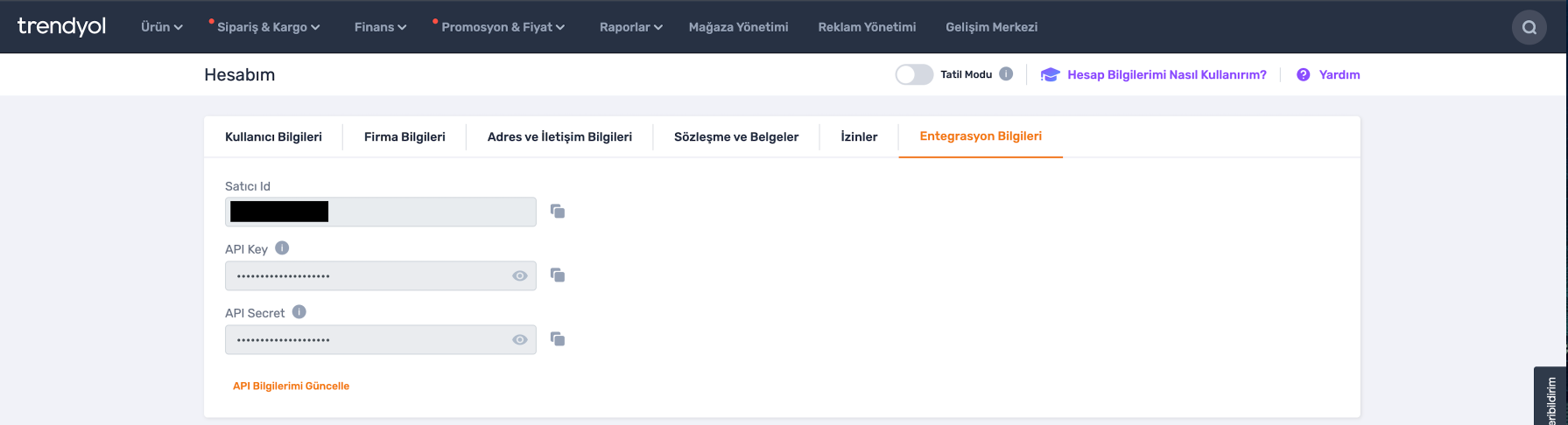
const trendyol = new Trendyol("shopId","apiKey","apiSecret")API Reference
List All Products;
Returns a list of all products
let options={
  page:0,
  size:50,
  startDate:1679321575388, // optional
  dateType:LAST_MODIFIED_DATE //optional
};

let products= await trendyol.getAllProducts(options);
| option | Description | | --------- | ----------------------------------------------------------------------------------------- | | page | Page parameter starts from 0 | | size | Determine how many products will return from request. Max value 200 | | startDate | Use Timestamp fromat | | dateType | Determine date filter option. CREATED_DATE or LAST_MODIFIED_DATE can be send for dateType |
List One Product By Barcode;
Returns a product
let options={
  barcode:"product barcode"
};

let product= await trendyol.getProductDetailByBarcode(options);
| option | Description | | ------- | --------------- | | barcode | Product Barcode |
List All Orders;
Returns a list of all orders
let options={
  page:0,
  size:50,
  status:"Created" //optional
};

let orders= await trendyol.getOrders(options);
| option | Description | | ------ | ------------------------------------------------------------------- | | page | Page parameter starts from 0 | | size | Determine how many products will return from request. Max value 200 |
List One Order By Order Number;
Returns an order
let options={
  orderId:"Order Number"
};

let order= await trendyol.getOrderDetailByOrderId(options);
| option | Description | | ------- | ------------ | | orderId | Order Number |
Get Other Financials;
Returns an order
let options={
  day:17,
  transactionType:"DeductionInvoices"
};

let order= await trendyol.getOtherFinancials(options);
| option | Description | | --------------- | ---------------------------------------------------------------------------------------------------------------------- | | day | How many days before now for data date range | | transactionType | CashAdvance, WireTransfer, IncomingTransfer, ReturnInvoice, CommissionAgreementInvoice, PaymentOrder,DeductionInvoices |
Webhook Management
Register Webhook
Register a new webhook to receive notifications for specific events.
let webhookData = {
  url: "https://your-webhook-endpoint.com/webhook",
  subscribedStatuses: ["Created", "Picking", "Invoiced", "Shipped", "Delivered", "Cancelled", "Returned"]
};

let webhook = await trendyol.registerWebhook(webhookData);
| option | Description | | ------------------ | -------------------------------------------------------------------------------------------------------------------------------- | | url | The URL where webhook notifications will be sent | | subscribedStatuses | Array of order statuses to subscribe to. Available statuses: Created, Picking, Invoiced, Shipped, Delivered, Cancelled, Returned |
Get All Webhooks
Retrieve a list of all registered webhooks.
let webhooks = await trendyol.getWebhooks();Delete Webhook
Delete a specific webhook by its ID.
let webhookId = "webhook-id-from-response";
await trendyol.deleteWebhook(webhookId);
| option | Description | | --------- | --------------------------------------------------------------------------------------- | | webhookId | The ID of the webhook to delete (obtained from registerWebhook or getWebhooks response) |
More is coming
Contributions are welcome!