
@reydi-dev/vue3-smart-datatable
v0.1.0
Published
A TypeScript-ready Vue 3 data table with local/async data, responsive layouts, RTL, typed slots and CSV.


Readme
Vue 3 Smart DataTable

A TypeScript-ready data table for Vue 3, with no required UI framework. Local and async data use the same responsive table, with filters, sorting, selection, typed slots, RTL, light/dark themes and optional CSV/persistence adapters.
Live demo · Quick start · Examples · API reference
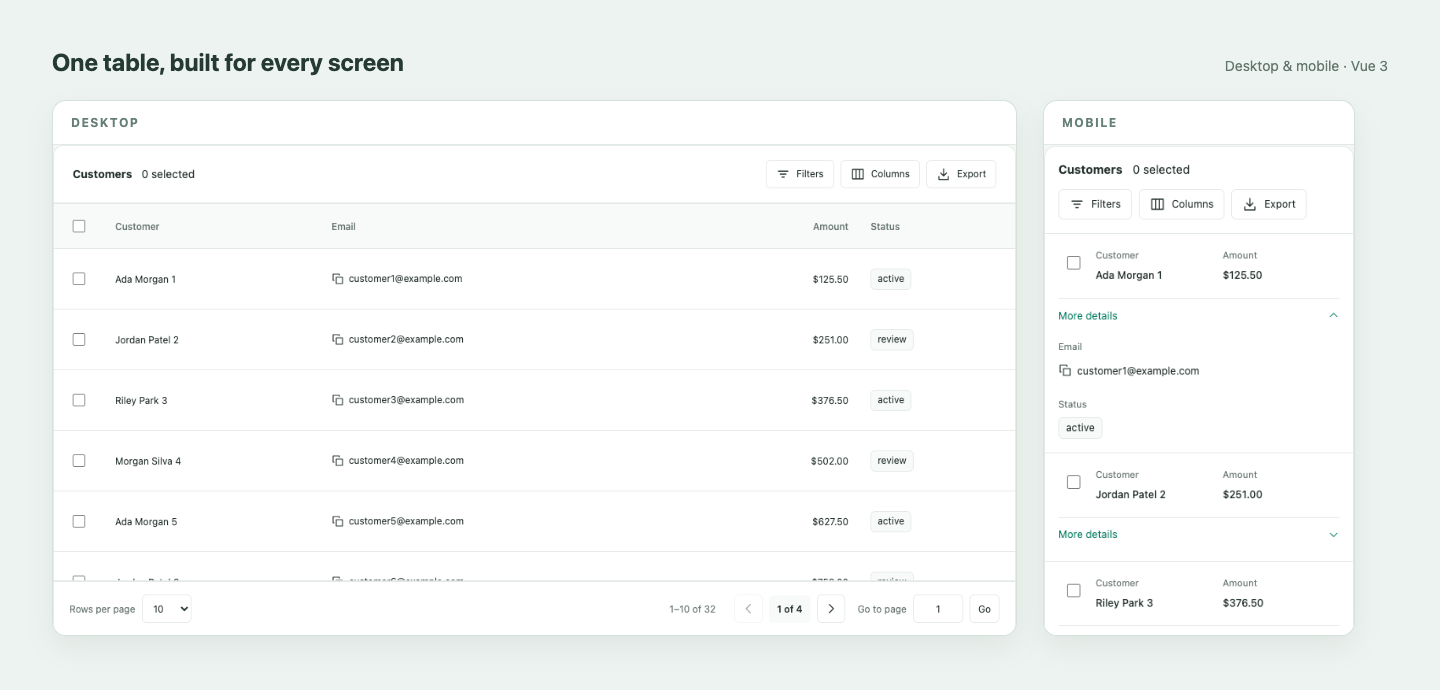
Desktop and mobile views captured from the live Vue 3 demo, arranged side by side.
The package name is @reydi-dev/vue3-smart-datatable.
Check the npm package page
for availability. The unrelated unscoped
vue3-smart-datatable package is a different project. The independent
Vue 2 library remains separate.
Install
After the approved 0.1.0 release is available on npm:
npm install @reydi-dev/vue3-smart-datatableUse Vue 3.5.44+. The verified baseline is Vue 3.5.44, TypeScript 5.9.3 and vue-tsc 3.3.13. The library is ESM-only; import its CSS explicitly. To build and install a local archive:
# Build an actual local npm archive (Node 24.21.0 / npm 11+ tooling).
git clone https://github.com/reydi-dev/vue3-smart-datatable.git
cd vue3-smart-datatable
npm ci
npm run build
npm pack
Then, from your Vue 3 application directory:
npm install /absolute/path/to/reydi-dev-vue3-smart-datatable-0.1.0.tgzThe archive installation is checked in an independent project in CI. During
preparation, latest pointed to the beta; see issue #27 for its current status.
Quick start
Copy this component into your application. CSS may instead be imported once in your client entry. This exact example is typechecked against the installed package.
<script setup lang="ts">
import SmartDataTable from '@reydi-dev/vue3-smart-datatable'
import '@reydi-dev/vue3-smart-datatable/styles.css'
import type { DataTableColumn } from '@reydi-dev/vue3-smart-datatable'
interface Customer {
  id: number
  name: string
  amount: number
}
const items: Customer[] = [
  { id: 1, name: 'Ada Morgan', amount: 125.5 },
  { id: 2, name: 'Jordan Patel', amount: 240 },
]
const columns: DataTableColumn<Customer>[] = [
  { key: 'name', label: 'Customer', sortable: true, filterable: true },
  {
    key: 'amount',
    label: 'Amount',
    type: 'number',
    numberFormat: { style: 'currency', currency: 'USD' },
  },
]
</script>
<template><SmartDataTable :columns="columns" :items="items" /></template>
Examples
| Example | What it demonstrates | | --------------------------------------------------------------------------------------------------------------- | ----------------------------------------------------------------- | | Local data | Selection, filters, CSV and saved columns. | | Async provider | Synthetic server, signal cancellation, filter/sort/page requests. | | HTTP provider | Forward signal to fetch and validate unknown business rows. | | Cells and actions | Typed specific slots and guarded action triggers. | | Persian / RTL | Messages, Persian numbers, responsive layout and theme. | | Vue 2 migration | Vue 3 models, emits, slots and public refs. |
Examples that import ./data.js use the adjacent
data.ts.
Every runnable example is copied into and typechecked in the independent tarball
consumer. The public demo uses those same example components.
Models and interaction
Use v-model for selected keys, and v-model:page, v-model:items-per-page,
v-model:sort, v-model:filters or v-model:visible-columns when the parent owns
those values. Omit a model for internal state. A defined value is strictly
controlled: a fixed :items-per-page="10" keeps that value fixed; use v-model
when the built-in control should update it. Empty arrays and sort=null are
meaningful controlled values.
Set row-clickable explicitly to enable row activation. All twelve reference
cell kinds remain available, with plain text by default and typed slots for
custom content. Icons accept SVG definition objects; an external icon font is
not required. See the full
API.
Validation and scope
CI checks strict contracts, core/component/browser behavior, production demo output and an independently installed npm tarball. The tarball consumer verifies public types/CSS/adapters, normal client/server builds, Node import/SSR without DOM globals, and controlled production hydration in Chromium at desktop/mobile widths. The same table uses a desktop server/initial-client shell and switches layout after mount on a narrow viewport.
This is scoped SSR evidence, not a Nuxt integration or a second-browser guarantee.
For SSR, keep server/client rows and formatter results consistent; choose an
explicit dateFormat.timeZone for dates that must render identically. See
distribution evidence.
Virtualization, inline editing, grouping/pivoting, multi-sort, Excel/PDF export and a Nuxt module are outside the first-release scope. See the roadmap and progress.
Contribute and license
Use Node from .nvmrc and npm ci. npm run validate runs formatting, lint,
contracts, core/component checks, package outputs and both builds. After installing
Chromium, npm run test:e2e runs the interaction fixture and production demo;
npm run test:consumer checks the independent installed package and all documented
examples. See CONTRIBUTING.
Report reproducible issues with synthetic data. Use the security policy for vulnerabilities. MIT, copyright Mohammad Reza Dehghani; see LICENSE.