
@ricardohsmello/mongodb-cli-lab
v2.1.9
Published
CLI to create a local MongoDB sharded cluster using Docker

Maintainers
 ricas-mdb-lab
Readme
mongodb-cli-lab



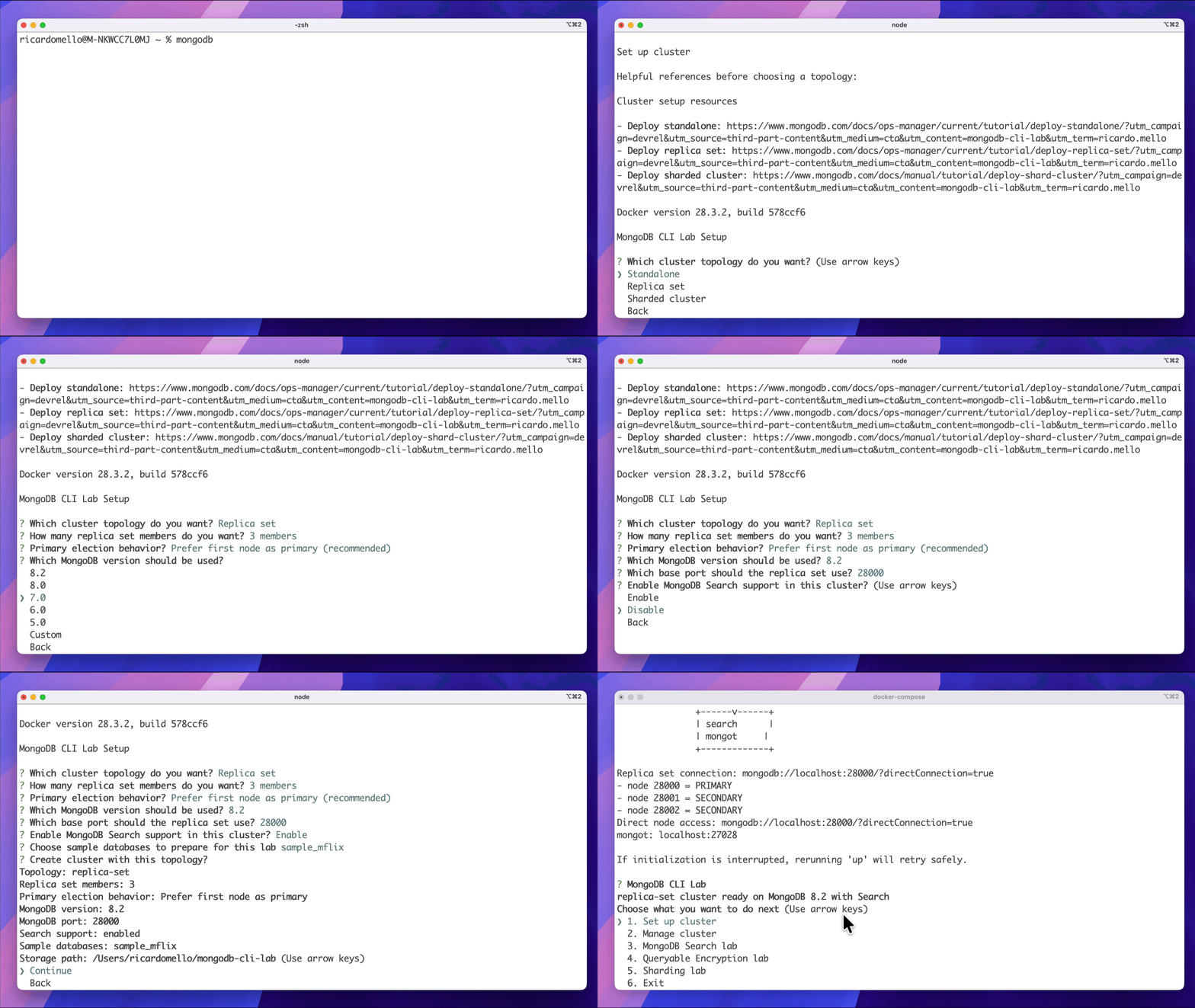
A Node.js CLI to spin up local MongoDB labs with Docker — standalone, replica set, sharded cluster, MongoDB Search, and Queryable Encryption labs.
Website: mongodb-cli-lab.vercel.app
Disclaimer
This is an independent project and is not an official MongoDB product. It is intended for local development, demos, testing, and learning purposes only.
⚠️ Do not use this tool in production environments.
Table of Contents
Features
- Interactive menu to create and manage labs
- Standalone MongoDB node
- Replica set
- Sharded cluster
- MongoDB Search on
standaloneandreplica-set - Queryable Encryption lab on
replica-set - Quickstart scripts for sharding, Search, and Queryable Encryption flows
- Sample database loading (
--sample-databases)
Prerequisites
- Docker installed and running
Installation
Install globally via npm:
npm install -g @ricardohsmello/mongodb-cli-labOr run directly from source:
node src/cli.jsUsage
Interactive Menu
Launch the interactive menu to set up and manage your lab:
mongodb-cli-labFrom the menu you can:
- Set up a cluster (standalone, replica set, or sharded)
- Open the Search lab
- Open the Queryable Encryption lab
- Work with data and sharding
- Manage the cluster lifecycle
Commands
| Command | Description |
|---------------------------|--------------------------------------------------|
| mongodb-cli-lab | Open the interactive menu |
| mongodb-cli-lab up | Start a lab with the given topology and options |
| mongodb-cli-lab status | Show the status of the running lab |
| mongodb-cli-lab down | Stop the running lab |
| mongodb-cli-lab clean | Remove all lab containers and volumes |
| mongodb-cli-lab quickstart | Run a quickstart script for the given topology |
| mongodb-cli-lab qe quickstart | Run the Queryable Encryption quickstart on the current cluster |
| mongodb-cli-lab qe setup | Create a custom Queryable Encryption demo collection |
| mongodb-cli-lab qe status | Show Queryable Encryption lab status |
Options
| Flag | Values | Description |
|-------------------------------|---------------------------------------------|----------------------------------------------------------|
| --topology | standalone, replica-set, sharded | MongoDB topology to create |
| --mongodb-version | e.g. 8.2 | MongoDB Docker image version |
| --port | e.g. 28000 | Host port to expose |
| --replicas | integer | Members in replica-set; members per shard in sharded |
| --shards | integer | Number of shards (only for sharded) |
| --search | — | Enable MongoDB Search (only for standalone/replica-set) |
| --sample-databases | comma-separated names or all | Load sample databases after setup |
Examples
Standalone
Without Search:
mongodb-cli-lab up --topology standalone --mongodb-version 8.2 --port 28000With Search:
mongodb-cli-lab up --topology standalone --search --mongodb-version 8.2 --port 28000Replica Set
Without Search:
mongodb-cli-lab up --topology replica-set --replicas 3 --mongodb-version 8.2 --port 28000With Search:
mongodb-cli-lab up --topology replica-set --replicas 3 --search --mongodb-version 8.2 --port 28000Search quickstart:
mongodb-cli-lab quickstart --topology replica-set --replicas 3 --search --mongodb-version 8.2 --port 28000Queryable Encryption quickstart on the current cluster:
mongodb-cli-lab qe quickstartSharded Cluster
Basic:
mongodb-cli-lab up --topology sharded --shards 2 --replicas 3 --mongodb-version 8.2 --port 28000With sample databases:
mongodb-cli-lab up --topology sharded --shards 2 --replicas 3 --mongodb-version 8.2 --port 28000 --sample-databases allSharding quickstart:
mongodb-cli-lab quickstart --topology sharded --shards 2 --replicas 3 --mongodb-version 8.2 --port 28000Note: MongoDB Search is only supported on
standaloneandreplica-settopologies.Note: Queryable Encryption lab is currently supported on
replica-settopologies and uses a local KMS demo setup.
Help
mongodb-cli-lab --help
mongodb-cli-lab up --help
mongodb-cli-lab quickstart --help
mongodb-cli-lab search --help
mongodb-cli-lab search up --help
mongodb-cli-lab search quickstart --help
mongodb-cli-lab qe --help