
@richfort/nolan
v0.2.3
Published
Screenplay-driven demo films for web apps — direct your real app, get a GIF or MP4 that regenerates on every release.

Maintainers
 richfort
Readme
nolan
Let your agents show, not just tell.
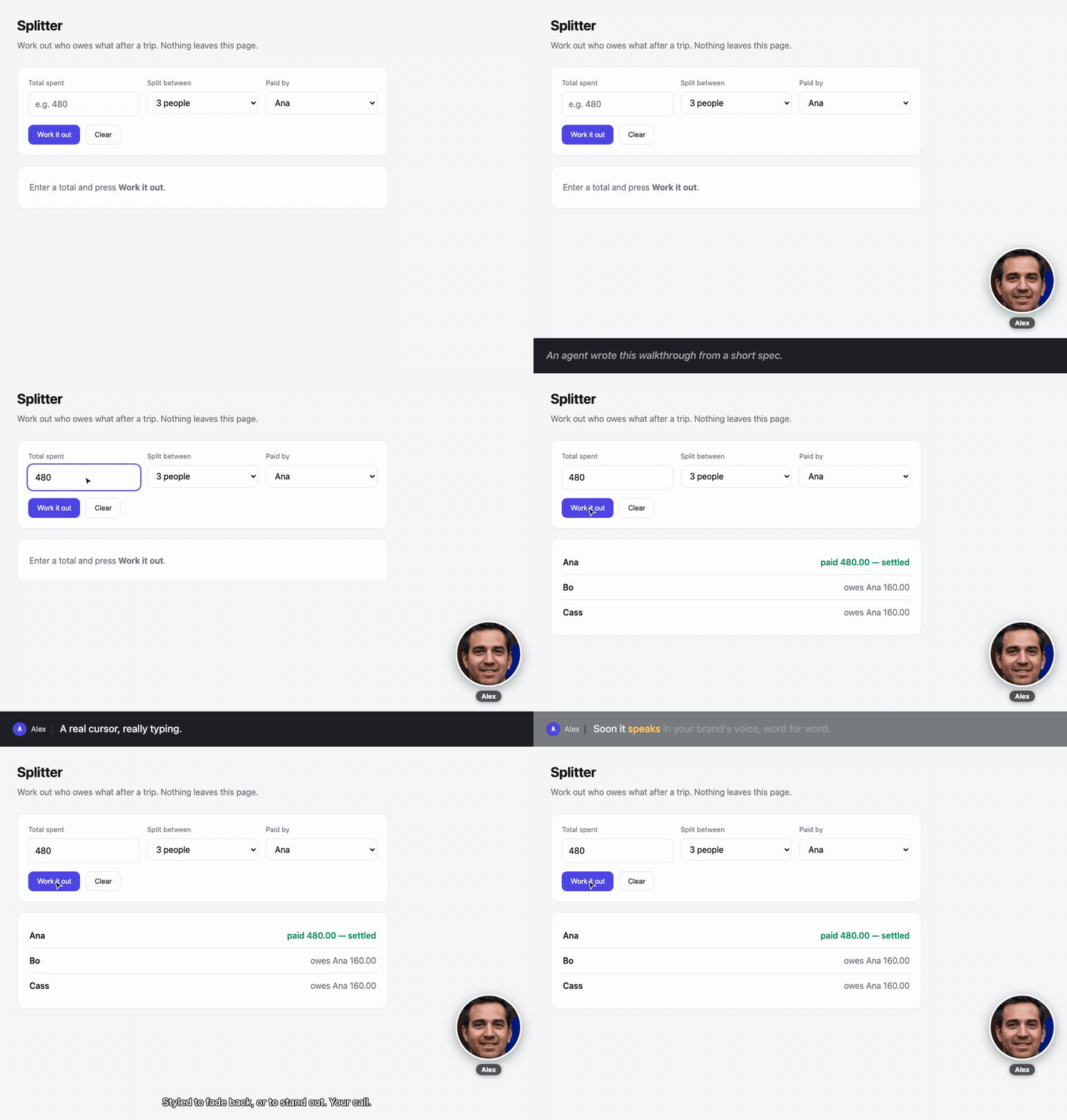
The GIF above is a nolan walkthrough — generated from a spec, filmed against a
real app, narrating its own features. Rebuild it with npm run example:showcase.
Nolan turns a short spec into a narrated walkthrough of your real app — a feature tour, a bespoke answer to a support question, a look at something an agent just built and wants to show you. What it shows is generated fresh for each person and moment. How it looks and speaks — your colours, your captions, and (soon) your voice — lives in a separate document your agents reuse and refine. So the content stays personal while the delivery stays unmistakably yours.
nolan demo.screenplay.json --cut=hero· filming "Splitter — settle up after a trip" — cut: hero (pace 0.65)
· encoding gif → out/splitter-hero.gif
· encoding mp4 → out/splitter-hero.mp4
✓ 12 beats · 9.6sWhy not just record it by hand?
Two reasons. A recording rots the moment the UI moves, so you re-shoot it every release. And a person can only record so many — you can't hand-film a bespoke walkthrough for every user, every support question, every POC an agent ships. A spec an agent writes scales to all of them.
| | hand-recorded | nolan | |---|---|---| | Re-shoot after a UI change | record it again | re-run the spec | | Rebrand every walkthrough at once | re-record each one | edit one style file | | A bespoke version per person | not happening | an agent writes a new spec | | It quietly drifts out of date | a user tells you | CI fails |
The last two rows are the point: personal at scale, and never stale.
Try it
Requires Node ≥ 18, ffmpeg, and Playwright's Chromium.
git clone https://github.com/richardofortune/nolan && cd nolan
npm install playwright && npx playwright install chromium
npm start
npm start opens an interactive menu — pick a demo (the toy app, the
self-describing showcase, a live-site walkthrough, karaoke captions, verify,
restyle…) and nolan films it. It checks ffmpeg and Playwright are present and
tells you what to install if not.
Prefer to skip the menu? npm run example films the bundled toy app in
examples/site directly — no other setup, nothing to configure.
Hand this to your agent
nolan's point is that an agent writes the walkthrough. So the fastest way to see what it's worth is to let one. Install nolan in your project, then paste this to whatever coding agent you already use:
Use nolan to film a 30-second walkthrough of <the feature> in this app.
nolan drives a real browser and narrates what it does, so the film shows the real UI, not a mockup. You write a screenplay (JSON) and it films it.
- Read
node_modules/@richfort/nolan/README.mdfor the screenplay format, andnode_modules/@richfort/nolan/docs/craft.mdfor the writing rules. Follow the rules — they're what stops it reading as AI-written.- Find the real selectors by reading this app's source. Don't guess them.
- Write
<name>.screenplay.json. Open on the page the feature lives on. Keep it under ten beats. One idea per caption, six to twelve words.- If the app needs a server to run, start it from
set.serversso the film is reproducible. If it needs a login, useset.initScript.- Run
npx nolan lint <name>.screenplay.jsonand fix every error.- Run
npx nolan verify <name>.screenplay.jsonto prove every target resolves.- Run
npx nolan <name>.screenplay.json --out=./demoand show me the GIF.- Open the GIF and read it back against your captions. Every number, label and outcome you narrated has to be the one actually on screen. If you said "owes her 120" and the app shows 160, the walkthrough is lying — fix the caption or the beats until they agree.
If a step fails, fix the screenplay and run it again. Don't skip the lint.
Step 8 is not padding. lint checks the writing and verify checks the
targets; neither reads what's on screen, so a caption can be well written,
resolve perfectly, and still state a number the app never produced. That is the
most likely mistake an agent makes, because inventing a plausible figure is
exactly what language models do. Until expect
lands, a human or an agent re-reading the film is the only thing that catches it.
The three commands are the loop: lint says whether it's written well, verify says whether it still matches the app, and the render is only worth doing once both pass. That's the same loop you'd put in CI later.
No app handy? Point the prompt at the bundled toy app instead — swap step 2
for "the app is examples/site/index.html, served by set.servers" and the
whole thing runs on a fresh clone.
Install it in your own project
npm i @richfort/nolan
npm i playwright && npx playwright install chromium   # peer dependency
Playwright is a peer dependency, not a bundled one, so nolan never drags a
browser into a project that only needs the types or the linter. ffmpeg has to be
on your PATH as well. Miss either and you get a runtime error at filming time,
not an install error — so install both up front.
import { render, verify, DEFAULT_STYLE } from "@richfort/nolan";The nolan CLI is on PATH too once installed, or run it with npx nolan.
Three documents, three owners
The split is the whole point. What you show is generated per person and moment; how it looks and speaks is your brand — held apart so it becomes an asset every walkthrough inherits.
| | Holds | Who owns it |
|---|---|---|
| Screenplay *.screenplay.json | WHAT to show — beats, cast, the set | an agent writes it, per feature or per recipient |
| Style + voice styles/*.json | HOW it looks and speaks — captions, presenter, pace, brand colours, output formats (voice / TTS next) | your voice-of-business, refined over time |
| Engine src/ | drives the browser, films, narrates | nobody |
Because the screenplay is data rather than code, an agent can author a fresh walkthrough for each person or moment without writing scripts. Because the voice-of-business lives in one place, every walkthrough any agent makes inherits it — improve it once, improve them all.
Writing one that lands — tone, text, tempo, transitions — is a craft, and it's
the value. docs/craft.md is the guide every screenplay (and
every agent writing one) should follow.
A screenplay
{
  "title": "Splitter", "slug": "splitter",
  "cuts": { "full": { "pace": 1 }, "hero": { "pace": 0.65 } },
  "cast": { "user": { "kind": "human", "name": "Ana", "bg": "#4f46e5", "ink": "#fff" } },
  "set": {
    "servers": [{ "cmd": "python3", "args": ["-m", "http.server", "8099"], "cwd": "site" }],
    "waitFor": ["http://localhost:8099/index.html"]
  },
  "scenes": [{
    "id": "walkthrough",
    "beats": [
      { "do": "goto",  "url": "http://localhost:8099/index.html" },
      { "do": "actor", "who": "user" },
      { "do": "say",   "text": "Put in what the trip cost." },
      { "do": "click", "to": { "sel": "#total" } },
      { "do": "type",  "text": "480" },
      { "do": "say",   "text": "Then work it out." },
      { "do": "click", "to": { "role": "button", "name": "Work it out" } },
      { "do": "hold",  "ms": 900 }
    ]
  }]
}
Surfaces — what can put words on screen
Five beats put words on screen, and they are not interchangeable. Reach for the wrong one and the writing fights the medium.
| Surface | Beat | Good for | Duration | Restylable | Linted |
|---|---|---|---|---|---|
| Caption bar | say | Narrating what is happening now | derived from text | yes | yes |
| Title card | card | Establishing, framing, closing | fixed ms you author | no | no |
| Scene change | cut | A titled transition that navigates | fixed ms | no | no |
| Presenter | actor | Attributing narration to a persona | n/a | no | no |
| Step rail | step | Position in a long multi-step flow | n/a | no | no |
step needs opting into: the style sets steps.show, the screenplay supplies
top-level steps: [...] labels, and each step beat advances the rail to n.
Three consequences worth knowing before you write:
- Only
sayscales with its text, and onlysayhas a craft floor. Put setup in the caption bar and every caption gets longer and the linter starts complaining. Put it on acardand the caption bar stays short. - Only
sayis restylable. See Restyle without re-filming. cutis not a free title card — it requires aurland performs a navigation. For a title over the current page, usecard.
Beats
| do | Fields | |
|---|---|---|
| goto | url | navigate |
| cut | url, title, ms, after[] | curtained scene change |
| card | lines[], ms | full-screen title card |
| actor | who | set the persona chip |
| say | text, as | narrate — duration derived from length; as picks a caption variant |
| hold | ms | explicit pause (scales with pace) |
| step | n | advance the how-to rail (needs steps.show) |
| move / click | to | glide the cursor, optionally click |
| type | text, delay | keyboard input |
| scrollTo | to | centre a target |
| call | fn, args[] | invoke a function on the page |
| http | method, url, as | real backend call; bind the response |
| set | name, from, where | derive a variable from bound data |
| js | code | escape hatch |
Targets: {sel} · {role, name} · {shadow} / {shadowText} (with
set.shadowHost) · {x, y}. Prefer role + name — it survives refactors,
which is what keeps a walkthrough usable as documentation.
Interpolation: any string takes {{var.path|filter}}
(truncate:n, upper, plural:one:many).
Styled captions
A caption's look lives in the style file, never in the screenplay — the same
split as everything else. The style file picks a preset (docs, karaoke,
highlight, minimal) for the whole film, and defines variants: small,
named looks a single line can opt into.
// styles/default.json
"caption": {
  "preset": "docs",
  "backgroundColor": "#16181D", "color": "#F2F3F5", "size": 18,
  "variants": {
    "warn":  { "backgroundColor": "#3A2A0B", "color": "#FFC53D" },
    "aside": { "color": "#9AA0AA", "showChip": false, "italic": true }
  }
}
// screenplay — names the intent, not the paint
{ "do": "say", "text": "This deletes the trip. No undo.", "as": "warn" }The screenplay says this line is a warning; the style file owns what a warning
looks like — same reason {role, name} targets beat {sel}. Change the look of
every warning in every demo you own by editing one file.
Fields are flat scalars (size, fontWeight, backgroundColor,
backgroundOpacity, …) rather than CSS shorthand, so one axis changes without
touching the rest. The karaoke and highlight presets light up a word at a
time — and because captions are authored, the word timing is derived from
length, with no speech recognition. Old bg / ink / font-shorthand style
files keep working; they're migrated on load.
Cuts: tag any scene or beat with cuts: ["full"]. One screenplay, a tight
README hero and a long pitch cut, from a single recording pass.
Restyle without re-filming
Driving the app is the slow part; the captions are the part you fiddle with.
So --overlay=post films the app clean and composites the captions on
afterwards, keeping the clean master and a segment manifest next to the outputs:
nolan demo.screenplay.json --overlay=postCaptions only. restyle re-composites the caption layer over the clean
master. Anything filmed into the master — a card, a cut title, the app's
own pixels — is already burned in, so changing a card's text or a title's
wording still needs a re-film. Worth knowing before you design a pipeline
around cheap iteration.
Now a new look is a re-encode, not a re-film — no browser, no app, seconds:
nolan restyle out/splitter-hero.segments.json --style=styles/dark.jsonThe segments are Cap-shaped ({ id, start, end, text, as, actor }). Word-level
animation survives compositing: a karaoke or pill-highlight caption is rendered
as a short frame sequence — one still per word-state — and each is overlaid on
its sub-window, so the words light up in post just as they do burned in. (The
per-character typewriter reveal is the one thing still drawn resting in post.)
Subtitle sidecars
Every render also drops .srt and .vtt next to the film — the caption text is
authored and its timing is derived, so a subtitle track is just the segment
manifest in another shape. That makes a demo searchable and screen-readable
instead of pixels-only, for free. WebVTT carries the speaker as a <v Name>
voice tag. Choose formats (or opt out) in the style file:
"encode": { "subtitles": ["srt", "vtt"], "outputs": [ /* … */ ] }A presenter in the corner
Turn on a screen-share-style webcam bubble showing whoever's currently speaking — off by default, opt in from the style:
// style
"presenter": { "show": true, "corner": "bottom-right", "size": 140, "shape": "circle" }
The person is the current actor. Give a cast member a cam for a real
headshot; without one they get a coloured avatar of their initial:
"cast": { "host": { "kind": "human", "name": "Mia", "bg": "#1A73E8", "cam": "./mia.jpg" } }The bubble is a circle, so a face cropped tight against its edges loses hair
and ears to the mask. examples/assets/README.md
has the framing rules a presenter shot has to meet, and prompts for generating
one that does.
It's burned in like the cursor, so it works in both burn and post modes, and it lifts clear of the caption bar automatically. (The rig is Trusted-Types-safe, so the bubble — and every overlay — renders even on strict sites like Google.)
Demos that fail CI when they go stale
nolan verify demo.screenplay.jsonResolves every target, films nothing, exits non-zero if the app moved:
✗ 2 target(s) no longer resolve:

  [walkthrough] click: no visible element matching "#amount"
  [walkthrough] click: no visible button named "Calculate split"

The app moved under the screenplay. Update the beats, or the demo will lie.
Takes a second or two. Put it in CI and your walkthroughs can't quietly start lying to users.
That's the right default when you own the app — a moved target is your bug to
fix. For a walkthrough of a site you don't own, a hard failure you can't action
is the wrong call, so --on-drift picks the response (same detector, different
who's-responsible):
fail(default) — exit non-zero. The CI gate.warn— report the drift, exit 0. A heads-up, not a blocker.refresh— re-render if the demo still resolves; only warn if a target truly broke.
Lint the writing
verify checks that the demo still matches the app. lint checks that it's any
good:
nolan lint demo.screenplay.jsonIt reads the screenplay (no browser) and flags the mechanical tells that make a
walkthrough read as AI-written or feel unpolished — em-dashes, forced triads,
clichés, over-long captions, no breathing room, choppy transitions — against the
craft rules in docs/craft.md. It checks every surface that
puts words on screen, not just captions: the how-to rail labels and title-card
lines are held to the same floor, since a tell in a rail that sits there all film
costs more than one in a caption that flashes past. Errors fail; warnings report;
--strict fails on warnings too. The taste (warmth, specificity, whether the
arc builds) stays with the author; lint just holds the floor, consistently.
Tell us when it's wrong
When nolan does the wrong thing — or won't do the thing you need — say so from where you already are:
nolan feedback "restyle can't reposition captions, only recolour them"That opens a prefilled GitHub issue: your sentence, plus nolan's version, node's version, and your platform. You read it over and hit submit. Nothing is ever sent automatically.
Every time nolan reports bad news it prints the line back to you with the summary already typed, so filing is a copy-paste:
The app moved under the screenplay. Update the beats, or the demo will lie.
↳ nolan wrong about this? nolan feedback "verify: targets stopped resolving in demo.screenplay.json"
| Flag | |
|---|---|
| --print | print the URL instead of opening a browser. Automatic when stdout isn't a TTY or CI is set — so an agent driving nolan gets a link to hand its human, not a hijacked browser. Agents hit nolan's limits first-hand more often than people do. |
| --with-context=<path> | attach a screenplay, style, or segments file to the issue. |
Nothing about your app leaves your machine unless you pass --with-context.
The default body carries only the sentence you typed and those three version
fields — no paths, no cwd, no screenplay contents, no environment. There's no
setting that makes context sticky, deliberately: sticky context sharing is how
people leak things they forgot they turned on.
Disagreeing with a lint rule counts. The craft rules are meant to be argued with
— that's how docs/craft.md gets better.
Point it at your own app
nolan drives a real browser, so it can film anything that renders — but its
sweet spot is your own product. Against your app you can whitelist the
automation, log in through set.initScript, and skip the captchas that guard
third-party sites. That's where "a walkthrough that regenerates every release"
pays off most: your features, your help centre, your onboarding — filmed against
the real UI, and failing CI the moment it drifts.
You can point it at public sites — the examples do (Wikipedia, the Wayback
Machine, Google Calendar, Airbnb). For sites that turn away an unfamiliar
browser, give the screenplay a real identity in set:
"set": {
  "userAgent": "Mozilla/5.0 … Chrome/122 …",
  "locale": "en-NZ",
  "initScript": "localStorage.setItem('token', '…')"   // e.g. a test login
}
But heavy bot protection — reCAPTCHA, Cloudflare challenges — will block filming, and that's by design: nolan won't circumvent it. One more reason the best target is the app you control.
Timing is derived, on purpose
say computes its own duration from the caption length. It is never hardcoded,
so when voiceover lands, duration becomes real audio length and every
screenplay you already wrote re-times itself — no re-authoring.
timing.readingSpeed is milliseconds per character, so a higher number is a
slower film. It reads like a speed and behaves like a duration:
captionMs = max(minCaption, text.length * readingSpeed)readingSpeed: 30 holds a caption longer than readingSpeed: 22. If you assume
the opposite, every duration you derive comes out plausible and wrong, and
nothing fails — so nothing tells you.
card is the exception: its hold does not derive from its text. A card
sleeps for exactly the ms you give it (default 2200) however many lines it
carries. lint now reads card copy and holds it to the craft floor, but it
still can't judge the hold — a card with three lines of setup at the default
2200ms is unreadable, renders correctly, and passes every gate. Author ms for
any card carrying more than a few words; the formula above is a fair start.
Status
Early, but it already does a lot: styled captions (variants, presets, karaoke
that animates even in post), post-composited restyling, subtitle sidecars, a
presenter bubble, and a verify that fails CI when a demo drifts. It works and
it's in real use — expect rough edges.
Where it's headed, roughly in order:
- Voice. The "voice" half of the voice-of-business, and the biggest thing ahead. Timing already derives from caption length, so when TTS lands — narrating in your brand's voice, personalised to the recipient — duration becomes real audio length and every walkthrough you already have re-times itself, no re-authoring.
- Authoring + delivery. An agent that turns a trigger — a feature spec, a
support ticket, a user record — into a screenplay, renders it, and drops the
walkthrough where people already are: Slack, email, an embed. The
{{who}}variable is the seed of the personal-at-scale version.
Rough edges:
- Nothing checks the narration against the screen.
lintreads the writing andverifyreads the targets; neither reads what the app rendered, so a caption can be clean, resolve perfectly, and still state a number the app never produced.expectis the fix; until then, read the film back against its captions. - No schema validation — a malformed screenplay fails at the beat, not at load.
- The
jsescape hatch is arbitrary code. Treat agent-generatedjsbeats with the same scrutiny as any generated code; don't accept screenplays from people you don't trust.
Prior art
VHS does this beautifully for terminal apps and is the direct inspiration — nolan is the browser-shaped version. Pagecast records a browser via an AI agent, aimed at one-off demos with automatic effects; nolan is the opposite axis — authored, deterministic, re-runnable.
Licence
MIT