
@riebel/react-native-multiple-select
v0.6.2
Published
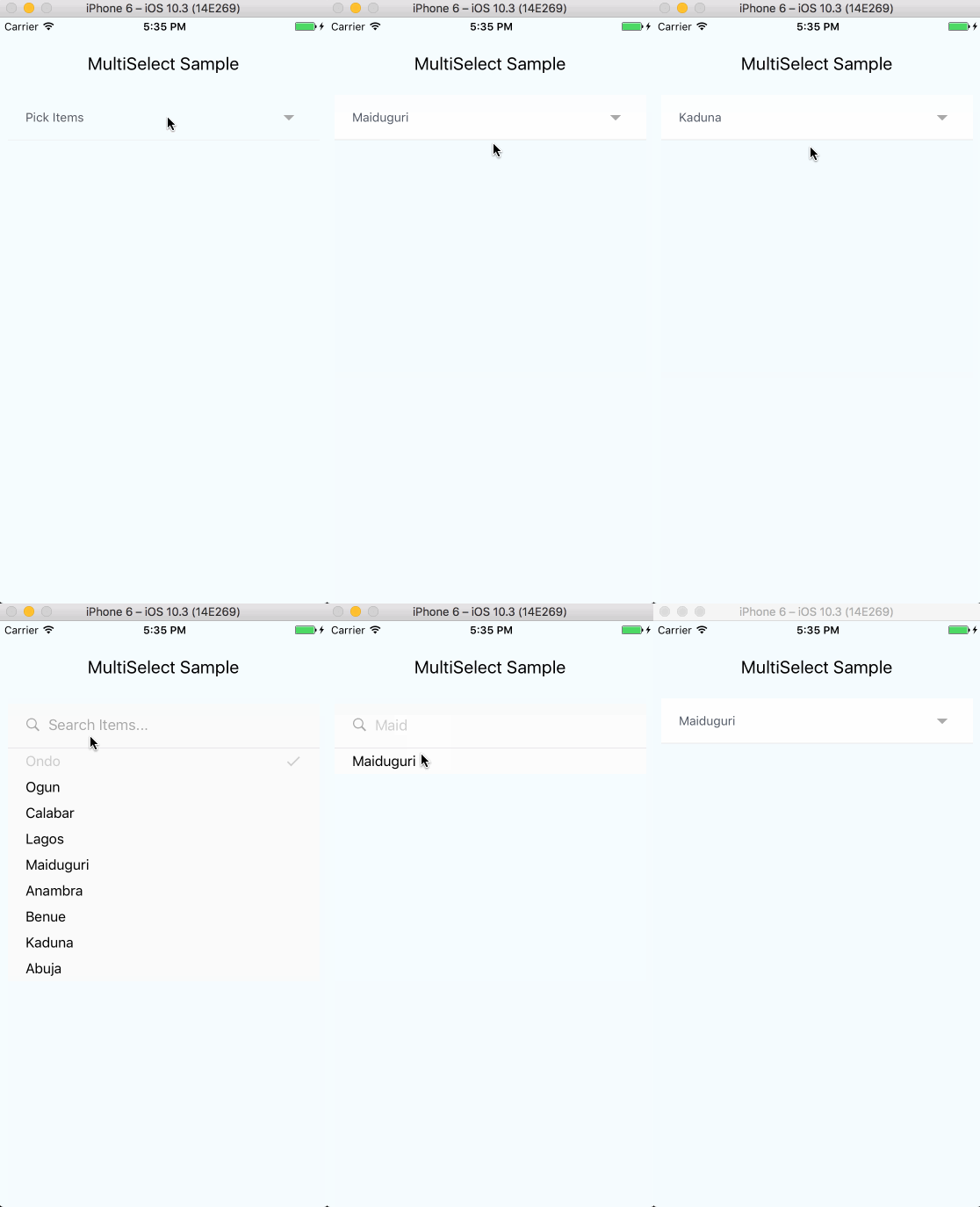
Modernized Simple multi-select component for react-native
Downloads
37

Maintainers
 riebel
Readme
@riebel/react-native-multiple-select



Simple multi-select component for React Native, written in TypeScript.

Installation
npm install @riebel/react-native-multiple-selector with yarn:
yarn add @riebel/react-native-multiple-selectPeer dependencies
react>= 16.8.0react-native>= 0.60.0
Icon library
This component does not bundle an icon library. You provide your own via the iconComponent prop. The component you pass must accept name, size?, color?, style?, and onPress? props.
Icon names default to MaterialCommunityIcons names. Use the iconNames prop to remap them for other icon sets:
| Key | Default | Purpose |
|-----|---------|---------|
| search | magnify | Search input icon |
| close | close-circle | Tag remove icon |
| check | check | Selected item checkmark |
| arrowDown | menu-down | Dropdown indicator |
| arrowRight | menu-right | Dropdown indicator (hideSubmitButton) |
| arrowLeft | arrow-left | Back / close dropdown |
MaterialCommunityIcons (defaults work out of the box):
import { MaterialDesignIcons } from '@react-native-vector-icons/material-design-icons'
// or
import MaterialCommunityIcons from '@expo/vector-icons/MaterialCommunityIcons'

<MultiSelect iconComponent={MaterialCommunityIcons} items={items} ... />
Ionicons:
import Ionicons from '@expo/vector-icons/Ionicons'

<MultiSelect
  iconComponent={Ionicons}
  iconNames={{
    search: 'search',
    close: 'close-circle',
    check: 'checkmark',
    arrowDown: 'chevron-down',
    arrowRight: 'chevron-forward',
    arrowLeft: 'arrow-back'
  }}
  items={items}
  ...
/>
FontAwesome 6:
import FontAwesome6 from '@expo/vector-icons/FontAwesome6'

<MultiSelect
  iconComponent={FontAwesome6}
  iconNames={{
    search: 'magnifying-glass',
    close: 'circle-xmark',
    check: 'check',
    arrowDown: 'chevron-down',
    arrowRight: 'chevron-right',
    arrowLeft: 'arrow-left'
  }}
  items={items}
  ...
/>
Usage
import React, { useRef, useState } from 'react'
import { View } from 'react-native'
import MultiSelect from 'react-native-multiple-select'
import type { MultiSelectRef } from 'react-native-multiple-select'
import MaterialCommunityIcons from '@expo/vector-icons/MaterialCommunityIcons'

const items = [
  { id: '92iijs7yta', name: 'Ondo' },
  { id: 'a0s0a8ssbsd', name: 'Ogun' },
  { id: '16hbajsabsd', name: 'Calabar' },
  { id: 'nahs75a5sg', name: 'Lagos' },
  { id: '667atsas', name: 'Maiduguri' },
  { id: 'hsyasajs', name: 'Anambra' },
  { id: 'djsjudksjd', name: 'Benue' },
  { id: 'sdhyaysdj', name: 'Kaduna' },
  { id: 'suudydjsjd', name: 'Abuja' }
]

const MultiSelectExample = () => {
  const [selectedItems, setSelectedItems] = useState<string[]>([])
  const multiSelectRef = useRef<MultiSelectRef>(null)

  return (
    <View style={{ flex: 1 }}>
      <MultiSelect
        hideTags
        items={items}
        iconComponent={MaterialCommunityIcons}
        uniqueKey="id"
        ref={multiSelectRef}
        onSelectedItemsChange={setSelectedItems}
        selectedItems={selectedItems}
        selectText="Pick Items"
        searchInputPlaceholderText="Search Items..."
        onChangeInput={(text) => console.log(text)}
        tagRemoveIconColor="#CCC"
        tagBorderColor="#CCC"
        tagTextColor="#CCC"
        selectedItemTextColor="#CCC"
        selectedItemIconColor="#CCC"
        itemTextColor="#000"
        displayKey="name"
        searchInputStyle={{ color: '#CCC' }}
        submitButtonColor="#CCC"
        submitButtonText="Submit"
      />
      <View>
        {multiSelectRef.current?.getSelectedItemsExt(selectedItems)}
      </View>
    </View>
  )
}
Props
Required
| Prop | Type | Purpose |
|------|------|---------|
| items | MultiSelectItem[] | Array of objects to display. Each object must contain a name and unique identifier |
| iconComponent | IconComponentType | Icon component to render icons (e.g. MaterialCommunityIcons) |
| onSelectedItemsChange | (items: string[]) => void | Called when selection changes |
Optional
| Prop | Type | Default | Purpose |
|------|------|---------|---------|
| iconNames | Partial<IconNames> | MaterialCommunityIcons defaults | Override icon names for other icon libraries (see above) |
| single | boolean | false | Toggle between single and multi select mode |
| selectedItems | string[] | [] | Array of selected item keys |
| uniqueKey | string | '_id' | Key used to uniquely identify each item |
| displayKey | string | 'name' | Key used to display item label |
| selectText | string | 'Select' | Text displayed on the main component |
| selectedText | string | 'selected' | Text appended to selection count |
| searchInputPlaceholderText | string | 'Search' | Placeholder for the search input |
| searchIcon | ReactNode | magnify icon | Custom search icon element |
| noItemsText | string | 'No items to display.' | Text shown when no items match |
| filterMethod | 'partial' \| 'full' | 'partial' | Search matching strategy |
| canAddItems | boolean | false | Allow users to add new items via the search input |
| removeSelected | boolean | false | Hide already-selected items from the dropdown |
| hideTags | boolean | false | Hide tokenized selected items below the selector |
| hideSubmitButton | boolean | false | Hide the submit button in the dropdown |
| hideDropdown | boolean | false | Hide dropdown cancel, show back arrow instead |
| fixedHeight | boolean | false | Use fixed height with scroll instead of auto height |
| fontSize | number | 14 | Font size for the dropdown label |
| itemFontSize | number | 16 | Font size for each item in the dropdown |
| fontFamily | string | '' | Custom font family for the component |
| altFontFamily | string | '' | Font family for the placeholder text |
| itemFontFamily | string | '' | Font family for non-selected items |
| selectedItemFontFamily | string | '' | Font family for selected items |
| textColor | string | '#525966' | Color for the dropdown label |
| itemTextColor | string | '#525966' | Text color for non-selected items |
| selectedItemTextColor | string | '#00A5FF' | Text color for selected items |
| selectedItemIconColor | string | '#00A5FF' | Check icon color for selected items |
| tagBorderColor | string | '#00A5FF' | Border color for selected item tags |
| tagTextColor | string | '#00A5FF' | Text color for selected item tags |
| tagRemoveIconColor | string | '#C62828' | Color for the tag remove icon |
| submitButtonColor | string | '#CCC' | Background color for the submit button |
| submitButtonText | string | 'Submit' | Text on the submit button |
| searchInputStyle | StyleProp<TextStyle> | | Style for the search input |
| tagContainerStyle | StyleProp<ViewStyle> | | Style for tag containers |
| styleMainWrapper | StyleProp<ViewStyle> | | Style for the outermost wrapper |
| styleDropdownMenu | StyleProp<ViewStyle> | | Style for the dropdown menu view |
| styleDropdownMenuSubsection | StyleProp<ViewStyle> | | Style for the inner dropdown view |
| styleInputGroup | StyleProp<ViewStyle> | | Style for the search input group |
| styleItemsContainer | StyleProp<ViewStyle> | | Style for the items container |
| styleListContainer | StyleProp<ViewStyle> | | Style for the list container |
| styleRowList | StyleProp<ViewStyle> | | Style for each item row |
| styleSelectorContainer | StyleProp<ViewStyle> | | Style for the open selector container |
| styleTextDropdown | StyleProp<TextStyle> | | Style for dropdown text |
| styleTextDropdownSelected | StyleProp<TextStyle> | | Style for dropdown text when items are selected |
| styleTextTag | StyleProp<TextStyle> | | Style for tag text |
| styleIndicator | StyleProp<ViewStyle> | | Style for the dropdown indicator icon |
| textInputProps | TextInputProps | | Additional props for the TextInput |
| flatListProps | Partial<FlatListProps> | | Additional props for the FlatList |
Callbacks
| Prop | Type | Purpose |
|------|------|---------|
| onAddItem | (newItems: MultiSelectItem[]) => void | Called when a new item is added |
| onChangeInput | (text: string) => void | Called when the search input changes |
| onClearSelector | () => void | Called when the back button is pressed |
| onToggleList | () => void | Called when the selector is toggled |
Notes
Displaying tags elsewhere: Use a ref to call
getSelectedItemsExt(selectedItems)and render tags in a different part of your view.Disabled items: Set
disabled: trueon an item object to render it in gray and make it non-interactive.Single mode:
selectedItemsshould still be passed as an array. The selected item is returned as a single-element array.Display key: By default the component uses the
namekey to display items. UsedisplayKeyto change this.Filter methods:
partial: "University of New" matches "University of New York" but also "University of Columbia" and "New England Tech" (individual word matches)full: "University of New" only matches items containing the full substring "University of New"
TypeScript
This package is written in TypeScript and ships type declarations. Exported types:
import type {
  MultiSelectProps,
  MultiSelectItem,
  MultiSelectRef,
  IconProps,
  IconComponentType,
  IconNames
} from 'react-native-multiple-select'
Type assertions
iconComponent — Icon libraries such as @expo/vector-icons type their name prop as a narrow union of string literals, which conflicts with IconComponentType's name: string. Cast the component to silence this:
import MaterialCommunityIcons from '@expo/vector-icons/MaterialCommunityIcons'
import type { IconComponentType } from '@riebel/react-native-multiple-select'

<MultiSelect iconComponent={MaterialCommunityIcons as IconComponentType} ... />
items — MultiSelectItem has an index signature ([key: string]: unknown). Custom interfaces without that signature are not directly assignable, even if all properties match at runtime. Use a double assertion:
interface MyItem {
  id: string
  label: string
}

const items: MyItem[] = [...]

<MultiSelect items={items as unknown as MultiSelectItem[]} ... />
Contributing
Contributions are welcome and will be fully credited.
Contributions are accepted via Pull Requests on Github.
Pull Requests
- Document changes in behaviour - Keep the README and relevant docs up-to-date.
- Follow SemVer - We follow SemVer v2.0.0.
- Create feature branches - Don't ask us to pull from your master branch.
- One pull request per feature - If you want to do more than one thing, send multiple pull requests.
- Squash commits - Make sure each commit in your PR is meaningful.
Issues
Check issues for current issues.
Contributors
See CONTRIBUTORS
License
The MIT License (MIT). See LICENSE for more information.