
@rocksky/cli
v0.11.2
Published
Command-line interface for Rocksky – scrobble tracks, view stats, and manage your listening history

Maintainers
 tsiry
tsiryReadme
Rocksky CLI

🎧 The official command-line interface for Rocksky — a modern, decentralized music tracking and discovery platform built on AT Protocol.
Features
- Interactive TUI — a full terminal UI to browse scrobbles, stream your uploaded music, and manage playlists (just run
rocksky) - Built-in player — gapless playback with crossfade, a 10-band equalizer, bass/treble, and ReplayGain (powered by the Rockbox engine)
- Upload audio files to your private library with live progress
- Playlists — create, edit, and play playlists via the Navidrome/Subsonic-compatible API
- Favorites — like/unlike tracks and browse your starred songs
- Queue management, fuzzy search, disk caching, and MPRIS (media keys) on Linux
- MPD server — control playback and browse your library from any MPD client (ncmpcpp, rmpc, mpc, MALP…)
- Authenticate with your Rocksky account using OAuth
- View your currently playing track, recent scrobbles, and stats
- Manually scrobble tracks
- Useful developer tools for integrating Rocksky into your workflows
- MCP Server
Table of Contents
- Documentation
- Installation
- Run in development
- Usage
- Interactive TUI
- MPD Server
- Available Commands
- MCP Server
Documentation
For comprehensive guides, API references, and tutorials, visit the official documentation at docs.rocksky.app.
Installation
npm install -g @rocksky/cliYou can also use the CLI without installing it globally by running npx:
npx @rocksky/cli --helpRun in development
To run the CLI in development mode, install the dependencies:
bun installThen, run the CLI with:
bun run dev --helpUsage
rocksky <command> [options]Interactive TUI
Running rocksky with no arguments (or rocksky tui) launches a full-screen terminal UI.
Tabs
- Global Scrobbles — a live feed of what everyone is playing (auto-refreshes); press
Enterfor scrobble details. - My Music — browse your uploaded library by Tracks / Albums / Artists / Favorites, with drill-down and infinite scroll. Stream tracks with gapless playback + crossfade.
- Profile — your stats (scrobbles, artists, albums, tracks, loved) plus recent scrobbles and top tracks/artists/albums. Open your Bluesky (
b) or PDSLS (d) profile. - Playlists — create, delete, play, and edit playlists via the Navidrome (Subsonic-compatible) API.
Keyboard shortcuts
| Key | Action |
| ------------------------- | --------------------------------------------------------------------- |
| 1–4, Tab | Switch tabs |
| ↑/↓ | Move selection · ←/→ switch My Music sub-tab |
| Enter | Play / open · Space play/pause · n/p next/prev |
| +/− | Volume · s shuffle · r/o/0 repeat all/one/off |
| a · N/L · i · P | Play album · play next/last · insert-mode menu · play only this track |
| f · ; | Like / unlike · add track to a playlist |
| / · Q · e | Search · queue · equalizer & sound |
| C · R · A · ? | Track cache · refresh feeds · sign in/out · help |
| q | Quit |
Playback preferences (volume, EQ, crossfade, ReplayGain) are saved to ~/.rocksky/settings.toml, and the current queue/position is restored on restart.
Audio output
By default audio plays on your system's default device. You can route the raw
PCM stream elsewhere with the output setting, so another process (or another
machine) does the actual playback:
output = ""                     # default audio device (cpal)
# output = "stdout"             # raw S16LE stereo PCM on stdout (or "-")
# output = "fifo:/tmp/rocksky"  # write to a named pipe
# output = "unix:/tmp/rk.sock"  # listen on a Unix socket (blocks until a client connects)
# output = "unix-connect:/tmp/rk.sock"
# output = "tcp:0.0.0.0:9000"   # listen on TCP (blocks until a client connects)
# output = "tcp-connect:host:9000"
Both rocksky tui and rocksky mpd accept -o, --output <spec> to override the
persisted value for a single run (without writing it back to settings.toml):
# headless daemon: pipe raw PCM straight into a player
rocksky mpd --output stdout | ffplay -f s16le -ar 44100 -ac 2 -

# TUI: use a fifo/socket, since the TUI itself renders to stdout
rocksky tui --output unix:/tmp/rocksky.sock
ffplay -f s16le -ar 44100 -ac 2 unix:///tmp/rocksky.sock   # in another shell
The stream is raw, headerless S16LE stereo PCM, pinned to 44.1 kHz for the
socket/stdout sinks, so the consumer must be told the format explicitly
(-f s16le -ar 44100 -ac 2) — there is no container to autodetect. If audio
plays too slow or too fast, the -ar value doesn't match: the raw sinks are
always 44100 Hz. Two more things to remember:
stdoutis only for the headlessrocksky mpd— thetuirenders to stdout, so usefifo:/unix:/tcp:there instead.unix:/tcp:are listen sockets: rocksky blocks until a client connects. Start rocksky first, then connect your player (or use theunix-connect:/tcp-connect:variants to have rocksky connect out).
MPD Server
Rocksky speaks the Music Player Daemon protocol, so any MPD client — ncmpcpp, rmpc, mpc, MALP, … — can control playback and browse your uploaded library.
Running it
Standalone daemon (works without the TUI):
rocksky mpd            # listens on 127.0.0.1:6600 by default
rocksky mpd -p 6601    # custom port
rocksky mpd -b 0.0.0.0 # bind address (for remote clients)
Then point a client at it:
mpc -p 6600 status
mpc -p 6600 play
ncmpcpp -h 127.0.0.1 -p 6600
You can also run the server inside the TUI by enabling it in settings (see below); it then shares the exact session you see in the TUI.
Configuration
Port and bind address come from the [mpd] section of ~/.rocksky/settings.toml, and are overridable with -p / -b:
[mpd]
enabled = false      # true also starts the server inside the TUI
port = 6600
bind = "127.0.0.1"
If the port is already in use, the server automatically falls back to the next free one (and logs which port it bound).
What you get
- Transport & options — play/pause/stop, next/previous, seek, volume, random (shuffle), repeat, single.
- Queue — view, add, delete, clear; songs use a stable
rocksky:upload:…/rocksky:track:…URI. - Library browse — Artists, Album Artists, Albums, and a Directory tree; tag filters (
find/search/list) and stored playlists. - Cover art — real album covers via
albumart/readpicture. - Live updates —
idlechange events (player, mixer, options, playlist, database), so clients refresh instantly. - Resume — the session restored on startup shows as paused on the last track, so clients render it right away.
- Fast browsing — your whole library is preloaded into memory and cached on disk (
~/.rocksky/mpd-cache), so browsing is instant and survives restarts. The cache is kept in sync with the API in the background;update/rescantriggers a fresh scan.
The server shares the same Rockbox-powered player as the TUI, so playback stays in sync between the two.
Note: reordering the play queue (
move/ in-queueshuffle) isn't supported by the underlying engine, and song ids track queue position.
Available Commands
login - Initiates a browser-based OAuth login flow and saves your access token securely on your machine.
rocksky loginnowplaying - Displays the currently playing track on your/other Rocksky account.
rocksky nowplayingscrobble - Manually scrobbles a track.
rocksky scrobble "Karma Police" "Radiohead"scrobbles - Lists all recently scrobbled tracks.
rocksky scrobblessearch - Searches for tracks, albums, artists or Rocksky users.
rocksky search <query>stats - Displays your Rocksky account statistics.
rocksky stats [did]artists - Lists the user's top artists.
rocksky artists [did]albums - Lists the user's top albums.
rocksky albums [did]tracks - Lists the user's top tracks.
rocksky tracks [did]tui - Launch the interactive terminal UI (also the default when run with no command).
rocksky tuiupload - Upload audio files (or whole folders) to your private Rocksky library, with live progress.
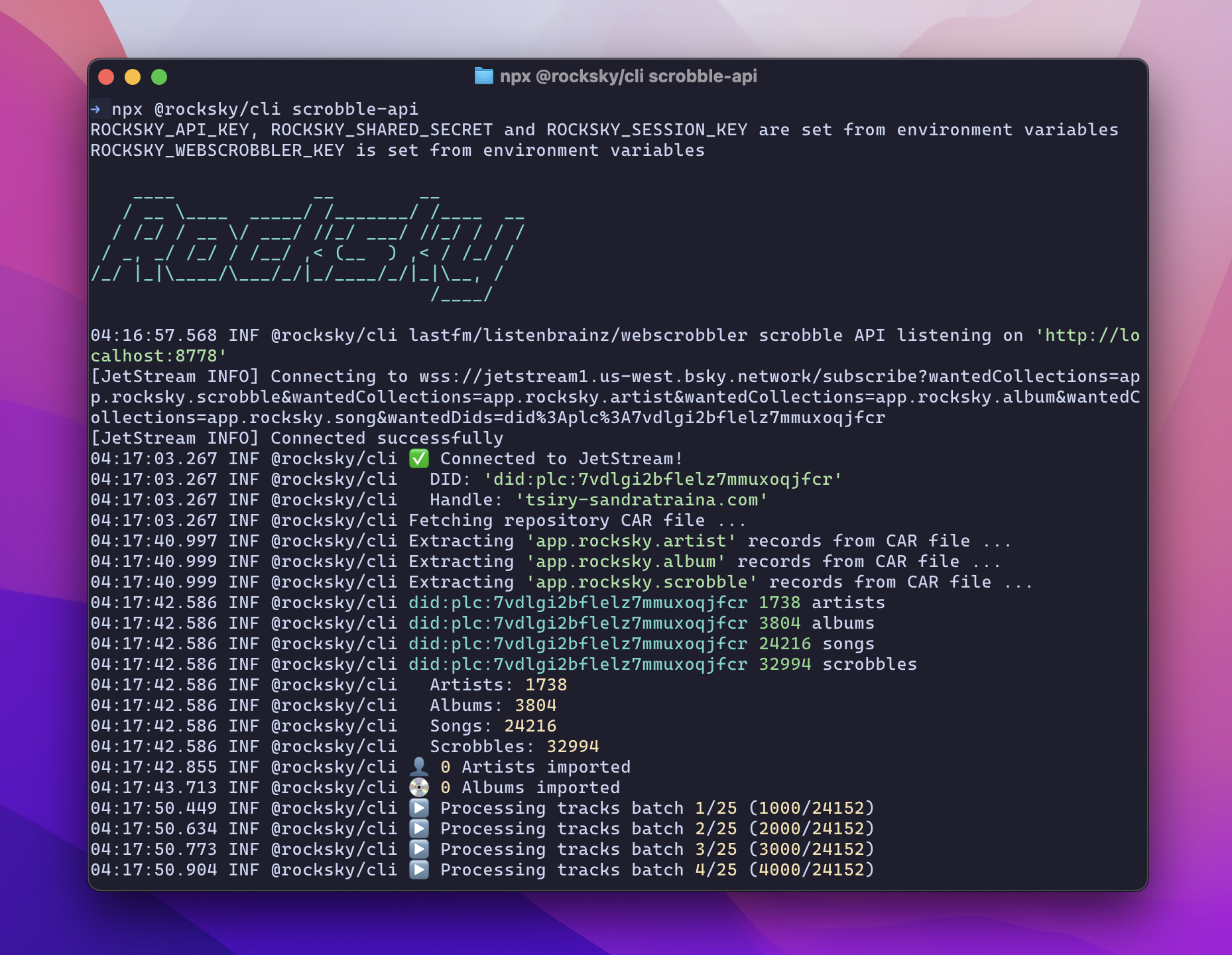
rocksky upload track.flac ./my-albumscrobble-api - Start a local listenbrainz/lastfm compatibility server
rocksky scrobble-apimpd - Start an MPD-protocol server to control playback and browse your library (see MPD Server).
rocksky mpd -p 6600sync - Sync your local Rocksky data from AT Protocol
rocksky syncwhoami - Displays the current user's information.
rocksky whoamimcp - Starts the Rocksky MCP server (see MCP Server).
rocksky mcpMCP Server
rocksky mcp is a Model Context Protocol
server on stdio, so an AI agent can drive Rocksky for you: put music on a real
player, build a queue, browse the library, and read your listening history.
It is a native binary (rocksky-mcp, written in Rust — source in
rocksky-mcp/) that
the CLI downloads for your platform on first use and then execs. Nothing to
configure: it reads the token rocksky login wrote and talks to the hosted
Rocksky API.
rocksky login
rocksky mcp
Options, all optional: --device (which player command tools address when a
call names none), --token-path, and --api-url / --ws-url for pointing at a
development server. Set ROCKSKY_MCP_BIN to run a binary you built yourself.
Connecting a client
Claude Code:
claude mcp add rocksky -- rocksky mcpAnything that reads an mcpServers block (Claude Desktop, Cursor, Zed…):
{
  "mcpServers": {
    "rocksky": { "command": "rocksky", "args": ["mcp"] }
  }
}
Tools
Forty tools. rocksky-mcp tools prints the full schemas; the short version:
| Group | Tools |
| ------------------------------------------------------------------------------------------------------ | ----------------------------------------------------------------------------------------------------------------------------------------------------------------------------- |
| Players — every device online for your account (playerd daemons, the desktop app, web miniplayers) | list_devices, get_player_state, set_primary_device, play, pause, next_track, previous_track, seek, set_volume, set_playback_mode |
| Queue | get_queue, enqueue, queue_jump, queue_remove, queue_move, clear_queue |
| Library — your music, over the Navidrome/Subsonic API | search_library, get_album, get_artist, browse_songs, browse_albums, list_genres, list_playlists, get_playlist, get_listening_history, get_recommendations |
| Audio — the remote DSP chain | get_audio_settings, set_audio_settings, set_equalizer, list_equalizer_presets, apply_equalizer_preset |
| Account — the Rocksky AppView, for any user | whoami, get_profile, get_stats, get_scrobbles, get_top, get_now_playing, search, get_charts, create_api_key |
Every tool with its parameters is documented in rocksky-mcp/TOOLS.md; the server itself is described in the rocksky-mcp README.