
@rolandsall24/nest-mediator
v1.2.0
Published
A lightweight CQRS (Command Query Responsibility Segregation) mediator pattern implementation for NestJS applications with optional event sourcing

Maintainers
 rolandsall24
Readme
NestJS Mediator
A lightweight CQRS mediator for NestJS — start simple, add event persistence when you need it, scale to full event sourcing when you're ready.
Features
- CQRS — Commands, Queries, and Domain Events with type-safe handlers
- Three architecture modes — Simple (no DB), Audit (event log), Source (event sourcing)
- Zero-boilerplate event sourcing —
@ForAggregate+@DomainEventeliminate all wiring - Critical & Non-Critical consumers — Sequential saga-style or fire-and-forget
- Saga compensation — Automatic rollback via
applyCompensatingEvent() - Pipeline Behaviors — Cross-cutting concerns (logging, validation, caching, retry)
- Flexible Event Store — PostgreSQL-backed, bring your own pool or repository
- Optimistic Concurrency — Sequence-based version control with
ConcurrencyError - Correlation & Causation IDs — Automatic distributed tracing via
AsyncLocalStorage - MediatorFlow Dashboard — Real-time visual monitoring, topology graphs, execution tracing
- Zero config — Decorator-based auto-discovery, built on NestJS DI
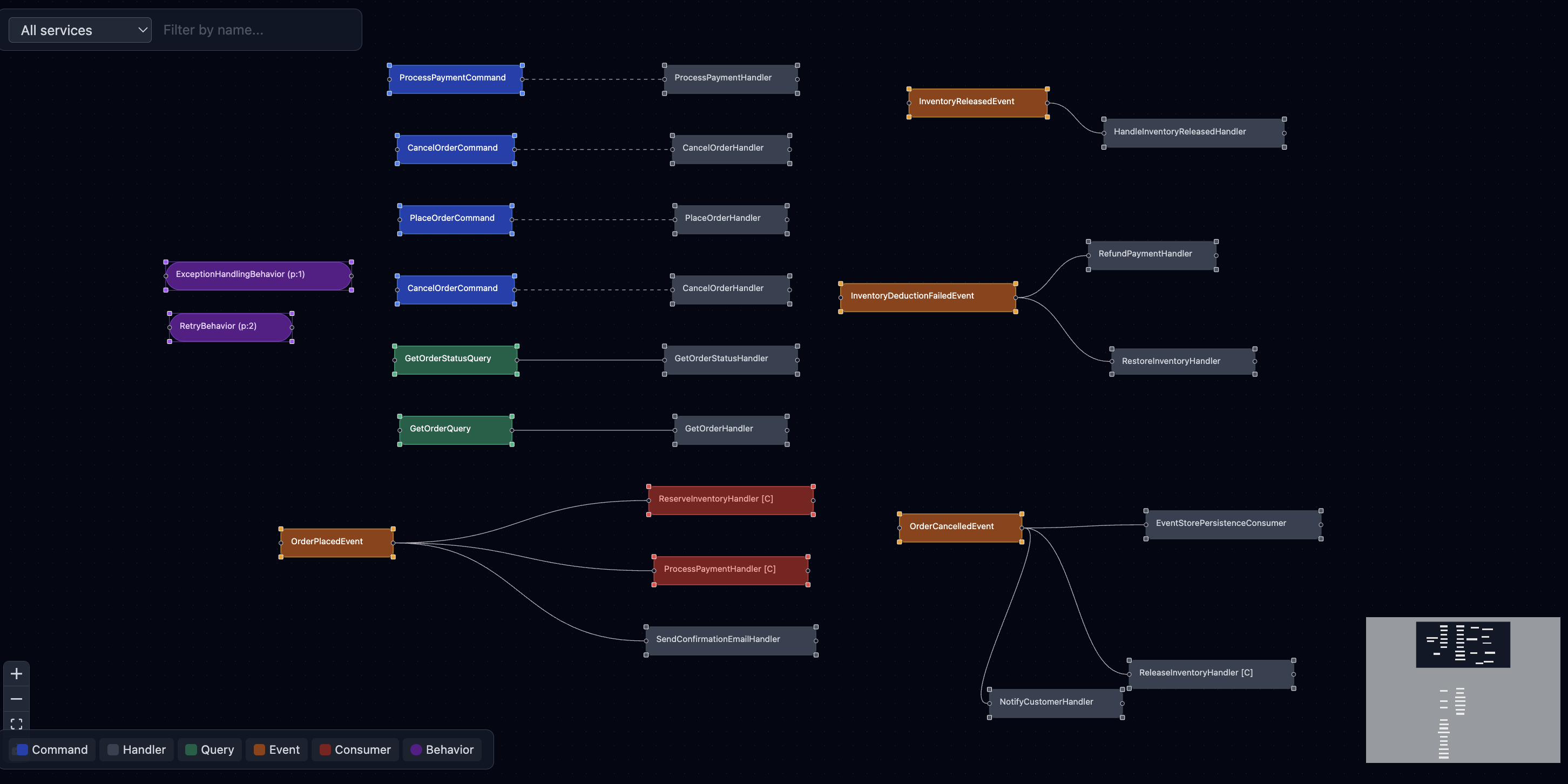
Topology View
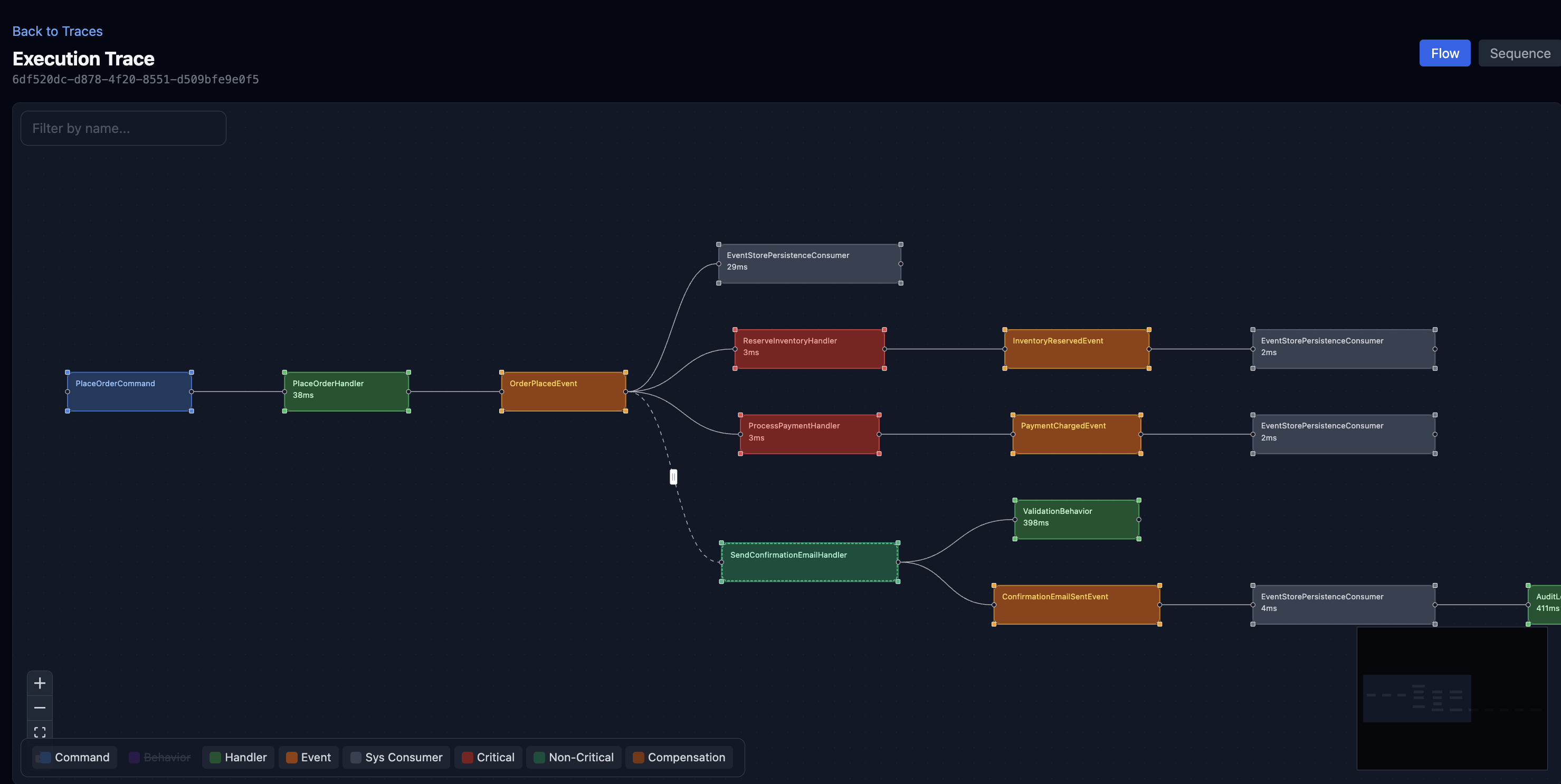
Execution Trace — Flow
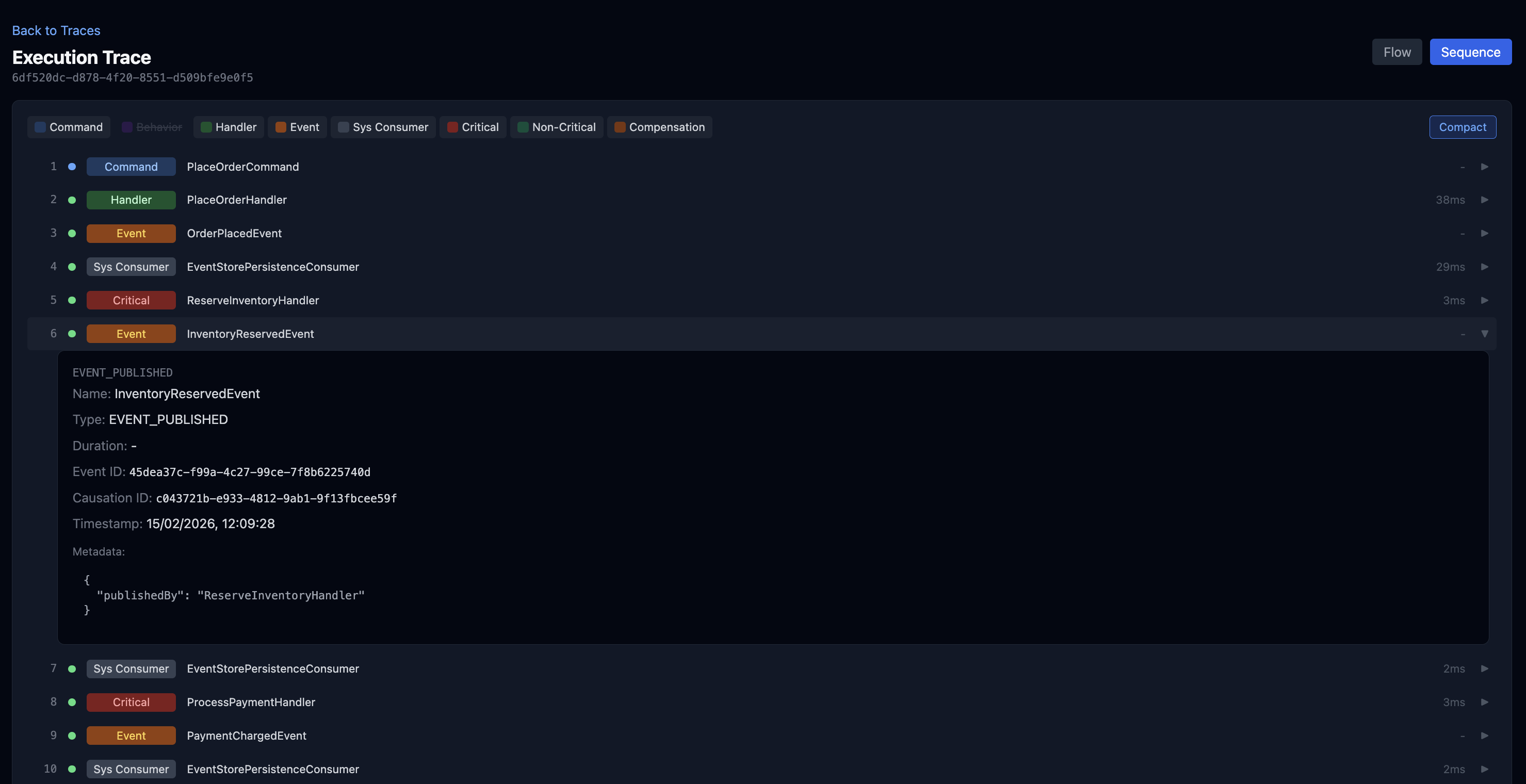
Execution Trace — Sequence
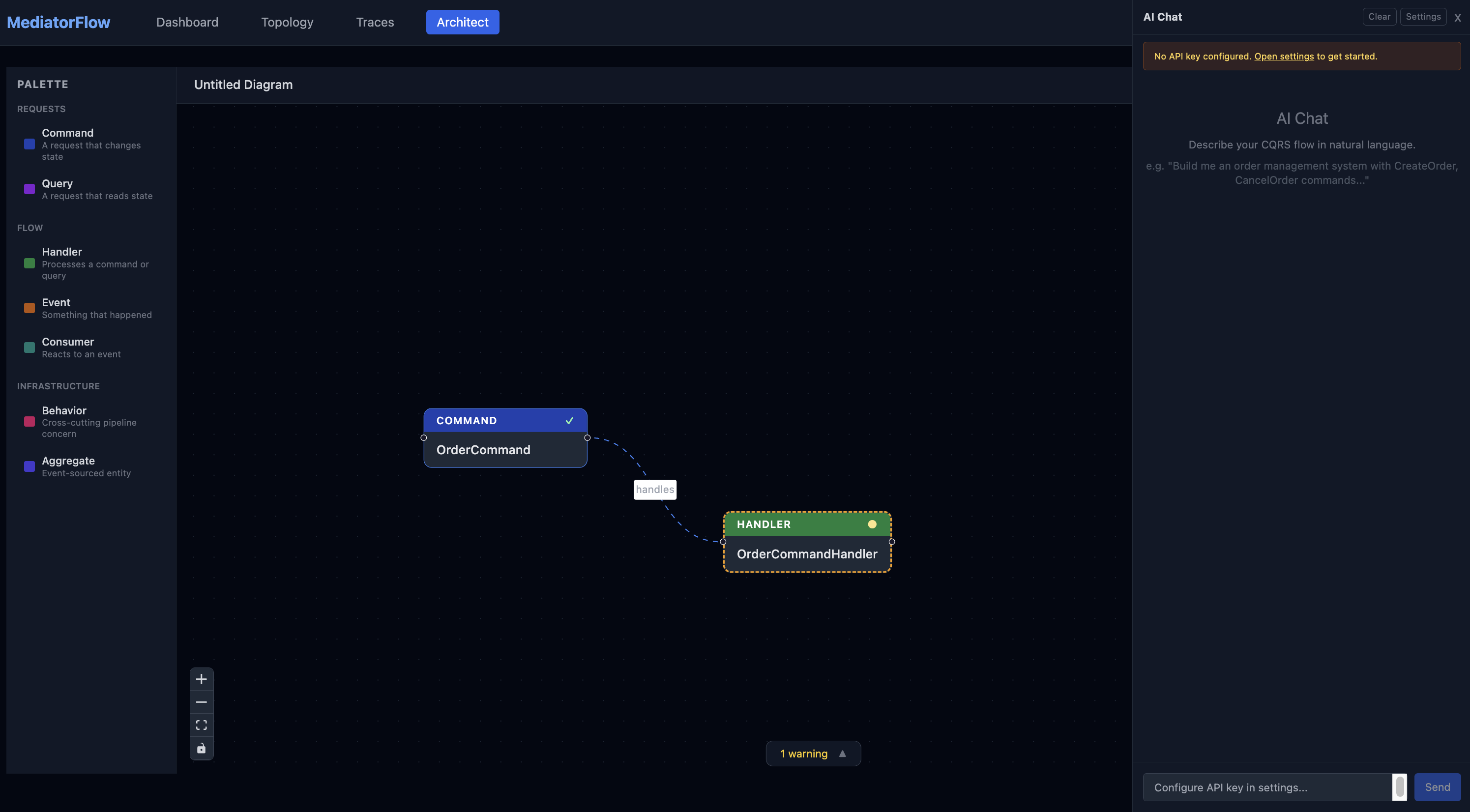
Architect — Drag & Drop Flow Design
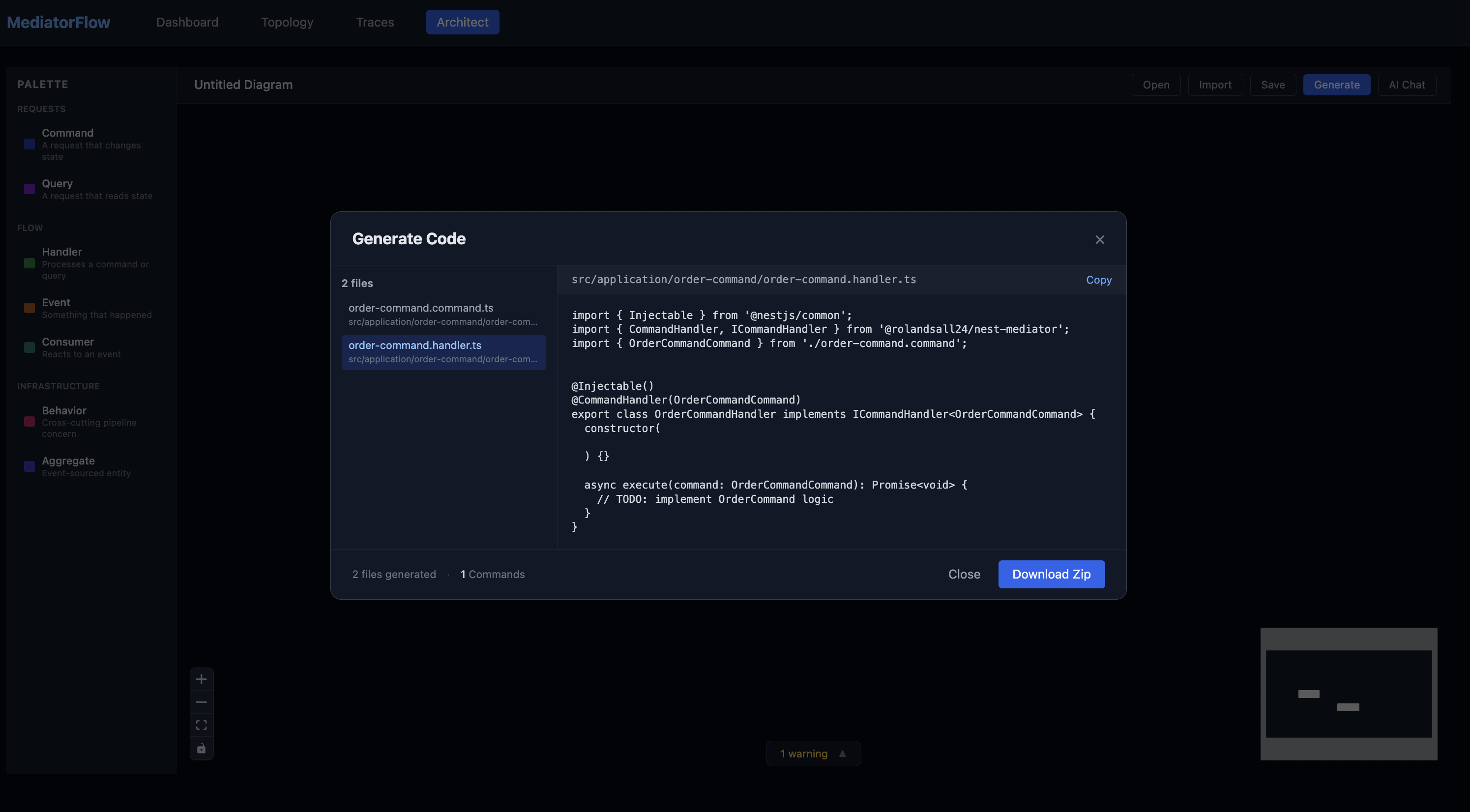
Architect — Code Generation
Installation
npm install @rolandsall24/nest-mediatorTypeScript configuration — enable decorators in tsconfig.json:
{
  "compilerOptions": {
    "experimentalDecorators": true,
    "emitDecoratorMetadata": true
  }
}
Choose Your Architecture
NestJS Mediator grows with your application. Start simple, add what you need.
| | Simple | Audit | Source |
|---|---|---|---|
| Database required | No | PostgreSQL | PostgreSQL |
| State storage | Your choice (in-memory, any DB) | Your tables (e.g., orders) | Event store only |
| Event persistence | None | Events logged alongside state | Events ARE the state |
| Aggregates | Not needed | Not needed | AggregateRoot + AggregateRepository |
| Concurrency control | Your responsibility | Your responsibility | Built-in (optimistic) |
| Use when | Prototyping, simple apps | Production apps needing audit trail | Domain-driven, event-sourced systems |
Simple ──────────► Audit ──────────► Source
No DB               + event log       + event sourcing
Just CQRS           + traceability    + aggregates
                    + audit trail     + concurrency control
Mode 1: Simple (No Database Required)
Pure CQRS with commands, queries, and domain events. No event store, no database — just clean separation of concerns.
Module Setup
import { Module } from '@nestjs/common';
import { NestMediatorModule } from '@rolandsall24/nest-mediator';

@Module({
  imports: [
    NestMediatorModule.forRoot({
      enableLogging: true,
      enableValidation: true,
    }),
  ],
  providers: [
    CreateUserHandler,
    GetUserHandler,
    SendWelcomeEmailConsumer,
  ],
})
export class AppModule {}
Define Commands & Handlers
import { ICommand, ICommandHandler, CommandHandler, MediatorBus } from '@rolandsall24/nest-mediator';

// Command — a simple data container
export class CreateUserCommand implements ICommand {
  constructor(
    public readonly email: string,
    public readonly name: string,
  ) {}
}

// Handler — contains the business logic
@Injectable()
@CommandHandler(CreateUserCommand)
export class CreateUserHandler implements ICommandHandler<CreateUserCommand> {
  constructor(private readonly mediatorBus: MediatorBus) {}

  async execute(command: CreateUserCommand): Promise<void> {
    const userId = randomUUID();
    // Save user to your database...

    // Publish domain event to trigger side effects
    await this.mediatorBus.publish(
      new UserCreatedEvent(userId, command.email, command.name),
    );
  }
}
Define Queries & Handlers
import { IQuery, IQueryHandler, QueryHandler } from '@rolandsall24/nest-mediator';

export class GetUserQuery implements IQuery {
  constructor(public readonly userId: string) {}
}

@Injectable()
@QueryHandler(GetUserQuery)
export class GetUserHandler implements IQueryHandler<GetUserQuery, UserDto> {
  async execute(query: GetUserQuery): Promise<UserDto> {
    // Fetch and return user...
  }
}
Define Events & Consumers
import { IEvent, IEventConsumer, EventHandler, NonCritical } from '@rolandsall24/nest-mediator';

export class UserCreatedEvent implements IEvent {
  constructor(
    public readonly userId: string,
    public readonly email: string,
    public readonly name: string,
  ) {}
}

@Injectable()
@EventHandler(UserCreatedEvent)
@NonCritical()
export class SendWelcomeEmailConsumer implements IEventConsumer<UserCreatedEvent> {
  async handle(event: UserCreatedEvent): Promise<void> {
    // Send welcome email — fire-and-forget
  }
}
Use from Controllers
@Controller('users')
export class UserController {
  constructor(private readonly mediator: MediatorBus) {}

  @Post()
  async create(@Body() body: CreateUserDto) {
    await this.mediator.send(new CreateUserCommand(body.email, body.name));
  }

  @Get(':id')
  async getById(@Param('id') id: string) {
    return this.mediator.query(new GetUserQuery(id));
  }
}
Mode 2: Audit (Event Logging)
Everything from Simple mode, plus every domain event is automatically persisted to a PostgreSQL table. Your application still manages state in its own tables — the event log provides traceability, debugging, and compliance.
What changes from Simple mode
- Add
eventStoreconfig withmode: 'audit' - That's it — events are persisted automatically
@Module({
  imports: [
    NestMediatorModule.forRoot({
      enableLogging: true,
      eventStore: {
        type: 'postgres',
        url: process.env.DATABASE_URL,
        mode: 'audit',
        tableName: 'audit_events', // optional, defaults to 'domain_events'
      },
    }),
  ],
  providers: [
    // Your application manages state in its own tables
    { provide: ORDER_PERSISTOR, useClass: PostgresOrderAdapter },

    CreateOrderHandler,
    GetOrderHandler,
    ReserveInventoryHandler,
    ProcessPaymentHandler,
  ],
})
export class AppModule {}
How it works
Your command handler saves state to your own table, then publishes a domain event. The library automatically persists the event to the audit table before dispatching to consumers.
@Injectable()
@CommandHandler(CreateOrderCommand)
export class CreateOrderHandler implements ICommandHandler<CreateOrderCommand> {
  constructor(
    @Inject(ORDER_PERSISTOR) private readonly orderPersistor: IOrderPersistor,
    private readonly mediatorBus: MediatorBus,
  ) {}

  async execute(command: CreateOrderCommand): Promise<void> {
    const orderId = `order-${Date.now()}`;

    // 1. Save to YOUR orders table (source of truth)
    await this.orderPersistor.save({
      orderId,
      customerId: command.customerId,
      items: command.items,
      total: command.total,
      status: 'placed',
    });

    // 2. Publish event — automatically logged to audit_events table
    await this.mediatorBus.publish(
      new OrderPlacedEvent(orderId, command.customerId, command.items, command.total),
    );
  }
}
Optional: @DomainEvent for richer audit logs
In audit mode, @DomainEvent is purely informational — it does not change runtime behavior. Adding it populates the aggregate_type and aggregate_id columns in the event store, which makes querying and filtering your audit log significantly easier.
// Without @DomainEvent — events are still persisted, but aggregate_type and aggregate_id are null
export class OrderPlacedEvent implements IEvent {
  constructor(public readonly orderId: string, public readonly total: number) {}
}

// With @DomainEvent — aggregate_type='Order', aggregate_id=orderId in the audit table
@DomainEvent('Order', 'orderId')
export class OrderPlacedEvent implements IEvent {
  constructor(public readonly orderId: string, public readonly total: number) {}
}
This is optional. Events are logged either way. The decorator just gives you better data for queries like "show me all events for order X" or "show me all Order events".
What you get
Every event is stored with full context:
| Column | Description |
|--------|-------------|
| event_id | Unique event identifier |
| event_type | Class name (e.g., OrderPlacedEvent) |
| aggregate_type | Aggregate name from @DomainEvent (if present) |
| aggregate_id | Aggregate ID from @DomainEvent (if present) |
| correlation_id | Groups all events from the same business transaction |
| causation_id | Points to the parent event that caused this one |
| payload | Full event data as JSON |
| occurred_at | Timestamp |
When to use Audit mode
- You need an audit trail for compliance or debugging
- You want to trace event chains (correlation/causation IDs)
- You're happy managing state in your own tables
- You want to answer "what happened?" without changing your architecture
Mode 3: Source (Event Sourcing)
Events are the data. There are no state tables. Application state is rebuilt by replaying events from the event store.
What changes from Audit mode
- Change
mode: 'audit'tomode: 'source' - Define an
AggregateRootwith business rules - Add an
AggregateRepositorywith@ForAggregate(one line) - Gain optimistic concurrency control for free
@Module({
  imports: [
    NestMediatorModule.forRoot({
      enableLogging: true,
      eventStore: {
        type: 'postgres',
        url: process.env.DATABASE_URL,
        mode: 'source',
        tableName: 'domain_events',
      },
    }),
  ],
  providers: [
    OrderAggregateRepository,

    PlaceOrderHandler,
    CancelOrderHandler,
    GetOrderHandler,
    ReserveInventoryHandler,
    ProcessPaymentHandler,
  ],
})
export class AppModule {}
Mark Events with @DomainEvent
The @DomainEvent decorator associates events with aggregates and registers them in a global event registry. Required for source mode (used for aggregate hydration). Optional for audit mode (only populates aggregate_type/aggregate_id columns for easier querying — has no effect on runtime behavior).
import { IEvent, DomainEvent } from '@rolandsall24/nest-mediator';

@DomainEvent('Order', 'orderId')
export class OrderPlacedEvent implements IEvent {
  constructor(
    public readonly orderId: string,
    public readonly customerId: string,
    public readonly items: { productId: string; quantity: number }[],
    public readonly total: number,
  ) {}
}

@DomainEvent('Order', 'orderId')
export class OrderCancelledEvent implements IEvent {
  constructor(
    public readonly orderId: string,
    public readonly reason: string,
  ) {}
}
The first argument is the aggregate type name (must match aggregateType on your aggregate). The second is the property name holding the aggregate ID. The @DomainEvent decorator also auto-registers the event class so AggregateRepository can deserialize stored events without any manual wiring.
Define an Aggregate
The aggregate encapsulates business rules and tracks state changes as events.
import { AggregateRoot } from '@rolandsall24/nest-mediator';

export class OrderAggregate extends AggregateRoot<string> {
  private _orderId!: string;
  private _customerId!: string;
  private _items: { productId: string; quantity: number }[] = [];
  private _total: number = 0;
  private _status: 'placed' | 'cancelled' = 'placed';

  readonly aggregateType = 'Order';
  get id() { return this._orderId; }
  get status() { return this._status; }

  // ── Command methods (enforce business rules, emit events) ──

  static create(
    orderId: string,
    customerId: string,
    items: { productId: string; quantity: number }[],
    total: number,
  ): OrderAggregate {
    if (!items.length) throw new Error('Order must have at least one item');
    const order = new OrderAggregate();
    order.apply(new OrderPlacedEvent(orderId, customerId, items, total));
    return order;
  }

  cancel(reason: string): void {
    if (this._status === 'cancelled') {
      throw new Error(`Order ${this._orderId} is already cancelled`);
    }
    this.apply(new OrderCancelledEvent(this._orderId, reason));
  }

  // ── Event handlers (update state from events) ──

  applyOrderPlacedEvent(event: OrderPlacedEvent): void {
    this._orderId = event.orderId;
    this._customerId = event.customerId;
    this._items = event.items;
    this._total = event.total;
    this._status = 'placed';
  }

  applyOrderCancelledEvent(event: OrderCancelledEvent): void {
    this._status = 'cancelled';
  }
}
The applyXxxEvent Convention
When you call this.apply(new OrderPlacedEvent(...)), the base class automatically looks for a method named apply + the event class name — in this case applyOrderPlacedEvent. This convention is used in two scenarios:
- New events — when a command method calls
this.apply(event), the handler updates state and the event is tracked as uncommitted. - Replayed events — when loading from history via
loadFromHistory(), the same handlers rebuild state from stored events.
This means your aggregate's state mutation logic is written once and works for both paths. If a handler is missing, the library logs a warning for new events and silently skips during replay.
Define an Aggregate Repository
With @ForAggregate, the repository is a one-liner. The decorator tells the base class which aggregate to instantiate, and the @DomainEvent registry handles event deserialization automatically.
import { Injectable } from '@nestjs/common';
import { AggregateRepository, ForAggregate } from '@rolandsall24/nest-mediator';

@Injectable()
@ForAggregate(OrderAggregate)
export class OrderAggregateRepository
  extends AggregateRepository<OrderAggregate, string> {}
That's it. No constructor, no overrides. The base class provides:
findById(id)— loads events from the store, deserializes them via the@DomainEventregistry, and replays them to rebuild aggregate stategetById(id)— same asfindByIdbut throws if the aggregate doesn't existsave(aggregate)— publishes each uncommitted event through the event bus (persistence + consumers)
Need custom logic? Every method is overridable:
@Injectable()
@ForAggregate(OrderAggregate)
export class OrderAggregateRepository
  extends AggregateRepository<OrderAggregate, string>
{
  // Override any method for custom behavior
  protected deserializeEvent(eventType: string, payload: Record<string, unknown>): IEvent {
    // Custom deserialization logic
  }
}
Use from Handlers
@Injectable()
@CommandHandler(PlaceOrderCommand)
export class PlaceOrderHandler implements ICommandHandler<PlaceOrderCommand> {
  constructor(private readonly orderRepository: OrderAggregateRepository) {}

  async execute(command: PlaceOrderCommand): Promise<void> {
    const order = OrderAggregate.create(
      `order-${Date.now()}`,
      command.customerId,
      command.items,
      command.total,
    );

    // Save publishes the event -> persistence -> critical consumers -> non-critical
    await this.orderRepository.save(order);
  }
}

@Injectable()
@CommandHandler(CancelOrderCommand)
export class CancelOrderHandler implements ICommandHandler<CancelOrderCommand> {
  constructor(private readonly orderRepository: OrderAggregateRepository) {}

  async execute(command: CancelOrderCommand): Promise<void> {
    // Load aggregate (replays events -> rebuilds state + version)
    const order = await this.orderRepository.findById(command.orderId);
    if (!order) throw new OrderNotFoundException(command.orderId);

    // Apply business rules, record OrderCancelledEvent
    order.cancel(command.reason);

    // Save with concurrency check — throws ConcurrencyError if version conflict
    await this.orderRepository.save(order);
  }
}
Optimistic Concurrency
In source mode, each event stored for an aggregate carries a sequence number. When two requests load the same aggregate simultaneously, both see version N. The first to save writes version N+1 successfully. The second gets a ConcurrencyError because the version has advanced.
Request A: load(order) -> version 3 -> cancel() -> save() -> writes seq 4 ok
Request B: load(order) -> version 3 -> cancel() -> save() -> expected 3, found 4 -> ConcurrencyError
The example-source project includes a POST /orders/test-concurrency endpoint that demonstrates this by placing an order and firing two cancel commands simultaneously.
When to use Source mode
- You need a complete history of every state change
- You want optimistic concurrency without manual locking
- Your domain is complex enough to benefit from aggregates and business rules
- You want to rebuild state at any point in time
- You're building a domain-driven system where events are first-class citizens
Core Concepts
Domain Events
Domain events notify other parts of the system when something happens. Consumers come in two types:
Critical consumers — run sequentially in order. Must succeed. Support compensation.
@Injectable()
@EventHandler(OrderPlacedEvent)
@Critical({ order: 1 })
export class ReserveInventoryHandler implements ICriticalEventConsumer<OrderPlacedEvent> {
  async handle(event: OrderPlacedEvent): Promise<void> {
    // Reserve inventory — must succeed before payment
  }

  // Called if a SUBSEQUENT critical consumer fails
  async applyCompensatingEvent(event: OrderPlacedEvent): Promise<IEvent> {
    return new InventoryReleasedEvent(event.orderId);
  }
}
Non-critical consumers — fire-and-forget. Failures are logged but don't affect the result.
@Injectable()
@EventHandler(OrderPlacedEvent)
@NonCritical()
export class SendConfirmationEmailHandler implements IEventConsumer<OrderPlacedEvent> {
  async handle(event: OrderPlacedEvent): Promise<void> {
    // Send email — failure doesn't block the order
  }
}
Consumers without @Critical or @NonCritical default to non-critical.
Event Execution Flow
publish(OrderPlacedEvent)
    |
    |-> System Phase (event store persistence)
    |
    |-> Critical Consumers (sequential, awaited)
    |   |-> ReserveInventoryHandler  (order: 1)  ok  [has compensation]
    |   |-> ProcessPaymentHandler    (order: 2)  FAILS
    |   |
    |   |   On failure -> compensations in REVERSE order:
    |   |   '-> ReserveInventoryHandler.applyCompensatingEvent()
    |   |         -> publishes InventoryReleasedEvent
    |   |         -> persisted, dispatched to its own consumers
    |   '-> Throw original error
    |
    '-> Non-Critical Consumers (parallel, fire-and-forget)
        |-> SendConfirmationEmailHandler
        '-> TrackAnalyticsHandler
        Only runs if ALL critical consumers succeed
Saga-Style Compensation
Critical consumers can return compensating events when a later consumer in the chain fails. The library publishes these events through the full event flow — persisted, dispatched, traceable.
@Injectable()
@EventHandler(OrderPlacedEvent)
@Critical({ order: 1 })
export class ReserveInventoryHandler implements ICriticalEventConsumer<OrderPlacedEvent> {
  constructor(private readonly mediatorBus: MediatorBus) {}

  async handle(event: OrderPlacedEvent): Promise<void> {
    // Reserve inventory...
    await this.mediatorBus.publish(new InventoryReservedEvent(event.orderId, event.items));
  }

  // Return the compensating event — don't perform side effects here
  async applyCompensatingEvent(event: OrderPlacedEvent): Promise<IEvent> {
    return new InventoryReleasedEvent(event.orderId);
  }
}

// Dedicated consumer where the actual rollback logic lives
@Injectable()
@EventHandler(InventoryReleasedEvent)
export class HandleInventoryReleasedHandler implements IEventConsumer<InventoryReleasedEvent> {
  async handle(event: InventoryReleasedEvent): Promise<void> {
    // Release the reserved inventory
  }
}
Compensation rules:
- Runs in reverse order (last succeeded -> first succeeded)
- The returned event is published through the full event flow (persisted + dispatched)
- Should be idempotent
- Errors in compensations are logged but don't stop other compensations
Correlation & Causation IDs
The library automatically tracks two IDs through AsyncLocalStorage — no configuration needed.
Correlation ID groups every event that stems from a single business transaction. When a command enters the system, a new correlation_id (UUID) is generated and propagated to every event published during that transaction, including events published by event handlers themselves.
Causation ID creates a parent-child link between events. When an event handler publishes a new event, the child's causation_id is set to the parent event's event_id. This lets you reconstruct the full causal chain.
PlaceOrderCommand                         correlation: abc
  '-> OrderPlacedEvent                    correlation: abc, causation: null
        |-> InventoryReservedEvent        correlation: abc, causation: <OrderPlacedEvent.id>
        '-> PaymentChargedEvent           correlation: abc, causation: <OrderPlacedEvent.id>
              '-> ReceiptGeneratedEvent   correlation: abc, causation: <PaymentChargedEvent.id>
Both IDs are stored in the event store automatically. This gives you:
- Transaction tracing — query all events with the same
correlation_idto see everything that happened in one business operation - Causal ordering — follow
causation_idchains to understand what triggered what - Debugging — when something fails, trace the full event chain that led to the failure
Pipeline Behaviors
Behaviors wrap around command and query handlers for cross-cutting concerns.
Built-in Behaviors
NestMediatorModule.forRoot({
  enableLogging: true,             // Log requests with timing
  enableValidation: true,          // class-validator validation
  enableExceptionHandling: true,   // Centralized error logging
  enablePerformanceTracking: true, // Slow request warnings
  performanceThresholdMs: 500,
})
| Behavior | Priority | Description |
|----------|----------|-------------|
| ExceptionHandlingBehavior | -100 | Catches and logs exceptions |
| LoggingBehavior | 0 | Logs request handling with timing |
| PerformanceBehavior | 10 | Warns on slow requests |
| ValidationBehavior | 100 | Validates using class-validator |
Custom Behaviors
@Injectable()
@PipelineBehavior({ priority: 50, scope: 'command' })
export class AuditLoggingBehavior<TRequest, TResponse>
  implements IPipelineBehavior<TRequest, TResponse>
{
  async handle(request: TRequest, next: () => Promise<TResponse>): Promise<TResponse> {
    console.log(`Executing ${request.constructor.name}`);
    const result = await next();
    console.log(`Completed ${request.constructor.name}`);
    return result;
  }
}
Type-Specific Behaviors
Add @Handle() to make a behavior only run for a specific request type:
@Injectable()
@PipelineBehavior({ priority: 95, scope: 'command' })
export class CreateUserValidation implements IPipelineBehavior<CreateUserCommand, void> {
  @Handle()  // Only runs for CreateUserCommand
  async handle(request: CreateUserCommand, next: () => Promise<void>): Promise<void> {
    if (!request.email.includes('@')) throw new Error('Invalid email');
    return next();
  }
}
Skip Behaviors
@SkipBehavior(PerformanceBehavior)
export class HighFrequencyCommand implements ICommand {}

@SkipBehavior([PerformanceBehavior, LoggingBehavior])
export class HealthCheckQuery implements IQuery {}
Priority Guidelines
-100 to -1:  Exception handling (outermost)
0 to 99:     Logging, performance tracking
100 to 199:  Validation
200+:        Transaction / unit of work (innermost)
Event Store Configuration
The event store is flexible — you control how it connects, what repository it uses, and what table it writes to.
Connection Options
// Option 1: Library manages the connection pool
eventStore: {
  type: 'postgres',
  url: 'postgres://user:pass@localhost:5432/mydb',
  mode: 'source',
}

// Option 2: Reuse an existing connection pool from your app
eventStore: {
  type: 'postgres',
  useExistingPool: 'DATABASE_POOL',  // your DI token
  mode: 'audit',
}

// Option 3: Bring your own IEventStoreRepository implementation
eventStore: {
  type: 'postgres',
  url: 'postgres://...',             // used only for schema creation
  useExistingRepository: 'MY_EVENT_STORE',  // your DI token
  mode: 'source',
}
Custom Event Store Repository
If the built-in PostgreSQL repository doesn't fit your needs, implement IEventStoreRepository and register it yourself:
@Injectable()
export class MyEventStoreRepository implements IEventStoreRepository {
  async saveEvent(event: StoredEvent): Promise<void> { /* ... */ }
  async appendEvents(aggregateType: string, aggregateId: string,
    events: StoredEvent[], expectedVersion: number): Promise<void> { /* ... */ }
  async getEventsForAggregate(aggregateType: string,
    aggregateId: string): Promise<StoredEvent[]> { /* ... */ }
  async getNextSequence(aggregateType: string,
    aggregateId: string): Promise<number> { /* ... */ }
}

// Register in your module
@Module({
  providers: [
    { provide: 'MY_EVENT_STORE', useClass: MyEventStoreRepository },
  ],
})
export class PersistenceModule {}

// Reference in config
NestMediatorModule.forRoot({
  eventStore: {
    type: 'postgres',
    url: process.env.DATABASE_URL,      // schema creation only
    useExistingRepository: 'MY_EVENT_STORE',
    mode: 'source',
  },
})
The library creates the schema using a temporary connection, then delegates all operations to your repository. The AggregateRepository base class injects the EVENT_STORE_REPOSITORY token, which resolves to whatever you provide.
Custom Repository Class
Alternatively, pass a class and let the library instantiate it with the pool:
eventStore: {
  type: 'postgres',
  url: process.env.DATABASE_URL,
  repository: MyCustomPostgresEventStore,  // must implement IEventStoreRepository
  mode: 'source',
}
Full Configuration Reference
NestMediatorModule.forRoot({
  enableLogging?: boolean,                  // default: false
  enableValidation?: boolean,               // default: false
  enableExceptionHandling?: boolean,        // default: false
  enablePerformanceTracking?: boolean,      // default: false
  performanceThresholdMs?: number,          // default: 500
  eventStore?: {
    type: 'postgres',
    url?: string,                           // library-managed pool
    useExistingPool?: string,               // reuse your pool (DI token)
    useExistingRepository?: string,         // bring your own repo (DI token)
    repository?: Type<IEventStoreRepository>, // custom repo class
    mode?: 'audit' | 'source',             // default: 'audit'
    tableName?: string,                     // default: 'domain_events'
  },
  mediatorFlow?: {
    enabled: boolean,                       // enable telemetry export
    collectorUrl: string,                   // MediatorFlow server URL
    serviceName?: string,                   // default: 'unknown'
    batchSize?: number,                     // default: 50
    flushIntervalMs?: number,               // default: 2000
    includePayloads?: boolean,              // default: false
    httpTimeoutMs?: number,                 // default: 3000
  },
})
MediatorFlow — Visual Monitoring Dashboard
MediatorFlow is a real-time monitoring dashboard that visualizes every command, query, event, and consumer execution in your application. It ships as a standalone server (mediator-flow-server) with an embedded React dashboard.
NestJS App (@rolandsall24/nest-mediator)
    |
    +---> POST /collect/topology     (on boot — sends full architecture map)
    +---> POST /collect/steps        (batched — execution telemetry)
    |
    v
MediatorFlow Server (NestJS + PostgreSQL)
    |
    v
React Dashboard (topology graph, trace list, execution flow, stats)
What You Get
- Real-time stats dashboard — Throughput, error rate, top slow handlers, top errors at a glance
- Interactive topology graph — Visual map of your entire CQRS architecture: commands, handlers, events, consumers, behaviors, and their connections. Click any node for details.
- Paginated trace list — Every command/query execution as a trace with status, duration, step count. Search and filter by entry name, status, or service.
- Execution flow visualization — Click a trace to see a full DAG (directed acyclic graph) showing the causation chain: which handler published which event, which consumers ran, where errors occurred.
- Sequence diagram view — Step-by-step chronological view with compact mode for dense traces
- Compensation chain display — When saga compensation fires, see the full rollback flow
- Category filtering — Toggle visibility of commands, events, consumers, behaviors in any graph view
- Resizable graph nodes — Drag to resize any node in topology or execution flow views
Quick Start — Docker (Recommended)
Option A: Pull from DockerHub (fastest)
docker run -d -p 4800:4800 --name mediatorflow rolandsall24/mediatorflow:latestOption B: Build locally
cd mediator-flow-server
npm run docker:up       # builds and starts on port 4800
Open http://localhost:4800 to see the dashboard.
To stop:
npm run docker:down
# or if using Option A:
docker rm -f mediatorflow
Quick Start — Local Development
cd mediator-flow-server

# 1. Start PostgreSQL (port 5433)
npm run dev:db

# 2. Start API + UI with hot reload
npm run dev:start

# To stop everything:
npm run dev:stop
The API runs on http://localhost:4000 and the UI dev server on http://localhost:5173.
Enable Telemetry in Your App
Add the mediatorFlow option to your module configuration. That's it — the library handles batching, flushing, and topology export automatically.
import { Module } from '@nestjs/common';
import { NestMediatorModule } from '@rolandsall24/nest-mediator';

@Module({
  imports: [
    NestMediatorModule.forRoot({
      enableLogging: true,
      mediatorFlow: {
        enabled: true,
        collectorUrl: 'http://localhost:4800',  // MediatorFlow server URL
        serviceName: 'order-service',           // identifies your service in the dashboard
      },
    }),
  ],
  providers: [/* your handlers, consumers, etc. */],
})
export class AppModule {}
Configuration Options
| Option | Default | Description |
|--------|---------|-------------|
| enabled | — | Enable/disable telemetry export |
| collectorUrl | — | MediatorFlow server URL (e.g., http://localhost:4800) |
| serviceName | 'unknown' | Service name shown in the dashboard |
| batchSize | 50 | Number of steps to buffer before flushing |
| flushIntervalMs | 2000 | Maximum time between flushes (ms) |
| includePayloads | false | Include command/event payloads in telemetry (may contain sensitive data) |
| httpTimeoutMs | 3000 | Timeout for HTTP flush calls to the collector |
How It Works
On application boot, the library sends your full architecture topology to the MediatorFlow server — every registered command, handler, event, consumer (with criticality and compensation info), behavior (with priority and scope), and aggregate. This builds the topology graph.
During runtime, every execution step is captured as a lightweight telemetry event:
| Step Type | When |
|-----------|------|
| COMMAND_DISPATCHED | Command enters the mediator |
| COMMAND_HANDLER_STARTED/COMPLETED/FAILED | Handler lifecycle |
| QUERY_DISPATCHED | Query enters the mediator |
| QUERY_HANDLER_STARTED/COMPLETED/FAILED | Handler lifecycle |
| BEHAVIOR_ENTERED/COMPLETED/FAILED | Pipeline behavior execution |
| EVENT_PUBLISHED | Event dispatched to consumers |
| CRITICAL_CONSUMER_STARTED/COMPLETED/FAILED | Critical consumer lifecycle |
| NONCRITICAL_CONSUMER_DISPATCHED/COMPLETED/FAILED | Non-critical consumer lifecycle |
| COMPENSATION_STARTED/COMPLETED/FAILED | Compensation chain execution |
| COMPENSATING_EVENT_PUBLISHED | Compensating event emitted |
Steps are buffered in memory and flushed to the server in batches — either when the buffer reaches batchSize or every flushIntervalMs, whichever comes first. Flushing is fire-and-forget: if the server is down, steps are dropped and the application continues normally.
Each step carries the correlationId and causationId from AsyncLocalStorage, so the dashboard can reconstruct the full execution tree for any trace.
External Database
By default, Docker mode runs PostgreSQL inside the container. To use an external database (e.g., AWS RDS):
docker run -d -p 4800:4800 \
  -e DATABASE_URL=postgres://user:[email protected]:5432/mediatorflow \
  rolandsall24/mediatorflow:latest
Or with docker compose:
DATABASE_URL=postgres://user:[email protected]:5432/mediatorflow \
  docker compose up -d
The embedded PostgreSQL is automatically skipped when DATABASE_URL points to a non-localhost host. Schema migrations run against the external database.
Environment Variables
| Variable | Description | Default |
|----------|-------------|---------|
| DATABASE_URL | External PostgreSQL connection string (skips embedded DB) | — |
| PORT | API port | 4800 |
| POSTGRES_USER | Embedded DB username | mediatorflow |
| POSTGRES_PASSWORD | Embedded DB password | mediatorflow |
| POSTGRES_DB | Embedded DB name | mediatorflow |
For full documentation, see the DockerHub page.
Architect — Visual CQRS Designer
The Architect tab in MediatorFlow lets you visually design your CQRS flows using drag-and-drop. Build your application architecture by placing nodes from the palette — Commands, Queries, Handlers, Events, Consumers, Behaviors, and Aggregates — onto a canvas and linking them together.
Drag & Drop Flow Design
- Drag nodes from the Palette (left sidebar) onto the canvas
- Connect Commands/Queries to their Handlers, Handlers to Events, Events to Consumers
- Visual edge labels (e.g., "handles") clarify the relationship between nodes
- Zoom, pan, and resize nodes to organize complex flows
Code Generation
Once your flow is designed, click Generate to produce ready-to-use TypeScript/NestJS code compatible with @rolandsall24/nest-mediator. The generated code includes proper decorators, imports, and handler stubs — download everything as a zip file.
- Preview generated files with syntax highlighting before downloading
- Each command/query gets its own file along with its handler
- Code follows NestJS conventions with proper
@CommandHandler/@QueryHandlerdecorators - Download as a zip to drop directly into your project
AI Chat
The Architect also includes an AI Chat panel where you can describe your CQRS flow in natural language (e.g., "Build me an order management system with CreateOrder, CancelOrder commands...") and have it generate the flow diagram for you. Requires an OpenAI API key configured in settings. This feature is currently in beta.
Note: Code generation currently supports TypeScript + NestJS only.
Zero Overhead When Disabled
When mediatorFlow.enabled is false (or not set), the StepEmitter is still registered as a NestJS provider but its emit() method returns immediately on line 1 — zero allocation, zero network calls. The wrapAsync() method skips telemetry entirely and just executes your function directly. There is no performance impact when telemetry is off.
API Reference
Interfaces
| Interface | Description |
|-----------|-------------|
| ICommand | Marker interface for commands |
| ICommandHandler<T> | execute(command: T): Promise<void> |
| IQuery | Marker interface for queries |
| IQueryHandler<T, R> | execute(query: T): Promise<R> |
| IEvent | Marker interface for events |
| IEventConsumer<T> | handle(event: T): Promise<void> |
| ICriticalEventConsumer<T> | Extends IEventConsumer with applyCompensatingEvent() |
| IPipelineBehavior<T, R> | handle(request: T, next: () => Promise<R>): Promise<R> |
| IEventStoreRepository | saveEvent(), appendEvents(), getEventsForAggregate(), getNextSequence() |
| AggregateRoot<TId> | Base class for event-sourced aggregates |
| AggregateRepository<T, TId> | Base class for aggregate repositories |
Decorators
| Decorator | Target | Description |
|-----------|--------|-------------|
| @CommandHandler(CommandClass) | Class | Registers a command handler |
| @QueryHandler(QueryClass) | Class | Registers a query handler |
| @EventHandler(EventClass) | Class | Registers an event consumer |
| @Critical({ order: n }) | Class | Marks consumer as critical (sequential) |
| @NonCritical() | Class | Marks consumer as non-critical (fire-and-forget) |
| @DomainEvent(aggregate, idProp) | Class | Associates event with aggregate + registers in event registry. Required for source mode; optional in audit mode (adds aggregate_type/aggregate_id to logs) |
| @ForAggregate(AggregateClass) | Class | Wires an AggregateRepository to its aggregate (zero-boilerplate) |
| @PipelineBehavior(options) | Class | Registers a pipeline behavior |
| @Handle() | Method | Enables type-specific behavior filtering |
| @SkipBehavior(behavior) | Class | Excludes behaviors from a command/query |
MediatorBus
| Method | Description |
|--------|-------------|
| send<T>(command: T) | Execute a command |
| query<T, R>(query: T) | Execute a query |
| publish<T>(event: T) | Publish an event to all consumers |
Example Projects
The repository includes two complete example projects demonstrating clean architecture (domain/, application/, infrastructure/, presentation/):
example-audit/
Audit mode — Orders stored in a PostgreSQL orders table. Events logged to audit_events for traceability.
cd example-audit
docker compose up -d                   # PostgreSQL on port 5433
DATABASE_URL=postgres://postgres:postgres@localhost:5433/audit_example npm run start:dev
| Endpoint | Description |
|----------|-------------|
| POST /orders | Create an order (saved to orders table + event logged) |
| POST /orders/:id/cancel | Cancel an order |
| GET /orders/:id | Get order from orders table |
| GET /orders | List all orders |
| GET /internals/events | View audit event log |
example-source/
Source mode — No orders table. State rebuilt entirely from events in domain_events.
cd example-source
docker compose up -d                   # PostgreSQL on port 5434
DATABASE_URL=postgres://postgres:postgres@localhost:5434/source_example npm run start:dev
| Endpoint | Description |
|----------|-------------|
| POST /orders | Place an order (event persisted, state rebuilt from events) |
| POST /orders/:id/cancel | Cancel via aggregate pattern (load -> validate -> save) |
| GET /orders/:id | Get order state (rebuilt by replaying events) |
| GET /orders/:id/events | View raw event stream for an order |
| POST /orders/test-concurrency | Demo: fires two cancels simultaneously, one gets ConcurrencyError |
Migrating to v1.0.0
AggregateRepository — zero-boilerplate with @ForAggregate
The AggregateRepository no longer requires a constructor, aggregateType, createEmptyAggregate(), or deserializeEvent() overrides. Use the @ForAggregate decorator instead.
Before:
@Injectable()
export class OrderAggregateRepository
  extends AggregateRepository<OrderAggregate, string>
{
  protected readonly aggregateType = 'Order';

  constructor(
    @Inject(EVENT_STORE_REPOSITORY) eventStore: IEventStoreRepository,
    mediatorBus: MediatorBus,
  ) {
    super(eventStore, mediatorBus);
  }

  protected createEmptyAggregate(): OrderAggregate {
    return new OrderAggregate();
  }

  protected deserializeEvent(eventType: string, payload: Record<string, unknown>): IEvent {
    const types = { OrderPlacedEvent, OrderCancelledEvent };
    const EventClass = types[eventType];
    if (!EventClass) throw new Error(`Unknown event type: ${eventType}`);
    return Object.assign(Object.create(EventClass.prototype), payload);
  }
}
After:
@Injectable()
@ForAggregate(OrderAggregate)
export class OrderAggregateRepository
  extends AggregateRepository<OrderAggregate, string> {}
The base class now uses property injection (@Inject) for eventStore and eventBus, derives aggregateType from the aggregate class, and uses the @DomainEvent registry for automatic event deserialization. All methods remain overridable for custom logic.
compensate() -> applyCompensatingEvent()
The compensate() method on ICriticalEventConsumer is deprecated. It performed side effects directly, which were not captured in the event store and not traceable.
Use applyCompensatingEvent() instead — it returns a compensating event that the library publishes through the full event flow (persisted, dispatched, traceable).
Before (deprecated):
async compensate(event: OrderPlacedEvent): Promise<void> {
  await this.inventoryService.release(event.orderId); // Side effect, not persisted
}
After:
async applyCompensatingEvent(event: OrderPlacedEvent): Promise<IEvent> {
  return new InventoryReleasedEvent(event.orderId); // Event published through full flow
}

// Dedicated consumer for the compensating event
@EventHandler(InventoryReleasedEvent)
export class HandleInventoryReleasedHandler implements IEventConsumer<InventoryReleasedEvent> {
  async handle(event: InventoryReleasedEvent): Promise<void> {
    await this.inventoryService.release(event.orderId); // Logic lives here now
  }
}
Other Changes
IEventHandlerrenamed toIEventConsumer—IEventHandleris a deprecated alias- MediatorBus API unchanged —
send(),query(),publish()work as before
License
MIT
Contributing
Contributions are welcome! Please feel free to submit a Pull Request.