
@rozenite/controls-plugin
v2.4.0
Published
A Rozenite plugin for exposing app-defined controls directly in React Native DevTools.


Readme
A Rozenite plugin for exposing app-defined controls directly in React Native DevTools.
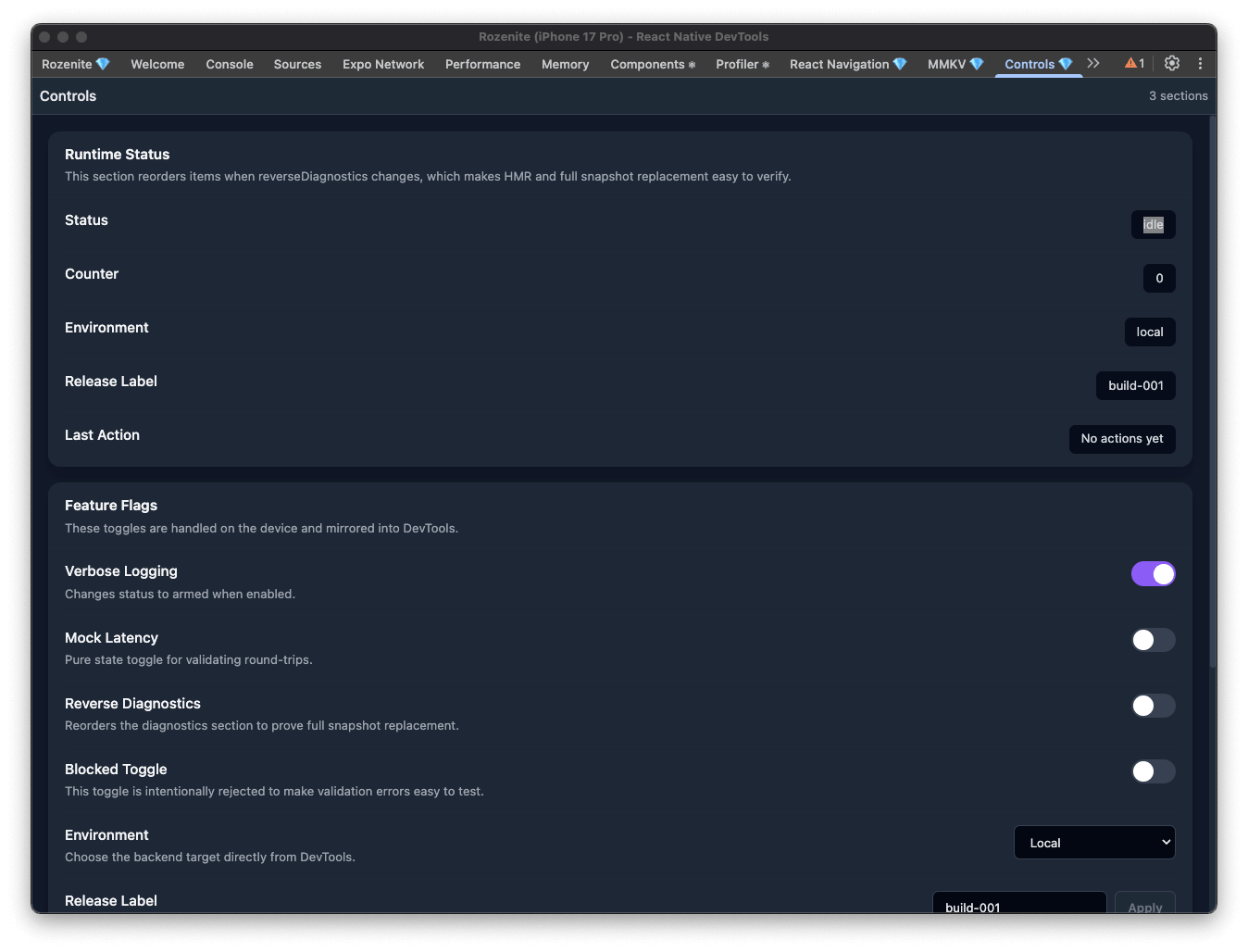
The Controls Plugin lets you create a custom control panel for your app inside Rozenite. You define sections and items on the device, then use DevTools to read runtime values, flip toggles, switch options, submit text input, and trigger actions without building extra debug screens.
Installation
npm install @rozenite/controls-pluginUsage
import { createSection, useRozeniteControlsPlugin } from '@rozenite/controls-plugin';
import { useMemo, useState } from 'react';

function App() {
  const [verboseLogging, setVerboseLogging] = useState(false);
  const [environment, setEnvironment] = useState('local');
  const [releaseLabel, setReleaseLabel] = useState('build-001');

  const sections = useMemo(
    () => [
      createSection({
        id: 'runtime-status',
        title: 'Runtime Status',
        items: [
          {
            id: 'current-environment',
            type: 'text',
            title: 'Environment',
            value: environment,
          },
          {
            id: 'verbose-logging',
            type: 'toggle',
            title: 'Verbose Logging',
            value: verboseLogging,
            onUpdate: setVerboseLogging,
          },
          {
            id: 'environment-selector',
            type: 'select',
            title: 'Environment',
            value: environment,
            options: [
              { label: 'Local', value: 'local' },
              { label: 'Staging', value: 'staging' },
              { label: 'Production', value: 'production' },
            ],
            onUpdate: setEnvironment,
          },
          {
            id: 'release-label',
            type: 'input',
            title: 'Release Label',
            value: releaseLabel,
            placeholder: 'build-001',
            applyLabel: 'Apply',
            onUpdate: setReleaseLabel,
          },
          {
            id: 'reset-session',
            type: 'button',
            title: 'Reset Session',
            actionLabel: 'Reset',
            onPress: () => {
              setVerboseLogging(false);
              setEnvironment('local');
              setReleaseLabel('build-001');
            },
          },
        ],
      }),
    ],
    [environment, releaseLabel, verboseLogging]
  );

  useRozeniteControlsPlugin({ sections });

  return <YourApp />;
}
You can also call the hook from multiple components. Each active hook instance contributes sections to the same panel:
function LocaleControls() {
  useRozeniteControlsPlugin((previousOptions) => ({
    sections: [
      ...previousOptions.sections,
      createSection({
        id: 'locale',
        title: 'Locale',
        items: [
          {
            id: 'language',
            type: 'select',
            title: 'Language',
            value: 'en',
            options: [
              { label: 'English', value: 'en' },
              { label: 'Polish', value: 'pl' },
            ],
            onUpdate: (language) => {
              i18n.changeLanguage(language);
            },
          },
        ],
      }),
    ],
  }));

  return null;
}
Supported Controls
text: Show read-only runtime values such as current environment, build label, or connection status.toggle: Enable or disable boolean flags from DevTools.select: Switch between predefined options such as backend targets or feature variants.input: Edit text values and apply them from DevTools.button: Trigger one-off actions such as reset, sync, refetch, or clear cache.
Organizing the Panel
Group related controls into sections so the panel stays readable as your app grows:
- Use one section for read-only diagnostics and another for mutable settings.
- Keep labels short and descriptive so they scan well in DevTools.
- Add
descriptionwhen a control changes app behavior in a non-obvious way. - Use stable
idvalues so controls remain predictable across reloads.
Validation and Disabled States
Controls can guide users toward safe actions:
- Use
validateto block invalid values and show a clear error message in DevTools. - Use
disabledwhen a control should be visible but unavailable in the current state. - For text input,
applyLabelcan make the action clearer than a generic submit button.
Notes
- The panel appears in React Native DevTools as
Controls. - Updates flow both ways: local state changes are reflected in DevTools, and DevTools actions update the device.
- The hook is disabled in production builds.