
@rozenite/performance-monitor-plugin
v2.4.0
Published
Performance Monitor for Rozenite.
Downloads
248,015


Readme
A Rozenite plugin that provides real-time React Native performance monitoring and metrics visualization in DevTools.




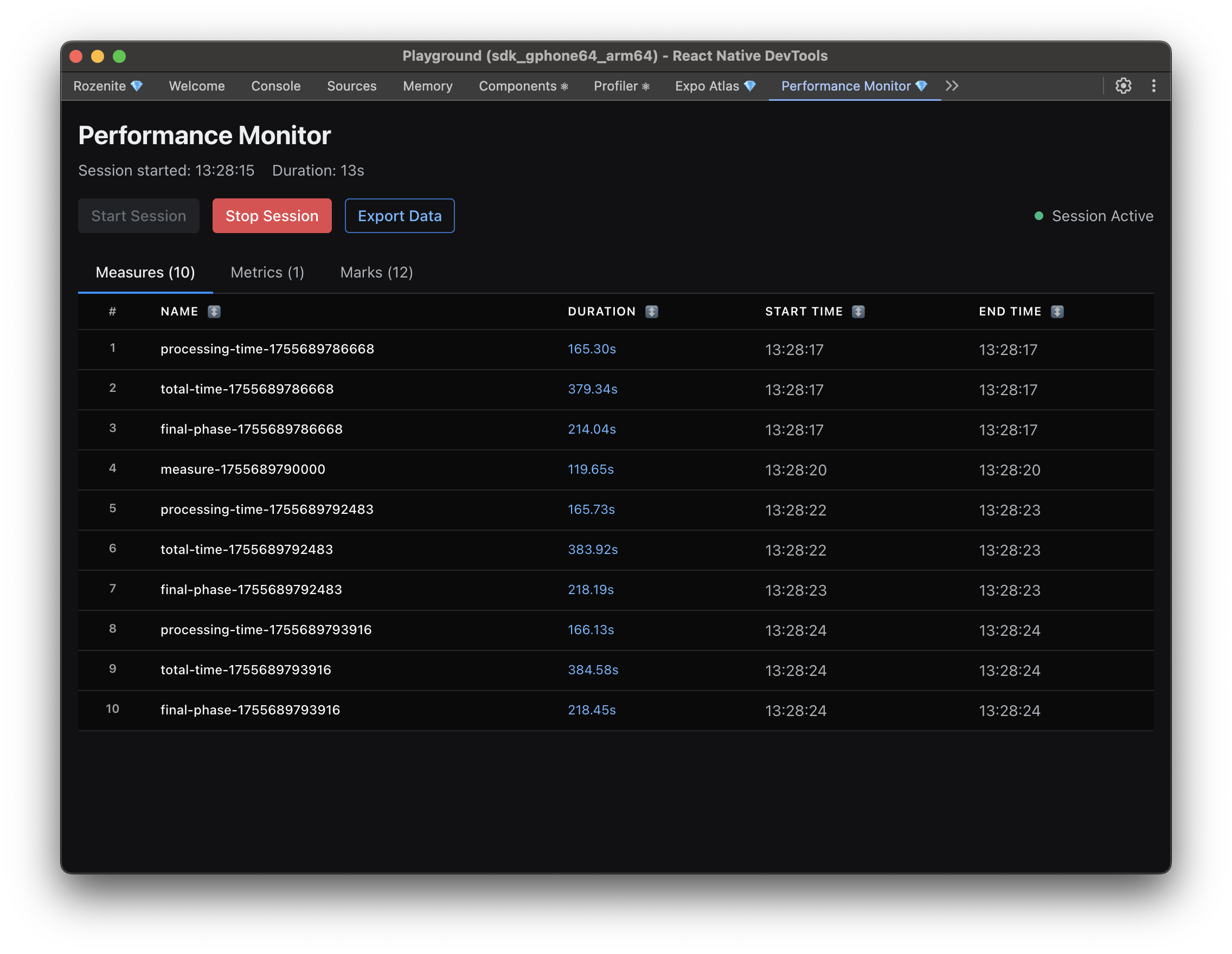
The Rozenite Performance Monitor Plugin offers comprehensive real-time monitoring of React Native performance metrics within your DevTools environment. It's based on the react-native-performance library and tracks performance marks, measures, and metrics to help you identify bottlenecks and optimize your app's performance. Any marks, measures, or metrics you emit using the react-native-performance library will automatically appear in the DevTools interface.
Features
- Real-time Performance Monitoring: Live tracking of performance marks, measures, and metrics
- Session Management: Start/stop monitoring sessions with real-time duration tracking
- Performance Measures: Track custom performance measurements with details
- Performance Marks: Monitor key performance milestones and events
- Performance Metrics: Real-time metrics with values and details
- Data Export: Export performance data for analysis
- Production Safety: Automatically disabled in production builds
Installation
Install the Performance Monitor plugin and its peer dependencies:
npm install @rozenite/performance-monitor-plugin react-native-performanceQuick Start
1. Install the Plugin
npm install @rozenite/performance-monitor-plugin react-native-performance2. Integrate with Your React Native App
Add the DevTools hook to your React Native app:
// App.tsx
import { usePerformanceMonitorDevTools } from '@rozenite/performance-monitor-plugin';

function App() {
  // Enable Performance Monitor DevTools in development
  usePerformanceMonitorDevTools();

  return (
    // Your app components
  );
}
3. Access DevTools
Start your development server and open React Native DevTools. You'll find the "Performance Monitor" panel in the DevTools interface.
Usage
Basic Integration
The plugin automatically integrates with your existing React Native setup:
import { usePerformanceMonitorDevTools } from '@rozenite/performance-monitor-plugin';

function App() {
  // DevTools are automatically enabled in development
  usePerformanceMonitorDevTools();

  return <YourApp />;
}
Using Performance API
The plugin is based on the react-native-performance library and works with React Native's Performance API. Any marks, measures, or metrics you emit using the react-native-performance library will automatically appear in the DevTools interface. You can add custom performance marks and measures:
import performance from 'react-native-performance';

// Add performance marks
performance.mark('app-start');
performance.mark('data-loaded');

// Measure performance between marks
performance.measure('app-initialization', 'app-start', 'data-loaded');

// Add custom metrics
performance.metric('custom-metric', 42, { detail: 'Additional info' });
Performance Data Types
Performance Marks
- Purpose: Mark specific points in time for performance analysis
- Use Cases: App startup, data loading, user interactions
- Example:
performance.mark('user-login-complete')
Performance Measures
- Purpose: Measure duration between two marks or specific time periods
- Details: Can include additional context information
- Example:
performance.measure('login-duration', 'login-start', 'login-end')
Performance Metrics
- Purpose: Track specific performance indicators
- Values: Can be strings or numbers
- Details: Can include additional context information
- Example:
performance.metric('memory-usage', 1024, { unit: 'MB' })
Made with ❤️ at Callstack
rozenite is an open source project and will always remain free to use. If you think it's cool, please star it 🌟.
Callstack is a group of React and React Native geeks, contact us at [email protected] if you need any help with these or just want to say hi!
Like the project? ⚛️ Join the team who does amazing stuff for clients and drives React Native Open Source! 🔥