
@rozenite/react-navigation-plugin
v2.4.0
Published
React Navigation for Rozenite.


Readme

A Rozenite plugin that provides comprehensive React Navigation debugging and inspection for React Native applications.




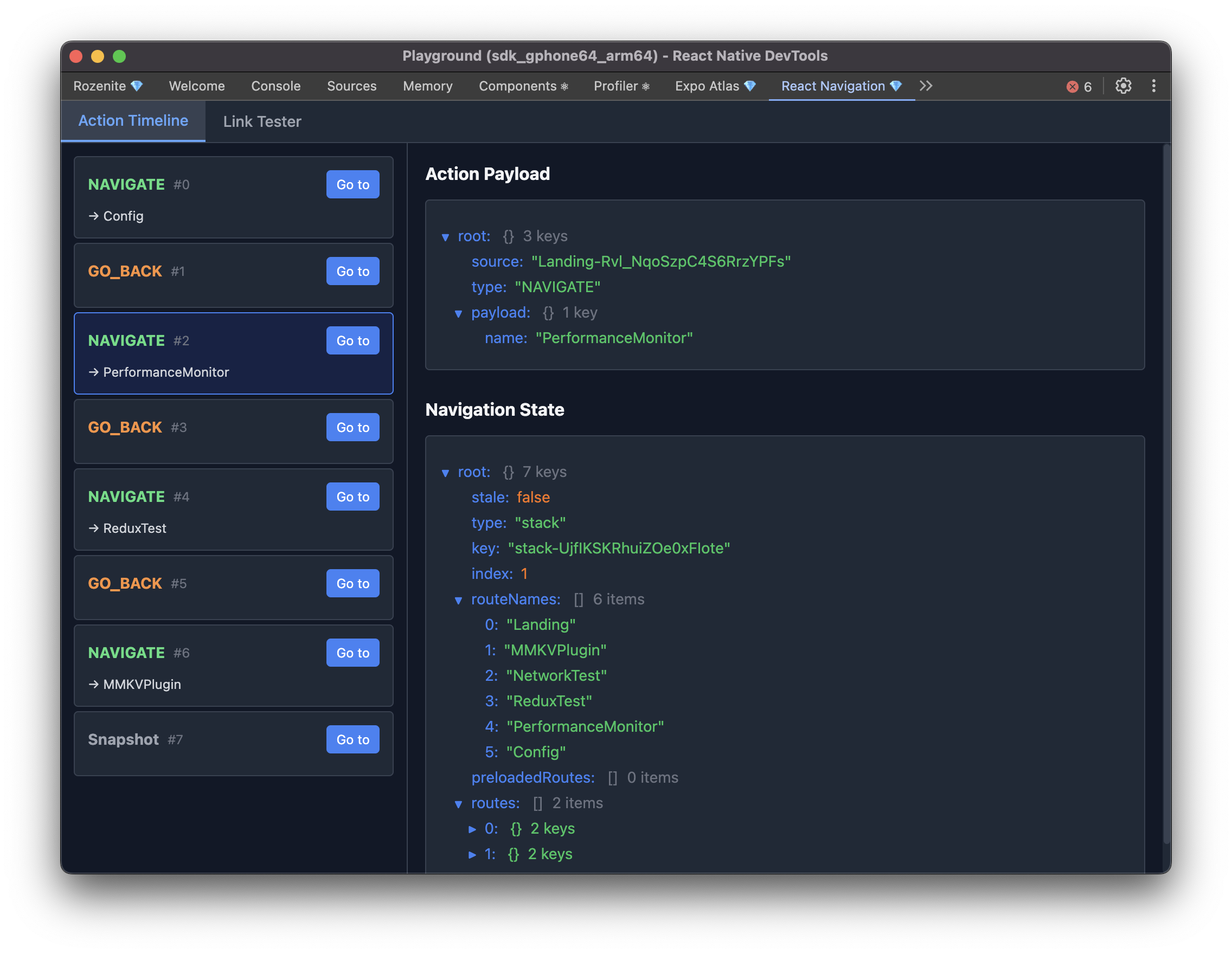
The Rozenite React Navigation Plugin provides real-time navigation state monitoring, action timeline inspection, and deep linking testing within your React Native DevTools environment. It offers comprehensive navigation debugging capabilities for React Navigation v7.
Features
- Action Timeline: Track all navigation actions in real-time with detailed history
- State Inspection: View and analyze navigation state at any point in time
- Time Travel Debugging: Jump back to any previous navigation state
- Deep Link Testing: Test and validate deep links directly from DevTools
- Real-time Updates: See navigation changes as they happen in your app
- Production Safety: Automatically disabled in production builds
Installation
Install the React Navigation plugin as a dependency:
npm install @rozenite/react-navigation-pluginQuick Start
1. Install the Plugin
npm install @rozenite/react-navigation-plugin2. Integrate with Your App
With react-navigation
Add the DevTools hook to your React Native app with a reference to your NavigationContainer:
// App.tsx
import React, { useRef } from 'react';
import { NavigationContainer } from '@react-navigation/native';
import { useReactNavigationDevTools } from '@rozenite/react-navigation-plugin';

function App() {
  const navigationRef = useRef(null);

  // Enable React Navigation DevTools in development
  useReactNavigationDevTools({ ref: navigationRef });

  return (
    <NavigationContainer ref={navigationRef}>
      <YourAppNavigator />
    </NavigationContainer>
  );
}
With expo-router
Add the DevTools hook to your root _layout file with a reference to your NavigationContainer:
// _layout.tsx
import { Stack, useNavigationContainerRef } from 'expo-router';
import { useReactNavigationDevTools } from '@rozenite/react-navigation-plugin';

function App() {
  const navigationRef = useNavigationContainerRef();

  // Enable React Navigation DevTools in development
  useReactNavigationDevTools({ ref: navigationRef });

  return <Stack />;
}
3. Access DevTools
Start your development server and open React Native DevTools. You'll find the "React Navigation" panel in the DevTools interface.
Agent Tools (LLM Integration)
When this plugin is active, it registers agent tools under the @rozenite/react-navigation-plugin domain. This lets LLMs inspect current navigation state and interact with navigation just like the DevTools panel.
Available tools:
navigate: high-level route navigation by route name with optional params.go-back: high-level back navigation (countdefaults to1).get-root-state: returns{ state, hasState }.get-focused-route: returns focused route details (routePath,focusedRoute,navigatorPath,params).list-actions: returns paginated action history (offset,limit,total,items).reset-root: resets navigation state to a provided snapshot.open-link: opens a deep link URL.dispatch-action: low-level arbitrary React Navigation action dispatch (for exampleNAVIGATEorJUMP_TO).
The action history used for agent tool reads is an in-memory rolling buffer (newest first) capped at 100 entries.
Made with ❤️ at Callstack
rozenite is an open source project and will always remain free to use. If you think it's cool, please star it 🌟.
Callstack is a group of React and React Native geeks, contact us at [email protected] if you need any help with these or just want to say hi!
Like the project? ⚛️ Join the team who does amazing stuff for clients and drives React Native Open Source! 🔥