
@rozenite/redux-devtools-plugin
v2.4.0
Published
Redux DevTools for Rozenite.


Readme
A Rozenite plugin that provides Redux DevTools integration for React Native applications.




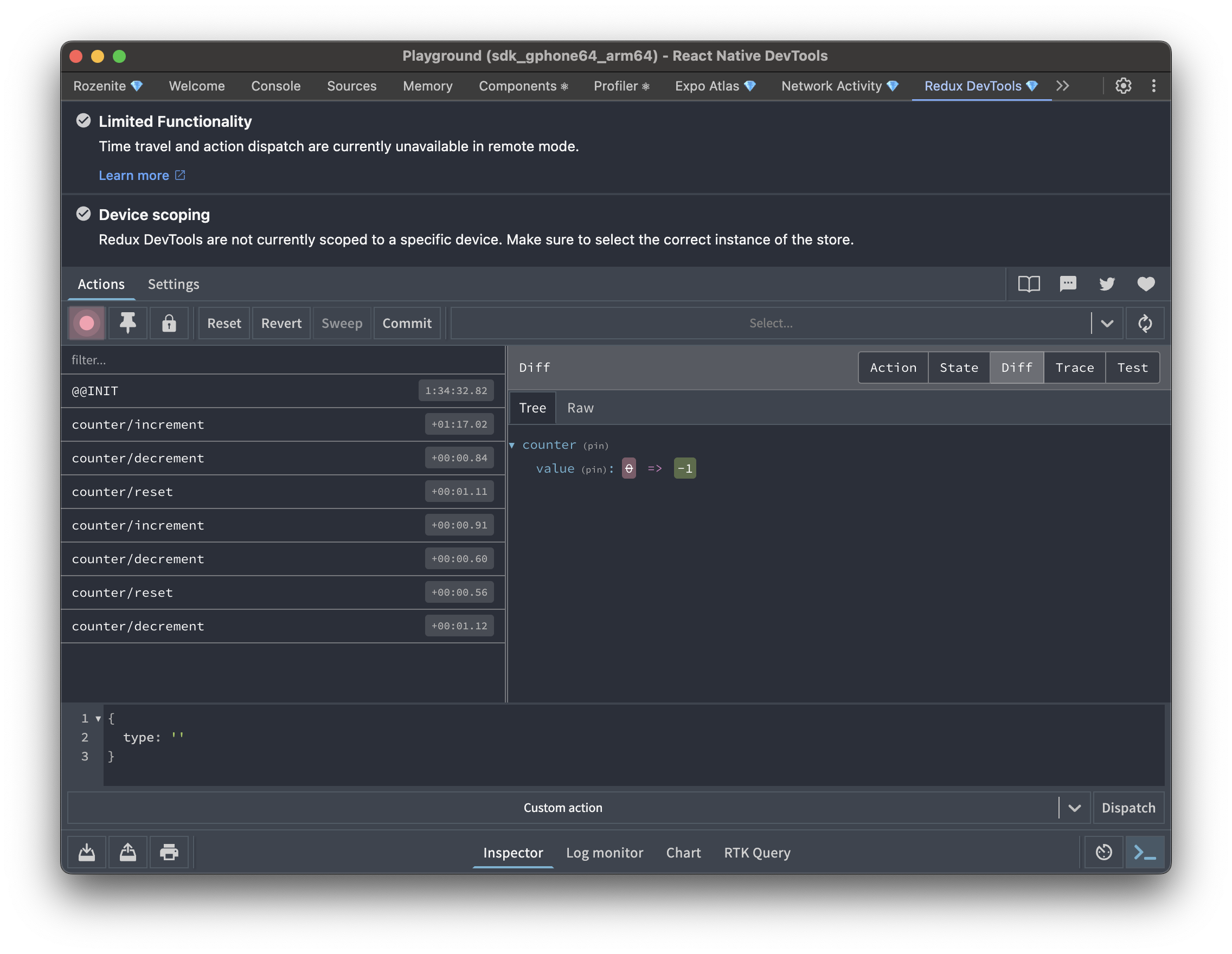
The Rozenite Redux DevTools Plugin provides Redux state inspection and debugging capabilities within your React Native DevTools environment, including action dispatch and time-travel controls.
Features
- Redux State Inspection: View and explore your Redux store state in real-time
- Action History: Track all dispatched actions with timestamps and payloads
- State Diff Viewing: See exactly how each action changes your state
- Agent Tools: Expose Redux state inspection and curated history-control tools to coding agents
- Production Safety: Automatically disabled in production builds
Installation
1. Install the Plugin
Install the Redux DevTools plugin:
npm install -D @rozenite/redux-devtools-plugin2. Set up the Store Enhancer
Add the Redux DevTools enhancer to your Redux store:
For Redux Toolkit (Recommended)
// store.ts
import { configureStore } from '@reduxjs/toolkit';
import { rozeniteDevToolsEnhancer } from '@rozenite/redux-devtools-plugin';
import rootReducer from './reducers';

const store = configureStore({
  reducer: rootReducer,
  enhancers: (getDefaultEnhancers) =>
    getDefaultEnhancers().concat(rozeniteDevToolsEnhancer()),
});

export default store;
For Classic Redux
// store.ts
import { createStore, applyMiddleware } from 'redux';
import { rozeniteDevToolsEnhancer } from '@rozenite/redux-devtools-plugin';
import rootReducer from './reducers';

const store = createStore(
  rootReducer,
  applyMiddleware(/* your middleware */),
  rozeniteDevToolsEnhancer()
);

export default store;
Configuration Options
To distinguish multiple stores, set a custom name per store:
const appStoreEnhancer = rozeniteDevToolsEnhancer({ name: 'app-store' });
const sessionStoreEnhancer = rozeniteDevToolsEnhancer({ name: 'session-store' });
maxAge controls how many actions Redux DevTools keeps in history. The default is 50.
On React Native, state is serialized and sent to DevTools over the device bridge. Large stores combined with a high maxAge can use a lot of memory — on Android this may cause an out-of-memory crash when opening the Redux DevTools panel. If your store is large (for example, it includes RTK Query caches or big entity maps), keep maxAge low and use stateSanitizer or actionSanitizer to strip bulky slices before they are sent to DevTools.
rozeniteDevToolsEnhancer({
  maxAge: 20,
  stateSanitizer: (state, index) => ({
    ...(state as Record<string, unknown>),
    api: '[omitted]',
  }),
  actionSanitizer: (action, id) => ({
    ...action,
    payload: action.type === 'large/payload' ? '[omitted]' : action.payload,
  }),
})
trace captures the dispatch stack for each action and enables the Trace tab. Rozenite will also try to symbolicate the stack through Metro so React Native traces point to source files instead of generated bundle locations.
rozeniteDevToolsEnhancer({
  trace: true,
  traceLimit: 25,
})
Set traceSymbolication: false to keep the raw stack without calling Metro's /symbolicate endpoint.
3. Access DevTools
Start your development server and open React Native DevTools. You'll find the "Redux DevTools" panel in the DevTools interface.
Agent Tools (LLM Integration)
Agent support is a separate manual integration step. Adding the store enhancer is not enough by itself.
If you want agents to use Redux DevTools, you must mount the hook once near your app root by hand:
import { useReduxDevToolsAgentTools } from '@rozenite/redux-devtools-plugin';

function App() {
  useReduxDevToolsAgentTools();

  return <YourApp />;
}
This manually registers tools under the @rozenite/redux-devtools-plugin domain.
Without this hook, the Redux DevTools panel will still work in DevTools, but the Redux domain will not appear for agents.
Available tools:
list-storesget-store-statelist-actionsget-action-detailsdispatch-actionjump-to-actiontoggle-actionreset-historyrollback-statecommit-current-statesweep-skipped-actionsset-recording-pausedset-locked
The public agent surface intentionally excludes raw eval-based action execution and raw lifted-state import.
Made with ❤️ at Callstack
rozenite is an open source project and will always remain free to use. If you think it's cool, please star it 🌟.
Callstack is a group of React and React Native geeks, contact us at [email protected] if you need any help with these or just want to say hi!
Like the project? ⚛️ Join the team who does amazing stuff for clients and drives React Native Open Source! 🔥