
@runkids/figlens
v0.9.3
Published
Read local Figma designs with CLI, MCP, Pi, OpenCode and OMP integrations.
Downloads
3,488

Maintainers
 runkids
Readme
Figma designs your coding agent can read
Give your agent a saved .fig. figlens reads its layout, text, styles and assets on the machine where the agent runs, including a remote host or CI. Reading the local file needs no Figma app, Figma sign-in or Figma API calls.
Your agent can inspect the design's measurements, extract icons and images, and implement with your project's components. A frame bundle brings the structured design, assets and reference render together for a portable handoff.
Start with Pi
Requires Pi 1.3.0+. The package includes the CLI, MCP connection, extension and agent skill:
pi install npm:@runkids/figlensRestart Pi or run /reload, then ask. Replace "task board" with a screen from your design:
Build the task board from ./design.fig in this project.
Find the matching frame, use this project's components and image workflow,
then compare the running UI with the design and fix confirmed differences.
Report missing assets and any checks you could not run.
Export design.fig with Figma's File > Save local copy and place it in the project on the agent's machine. Pi resolves frame IDs itself; no manual /figlens open or separate global CLI install is required.
| Your task | Pi command |
|---|---|
| Plan only the requested scope | /figlens plan <request> |
| Plan, implement, check and correct | /figlens yolo <request> |
| Browse a saved design | /figlens preview ./design.fig |
The packaged skill guides the agent to follow existing project conventions, check fonts and image delivery, compare the running UI with the design and fix confirmed differences. It reports remaining gaps and checks it could not run. YOLO asks the agent to remove only its run-created temporary plan after successful verification; existing plans and failed or blocked work are preserved. These are agent instructions, not a guarantee of model behavior or visual fidelity.
Pi walkthrough · Pi package catalog
See Pi build the screen
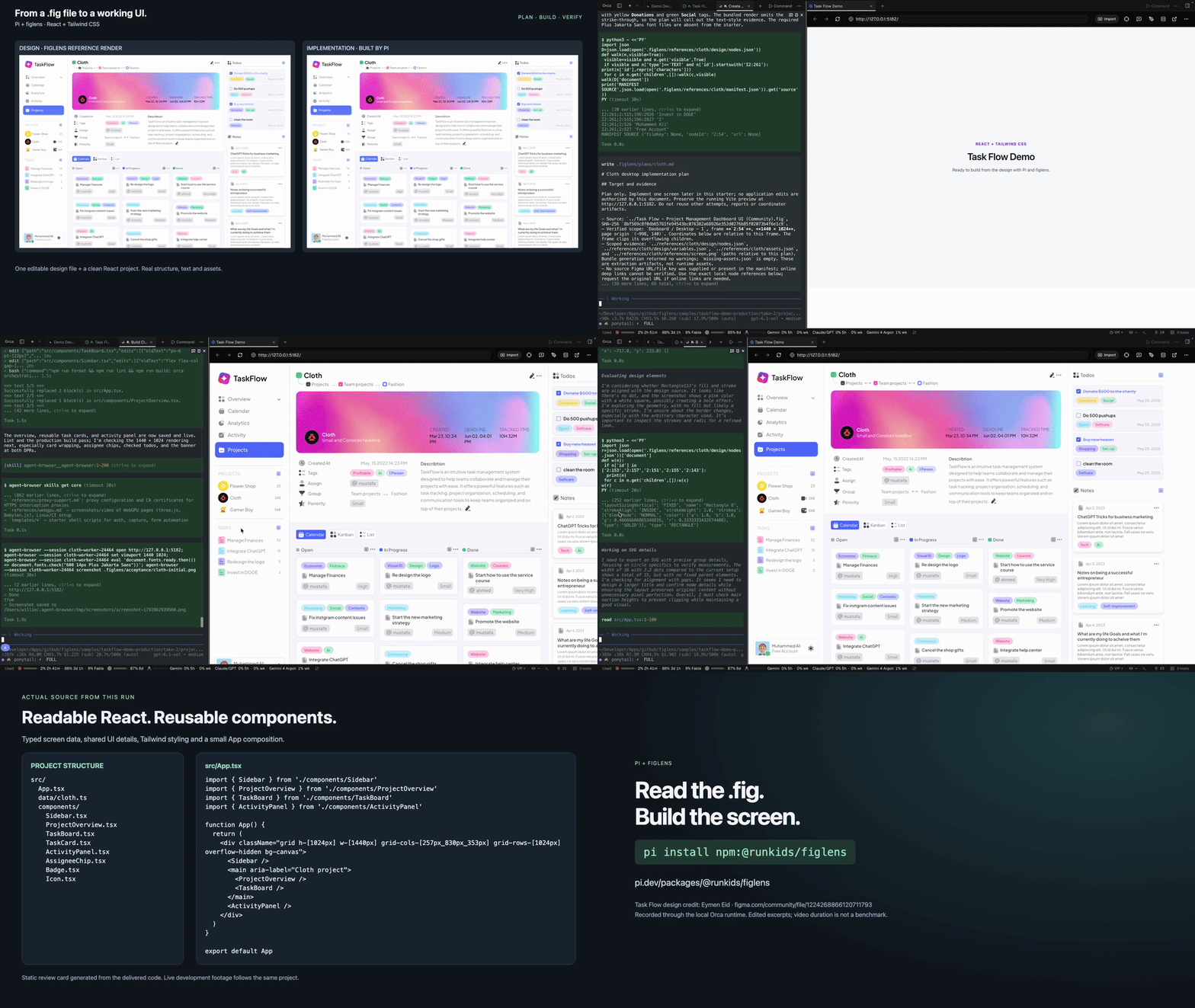
Looping GIF at 3× the edited video’s playback speed. Click it for the full 78-second video.
Watch the 78-second demo. Pi uses /figlens plan to read one Cloth dashboard frame from a local .fig, builds it with React and Tailwind CSS, then checks and corrects the running UI. The video shows Pi and the live browser together, followed by the actual component structure. Edited time-lapse; video length is not a performance benchmark or a promise of pixel-perfect output. Design credit, source and recording notes.
OpenCode V2 and OMP
The same package includes independent entries for OpenCode V2 2.2.0 and OMP 18.13.2. OpenCode V2: opencode plugin add @runkids/figlens. OMP: omp plugin install @runkids/figlens.
The integrations share the CLI launcher, skill and component mapping file. Restart the host, then run /figlens help.
Use with another agent
Connect the local MCP server to your client:
{ "mcpServers": { "figlens": { "command": "npx", "args": ["-y", "@runkids/figlens", "mcp"] } } }For Claude Code on macOS/Linux:
claude mcp add --transport stdio --scope local figlens -- npx -y @runkids/figlens mcpFor Codex CLI on macOS/Linux:
codex mcp add figlens -- npx -y @runkids/figlens mcpStart a new session and check /mcp. The MCP workflow tool includes on-demand guidance for design reading, project reuse, existing-UI audits, image preparation, scoped planning and explicitly requested autonomous implementation. It shares the portable skill's sources; no separate skill install is required for MCP use. The agent carries out the task with its own project/browser tools and host permissions; reading a guide does not execute the workflow.
Run the CLI
Node.js 18+; macOS, Linux and Windows:
npx @runkids/figlens preview design.fig
npx @runkids/figlens tree design.fig --depth 2
npx @runkids/figlens nodes design.fig 12:345 > frame.json
npx @runkids/figlens bundle design.fig 12:345 frame.zip
npx @runkids/figlens export design.fig 12:345 icon.svg
npx @runkids/figlens export design.fig 12:345 frame.png --scale 2
npx @runkids/figlens workflow build   # agent guidance, same as the MCP workflow tool
npx @runkids/figlens workflow audit   # compare existing UI; fixes require a fix request
Replace 12:345 with a node ID from the tree. A bundle contains design JSON, variables, assets, reference render and context.md instructions. The viewer also exports a standalone offline HTML snapshot: preview design.fig 12:345 --out preview.html.
The first launch downloads the matching native release binary, verifies it against the release's SHA256SUMS and caches it. Initial setup needs npm and GitHub access; subsequent local parsing works offline. Your model provider and project dependencies may still require network access. You can also install once with npm install -g @runkids/figlens and run figlens.
What to check
.fig is a snapshot: design updates need a new export. Some assets and fonts may be unavailable, and the independent parser/renderer has known gaps, including native Dev Mode annotations. Check the source, output and missing-asset report before claiming a visual match. Exporting or sharing a design requires its owner's permission; the tool's MIT license does not license the design or its assets.
Full documentation, limitations and standalone installs · Report a reproducible issue
MIT license.