
@rupa-ui/react-native
v0.2.1
Published
React Native components (Android and iOS) for the Rupa design system, themed by @rupa-ui/tokens.

Maintainers
 raihanevanza_
Readme
@rupa-ui/react-native
Storybook · GitHub · @rupa-ui/tokens · @rupa-ui/react · @rupa-ui/react-native
React Native components (Android and iOS) for the Rupa design system, themed by the same @rupa-ui/tokens as the web package, so a screen looks the same in the app and in the browser.
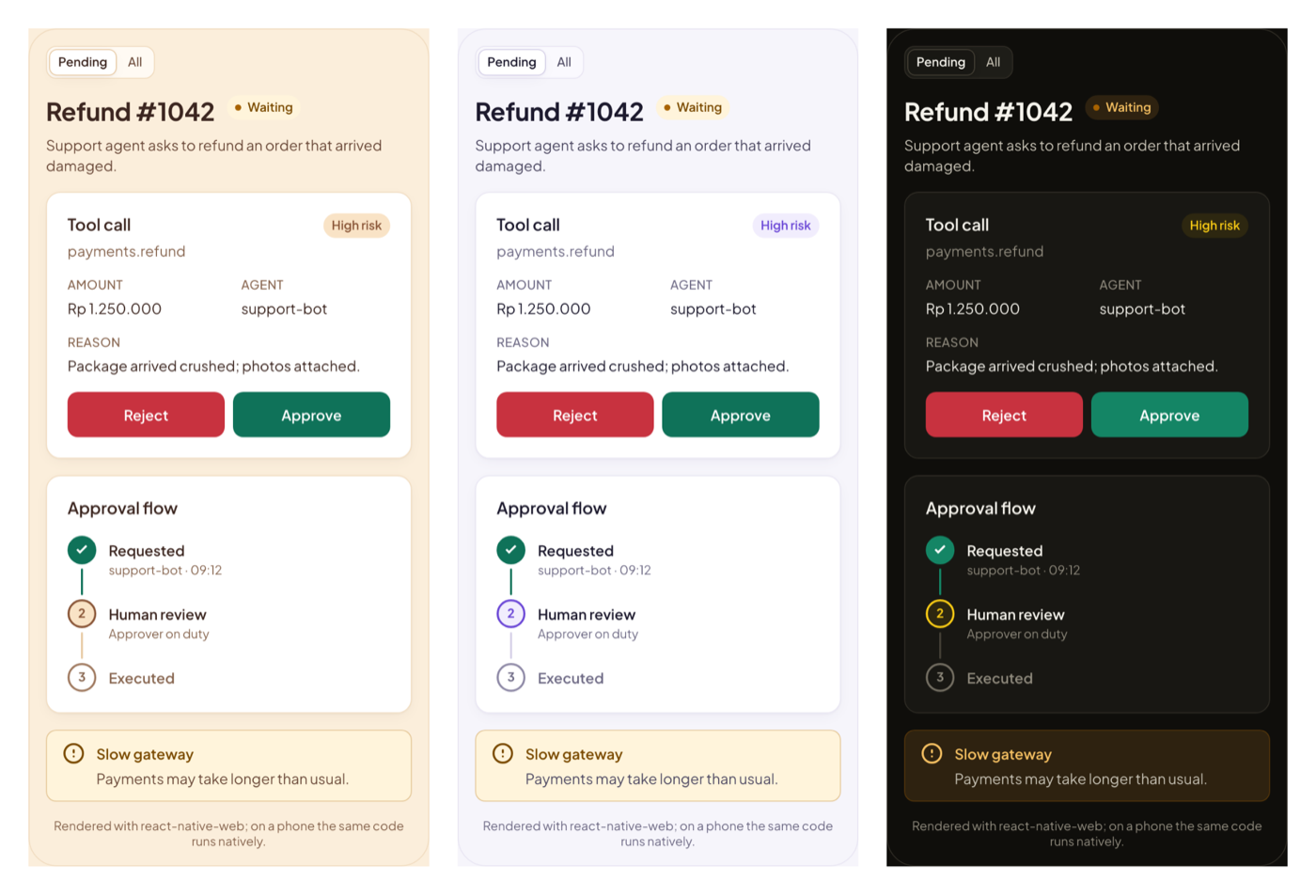
Live examples in Storybook: every component rendered with react-native-web, in every brand and mode. On a phone the same code runs natively.
npm install @rupa-ui/react-nativeRequires React Native 0.76+ (New Architecture, for boxShadow) and React 18.3+. No native modules: nothing to link, works in Expo Go.
Set up
Wrap the app once. mode="system" follows the phone's light/dark setting and updates when it changes.
import { ThemeProvider } from '@rupa-ui/react-native'

export default function App() {
  return (
    <ThemeProvider defaultBrand="signal" defaultMode="system">
      <Navigation />
    </ThemeProvider>
  )
}
Components still render without a provider (violet brand, OS light/dark), but useTheme() needs one.
Font
Components ask for Plus Jakarta Sans by file name (PlusJakartaSans-SemiBold, one family per weight so Android never double-bolds). With Expo:
import {
  useFonts,
  PlusJakartaSans_400Regular,
  PlusJakartaSans_500Medium,
  PlusJakartaSans_600SemiBold,
  PlusJakartaSans_700Bold,
} from '@expo-google-fonts/plus-jakarta-sans'

const [loaded] = useFonts({
  'PlusJakartaSans-Regular': PlusJakartaSans_400Regular,
  'PlusJakartaSans-Medium': PlusJakartaSans_500Medium,
  'PlusJakartaSans-SemiBold': PlusJakartaSans_600SemiBold,
  'PlusJakartaSans-Bold': PlusJakartaSans_700Bold,
})
In a bare React Native app, put the four .ttf files in assets/fonts and run npx react-native-asset. To skip the font entirely, use <ThemeProvider fonts="system">.
Remembering the choice
The provider does not pick a storage library for you. Control it and save with yours:
const [mode, setMode] = useMMKVString('theme-mode') // or AsyncStorage

<ThemeProvider mode={(mode as ThemeMode) ?? 'system'} onModeChange={setMode}>
Use
import { Badge, Button, Card, ConfirmDialog, InfoList, useTheme } from '@rupa-ui/react-native'

function RequestScreen() {
  const { palette, font } = useTheme()
  const [open, setOpen] = useState(false)
  return (
    <ScrollView style={{ backgroundColor: palette.canvas }}>
      <Card
        title="Refund"
        actions={
          <Badge tone="warning" pulse>
            Waiting
          </Badge>
        }
      >
        <InfoList items={[{ label: 'Amount', value: 'Rp 1.250.000' }]} />
        <Button variant="primary" block onPress={() => setOpen(true)}>
          Approve
        </Button>
      </Card>
      <ConfirmDialog
        open={open}
        onOpenChange={setOpen}
        tone="success"
        title="Approve this refund?"
        confirmLabel="Approve"
        onConfirm={() => api.approve(id)} // throw to keep it open and show the error
      />
    </ScrollView>
  )
}
useTheme() also gives you palette (every semantic color), shadows, font(weight), brand, mode, resolvedMode, setBrand, and setMode for your own styles.
Components
| Component | Props (same as @rupa-ui/react unless noted) |
| ------------- | --------------------------------------------------------------------------------------------------------------------------------------------------- |
| Button | variant, size, loading, iconStart, iconEnd, block, onPress. Icons can be (color) => node to match the label (lucide-react-native). |
| Badge | tone, dot, pulse (stops under Reduce Motion), size |
| Card | title, description, actions, padding |
| PageHeader | title, description, meta, actions. No breadcrumb: the navigation header does that on mobile. |
| InfoList | items, columns (default 1 on mobile), emptyValue |
| StatusFlow | steps, current, outcome, completed, stateLabels, orientation (default vertical on mobile) |
| Segmented | options, value, onChange, label, size, block |
| MultiSelect | label, options, value, onChange, placeholder, searchable, hint, error, labels. Opens a bottom sheet instead of a popup. |
| ConfirmDialog | open, onOpenChange, title, description, tone, confirmLabel, cancelLabel, onConfirm, errorMessage. No trigger: open it yourself. |
| Alert | tone, title, action, live |
| StateView | state: loading \| empty \| error, title, description, icon, action, onRetry, retryLabel, compact |
| Spinner | label, size, color |
Every component forwards ref, style, and testID. Every built-in label (Cancel, Try again, Completed…) can be replaced through props for bilingual apps.
Accessibility
- 44 pt touch targets (small buttons reach it with
hitSlop). - Roles and states for VoiceOver and TalkBack:
buttonwith busy/disabled/expanded,radioandcheckboxwith checked,header,alert. - ConfirmDialog moves screen reader focus to its title, ignores the Android back button and backdrop while the action runs, and runs
onConfirmonce even on a double tap. - MultiSelect options are checkboxes; the trigger speaks the label, the choice, and how many are chosen, screen reader focus moves to the sheet title and back, and the number of matches is announced after a search.
- Errors (live Alert, error StateView) are announced on both platforms.
- Status is never color alone: Badge has text, StatusFlow has a mark and a spoken state per step.
- Text scales with the system font size.
Try it
examples/mobile in the repo is an Expo app that runs against these sources:
npm run build -w @rupa-ui/tokens
cd examples/mobile && npm install && npm run ios   # or: npm run android