
@salemaljebaly/payload-plugin-rbac-ui
v0.5.0
Published
Reusable RBAC permissions UI and helpers for Payload CMS

Maintainers
 salemaljebaly
Readme
@salemaljebaly/payload-plugin-rbac-ui



RBAC permissions matrix UI for Payload CMS. Injects a grouped checkbox UI into your Roles collection and validates saved permissions against an auto-discovered allow-list.
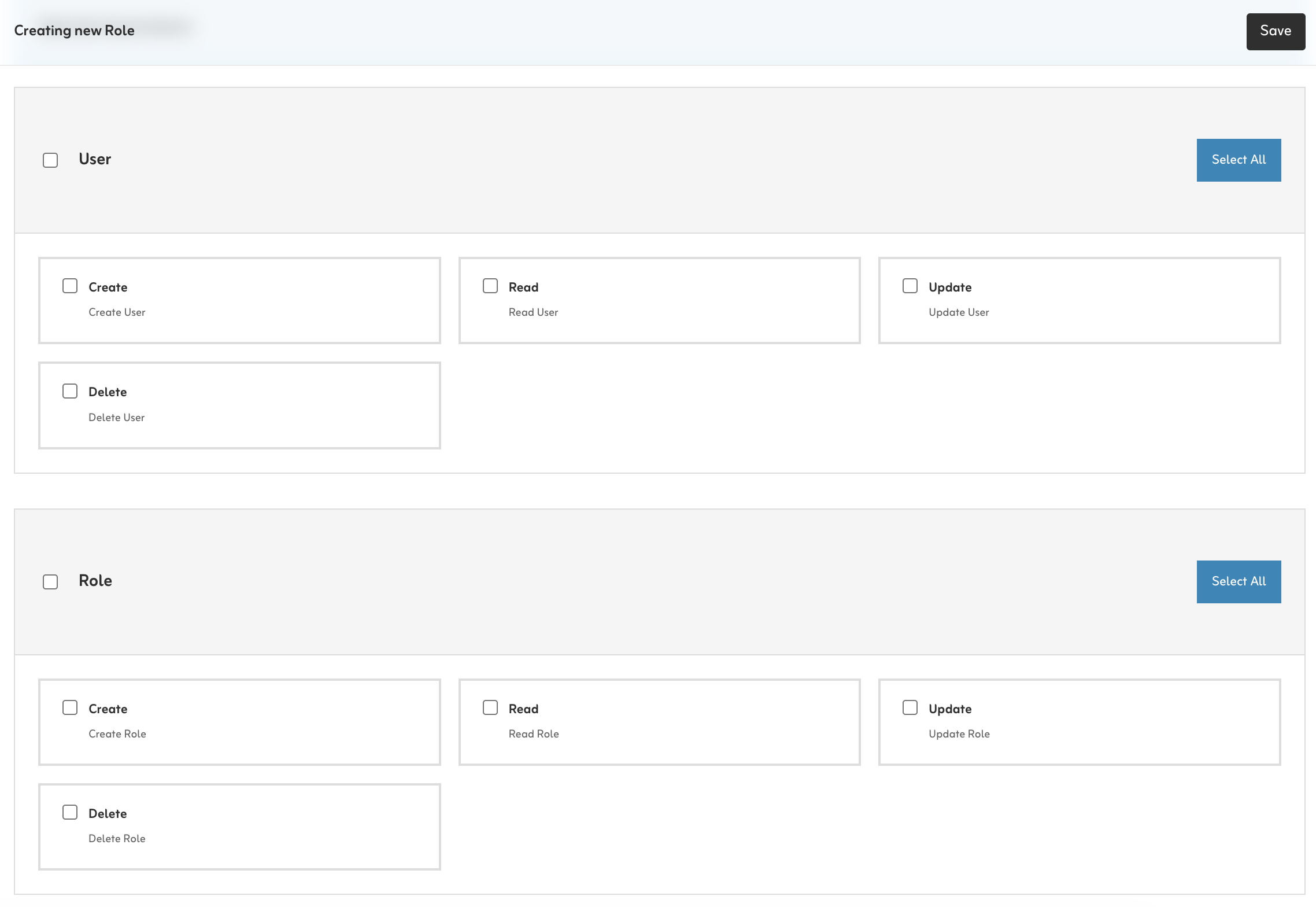
Install
pnpm add @salemaljebaly/payload-plugin-rbac-ui
# or
npm install @salemaljebaly/payload-plugin-rbac-ui
Setup
1. Access helpers
Create these helpers first — they are used in the collections below.
// src/access/index.ts
import type { Access } from 'payload'

/** Check if user is a super admin (bypasses all permission checks). */
export function isSuperAdmin(user: any): boolean {
  return user?.superAdmin === true
}

/** Check if user has a specific permission in any of their roles. */
export function hasPermission(user: any, permission: string): boolean {
  if (!user?.roles) return false
  const roles = Array.isArray(user.roles) ? user.roles : [user.roles]
  return roles.some((role: any) => {
    const permissions = typeof role === 'object' ? role?.permissions : null
    return Array.isArray(permissions) && permissions.includes(permission)
  })
}

/** Use in collection access — super admins always pass, others need the permission. */
export const checkPermission =
  (permission: string): Access =>
  ({ req: { user } }) =>
    isSuperAdmin(user) || hasPermission(user, permission)
2. Users collection
Add a superAdmin flag and a roles relationship to your Users collection:
// src/collections/Users.ts
fields: [
  {
    name: 'superAdmin',
    type: 'checkbox',
    defaultValue: false,
    access: {
      // Only super admins can grant super admin access
      update: ({ req: { user } }) => isSuperAdmin(user),
    },
    admin: { description: 'Grants full access, bypasses all permission checks.' },
  },
  {
    name: 'roles',
    type: 'relationship',
    relationTo: 'roles',
    hasMany: true,
    saveToJWT: true, // Required — without this, hasPermission() always returns false
  },
]
3. Roles collection
// src/collections/Roles.ts
import type { CollectionConfig } from 'payload'
import { isSuperAdmin } from '../access'

export const Roles: CollectionConfig = {
  slug: 'roles',
  admin: { useAsTitle: 'name' },
  access: {
    read:   ({ req: { user } }) => isSuperAdmin(user),
    create: ({ req: { user } }) => isSuperAdmin(user),
    update: ({ req: { user } }) => isSuperAdmin(user),
    delete: ({ req: { user } }) => isSuperAdmin(user),
  },
  fields: [
    { name: 'name', type: 'text', required: true, unique: true },
    { name: 'description', type: 'textarea' },
    // 'permissions' field is injected automatically by the plugin
  ],
}
4. Add the plugin
// src/payload.config.ts
import { rbacUIPlugin } from '@salemaljebaly/payload-plugin-rbac-ui'

export default buildConfig({
  collections: [Users, Roles, Posts /* ... */],
  plugins: [
    rbacUIPlugin({
      rolesCollectionSlug: 'roles',
      autoDiscover: true,
    }),
  ],
})
5. Generate the import map
After adding the plugin, run this once so Payload registers the permissions UI component:
pnpm payload generate:importmap
# or: npx payload generate:importmap
Re-run this whenever you add or remove Payload plugins with custom UI.
6. Enforce permissions on your collections
The plugin does not protect your collections automatically. You must add
checkPermission(orisSuperAdmin) to every collection you want to gate. Any collection without a customaccessrule remains visible and accessible to all authenticated users.Not sure what string to pass? Complete the first setup (step 7), then open any Role in the admin UI — all generated permission strings are listed there.
Apply to every collection — including Media:
// src/collections/Posts.ts
import { checkPermission } from '../access'

access: {
  create: checkPermission('Create:Post'),
  read:   checkPermission('Read:Post'),
  update: checkPermission('Update:Post'),
  delete: checkPermission('Delete:Post'),
}
7. First setup
No one has superAdmin: true yet, so no one can access the Roles collection. Bootstrap by adding a temporary seed route:
// src/app/seed/route.ts  — REMOVE IN PRODUCTION
import configPromise from '@payload-config'
import { getPayload } from 'payload'

export const GET = async () => {
  const payload = await getPayload({ config: configPromise })
  const { docs } = await payload.find({ collection: 'users', limit: 1, sort: 'createdAt' })
  if (!docs[0]) return Response.json({ error: 'Create an account first.' }, { status: 404 })
  await payload.update({
    collection: 'users',
    id: docs[0].id,
    data: { superAdmin: true } as any,
    overrideAccess: true,
  })
  return Response.json({ message: 'Done! Log out and back in.', email: docs[0].email })
}- Start your dev server, create your account at
/admin/create-first-user - Visit
http://localhost:3000/seed— your account is nowsuperAdmin - Log out and back in so the JWT refreshes
- Delete the seed route before deploying
The re-login step is required — the
superAdminflag is read from the JWT on each request.
Permission string format
| Type | Slug | Generated strings |
|------------|--------------|----------------------------------------------------------|
| Collection | posts | Create:Post, Read:Post, Update:Post, Delete:Post |
| Collection | categories | Create:Category, Read:Category, … |
| Global | settings | Read:Global:Setting, Update:Global:Setting |
Rule: slug → singularize → PascalCase. Open the Roles admin UI to see the exact strings for your app.
Hybrid mode (auto + custom)
rbacUIPlugin({
  autoDiscover: true,
  permissionGroups: [
    {
      label: 'Post',
      permissions: [
        { action: 'Publish', description: 'Publish posts', permission: 'Publish:Post' },
      ],
    },
  ],
})
Auto-discovered and manual groups with the same label are merged.
Options
| Option | Default | Description |
|--------|---------|-------------|
| rolesCollectionSlug | 'roles' | Slug of your roles collection |
| permissionsFieldName | 'permissions' | Field name to inject/patch |
| permissionGroups | [] | Manual permission groups |
| autoDiscover | false | true or config object (see below) |
| rolesFieldDescription | — | Description shown under the field |
| ensurePermissionsField | true | Auto-add field if missing. Set false to skip |
| customFieldPath | — | Override the React component path |
| onConfigureRolesCollection | — | Callback to modify the final collection config |
autoDiscover options
| Option | Default | Description |
|--------|---------|-------------|
| collections | true | Discover from collections |
| globals | true | Discover from globals |
| collectionActions | ['Create','Read','Update','Delete'] | Actions per collection |
| globalActions | ['Read','Update'] | Actions per global |
| includeRolesCollection | true | Include the roles collection itself. Set false to exclude — permissions like Create:Role won't be in the allow-list, so don't use them in seed data |
| formatPermission(ctx) | — | ctx: { action: string, slug: string, source: 'collection' \| 'global' } → string |
| formatGroupLabel(ctx) | — | ctx: { slug: string, source: 'collection' \| 'global' } → string |
Compatibility
- Payload:
^3.76.1 - React:
^19 - Next.js:
>=15.2.9 <15.3.0 || >=15.3.9 <15.4.0 || >=15.4.11 <15.5.0 || >=16.2.0-canary.10 <17.0.0
Development
pnpm install
pnpm build
pnpm typecheck
pnpm test
Contributing
- Fork and branch from
main. - Make focused changes with tests.
- Run
pnpm build && pnpm typecheck && pnpm test. - Open a PR with clear before/after context.
See CONTRIBUTING.md for details.
Releasing
pnpm version patch   # or minor / major
pnpm publish --access public
git tag -a vX.Y.Z -m "Release vX.Y.Z"
git push origin vX.Y.Z