
@salyra-ui/theme-studio
v1.0.1
Published
Theme editing, generation, contexts, presets, persistence and selected token exports
Downloads
897


Readme
@salyra-ui/theme-studio
Theme generation and composition, depending on color-picker. Optional fetching and storage, scoped CSS, SSR-safe per-provider state, separate loading content and fallback theme.
V1 composition
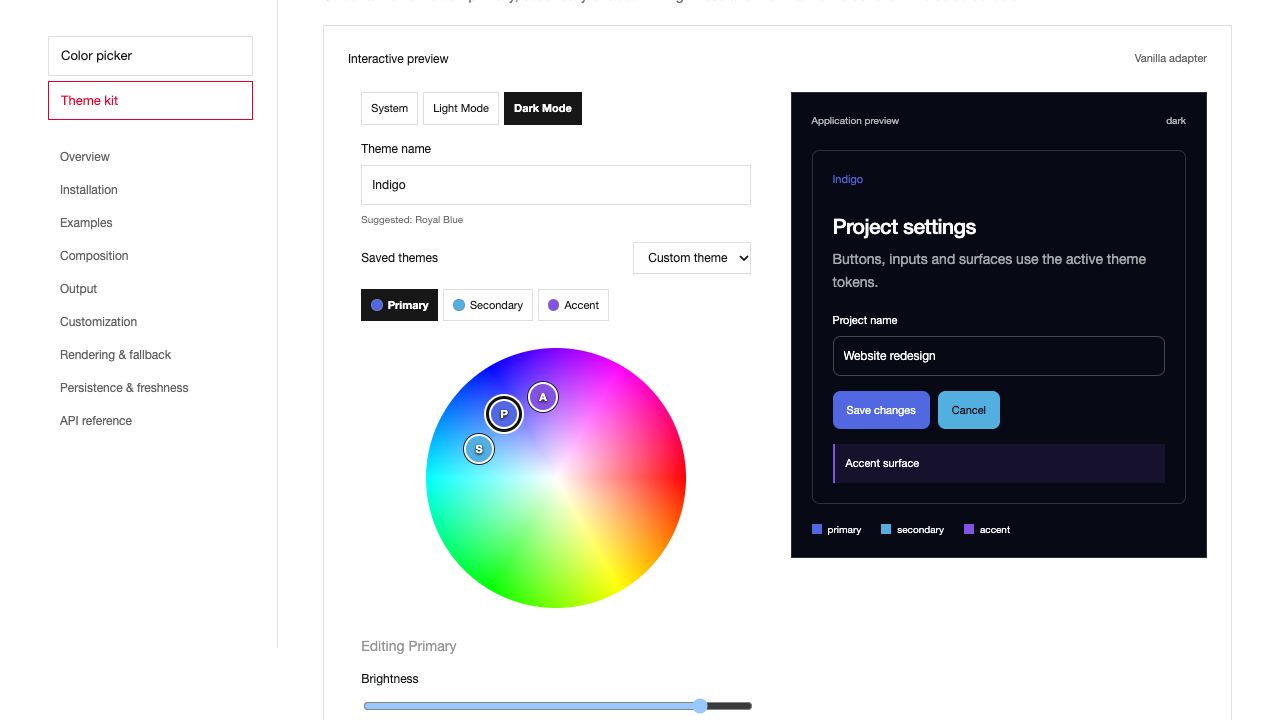
Version 1.0.0 separates context and behavior from your editor markup. The examples below use the published composition API.
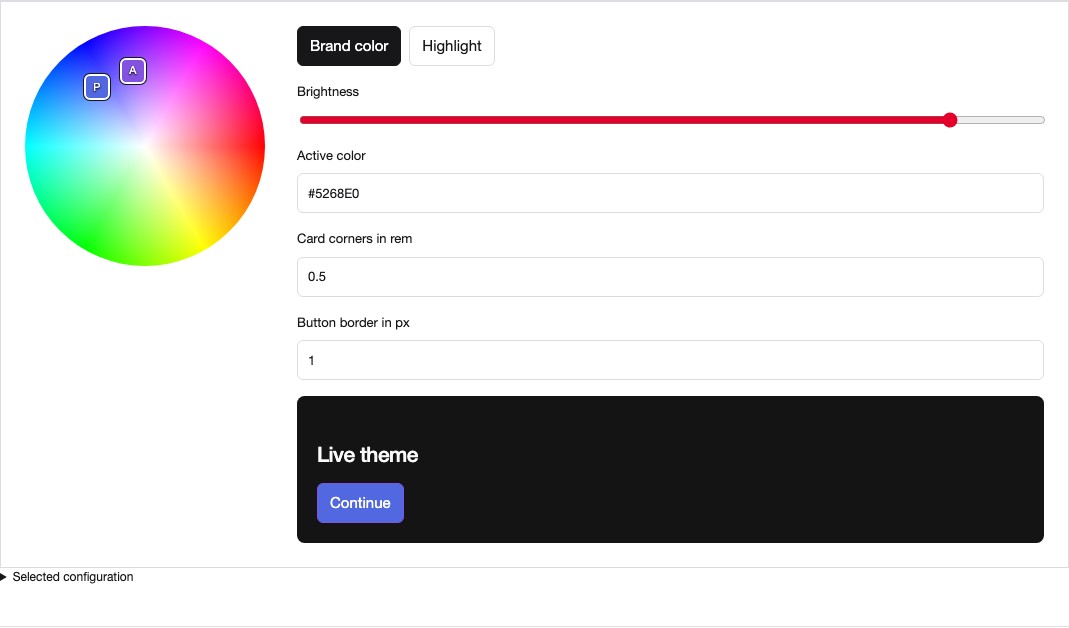
ThemeStudio.Root owns theme state and lifecycle. ThemeStudio.Scope applies CSS variables where you need them. ThemeStudio.PickerRoot connects selected theme roles to Color Picker controls. These are separate responsibilities, so the context can live above an editor without forcing its layout or styling every child.
import { ColorPicker } from '@salyra-ui/color-picker/react';
import { ThemeStudio, ThemeExport } from '@salyra-ui/theme-studio/react';
import { createThemeStore, generateTheme } from '@salyra-ui/theme-studio';

const store = createThemeStore({
  theme: generateTheme('#5268E0'),
  mode: 'dark',
  selection: {
    roles: ['primary', 'accent'],
    radius: ['card'],
    width: ['button'],
  },
});

<ThemeStudio.Root store={store}>
  <ThemeStudio.Scope className="theme-preview">
    <ThemeStudio.PickerRoot roles={['primary', 'accent']}>
      <ThemeStudio.RoleTrigger role="primary">
        Brand color
      </ThemeStudio.RoleTrigger>
      <ThemeStudio.RoleTrigger role="accent">Highlight</ThemeStudio.RoleTrigger>
      <ThemeStudio.Wheel className="theme-wheel" />
      <ColorPicker.Slider channel="v" aria-label="Brightness" />
      <ColorPicker.Input format="hex" />
      <label>
        Card corners in rem
        <ThemeStudio.GeometryInput kind="radius" target="card" />
      </label>
      <label>
        Button border in px
        <ThemeStudio.GeometryInput kind="width" target="button" />
      </label>
      <ThemeExport />
    </ThemeStudio.PickerRoot>
  </ThemeStudio.Scope>
</ThemeStudio.Root>;
Create a store per component or server request. Set an explicit selection when the server-rendered export must already contain only those tokens. After mounting, picker roots and geometry inputs register their own roles and targets. Unmounting a part removes its field registration. themeConfiguration(store.getSnapshot()) returns the selected configuration, JSON and CSS without requiring an export component.
The shared wheel uses the Color Picker surface and marker behavior. For a custom marker, compose ColorPicker.Marker inside ThemeStudio.Wheel and use useThemePicker() to read its marker data. Its position and color come from the selected role, while its label, shape and classes belong to the application. A single-role wheel can use a small unlabeled thumb.
React, Svelte and Vue expose the composition object and individual parts. Angular exposes native directives tkRoot, tkScope, tkPickerRoot, tkRoleTrigger and tkGeometry. Astro uses individual components, with an explicit initial theme for server-rendered controls. For Vanilla, mountThemeControls(root, store, options) connects existing HTML and returns the picker, configuration reader and cleanup function. bindThemeScope(element, store) applies the theme variables separately.
Headless compositions require only your own CSS. Ready-made presets such as ThemePicker, ThemePalette and ThemeExport use the optional package stylesheet. The package CSS includes the Color Picker preset styles.
Full examples for all six integrations
Provider composition
ThemeProvider is the ready composition of ThemeRoot and ThemeVariableScope. Root creates or receives the store and owns loading, storage, mode persistence and cleanup. Scope applies theme variables and state attributes. The ready provider adds a disabled controls boundary. All parts read the closest context.
Use ThemeStudio.Root and ThemeStudio.Scope directly in React, Svelte or Vue when you want your own layout. Root renders no wrapper. You can place multiple Scopes under one Root. Angular uses tkRoot and tkScope directives on your own elements. Its ready provider uses those same directives.
import { ThemeProvider, generateTheme } from '@salyra-ui/theme-studio/react';

<ThemeProvider
  theme={generateTheme('#5268E0')}
  modeStorage={false}
  className="app-theme"
  scopeProps={{ id: 'app-theme', 'aria-label': 'Themed application' }}
>
  <Application />
</ThemeProvider>;
Svelte and Vue forward native attributes to the scope. React and Svelte expose the scope element with ref and bind:ref. Use store methods for updates after initialization.
Astro receives serializable options. Its context component is ThemeRoot.astro, and its CSS boundary is ThemeVariableScope.astro. Pass the same options to both to seed matching server output. ThemeProvider.astro does this for you. Fetch starts in the browser and loading content is visible in the server output when a request or cache is pending.
Vanilla supports <tk-root> and <tk-scope> for declarative composition. <tk-provider> remains the ready scope recipe over the same root lifecycle. root.setStore(store, options) binds an existing store. Ordinary HTML can use mountThemeControls(element, store) and bindThemeScope(element, store) independently.
An app theme with a separate draft
Use one ThemeProvider for the application store. Nest ThemeStudio.Root with a different store, then put a ThemeStudio.Scope around the draft preview. A Scope by itself shares the nearest context and does not create separate state. Multiple scopes under the same Root all follow the same store.
<script lang="ts">
  import { onDestroy } from 'svelte';
  import { ColorPicker } from '@salyra-ui/color-picker/svelte';
  import {
    ThemeProvider,
    ThemeStudio,
    createThemeStore,
    createThemeEditor,
    generateTheme,
  } from '@salyra-ui/theme-studio/svelte';

  const applied = createThemeStore({
    theme: generateTheme('#5268E0'),
    modeStorage: false,
  });
  const editor = createThemeEditor(applied);
  onDestroy(() => editor.destroy());
</script>

<ThemeProvider store={applied} options={{ modeStorage: false }}>
  <button style="background:hsl(var(--primary))">Applied theme</button>
  <ThemeStudio.Root store={editor.store} options={{ modeStorage: false }}>
    <ThemeStudio.Scope class="draft-preview">
      <ThemeStudio.PickerRoot roles={['primary']}>
        <label>Primary<ColorPicker.Input format="hex" /></label>
      </ThemeStudio.PickerRoot>
      <button style="background:hsl(var(--primary))">Draft theme</button>
      <button onclick={() => editor.apply()}>Save</button>
      <button onclick={() => editor.cancel()}>Cancel</button>
    </ThemeStudio.Scope>
  </ThemeStudio.Root>
</ThemeProvider>
Save changes the applied store. Cancel restores the latest applied theme. Keep persistence on the applied store and Provider only. The example disables appearance storage in both scopes. apply() does not save to a backend. If a backend must accept the change first, save editor.store.getSnapshot().theme before applying. Handle an apply() conflict if the applied theme changed while the user was editing. apply({ force: true }) explicitly overwrites that update.
Create stores per mounted app or server request, rather than sharing user state through server module variables. Complete nested draft recipes for all six adapters include conflict feedback and owner cleanup.
Install
npm install @salyra-ui/theme-studioImport components from /react, /svelte, /vue, /angular, /astro or /vanilla. The package root exports the framework-independent core. Each framework entry also exports core helpers. Framework peers are optional. Only imported implementations enter your application bundle. Astro components use /astro/ThemeProvider.astro and the other individual component paths.
Core API: generateTheme, generatePalette, createThemeStore, parseTheme, themeStyle, themeVariables, fromLegacyTheme, toLegacyTheme, browserStorage.
<script>
  import { generateTheme } from '@salyra-ui/theme-studio';
  import {
    ThemeProvider,
    ThemeGenerator,
    ThemePalette,
  } from '@salyra-ui/theme-studio/svelte';
  import '@salyra-ui/theme-studio/styles.min.css';
  const theme = generateTheme('#6366f1');
</script>

<ThemeProvider options={{ theme }}>
  <ThemeGenerator />
  <ThemePalette />
</ThemeProvider>
Supplying theme is instant and standalone: no fetch or storage is required. fallbackTheme is applied automatically if a configured loader throws, returns invalid data or times out. Loading components are independent of that theme.
Read the workspace README for SSR, client fetch, failure, custom loading, persistence and all framework examples. Options initialize the provider; use useThemeStore().setTheme(theme) for later changes or remount for a new loader/configuration. loadTheme is called only after mounting or on explicit store.start()/reload().
ThemeLoading and ThemeReady accept arbitrary children. Ready includes fallback; ThemeError lets you expose a retry UI. ThemeGenerator is an optional composed example; combine color-picker primitives and store.generate(hex) to build your own controls. Angular consumers can compose their own <cp-provider> and connect (colorChange) to the theme store. CSS stays local to the provider's DOM subtree, including nested themes. Portals/teleports outside that subtree need their own provider/style variables.
Build independent packages with npm run build:packages. Publishable output is under release/; tarballs are produced by npm run pack:all. The theme core depends on @salyra-ui/color-picker, and framework entries import only the matching color picker entry. Release packages contain runtime files, types, styles and required framework components without sourcemaps.
Optional surfaces: generateTheme(seed, {background:'tinted'}) or store.setBackground('tinted') adds primary tint to light/dark backgrounds. ThemeBackground exposes the switch; neutral is the generated default. Imported themes retain their original backgrounds until explicitly changed.
Extended API
ThemeColor role="primary|secondary|accent" edits one palette; wheel enables the color wheel. ThemeHarmony selects analogous, triadic or split-complementary and generates the two companion colors on request. ThemeRadius / ThemeBorderWidth independently edit a target (DEFAULT, input, card, popover, button, table, picker). Width is px; radius is rem. All six adapters expose these components. The store provides setColor, setHarmony, generateHarmony and setBorder. selectThemeTokens(theme, {roles:["primary"], radius:["card"]}) exports only selected CSS tokens; generateThemeTokens(seed) exports primary only. The complete theme retains three roles; legacy semantic roles are stripped.
Composed picker views
ThemePicker adds three modes: area, wheel, shared-wheel (default). roles selects any nonempty subset of primary/secondary/accent; activeRole selects the initial editor. The role checkboxes and view selector are included in the default composition. Selection changes the shared brightness/format/channel editors without recoloring any palette. Edits change only the active role. One visible role uses a small anonymous dot; two/three roles have labeled markers. All wheel rendering and interactions come from color-picker/ColorWheel.
<ThemeProvider options={{ theme }}>
  <ThemePicker view="shared-wheel" roles={['primary', 'secondary', 'accent']} />
</ThemeProvider>
React/Svelte/Vue use ThemePicker; Angular exposes tk-picker with [roles], activeRole, view; Astro exports ThemePicker.astro (pass initial theme for matching SSR). createThemePickerStore(themeStore, options) provides independent formats, selection and retained HSV state per role. mount() subscribes to external theme changes and returns cleanup; adapters handle mounting automatically. picker.activeColor is a standard ColorStore, so arbitrary color-picker controls can edit the current role. React/Svelte/Vue may supply picker and replace the default controls via children/snippet/slot; Angular uses [store]="picker" and [custom]="true" with projected controls.
Theme lists and configured output
ThemeSelect themes={themes} applies the chosen Theme to the nearest context. Lists can be replaced; IDs must be unique. A manually edited theme shows “Custom theme” until it exactly matches an entry again. An empty list disables the selector. The simple ThemeSwatch remains available for custom list layouts.
ThemeExport reads that same context. Its default output is JSON; format="css" displays CSS declarations. The typed configuration is {theme, mode, tokens, css, json}. A selection filters theme, JSON, CSS and tokens together. Mounted editor parts register their roles and geometry fields automatically on the client. Pass an explicit selection to the provider and export component for a matching partial server export. Restore a partial export with store.setTheme(mergeThemeConfiguration(store.getSnapshot().theme, config.json)). The complete internal context is available as config.sourceTheme. Without a selection or registered editor fields, the export contains the full theme.
<script lang="ts">
  import {
    ThemeProvider,
    ThemePicker,
    ThemeSelect,
    ThemeExport,
  } from '@salyra-ui/theme-studio/svelte';
  import {
    generateTheme,
    type ThemeConfiguration,
  } from '@salyra-ui/theme-studio';
  const themes = [generateTheme('#6366f1'), generateTheme('#ef6b52')];
  let configured = $state<ThemeConfiguration>();
</script>

<ThemeProvider options={{ theme: themes[0] }}>
  <ThemeSelect {themes} />
  <ThemePicker />
  <ThemeExport
    onChange={(value) => {
      configured = value;
    }}
  />
</ThemeProvider>
For custom output, React accepts children(configuration), Svelte a children snippet, Vue a slot with {configuration}, Angular [custom]="true" with projected content and (configurationChange), Astro custom slot content with a bubbling configuration-change CustomEvent. React/Svelte use onChange; Vue uses @change. Events run on the client and report the initial configuration and later changes. Astro's ThemeExportElement also exposes .configuration. Without components, call themeConfiguration(store.getSnapshot(), selection?) whenever needed. Angular selectors are tk-select / tk-export; Astro files are ThemeSelect.astro / ThemeExport.astro (pass initial theme/mode for matching SSR).
A top-level ThemeProvider shares state with all descendant ThemePicker/ThemeGenerator/ThemeSelect instances, regardless of layout depth. The closest nested provider defines a separate scope. Standalone ColorPicker controls connect through their change callback or the ThemePicker's activeColor store. CSS applies inside the provider's DOM subtree; independent framework islands and portals outside it require explicit store/style wiring.
Cache freshness across applications
Storage and freshness are separate: browserStorage restores the last theme; a loader always revalidates on mount. An explicit server-rendered theme wins over old browser storage. browserStorage(key) now listens for changes in other same-origin tabs and applies valid themes without writing them back repeatedly. Removing the storage entry does not change the active theme.
import {
  browserStorage,
  createHttpThemeLoader,
  createThemeStore,
} from '@salyra-ui/theme-studio';
const loadTheme = createHttpThemeLoader('/api/themes/current');
const options = {
  // Supply a server-loaded theme here for immediate SSR when available.
  loadTheme,
  storage: browserStorage('my-app:current-theme'),
  revalidateOnFocus: true,
  revalidateIntervalMs: 30_000, // optional
};
const store = createThemeStore(options);
// Pass options + store to a native ThemeProvider; it mounts and cleans up watchers.
The HTTP helper expects a Theme JSON body on 200. With ETag support, it sends If-None-Match and reuses the last validated theme on 304; a changed ETag/body replaces it. Normal 200-only endpoints work too. .invalidate() clears the helper's conditional cache. Each loader instance belongs to a provider/user/endpoint; do not share one singleton between SSR requests. The helper's memory cache does not persist across reloads; the browser HTTP cache and browserStorage provide reload caching. Cross-origin APIs must allow the conditional request header and expose ETag; authenticated APIs can supply headers/credentials via the helper options.
For immediate changes from another application, connect backend notifications:
import { watchThemeUpdates } from '@salyra-ui/theme-studio';
const cleanup = watchThemeUpdates(store, {
  onFocus: true,
  subscribe(invalidate) {
    const events = new EventSource('/api/theme-events');
    events.addEventListener('theme-changed', invalidate);
    return () => events.close();
  },
});
// Call cleanup on component destruction; mount/start the store via the provider.
This is a client hook for your server's existing SSE/WebSocket protocol, not a bundled backend. Applications on different origins cannot share localStorage events; they must read a common authoritative API or receive its notifications. A backend can store themes in its database with a revision/updatedAt used as ETag. Redis is optional for server caching or distributing invalidation across server instances; when a theme is saved, invalidate that server cache and publish the revision notification. Redis itself does not update a browser's cached theme. Focus/interval refresh needs no realtime transport.
For React SSR, resolve remote data before constructing the store and initialize it with {theme: resolvedTheme, mode}. Its server snapshot is the immutable seed used for hydration. To render a configuration edited before SSR, construct a fresh store from configuration.sourceTheme and configuration.mode; client subscribers read the current live snapshot.
Protocol references: ETag and conditional requests, same-origin storage events, Redis Pub/Sub for backend invalidation.
Three persisted color modes and custom names
The selected modePreference is system, light or dark; snapshot mode is always resolved to light/dark. System follows matchMedia only after browser mount, with a deterministic systemMode SSR seed. Default preference is system. Default persistence uses localStorage key theme-studio:mode; use modeStorage: browserModeStorage('my-app:mode') to isolate applications, or modeStorage: false to disable it. Same-origin tabs synchronize. Storage errors do not break the UI.
ThemeMode value="dark" renders a selectable mode button with custom children (React), snippet (Svelte), slot (Vue/Astro) or ng-template (Angular). Without value it cycles system → light → dark. useThemeMode() exposes preference, resolvedMode, setMode and cycle for your own buttons/select/toggle. Svelte exposes a subscribable store; Vue uses computed refs, Angular signals, React plain current values. Vanilla uses themeModeActions(store) and snapshot fields.
ThemeName proposes the nearest primary color name but accepts an arbitrary name (up to 200 characters). store.setName('My theme') locks the name across palette/generator edits; store.setName() resets to suggested naming. The optional nameSource metadata survives theme JSON/cache round trips. generateTheme(seed, {name}) supplies a custom name. Configuration output includes the preference and resolved mode; JSON uses {theme, mode: modePreference, systemMode} for round trips.
Shade swatches and disabled editors
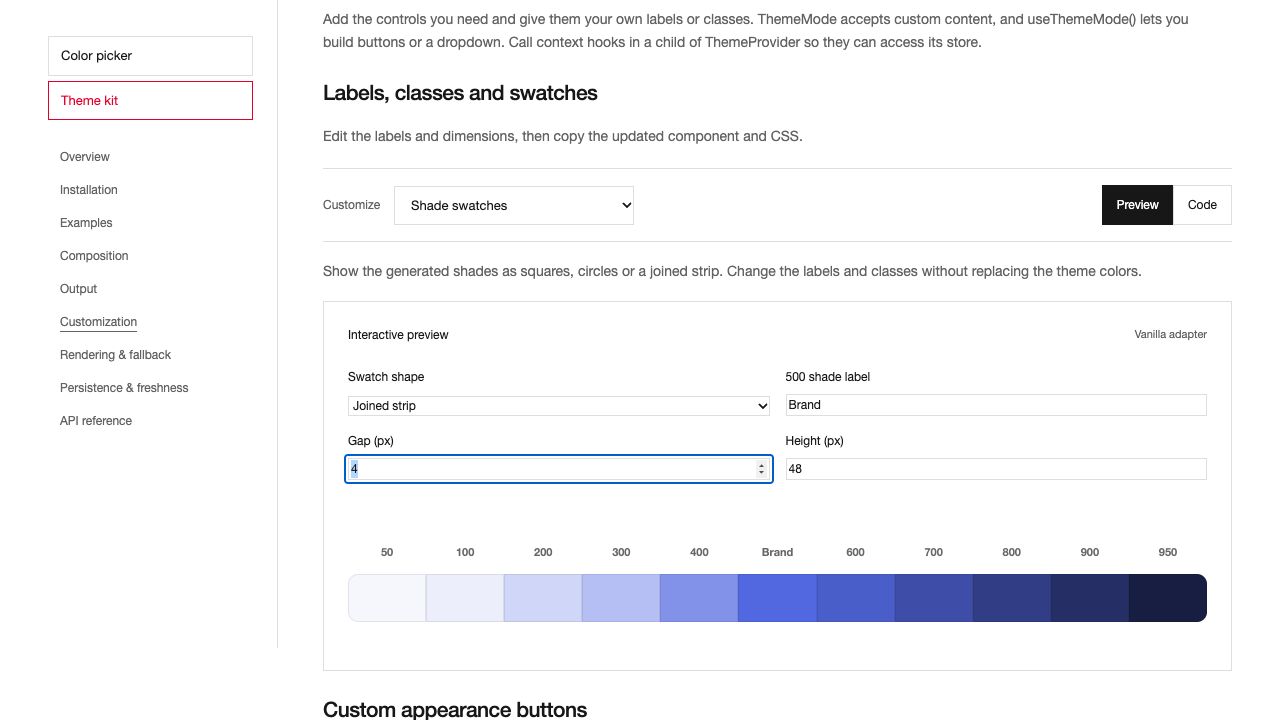
ThemePalette shows shades 50 through 950 for a role. Set shape to square, circle or joined. classes targets root, item, swatch and label. labels maps a shade to custom text, and shadeClasses styles individual shade items. The colors remain connected to the theme. Customize spacing and dimensions with --tk-palette-gap, --tk-swatch-height, --tk-swatch-radius and --tk-shade-label-size. Vanilla exposes themePaletteMarkup(role, options).
Pass disabled: true when creating the theme store or call store.setDisabled(true). The provider blocks editing and keeps the current values visible. Programmatic updates remain available. Use a provider scoped to the editor if the rest of the application should stay interactive.
A selection can contain roles, radius, width, background and modes. Radius and width targets are independent. With no modes, background JSON includes the resolved active mode. Set modes: ['light', 'dark'] to include both. Selected JSON is a partial theme, so merge it with an existing theme before passing it to a full-theme loader or storage adapter.
Production files
JavaScript runtime bundles and CSS are minified. The styles.css export loads styles.min.css, so existing imports work. Svelte, Vue and Astro retain their compiler inputs and type syntax with compact scripts. Declaration files remain readable. No sourcemaps are included.
Vanilla includes readable and minified browser bundles, browser/theme-studio.js and browser/theme-studio.min.js. The default ESM entry is minified. Import /vanilla/standard for the readable ESM entry, or /styles.standard.css for readable CSS.
Migration from theme kit
Install @salyra-ui/theme-studio. Replace @sebytza23/theme-kit-FRAMEWORK with @salyra-ui/theme-studio/FRAMEWORK and @sebytza23/theme-kit with @salyra-ui/theme-studio. Import CSS from the base package. Component and helper names remain available, including ThemeProvider, ThemeGenerator and mountThemeKit. Browser bundles now expose the ThemeStudio global and use the theme-studio.js or theme-studio.min.js filenames. Use explicit storage keys to retain an existing application's cache keys during migration.
Draft editing, history and generation locks
import { createThemeStore, createThemeEditor } from '@salyra-ui/theme-studio';
import { mountHistory } from '@salyra-ui/color-picker';

const applied = createThemeStore({ theme: savedTheme });
const editor = createThemeEditor(applied, { locked: ['accent'] });
// Pass applied to the application provider and editor.store to the editing provider.
// On client mount:
const detach = mountHistory(editorElement, editor.history);

editor.store.setColor('primary', '#123456');
editor.store.generateHarmony();
editor.apply();
editor.history.undo();
editor.cancel();

// On unmount:
detach();
editor.destroy();
Draft edits and appearance changes stay separate from the applied theme and its persistence. apply() commits them. cancel() loads the latest applied theme and resets history. getSnapshot() exposes dirty, conflict, live and locked. Use subscribe to update your controls.
If the applied theme changes while the draft has edits, conflict becomes true. Normal Apply throws rather than replacing that newer theme. Cancel loads the new theme. apply({force:true}) explicitly replaces it. setLive(true) commits the draft and then applies changes immediately. Resolve a conflict before enabling live mode.
setLocked(role, true) preserves that role during regeneration. Manual editing is still allowed. The primary, secondary, accent and background locks affect generation. Radius and border width values are already preserved by generation. Only visible selected roles are regenerated by default.
editor.history has undo, redo, begin, end, clear, getSnapshot and subscribe. A separate applied store can use createThemeHistory(store, {limit}) with the same API. System appearance updates, loading state, field registration and disabled state do not add history steps.
Tailwind output and theme format
themeConfiguration(snapshot).tailwind and ThemeExport format="tailwind" produce Tailwind 4 CSS. themeTailwind(snapshot, {selection, selector, darkSelector}) lets you choose scope selectors. The defaults are :root and .dark.
import { themeTailwind } from '@salyra-ui/theme-studio';
const css = themeTailwind(store.getSnapshot(), {
  selection: {
    roles: ['primary'],
    radius: ['card'],
    width: ['button'],
    background: true,
    modes: ['light', 'dark'],
  },
  selector: '.app-theme',
  darkSelector: '.app-theme[data-mode="dark"]',
});
Import the generated stylesheet after Tailwind. The selected fields map to utilities such as bg-primary, text-primary-foreground, rounded-card and border-button. Plain CSS output continues to work without Tailwind. Single-mode exports contain only that mode.
Current complete themes and partial configuration exports use schemaVersion: 1. parseTheme upgrades unversioned and version 0 inputs with the existing structure. Unsupported future versions fail validation. Use mergeThemeConfiguration(base, saved) for partial exports.
themeContrast(snapshot, role) returns the text/surface contrast result without changing the theme. createThemeCollection({limit, favorites, storage}) keeps recent and favorite complete themes. Call load() on client mount, remember(theme) after Apply and toggleFavorite(theme) for a favorite action. browserThemeCollectionStorage(key) provides optional persistence. Subscribe and pass the chosen list to the existing ThemeSelect component.
Complete examples for all six integrations
Editor control styling
Use --tk-control-height, --tk-control-radius, --tk-control-border, --tk-focus-color and --tk-gap on the editor wrapper. These style editor controls independently of generated radius and border-width tokens. Geometry inputs keep an incomplete draft while focused and write only valid values from 0 to 1000. Blur, Enter or Escape restores the current stored value. Radius uses rem and width uses px. Vanilla provider updates preserve unrelated inline styles and custom control variables.
Sample the active theme color
With Color Picker 1.0.1, place ColorPicker.EyeDropper inside ThemeStudio.PickerRoot, next to your active color fields. It uses the selected role's color context, so sampling updates that role only. Role selection, geometry and other colors stay unchanged. The button is optional and accepts your content and classes.
<ThemeStudio.PickerRoot roles={['primary', 'accent']}>
  <ThemeStudio.RoleTrigger role="primary">Brand</ThemeStudio.RoleTrigger>
  <ThemeStudio.RoleTrigger role="accent">Highlight</ThemeStudio.RoleTrigger>
  <ColorPicker.EyeDropper className="sample-button">
    Sample active color
  </ColorPicker.EyeDropper>
</ThemeStudio.PickerRoot>
Import ColorPicker from @salyra-ui/color-picker/react and ThemeStudio from @salyra-ui/theme-studio/react. Mount the picker inside a theme Root or Provider. See the Color Picker reference for sampling support, cancellation and the other framework adapters.