
@sammorrowdrums/mcpi-ext
v1.1.5
Published
MCP extension for mcpi — skills, tool-cli, and code mode behind one authorization boundary

Maintainers
 sammorrow
Readme
mcpi-ext


An extension for mcpi that gives an agent three ways to reach MCP servers — skills, tool-cli, and code mode — behind a single authorization boundary, so every call is authorized, audited, and gated in one place.
Each mechanism exists to spend only the context tokens a task actually needs. A large MCP server can publish hundreds of tools; loading all of their schemas into every request is expensive and degrades tool selection. These three mechanisms let the agent discover and call tools progressively instead.
- Skills — the server publishes a documented workflow that unlocks a curated tool set on demand.
- tool-cli — a shell on-ramp for progressive discovery: servers → tools → schema → call.
- Code mode — sandboxed JavaScript that chains MCP calls and exact computation inside a V8 isolate; writes pause for the same approval as every other surface.
Quick start
Requires @sammorrowdrums/[email protected] or newer: mcpi-ext declares a peer range of
>=0.85.2 <1.0.0, and requires @sammorrowdrums/tool-cli v1 for the bridge contract. Any mcpi-ext
1.x works; the commands below pin the current one.
The floor is 0.85.2 rather than 0.85.0 because progressive disclosure needs two host behaviours that
land in that patch: registration-time deferred metadata, so a direct tool proxy is genuinely hidden
from turn 0 rather than only after its first use, and tool_reference activation driven by
addedToolNames on a tool result. On an older host the extension still loads, but skill activation
reveals nothing and deferred definitions are not deferred — a silent degradation, which is why the
floor is expressed as a hard peer range rather than a note.
1. Check Node
Node.js >=22.13.0. Node 22 and 24 are both covered by CI.
node --version2. Install mcpi and tool-cli globally
mcpi and tool-cli are commands you run, so they belong on your PATH:
npm install -g @sammorrowdrums/[email protected] @sammorrowdrums/[email protected]To track the newest releases instead of the pinned pair, use @latest:
npm install -g @sammorrowdrums/mcpi@latest @sammorrowdrums/tool-cli@latest3. Install the extension through mcpi
Do not install mcpi-ext globally and point --extension at it by hand. mcpi manages extension
packages itself, records them in its settings, and can update them later:
mcpi install npm:@sammorrowdrums/mcpi-extThat takes the newest 1.x, which is what most people want. To pin an exact version for a
reproducible setup, name it — this page documents 1.1.5:
mcpi install npm:@sammorrowdrums/[email protected]Confirm it registered:
mcpi listUser packages:
npm:@sammorrowdrums/[email protected]
~/.cache/mcpi/npm/node_modules/@sammorrowdrums/mcpi-extmcpi install writes to ~/.config/mcpi/settings.json. Add -l to install into the current
project's .mcpi/settings.json instead. Once a package is listed there, mcpi loads it on every
run — you never pass --extension for it again. The managed npm root intentionally does not
install another copy of mcpi; the host supplies its extension contract, while mcpi-ext carries its
own runtime dependencies.
4. Configure MCP servers
Create ~/.config/mcpi-ext/mcp.json. That is the default path; --mcp-config <path> overrides it,
and a missing file is not an error — mcpi-ext simply starts with zero servers.
Keep your token out of this file. Write it to a private env file instead, created with restrictive permissions from the start so the token is never briefly world-readable:
mkdir -p ~/.config/mcpi-ext
chmod 700 ~/.config/mcpi-ext
(umask 077 && gh auth token | sed 's/^/GITHUB_PERSONAL_ACCESS_TOKEN=/' > ~/.config/mcpi-ext/github-mcp.env)
chmod 600 ~/.config/mcpi-ext/github-mcp.env
ls -l ~/.config/mcpi-ext/github-mcp.env   # expect -rw-------
Substitute your own token for gh auth token if you are not using the GitHub CLI. The file is plain
KEY=VALUE lines, read by Docker itself — never parsed by mcpi-ext.
Then have Docker read it, substituting your real home directory for /home/you — arguments are
passed to the process directly and are not shell-expanded, so ~ and $HOME will not work
here:
{
  "mcpServers": {
    "github": {
      "type": "stdio",
      "command": "docker",
      "args": [
        "run",
        "--rm",
        "-i",
        "--env-file",
        "/home/you/.config/mcpi-ext/github-mcp.env",
        "ghcr.io/github/github-mcp-server:latest",
        "stdio"
      ]
    }
  }
}
Why not just
exportthe token? MCP stdio servers do not inherit your shell environment. The MCP SDK spawns them with a fixed safe set —HOME,LOGNAME,PATH,SHELL,TERM,USERon POSIX — plus whatever the server entry declares explicitly. An exportedGITHUB_PERSONAL_ACCESS_TOKENnever reaches the server.mcp.jsonalso performs no${VAR}expansion: values are used literally.--env-fileis therefore the way to supply a secret without writing it intomcp.json, and it keeps the token in onechmod 600file you can rotate.An
"env": { "GITHUB_PERSONAL_ACCESS_TOKEN": "..." }block does work, but it puts a live credential in a config file that is easy to copy, sync, or commit by accident.Not using Docker? A server you run directly gets the same restricted environment, so it cannot read an exported token either. Supply credentials through whatever mechanism that server already supports for reading a secret from a file. If you need a wrapper script for local development, see the server developer guide.
Both stdio (spawns a process) and remote (Streamable HTTP) servers are supported:
{
  "mcpServers": {
    "github": { "...": "..." },
    "my-remote-server": {
      "type": "remote",
      "url": "https://my-mcp-server.example.com/mcp",
      "headers": { "Authorization": "Bearer ..." }
    }
  }
}
A stdio entry takes command, optional args, env, and cwd. A remote entry takes url and
optional headers. Any other shape is rejected at startup with the offending path.
5. Run
mcpi --provider github-copilot --model claude-opus-5 \
  --mcp-config ~/.config/mcpi-ext/mcp.json
--mcp-config and --no-mcp-skills-extension are registered by mcpi-ext, so they exist only once
the extension is installed. Skills discovery is on by default: a server that declares the
SEP-2640 extension is negotiated with automatically, and one that does not is never spoken to in it.
Pass --no-mcp-skills-extension to opt out; see Skills support for what the draft
status means.
6. Authenticate the model provider
Providers are authenticated inside mcpi, not through this extension. On first run, use the /login
slash command:
/login github-copilot/login opens mcpi's provider authentication flow — OAuth where the provider supports it, otherwise
an API key prompt — and stores the credential for later sessions. Run bare /login to pick a
provider from a list. If a session later reports an expired credential, mcpi tells you to run
/login <provider> again. github-copilot defaults to the claude-opus-5 model, so
--model claude-opus-5 above is explicit rather than required.
Upgrading from pi or from mcpi before 0.85
mcpi 0.85.0 no longer reads the legacy ~/.pi/agent directory, and it refuses to start while
that directory exists rather than silently ignoring your history:
Error: mcpi no longer reads legacy pi config paths.Nothing is moved for you. Migrate by hand:
| Legacy | New |
| ----------------------- | ------------------------------------------------------------------ |
| ~/.pi/agent | ~/.local/state/mcpi (sessions in ~/.local/state/mcpi/sessions) |
| package / binary caches | recreate under ~/.cache/mcpi |
Caches are disposable — delete rather than move them. Alternatively set MCPI_CODING_AGENT_DIR to an
already-migrated directory. Settings live at ~/.config/mcpi/settings.json; mcpi-ext's own MCP
config is separate, at ~/.config/mcpi-ext/mcp.json.
What your MCP server actually gives you
The three mechanisms have different requirements. Only one of them depends on the server, so it is worth being precise about which you get.
| Mechanism | Requires | Works with the official GitHub MCP server? | | ------------- | ---------------------------------------------------------- | ------------------------------------------ | | tool-cli | any MCP server | Yes | | Code mode | any MCP tools; non-read-only calls pause for user approval | Yes | | Skills | a server that publishes skills (see below) | No — it publishes none today |
Measured against ghcr.io/github/github-mcp-server:latest (server v1.12.0, protocol 2026-07-28)
with the default toolset: 45 tools, of which 26 are read-only and non-destructive and run
unattended in Code Mode; the rest pause for approval when called. A declared outputSchema types
result.structuredContent, while an absent schema is shown honestly as
structuredContent?: unknown. The server does not declare the
io.modelcontextprotocol/skills extension, so it contributes no skills — mcpi-ext logs the
negotiation result and falls back to legacy skill:// discovery, which also finds none.
Image tags. Use
ghcr.io/github/github-mcp-server:latest. Askill-discoverytag was referenced by earlier revisions of this document; it does not exist on the registry. Published tags arelatest,main,nightly, andv0.1.0. The trailingstdioargument above is correct for:latest, which has an entrypoint;:v0.1.0has none and already includesstdioin its command, so passing it again fails to start.
Skills support
Skills require an MCP server that publishes them by one of two contracts:
SEP-2640 — the server declares the
io.modelcontextprotocol/skillsextension and servesskills/list. This is a live Draft on the MCP Extensions Track: open, unratified, and still changing. mcpi-ext pins revision753b9f2be43e07fdd070e535d75f190cff14beea.Negotiation is on by default, because requiring a flag to discover skills a server already advertises makes the common case a configuration problem. The draft status is handled by saying so — a visible diagnostic names the pinned revision whenever the contract is in use — rather than by hiding the feature. Opt out with
--no-mcp-skills-extension(or{"experimental": {"skillsExtension": false}}inmcp.json); with the gate off the extension is never advertised atinitialize, so no server can negotiate it. Either way, a server that never declared the extension is never spoken to in it.Legacy
skill://resources — the server listsskill://URIs among its resources. This is the compatibility fallback, used only when a server declares no extension.
The two are never mixed on one server. A server that declares the extension is served by the extension path alone, even when its listing is empty.
The eight-skill GitHub reference implementation used to develop and test this client — 8 skills over a 31-tool schema set — is not a public distribution. It is not published to GHCR, the MCP Registry, or any other registry or public image tag, and there is no branch or SHA you can pull. It remains local-only and can only be produced from the exact compatible source checkout. Treat it as the tested reference implementation pending upstream adoption and public distribution; the official server may implement skills in future, at which point they will work here with no change to this extension.
If you already have a compatible GitHub MCP server checkout, you can build and tag it locally and
point mcp.json at that local tag — see
running a custom server from a local image
in the developer guide. That path is for contributors with the source in hand; it does not make any
custom image available to pull.
To use skills today, point mcpi-ext at your own server implementing either contract. The server developer guide covers what to publish.
Verifying your install
Three prompts, one per mechanism. Each names the tool call you should actually see in the agent's transcript — if you see prose describing a call instead of the call itself, the mechanism is not working.
Code mode — works with zero MCP servers
Using code mode, compute the number of days between 2026-01-01 and 2026-09-07.
Expect a code_execute tool call returning 249. This needs no MCP server at all, so it is the
fastest check that the extension loaded. If it reports code mode unavailable, see
isolated-vm.
With servers connected, exercise MCP dispatch:
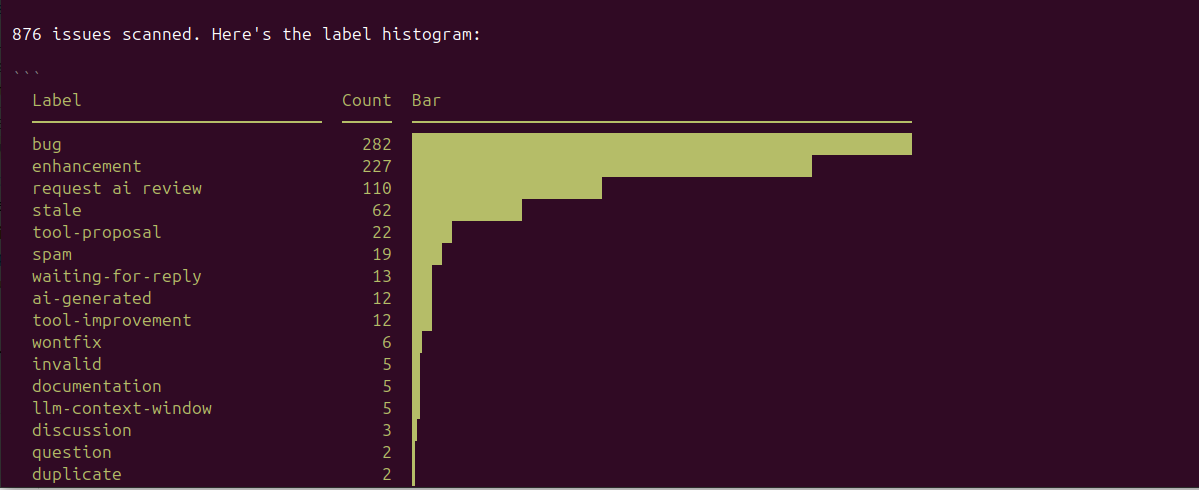
Using code mode, list the open issues on github/github-mcp-server and count how many carry each label.
Expect code_search (finding dispatchable tools) then code_execute looping over paginated
results. Every code_search response prints the full snapshotId; pass that exact value to
code_execute. Tool calls return the raw MCP envelope, so declared data is under
result.structuredContent, not at the result's top level.
tool-cli — works with any MCP server
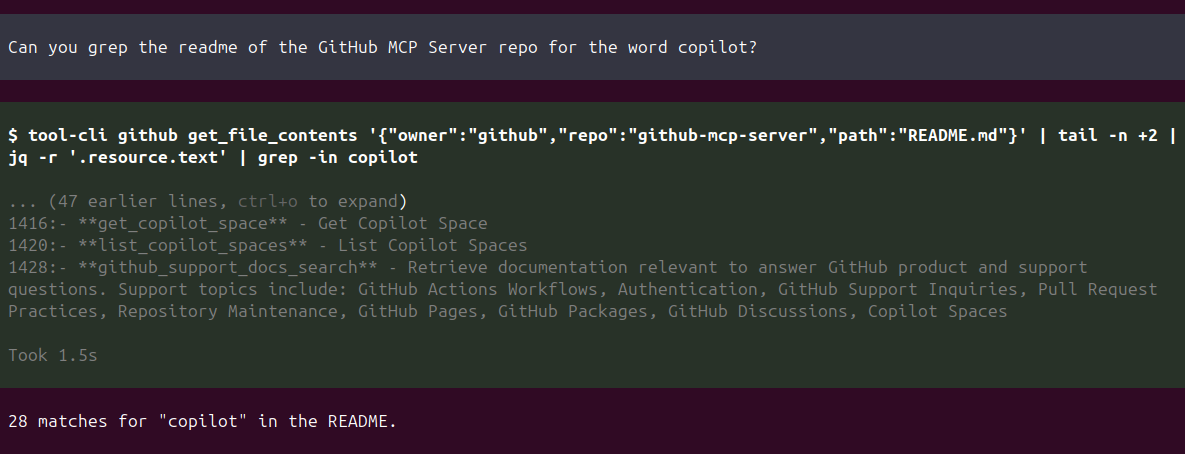
Use tool-cli to list the MCP servers available, then show the schema for the GitHub server's
search_repositoriestool.
Expect bash tool calls running tool-cli — for example tool-cli --help, then
tool-cli github, then tool-cli github search_repositories. There is no tool-cli entry in the
agent's tool registry: it is a program invoked through mcpi's bash tool. A response containing
<tool_cli> markup, or a transcript of a command that no bash call ran, is a hallucination.
Skills — needs a server that publishes them
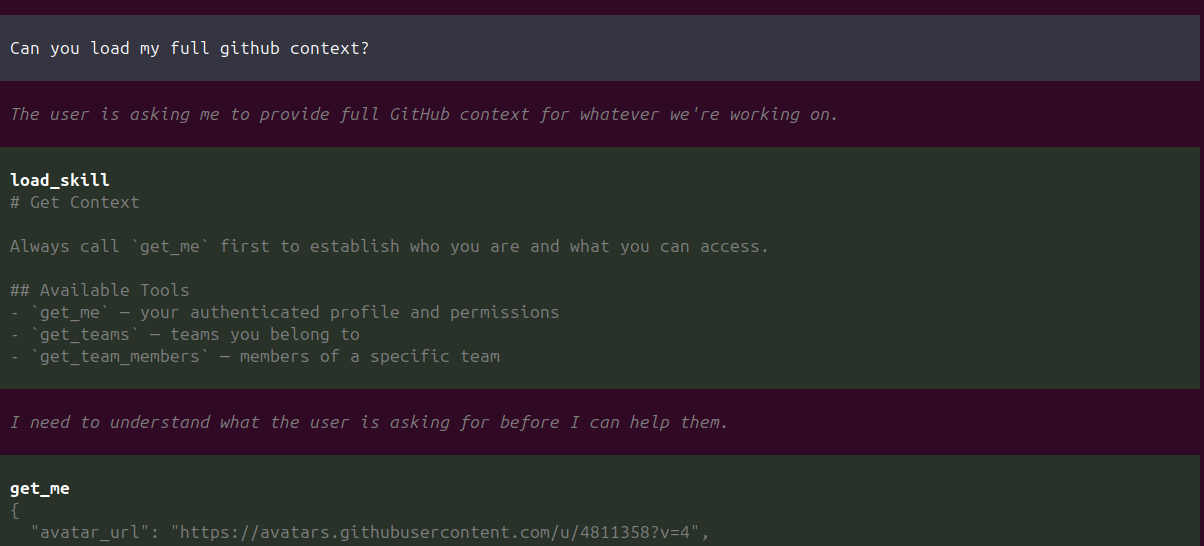
List the skills available, then load the one for issue triage.
Expect a load_skill tool call. Loading returns the skill body and reveals the full schemas of
the tool definitions it references — no approval prompt, because reading a procedure is not doing
anything. Those tools were always callable from Code Mode and tool-cli; what loading changes is only
whether the model can read their schemas directly. With no skills discovered, the agent should tell
you so — the routing section reports skills as unavailable with the reason rather than omitting them.
Confirming what loaded
At startup mcpi-ext reports connected servers and discovered tool counts, and — unless
--no-mcp-skills-extension turns it off — logs the pinned draft revision and the per-server
negotiation result. It always emits an <execution_routing> prompt section stating each facility's availability
and, when unavailable, why.
Four facilities, three MCP mechanisms
Skills, tool-cli, and code mode are the three ways this extension reaches MCP. The
<execution_routing> section describes a fourth facility alongside them — the host's own
bash tool — because most real tasks need it and mis-routing to a sandbox that cannot write files
is a common failure.
bash is not an MCP mechanism. It is the substrate: the only facility that can create, modify, or
inspect files, run the host's real programs, and leave artifacts behind. It is also how tool-cli is
invoked, which is why the two compose for real pipelines — for example, sending MCP-provided
Markdown to Pandoc or writing an export to disk. Exact multi-call
filtering, joins, aggregation, and arithmetic belong in Code Mode rather than tool-cli plus jq
loops.
| Facility | Suits work that is… | | --------- | ------------------------------------------------------------------------------------------- | | bash | touching the real machine: files, git, build tools, data pipelines, artifacts that persist | | Code mode | exact computation or control flow, sandboxed with no filesystem, network, or process access | | Skills | a documented domain workflow — sequencing, conventions, and a curated tool set | | tool-cli | shell discovery or MCP input to a real shell/file/external-program pipeline |
The facility list is alphabetical by identifier purely so its bytes stay stable between turns.
Selection remains by task shape, not by rank: a short <task_shape_selection> footer is emitted
after the detailed Code Mode instructions so the last routing instruction does not impose a
universal precedence.
For the live demonstration shape: profile lookup may use provider-native deferred tool search and a
direct get_me proxy call; adding open and closed issue counts should use code_search followed by
one code_execute that reads both structuredContent.total_count values; producing a Markdown or
Pandoc artifact should use bash, with tool-cli only when MCP data is an input to that real shell
pipeline.
Every facility states its own availability. An unavailable one is listed with its reason rather
than silently dropped, and "we could not tell" is reported as unknown rather than collapsed into
"absent".
With zero MCP servers connected
The extension still loads and still emits <execution_routing>. Code mode remains available, because
pure computation needs no server. Skills report as unavailable with the reason that none were
discovered. tool-cli starts its bridge but has no upstream to reach. Nothing errors, and a missing
mcp.json is treated as an empty server list rather than a failure.
Code mode needs isolated-vm
Code mode uses the optional isolated-vm native addon. It
ships prebuilt binaries for Linux (x64, arm64), macOS (Apple Silicon), and Windows (x64), so the
usual install is a download. Where no prebuild matches — Intel macOS, for instance — npm compiles it
from source and needs a C++ toolchain.
If the addon is unavailable for any reason, installation still succeeds and the extension still
loads. Code mode reports itself unavailable with the specific cause, and skills, tool-cli, and
execution routing continue to work. Code mode never falls back to node:vm: that would silently
downgrade an isolate boundary to same-process execution and hand sandboxed code the host realm.
To skip the addon deliberately: npm install --omit=optional.
Architecture
flowchart TD
subgraph mcpi["mcpi (agent)"]
LS["load_skill<br/>(skills)"]
BASH["bash → tool-cli<br/>(tool-cli)"]
CM["code_search / code_execute<br/>(code mode)"]
end
LS --> POL["McpPolicy<br/>(authorization boundary)"]
BASH --> POL
CM --> POL
POL --> MCM["McpClientManager<br/>(MCP client — stdio & Streamable HTTP)"]
MCM --> S1["MCP Server"]
MCM --> S2["MCP Server"]All three mechanisms route back through the extension process, and every one of them crosses the same
authorization boundary — McpPolicy — exactly once. Even when the model writes sandboxed JavaScript
or shells out to tool-cli, the actual MCP call is authorized and dispatched by that one object.
- Every tool invocation appears in the agent log — skills, tool-cli one-shots, and code mode sandbox calls alike. Full observability without instrumentation.
- Large direct results become session artifacts. Only registered direct MCP proxies apply this
adapter: textual or structured output above 2,048 UTF-8 bytes is atomically written with mode
0600under<session-dir>/mcpi-ext-results/<session-id>/, then replaced by an absolute path, digest, format, size, and bounded untrusted preview. Files persist with the session directory until its normal explicit cleanup. Code Mode and tool-cli keep their existing raw-result mechanisms. - Human-in-the-loop happens at one point, and only at execution.
McpPolicyreads tool annotations and gates non-read-only calls through user confirmation, whichever mechanism initiated them. Nothing else prompts: seeing a schema, loading a skill, or listing a catalogue are not actions, so they do not ask. - Code mode asks rather than refusing. A write or destructive tool called from the sandbox pauses mid-script at the same confirmation any other surface would raise, and continues with the value it returns. Refusing outright was the old behaviour, and it was wrong: it took the decision away from the person whose decision it is.
- Undiscovered tools never reach upstream. The policy verifies the tool exists in the discovered set and validates arguments against its schema before contacting the server, so naming an unknown tool over the authenticated bridge socket fails at the boundary. Deferral is not part of that test: a deferred definition is one the model has not been shown, not one it is forbidden to call.
- Resource reads use the same policy. tool-cli can list templates and read ordinary text and
binary resources, while every
skill://URI and SEP-2640-declared skill resource stays isolated. Skill reads are origin-bound, and a discovery pass cannot authorize a skill-load read. - Every decision is audited — allowed and denied alike, recorded with the source that made it
(
proxy,code-mode,tool-cli,skill-discovery,skill-load,skills-extension).
Skills never execute anything
Nothing in a skill is executed. A SKILL.md body is content, not commands: helper code and
instructions telling the host to run something are text the model reads, never actions the extension
performs. allowed-tools is an exposure list, not an authorization one: it decides which
definitions the model can read, and nothing else. A tool named there still faces the same
annotation-driven confirmation when it actually runs, and a tool named by no skill at all is still
callable from every surface.
Activation is content-bound all the same — keyed to the server, the resource URI, and a digest of
the referenced set — so a server that widens allowed-tools or rotates its content reveals what it
publishes now rather than what it published at discovery. That binding decides which definitions
appear, never whether anything may run.
tool-cli bridge credentials are session-scoped
tool-cli reaches the extension over an authenticated local bridge, not a shared service. On
session_start the bridge binds a random port and generates a fresh 32-byte session token;
both are torn down on session_shutdown. TOOL_CLI_PORT and TOOL_CLI_TOKEN are exposed to the
agent's bash environment only after an authenticated, compatible bridge-v1 handshake succeeds —
inherited values are masked until then, and startup, auth, timeout, or major-version failures
withhold the usage docs entirely and report an actionable reason.
Stdio MCP child servers are spawned with the SDK's safe environment plus their explicit
configuration, with every TOOL_CLI_* variable stripped — so a child server cannot inherit this
session's bridge credentials, even when mcpi was started from another mcpi session.
Protocol and defaults
mcpi-ext uses @modelcontextprotocol/[email protected] in automatic version-negotiation mode. It probes
the released 2026-07-28 protocol with server/discover, then falls back to the legacy
initialize handshake for servers that predate it. The connection log reports the negotiated era.
- Tool and skill-resource lists follow cursors automatically, with a 64-page safety limit.
- Results without a server-provided
ttlMsare immediately stale (defaultCacheTtlMs: 0). Explicit server cache hints are honoured in the SDK's in-memory cache; no persistent or shared cache is configured. - Tool-list change handling is enabled. Modern servers may use a
subscriptions/listenstream where advertised; legacy servers use list-changed notifications. Durable subscription resume and live skill-resource refresh are not exposed. - Modern
input_requiredflows support explicit form input, decline, and cancel in interactive sessions. Headless and URL elicitation fail with an actionable error rather than auto-approving.
Documentation
- Skills — deferred gating, the two discovery contracts, SEP-2640 integrity model, approval binding.
- tool-cli — bridge architecture, progressive discovery, resources, shell composability.
- Code mode — sandbox isolation, catalog provenance, dispatch eligibility.
- Server developer guide — what to publish so your MCP server works well with all three mechanisms.
- Releasing — trusted publishing and release preflight.
- AGENTS.md — contributor tooling, dev loop, and architecture detail.
- DECISIONS.md — the decision log behind these mechanisms.
Screenshots
Local development
git clone https://github.com/SamMorrowDrums/mcpi-ext.git
cd mcpi-ext
npm install
npm run build
npm test
Run mcpi against your local build with --extension, which loads a file directly and bypasses the
settings-managed package above. This is the one case where --extension is the right tool:
mcpi --extension ./dist/index.js --mcp-config ~/.config/mcpi-ext/mcp.jsonProject structure
src/
  index.ts             Extension entry point (lifecycle hooks, wiring)
  mcp/                 MCP client management (connections, discovery) + McpPolicy
  routing/             Execution-facility descriptors, prompt section, host seam
  skills/              Skill registry, discovery, gating, tool proxies, SEP-2640
  tool-cli/            tool-cli RPC server, provider, bridge handshake, prompt
  code-mode/           V8 sandbox executor, lazy isolated-vm adapter, structured discovery
  test-servers/        Test MCP servers (weather, echo, skills fixtures)
docs/                  Mechanism documentation
images/                Screenshots
scripts/               Integration, smoke, and release-check scripts
tsconfig.json          Development build (compiles tests and fixture servers)
tsconfig.build.json    Published build (no tests, fixtures, or source maps)
See AGENTS.md for the full dev loop.
Releasing
Published to npm by
.github/workflows/publish.yml
using npm trusted publishing — a GitHub Release triggers it, OIDC authenticates it, and no
NPM_TOKEN exists anywhere in this repository. See
docs/releasing.md.