
@sandylib27/dashboard-page-cli
v0.1.1
Published
CLI generator for feature-based Next.js dashboard management pages.

Maintainers
 sandylib27
Readme
Dashboard Page Pattern
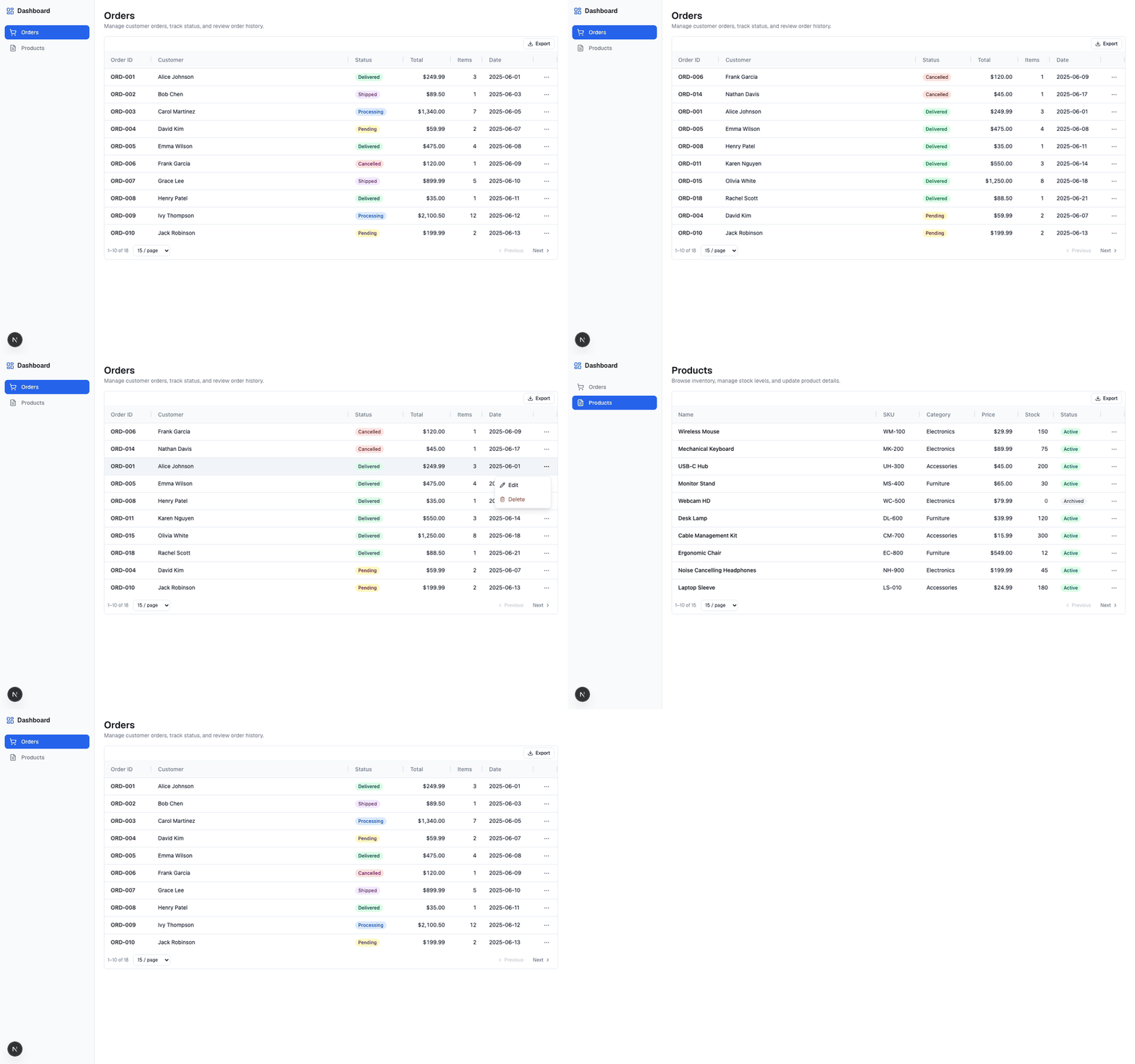
A runnable Next.js demo and publishable CLI source for a CLI-ready management page pattern. Every management page follows the same folder structure, making it possible to scaffold new pages with a single command.
GitHub: github.com/sandylib/dashboard-page-pattern
npm package: @sandylib27/dashboard-page-cli
CLI command: dashboard-page
Related:
- Medium Article: CLI-Ready Management Page Pattern
- @sandylib27/react-ag-datatable -- the DataTable library used in this demo
- feature-based-frontend -- the architecture skill this pattern follows
Demo Quick Start
git clone https://github.com/sandylib/dashboard-page-pattern.git
cd dashboard-page-pattern
npm install
npm run dev
Open http://localhost:3000 to see the dashboard.
What's Inside
Two management pages built with the same standardised pattern:
| Page | How it was built | What it shows | |------|-----------------|---------------| | Orders | Hand-built step-by-step | The full pattern with realistic columns, status badges, sorting, filtering, pagination, export | | Products | Generated by the CLI, then enriched | How the generator scaffolds a page, and how you customise it after |
Architecture
Follows the feature-based-frontend 4-layer architecture:
app/               → Routes (composition root)
  ↓ imports
features/           → UI components, hooks (business logic)
  ↓ imports
domains/            → Data layer (types, API, thin hooks)
  ↓ imports
core/               → Shared infrastructure (constants)
Layer rules:
app/imports fromfeatures/only (neverdomains/directly)features/imports fromdomains/andcore/domains/imports fromcore/onlycore/imports from nothing above it
Project Structure
dashboard-page-pattern/
├── app/                              # Next.js App Router
│   ├── layout.tsx                    # Root layout (sidebar + main)
│   ├── page.tsx                      # Redirects to /orders
│   ├── orders/page.tsx               # Orders route
│   └── products/page.tsx             # Products route (CLI-generated)
├── features/dashboard/ui/
│   ├── layout/
│   │   ├── DashboardSidebar.tsx      # Sidebar navigation
│   │   ├── SidebarIcon.tsx           # Icon registry
│   │   └── nav-items.ts             # Nav items (CLI append target)
│   ├── orders/                       # Hand-built reference
│   │   ├── OrdersManagement.tsx      # Render orchestrator
│   │   ├── hooks/useOrdersManagement.ts
│   │   └── table/
│   │       ├── useOrderColumns.tsx
│   │       └── OrderActionsMenu.tsx
│   └── products/                     # CLI-generated
│       └── ...same structure
├── domains/
│   ├── orders/                       # Typed domain layer
│   │   ├── types/orders.types.ts
│   │   ├── api/orders.api.ts
│   │   ├── hooks/useOrders.ts
│   │   └── index.ts
│   └── products/
│       └── index.ts                  # Domain stub (replace with real API)
├── core/constants/
│   └── query-keys.ts                # Query key constants
└── scripts/
    └── gen-dash-page.mjs            # CLI generator
The Management Page Pattern
Every management page follows this structure:
features/dashboard/ui/<domain>/
├── <Domain>Management.tsx            # Render orchestrator (DataTable + heading)
├── hooks/
│   └── use<Domain>Management.ts      # Composes domain hook + UI state
└── table/
    ├── use<Singular>Columns.tsx       # Column definitions
    └── <Singular>ActionsMenu.tsx      # Row actions dropdown
Layer responsibilities:
- Management component -- pure render orchestrator; imports hook and columns, renders DataTable
- Management hook -- composes the domain's data hook with UI state (edit/delete targets, callbacks)
- Columns hook -- returns
ColDef[]array with cell renderers and the actions column - Actions menu -- row-level dropdown (edit, delete) with click-outside-to-close
CLI Generator
This repo is also the source for the publishable CLI package:
npx @sandylib27/dashboard-page-cli customersAfter a global install:
npm install -g @sandylib27/dashboard-page-cli
dashboard-page customers
Target app requirements
Run the CLI from the root of a feature-based Next.js app with:
- Next.js App Router
- TypeScript path alias
@/* @sandylib27/react-ag-datatablelucide-reactapp/domains/features/dashboard/ui/layout/nav-items.tscore/constants/query-keys.ts
Scaffold a new management page with one command:
npm run gen:dash-page -- <domain-name>Or, after publish:
npx @sandylib27/dashboard-page-cli <domain-name>Example
npm run gen:dash-page -- customersCreates 6 files and appends to 2 existing files:
| Created | Purpose |
|---------|---------|
| features/dashboard/ui/customers/CustomersManagement.tsx | Render orchestrator |
| features/dashboard/ui/customers/hooks/useCustomersManagement.ts | Data hook |
| features/dashboard/ui/customers/table/useCustomerColumns.tsx | Column definitions |
| features/dashboard/ui/customers/table/CustomerActionsMenu.tsx | Row actions |
| app/customers/page.tsx | Route page |
| domains/customers/index.ts | Domain stub |
| Modified | Change |
|----------|--------|
| features/dashboard/ui/layout/nav-items.ts | Adds sidebar entry |
| core/constants/query-keys.ts | Adds query key |
Options
npm run gen:dash-page -- customers --dry-run   # Preview without writing
npm run gen:dash-page -- customers --force      # Overwrite existing
npx @sandylib27/dashboard-page-cli customers --dry-run
npx @sandylib27/dashboard-page-cli customers --force
After generating
- Replace the domain stub with real API types and hooks
- Customise column definitions for your data shape
- Register the sidebar icon in
SidebarIcon.tsx - Verify:
npx tsc --noEmit
Publishing
Publishing is manual. This repo is configured so the npm package only includes the CLI script, README, LICENSE, and package metadata.
Preview the package contents:
npm pack --dry-runPublish publicly:
npm publish --access publicScoped npm packages are private by default, so --access public is required for the first publish.
Tech Stack
- Next.js 16 -- App Router
- React 19
- TypeScript
- Tailwind CSS v4
- @sandylib27/react-ag-datatable -- AG Grid wrapper with filters, pagination, export
- Lucide React -- Icons
License
MIT