
@sanity/sanity-plugin-async-list
v1.3.3
Published
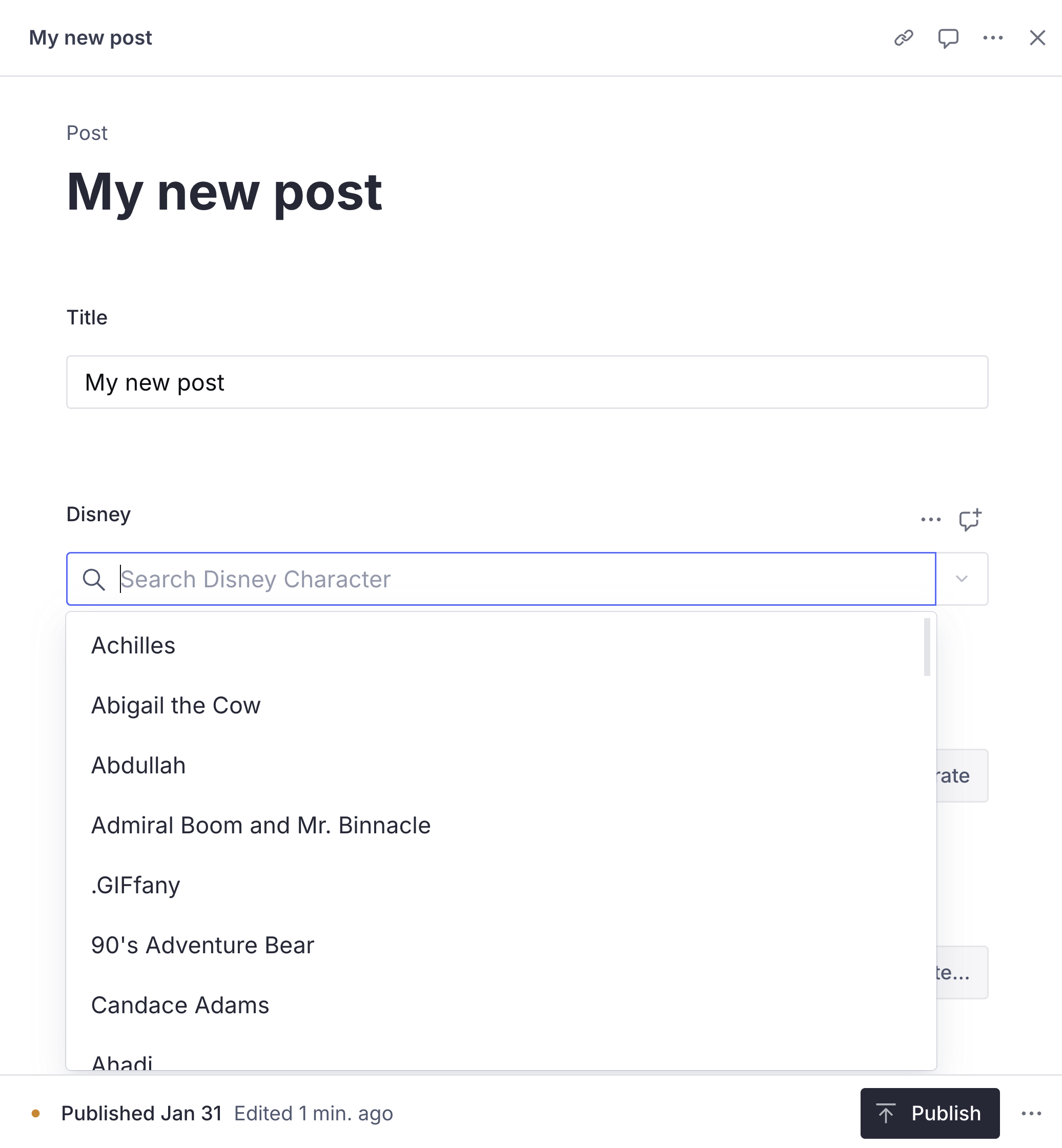
This plugin fetches data from an external API and returns that data as options in a selectable list of strings in your Sanity Studio.


Readme
sanity-plugin-async-list
This plugin fetches data from an external API and returns that data as options in a selectable list of strings in your Sanity Studio.
Installation
npm install @sanity/sanity-plugin-async-listUsage
As a plugin
Add it as a plugin in sanity.config.ts (or .js):
import {defineConfig} from 'sanity'
import {asyncList} from '@sanity/sanity-plugin-async-list'

export default defineConfig({
  //...
  plugins: [
    asyncList({
      schemaType: 'disneyCharacter', // Name of type to be used in schema definitions
      // Loader function to fetch data however you prefer
      loader: async () => {
        const response = await fetch('https://api.disneyapi.dev/character')
        const result: {data: {name: string}[]} = await response.json()

        return result.data.map((item) => {
          return {value: item.name, ...item}
        })
      },
    }),
  ],
})
Then in your schema definitions use the schemaType you set in sanity.config.ts
// schemaTypes/post.ts
import {defineField, defineType} from 'sanity'

export default defineType({
  name: 'post',
  title: 'Post',
  type: 'document',
  fields: [
    defineField({
      name: 'disney',
      type: 'disneyCharacter',
    }),
  ],
})
The field created by this plugin shares the same options as the default string field, with the exception of the initialValue and options properties.
As a component
Or access the component directly:
import {AsyncList} from '@sanity/sanity-plugin-async-list'

defineField({
  name: 'myString',
  type: 'string',
  components: {
    // Must pass the default props as the first argument
    input: (props) =>
      AsyncList(props, {
        loader: async () => {
          const response = await fetch('https://api.disneyapi.dev/character')
          const result: {data: {name: string}[]} = await response.json()

          return result.data.map((item) => {
            return {value: item.name, ...item}
          })
        },
      }),
  },
})
Example configurations
// sanity.config.ts
import {defineConfig} from 'sanity'
import {asyncList} from '@sanity/sanity-plugin-async-list'

export default defineConfig({
  // ...rest of config
  plugins: [
    asyncList({
      schemaType: 'disneyCharacter',
      loader: async () => {
        const response = await fetch('https://api.disneyapi.dev/character')
        const result: {data: {name: string}[]} = await response.json()

        return result.data.map((item) => {
          return {value: item.name, ...item}
        })
      },
    }),
    // Passing props to Autocomplete
    asyncList({
      schemaType: 'pokemon',
      loader: async () => {
        const response = await fetch('https://pokeapi.co/api/v2/pokemon?limit=50&offset=0')
        const result: {results: {name: string}[]} = await response.json()

        return result.results.map((item) => {
          return {value: item.name, ...item}
        })
      },
      autocompleteProps: {
        placeholder: 'Search Pokemon',
      },
    }),
    // More advanced usage w/secrets & query
    asyncList({
      schemaType: 'parkInfo',
      secrets: {
        keys: [{key: 'token', title: 'Token'}],
      },
      loaderType: 'search',
      loader: async ({secrets, query}) => {
        // Conditionally return 'all' options when no query is present
        const url = query
          ? `https://developer.nps.gov/api/v1/parks?q=${query}`
          : 'https://developer.nps.gov/api/v1/parks'

        const response = await fetch(url, {
          headers: {
            'X-Api-Key': secrets?.token ?? '',
          },
        })
        const result: {data: {fullName: string}[]} = await response.json()

        return result.data.length
          ? result.data.map((item) => {
              return {value: item.fullName, ...item}
            })
          : []
      },
    }),
  ],
})
Options
The plugin options are typed as AsyncListPluginConfig if you'd prefer to explore the options there.
schemaType
Field type name for schema definitions.
loaderType
loaderType allows you to choose between 2 different behaviors for loader: search or seed (the default). seed runs the loader once when the component is rendered to populate the list of options. search allows you to pass the query the user types into the Autocomplete component back to your loader function to search for their query in your API.
loader
loader allows you to get data from any source and pass it as options to the input. loader takes a function with 3 optional arguments: secrets which contains the values of the keys defined in secrets.keys, client - a preconfigured Sanity client, and query which is only passed when loaderType is set to search.
A note on the client argument: there are absolutely some valid use cases for wanting to have a client in the loader, but I encourage you to be sure that your use case wouldn't be better served by a reference field type before reaching for the client in a loader.
secrets
secrets allows you to specify what secrets should be fetched using @sanity/studio-secrets and passed to the `loader function.
asyncList({
  secrets: {
    namespace: 'my-secrets-namespace' // optional - namespace for secrets previously saved with @sanity/studio-secrets
    title: 'My title' // optional - Title for secrets management UI
    // Define what keys will be editable in the UI. All/all previously saved secrets in the namespace will be passed to the `loader` function
    keys: [
      {
        key: 'token', // required - key name for `secrets` arg passed to loader
        title: 'Token' // optional - Title for management UI
      }
    ],
  },
}),
clientOptions
Provide options for the client passed to loader.
autocompleteProps
AutoCompleteProps - Passthrough for the underlying Autocomplete component from @sanity/ui: https://www.sanity.io/ui/docs/component/autocomplete.
License
MIT © Chris LaRocque
Develop & test
This plugin uses @sanity/plugin-kit with default configuration for build & watch scripts.
See Testing a plugin in Sanity Studio on how to run this plugin with hotreload in the studio.
Release new version
Run "CI & Release" workflow. Make sure to select the main branch and check "Release new version".
Semantic release will only release on configured branches, so it is safe to run release on any branch.