
@schedulespark/calendar
v0.0.2-beta-1-0-1
Published
Framework-free schedule calendar and headless TypeScript calendar utilities.

Maintainers
 mstephenn
Readme
@schedulespark/calendar
Framework-free schedule calendar and headless TypeScript calendar utilities.
The package renders day, week, work-week, month, all-day, recurrence, and resource lane layouts with no framework dependency — drop it into any app. Pointer and keyboard move/resize, horizontal scroll-sync between the header/all-day-row/body, and event selection are all supported. The core entrypoint exposes the same framework-agnostic layout/date utilities on their own, for callers who want to build their own rendering.
Full documentation: https://docs.schedulespark.com/docs/calendar
Screenshots
Day view

Week view
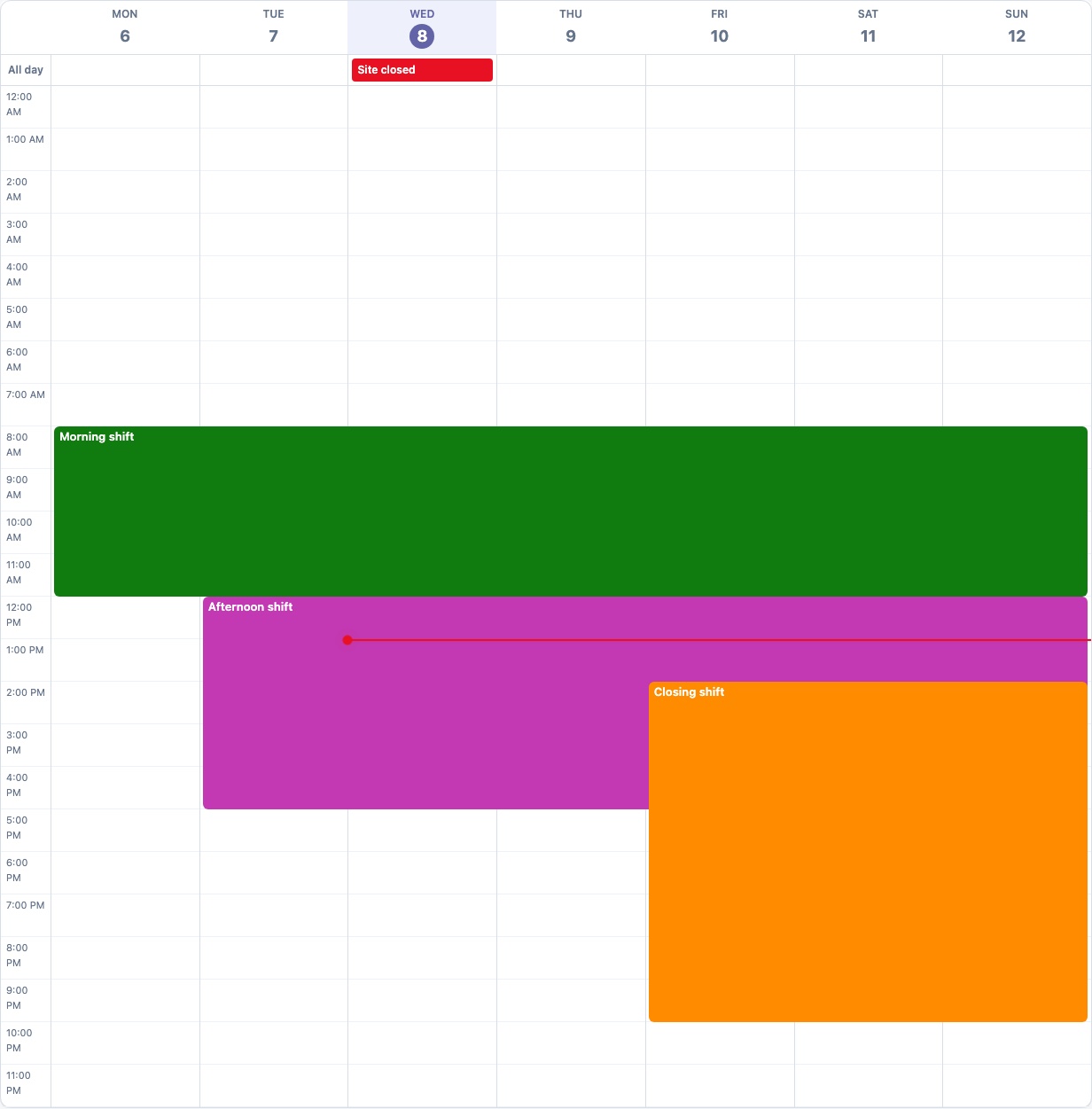
Month view

Drag and drop

Core Concepts
- Controlled rendering: callers own event data. The calendar renders events and calls
onDraftChangeafter an interaction; callsetEvents()yourself to persist and re-render. - Views:
day,week,workweek, andmonthcover the package's supported scheduling layouts. - Events: timed events render in the time grid. Events with
allDay: truerender in the all-day row or as all-day month chips. - Resources: day view can render resource lanes for workers, rooms, or locations by passing
resourcesand eventresourceIdvalues. - Interactions: set
interactiveand handleonDraftChangeto support move and resize via pointer drag or keyboard. - Recurrence: recurring master events can use iCalendar-style
recurrenceRulestrings. Expansion is bounded by the visible range and can use an IANA timezone for local wall-clock schedules. - Styling: import the package stylesheet once in your app shell.
Install
npm install @schedulespark/calendar @schedulespark/rruleNo other runtime dependencies or peer dependencies are required.
Usage
import { createCalendar } from "@schedulespark/calendar";
import "@schedulespark/calendar/styles.css";

const calendar = createCalendar({
  date: new Date("2026-07-06T12:00:00.000Z"),
  view: "week",
  events: [
    {
      id: "shift-1",
      title: "Morning shift",
      start: new Date("2026-07-06T08:00:00.000Z"),
      end: new Date("2026-07-06T10:00:00.000Z")
    }
  ]
});

calendar.mount(document.querySelector("#calendar"));

// Later, update in place:
calendar.setView("month");
calendar.setDate(new Date("2026-08-01T12:00:00.000Z"));
calendar.setEvents([/* ... */]);

// When done:
calendar.destroy();
Resource Lanes
import { createCalendar } from "@schedulespark/calendar";
import "@schedulespark/calendar/styles.css";

const calendar = createCalendar({
  date: new Date("2026-07-06T12:00:00.000Z"),
  view: "day",
  events: [
    {
      id: "shift-1",
      title: "Morning shift",
      start: new Date("2026-07-06T08:00:00.000Z"),
      end: new Date("2026-07-06T10:00:00.000Z"),
      resourceId: "worker-1"
    }
  ],
  resources: [{ id: "worker-1", title: "Ada" }]
});

calendar.mount(document.querySelector("#calendar"));
Interactive Scheduling
import { createCalendar, type CalendarDraftChange, type CalendarEvent } from "@schedulespark/calendar";
import "@schedulespark/calendar/styles.css";

let events: CalendarEvent[] = [
  {
    id: "shift-1",
    title: "Morning shift",
    start: new Date("2026-07-06T08:00:00.000Z"),
    end: new Date("2026-07-06T10:00:00.000Z"),
    resourceId: "worker-1"
  }
];

function applyDraft(change: CalendarDraftChange): void {
  events = events.map((event) =>
    event.id === change.eventId
      ? { ...event, start: change.start, end: change.end, resourceId: change.resourceId }
      : event
  );
  calendar.setEvents(events);
}

const calendar = createCalendar({
  date: new Date("2026-07-06T12:00:00.000Z"),
  events,
  interactive: true,
  onDraftChange: applyDraft,
  resources: [{ id: "worker-1", title: "Ada" }],
  view: "day"
});

calendar.mount(document.querySelector("#calendar"));
Recurring Events
import { createCalendar } from "@schedulespark/calendar";
import "@schedulespark/calendar/styles.css";

const calendar = createCalendar({
  date: new Date("2026-07-06T12:00:00.000Z"),
  view: "week",
  timeZone: "America/New_York",
  events: [
    {
      id: "standup",
      title: "Team standup",
      start: new Date("2026-07-06T09:00:00.000Z"),
      end: new Date("2026-07-06T09:30:00.000Z"),
      recurrenceRule: "FREQ=WEEKLY;BYDAY=MO,WE,FR"
    }
  ]
});

calendar.mount(document.querySelector("#calendar"));
When timeZone is omitted, recurrence expansion defaults to UTC.
Options Reference
createCalendar(options) accepts:
| Option | Type | Default | Description |
|---|---|---|---|
| date | Date | required | Anchor date used to compute the visible range for the current view. |
| events | CalendarEvent[] | required | Events to render. |
| view | "day" \| "week" \| "workweek" \| "month" | required | Active layout. |
| businessHours | { start: string; end: string } | { start: "00:00", end: "24:00" } | Inclusive/exclusive HH:mm bounds (UTC) for the visible time grid in day/week/work-week views. |
| collisionPolicy | "allow" \| "reject-overlap" | "allow" | Whether interaction drafts that overlap another event are still emitted (with hasCollisionWarning: true) or suppressed entirely. |
| compact | boolean | false | Reduces slot height for denser schedules. |
| defaultEventColor | string | undefined | Fallback color applied to events that omit color. The calendar never assigns colors automatically — with no color and no defaultEventColor, events render uncolored. |
| hideEmptyResources | boolean | false | When true, automatically hides resource lanes with no events in the current view by default. A manual show/hide (clicking a column header, or its chip in the hidden-resources strip) always overrides this. |
| interactive | boolean | false | Enables pointer and keyboard move/resize. Requires onDraftChange to actually apply changes. |
| minimumDurationMinutes | number | same as snapMinutes | Smallest duration a resize can produce. |
| now | Date | new Date() | Overrides "current time" for the now-indicator and today highlighting — useful for tests and snapshots. |
| onDraftChange | (change: CalendarDraftChange) => void | undefined | Called after a move/resize interaction completes. The calendar is controlled: it does not persist the change itself. |
| onEventCreate | (input: { start: Date; end: Date; resourceId?: string }) => void | undefined | Called when a click or drag on empty grid space creates a new event. Only wired when interactive and this are both set. |
| onEventCopy | (input: { sourceEvent: CalendarEvent; start: Date; end: Date; resourceId?: string }) => void | undefined | Called when Ctrl/Cmd+drag duplicates an existing event onto a new time/column, instead of moving it. |
| onEventSelect | (event: CalendarEvent) => void | undefined | Called when an event is activated (click, or Enter/Space when focused). |
| resources | CalendarResource[] | [] | Enables resource lanes in day view when non-empty. |
| showCurrentTimeIndicator | boolean | true | Shows the red "now" line in time-grid views. |
| slotMinutes | number | 60 | Height of one time-grid row, in minutes. |
| snapMinutes | number | same as slotMinutes | Granularity that interactive move/resize snaps to. |
| timeZone | string (IANA) | "UTC" | Timezone used to expand recurrenceRule occurrences and render local wall-clock times. |
| weekStartsOn | number (0–6) | 1 (Monday) | First day of the week for week/work-week/month layouts. |
createCalendar returns a CalendarInstance:
| Method | Description |
|---|---|
| mount(host) | Renders the calendar inside the given element. |
| setDate(date) | Updates the anchor date and re-renders. |
| setEvents(events) | Replaces the event list and re-renders. |
| setView(view) | Switches views and re-renders. |
| destroy() | Clears the mounted DOM. |
CalendarEvent
| Field | Type | Notes |
|---|---|---|
| id | string | Must be stable and unique within events. |
| title | string | Rendered in the event chip. |
| start / end | Date | Exclusive end; a 0-duration event is not rendered. |
| resourceId | string? | Matches a CalendarResource.id to place the event in a day-view resource lane. |
| color | string? | Any valid CSS color. Takes precedence over defaultEventColor. |
| recurrenceRule | string? | An iCalendar-style RRULE string (see @schedulespark/rrule for the supported field subset). |
| recurrenceId | string? | Identifies a single expanded occurrence when you need to override or exclude it. |
| allDay | boolean? | Renders in the all-day row (time-grid views) or as an all-day month chip, instead of the timed grid. |
| roleName / status / workerName | string? | Optional display metadata for schedule-oriented consumers; not interpreted by the calendar itself. |
CalendarResource
| Field | Type | Notes |
|---|---|---|
| id | string | Matches CalendarEvent.resourceId. |
| title | string | Lane header text. |
| subtitle | string? | Secondary lane header text (e.g. a role). |
| color | string? | Reserved for resource-level styling; not currently applied to events automatically. |
CalendarDraftChange
Passed to onDraftChange after a move or resize completes:
| Field | Type | Notes |
|---|---|---|
| eventId | string | The event that was moved/resized. |
| kind | "move" \| "resize-start" \| "resize-end" | Which edge (or the whole event) changed. |
| start / end | Date | The proposed new bounds. Apply these to your own event state — the calendar does not mutate events. |
| resourceId | string? | The resource lane the event was dropped into, if resource lanes are enabled. |
| hasCollisionWarning | boolean | true only when collisionPolicy: "allow" and the draft overlaps another event. Always false under "reject-overlap", since a colliding draft is suppressed instead of emitted. |
Keyboard Interactions
With interactive set and an event focused (Tab to it):
- Arrow Up / Down — move the event earlier/later by
snapMinutes. - Shift + Arrow Up / Down — resize the start edge.
- Alt + Arrow Up / Down — resize the end edge.
- Arrow Left / Right — move the event to the previous/next day, or the previous/next resource lane when resource lanes are enabled.
- Enter / Space — activate the event (calls
onEventSelect).
Each keypress calls onDraftChange immediately with the fully computed new bounds — there is no separate "commit" step, so your onDraftChange handler is the single place that applies both pointer-drag and keyboard-driven changes.
Headless TypeScript Usage
import { getVisibleRange, layoutEvents } from "@schedulespark/calendar/core";

const range = getVisibleRange({
  date: new Date("2026-07-06T12:00:00.000Z"),
  view: "week",
  weekStartsOn: 1
});

const layouts = layoutEvents({
  range,
  businessHours: { start: "00:00", end: "24:00" },
  events: [
    {
      id: "shift-1",
      title: "Morning shift",
      start: new Date("2026-07-06T08:00:00.000Z"),
      end: new Date("2026-07-06T10:00:00.000Z")
    }
  ]
});
Beta Status
This is an early beta package. APIs may change before a stable 1.0.0 release. This release is a rewrite from a React component to a framework-free vanilla renderer, including full interactivity (pointer/keyboard move-resize, scroll-sync). The apps/web admin scheduling view has also been migrated to the vanilla API.
Before publishing a new beta, review CHANGELOG.md and docs/release.md. Version changes are intentional release decisions and are not made automatically by documentation or CI updates.
License
MIT