
@schlomo/odl-drawcustom-designer
v3.4.3
Published
Visual editor for OpenDisplay Language YAML — Home Assistant drawcustom compatible.
Downloads
5,314

Maintainers
 schlomoschapiro
Readme
ODL/OEPL Drawcustom Designer


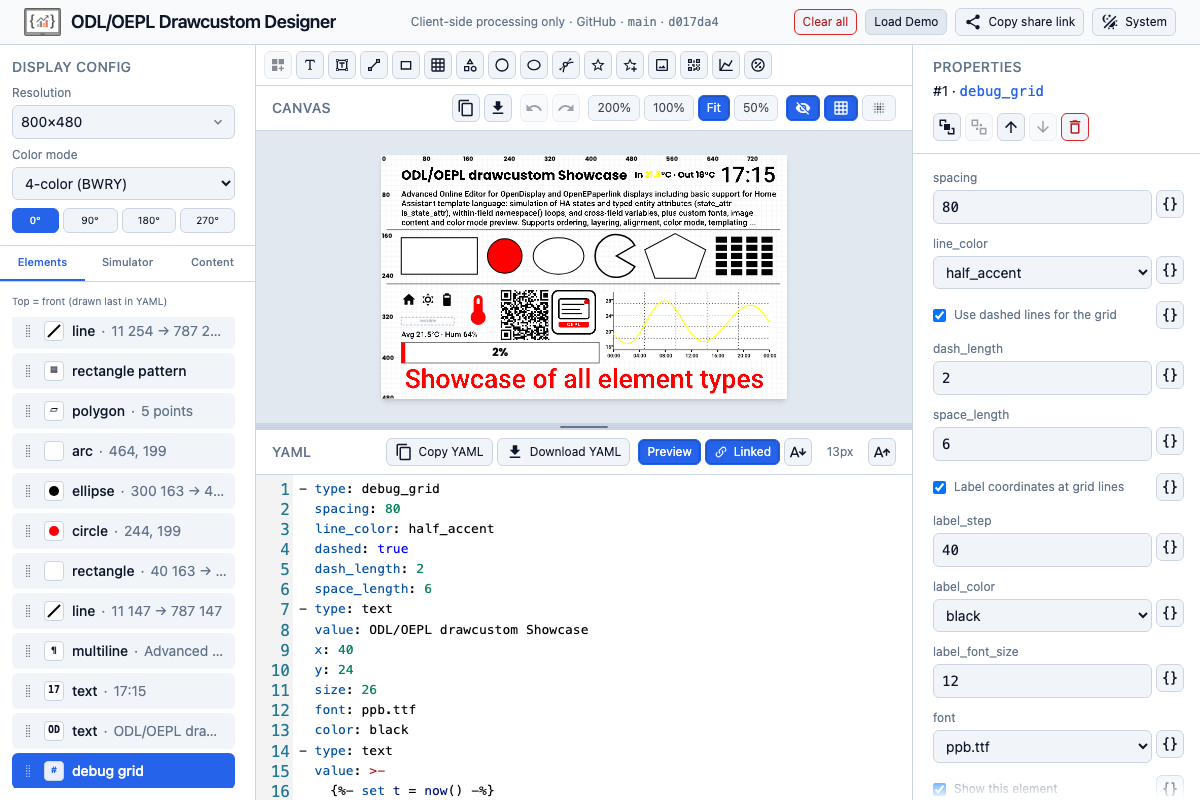
Visual feature-rich editor for OpenDisplay Language (ODL) and OpenEPaperLink (OEPL) drawcustom YAML. Design layouts in the browser, preview them with realistic tag palettes and dithering, export HA-clean YAML or PNG, and share designs via URL. Simulate Home Assistant entity states for template preview. Add custom fonts and images to your designs.
Client-side only — the app runs entirely in the browser. Designs, fonts, and images stay in local storage (IndexedDB). Share links embed the design in the URL hash (#d=…) — copied to clipboard, not uploaded anywhere.
Open the standalone designer → · Live embed demo →
Use it in your own app
npm install @schlomo/odl-drawcustom-designerShips as one self-contained ESM file — React and every other runtime dependency bundled in, no peer dependencies to resolve.
import { mount } from '@schlomo/odl-drawcustom-designer'

const handle = mount(document.getElementById('designer'), {
  payload: yamlString,          // initial drawcustom YAML (list of elements)
  states: { 'sensor.temperature': '21.5' },   // host states, for template preview
  theme: 'dark',                // 'light' | 'dark', scoped to the container
  // The displays you know about. One display is adopted and locked without a
  // pick; several give the user a picker.
  targets: [{
    id: 'display.kitchen',
    label: 'Kitchen tag',
    display: { pixelWidth: 296, pixelHeight: 128, colorScheme: 0x01 },
  }],
  // Your buttons in the designer's toolbar — the only save/send channel there
  // is: the designer never persists or transmits anything itself.
  actions: [{ id: 'save', label: 'Save' }, { id: 'send', label: 'Send to display' }],
  onAction(id, payload, context) {
    // user clicked one of your buttons — do the host-side thing with `payload`
  },
})

handle.setStates(newStates)   // replace the state map
handle.setTargets(newTargets) // replace the displays the picker offers
handle.getPayload()           // read the current payload YAML at any time
handle.destroy()              // unmount and empty the container
The container needs an explicit height; the designer fills it. Styles and DOM are isolated in a shadow root at the mount boundary — host CSS never leaks in, and the designer never touches the host document.
Full mount API (setActions, setPayload, setTheme, onTargetSelected) and every host-data field, plus the release/versioning story: docs/embedding.md. Live demo: see the link above; its full source (a fake host page pushing states, displays and actions) is at demo/.
Home Assistant integrations (drawcustom)
Paste the designer's exported YAML payload list into one of these custom components' (install via HACS) drawcustom service call.
| Integration | Service | Hardware | Install |
|-------------|---------|----------|---------|
| OpenEPaperLink | open_epaper_link.drawcustom | OpenEPaperLink AP and/or BLE tags (firmware) | HACS: OpenEPaperLink · OEPL drawcustom docs |
| OpenDisplay | opendisplay.drawcustom | OpenDisplay boards/displays (compatibility) | HACS: OpenDisplay · OD drawcustom docs |
Example (OpenEPaperLink — target your display device, not entity):
action: open_epaper_link.drawcustom
target:
  device_id: YOUR_DEVICE_ID
data:
  background: white
  payload:
    - type: text
      value: "Hello from the designer"
      x: 10
      y: 10
      size: 24
OpenDisplay uses the same payload shape with action: opendisplay.drawcustom.
Note: The built-in OpenDisplay core integration sends pre-rendered images via
upload_image— it does not usedrawcustom. Use the custom OpenDisplay integration above for YAML payloads.
Specifications & upstream projects
| Resource | Description | |----------|-------------| | OpenDisplay | Open-source firmware and protocol standard for e-paper tags (website) | | OpenDisplay Language (ODL) | OpenDisplay spec — canonical draw payload YAML format | | OpenDisplay Basic Standard | OpenDisplay spec — BLE/Wi‑Fi wire protocol (display announcement, image encoding); complementary to ODL | | OpenEPaperLink | Open-source firmware and ecosystem for supported e-paper tags | | HA drawcustom — supported types | Vendored element reference (all 16 types) — OpenEPaperLink upstream | | ODL gap report | Parity audit: ODL vs vendored HA spec vs this editor |
Features
YAML engine & validation
- All 16 draw element types —
debug_grid,text,multiline,line,rectangle,rectangle_pattern,polygon,circle,ellipse,arc,icon,icon_sequence,dlimg,qrcode,plot,progress_bar - Zod schema validation with spec-aligned defaults and completions metadata
- Parse / serialize round-trip — templates and designer-only fields handled explicitly
Visual canvas
- Tag-faithful preview — color modes BW, BWR, BWY, 4-color, 6-color scaffold, and RGB preview; palette clamping so named colors match what the tag can show
- Direct manipulation — select, drag, resize handles, keyboard nudge
- Snap — configurable grid snap plus edge snap to canvas bounds
- Multi-select — Shift+click, marquee rectangle, bulk move and nudge
- Alignment — align selection horizontally and vertically
- Layer order — bring to front, send to back, move up/down
- Zoom — 50%, 100%, 200%, and fit-to-panel
- Touch (tablets) — 1 finger is always element intent: select, drag, resize handles, and marquee (also starting from the scroll padding around the canvas, not just the canvas itself); a second finger landing mid-gesture cancels it (the element/selection reverts) rather than committing it. 2 fingers are always navigation: drag to pan, pinch to zoom — pinch steps between the toolbar's 50/100/200% levels and leaves Fit on the first pinch (it never zooms back to Fit). Extra fingers beyond two are ignored. The panel-width/height dividers don't yet respond to touch (#156). Known weakness: 2-finger navigation needs clearly separated fingers: some tablet digitizers (observed: Samsung Galaxy Tab S8+, Chrome/Android) merge close-set fingers into a single touch, which then acts as a 1-finger gesture (select/drag/marquee instead of pan). Spread your fingers if panning selects elements instead.
- Orientation — 0°, 90°, 180°, 270°; a quarter turn swaps the canvas W/H and the design is always edited upright
- Designer overlays — optional hints for hidden-on-tag elements (
visible: false, shapes with fill or color set tonone) - Dither preview — toggle ordered dither (d=2) on the flat canvas
YAML editor
- CodeMirror 6 with YAML syntax and embedded Jinja highlighting
- Delimiter scaffolding —
{{ }}and{% %}with HA-friendly autocomplete - Schema-driven completions — element types, fields, icons, and template helpers
- Inline diagnostics — parse and validation errors with source ranges
- Folded block scalars for long single-line strings (e.g. templated multiline values)
- Two-way coupling — canvas edits update YAML; YAML edits update canvas and selection
- Template preview mode — resolve
{{ … }}/{% … %}on the canvas using mock entity states you set in the State Simulator (no live Home Assistant connection)
Property panel
- Schema-driven forms for every element type, including nested plot fields
- Universal templating — any property can be a literal or a Jinja template string; JSON fields (
points,icons, plotdata) accept a whole-field template or structured JSON - Geometry lock — drag, resize, and nudge disabled when coordinates are templated
- Cross-cutting
visibleon all 16 types (ODL-aligned)
Home Assistant templates
- State Simulator — add mock entities and edit their state strings so template preview can resolve
states('…'),is_state, and similar patterns - Global mock store — persists in IndexedDB across sessions (not included in share links)
- Nunjucks evaluator —
states,is_state, filters, and common HA patterns (see ADR-004) - Entity scan — discover entity IDs referenced in the payload
Assets & content manager
- Local content map — fonts and images keyed by exact YAML path (
/local/…, bundled fonts) - Upload & verify — decode-check fonts and images before storing
- IndexedDB persistence — global asset store shared across designs
- Bundled fonts — includes
ppb.ttfandrbm.ttfas default fonts for correct text rendering
Display configuration
- Resolution — common tag WxH quick-picks plus custom width/height. A quick-pick names a display's two dimensions, not an orientation: it lands the way the panel is currently held, and a turned panel keeps reading as its own pick
- Color mode — drives accent / half_accent preview mapping
- Orientation (0°–270°) — which way round the panel is, and the only control that decides it: it orients the logical drawing surface the payload is authored against (the design stays upright, as
imagegendraws it). Absolute, not cumulative, and — like the other display settings — outside undo. Not emitted as drawcustomrotatetoday: that is per-target send metadata (issue #105) - Preview dither toggle — flat vs ordered d=2; maps to drawcustom
ditherin session and share links - Session persistence — display settings restored with last design
Session, demo & sharing
- Auto-save — last design, undo history, and mocks restored on reload
- Load Demo — one-click showcase bundle in
src/assets/showcase/:showcase.yml(payload),showcase.json(canvas + State Simulator seed),showcase.png(bundled dlimg) - Share link —
#d=eJ…<data>URL fragment encodes name, canvas, service options (when set), and elements (pako-deflated, base64url; assets/mocks stay local) - Undo / redo — 50-step history with drag coalescing
Export
- PNG — copy to clipboard or download; the upright logical canvas in the active color mode (HA applies the panel's own
rotate) - YAML — copy or download HA-ready payload from the toolbar
Home Assistant preview parity
The designer aims for a close match to what OEPL/OpenDisplay HA integrations render via Pillow imagegen, but it is not pixel-identical today.
| Area | Typical match | Known gaps |
|------|----------------|------------|
| Layout (anchors, positions) | Good for text when using bundled/custom fonts | Small (1–2 px) possible; templated values need mock states |
| Tag palette & dither | Color modes and finalizeTagImageData clamp to tag colours | Wrong-accent colours clamp to grey on BWR/BWY |
| Text glyphs | Readable; hard-edge filter approximates Pillow fontmode = "1" | Glyph edges differ (opentype.js vs Pillow/FreeType) |
| SVG shapes & lines | Rectangles, icons generally usable | Thin lines on coloured backgrounds may export as grey instead of black; SVG antialiasing vs Pillow integer pixels (ADR-007) |
| Templates | Mock entity states in the State Simulator | Live HA evaluation can differ |
| Assets | Local fonts/images by YAML path | Share links do not include uploaded blobs |
Use preview and PNG export to sanity-check layouts before deploying to a tag; compare against a real HA render when exact appearance matters. Details: ADR-007 · gap report.
Preview rendering fidelity
- OpenType — measured text and multiline layout with ink-bound anchors and font metrics
- MDI icons —
@mdi/jspaths with autocomplete - QR codes — live module preview
- Plots — axes, legends, and series from YAML
data parse_colors— inline color segments in text/multiline- Images —
dlimgwith local asset resolution
Not in v1
- Embedded Home Assistant panel (load/save automation block in iframe)
- Binary OpenDisplay wire-format export
- Element copy/paste, free canvas pan, continuous zoom beyond fixed steps
- On-canvas polygon vertex editing
- Using Canvas instead of SVG for rendering for better HA visual matching
See docs/adr/ for rationale (especially ADR-010, ADR-012).
Embedding — building from source
Contributing to or vendoring the library build straight from this repo (rather than npm):
npm run build:libEmits one self-contained ESM file — React, styles, and bundled fonts included:
dist-lib/odl-drawcustom-designer.jsTry the demo locally:
npm run build:site && npm run preview
# open the printed URL; the demo is at /embed/ (same path as production)
No dedicated server needed beyond that: the demo is plain static files, so any
static file server works too (e.g. python3 -m http.server -d dist-lib).
Full mount API, host data contract, and library build details: docs/embedding.md. Release procedure and semver policy: docs/releasing.md.
Development
Requires Node.js ^26 (see .nvmrc).
AI assistants: read AGENTS.md before changing code (TDD, ADRs, HA parity). Also: CLAUDE.md · .github/copilot-instructions.md.
npm install
npm run lint
npm test
npm run dev
npm run build
Deployment, GitHub Pages, and build-time environment variables (base path, legal header HTML, git metadata): docs/DEPLOYMENT.md.
Bundle composition and wire sizes (what the big JS chunk is, verified compression, why code splitting was rejected): docs/bundle-audit.md.
Touch/pointer debugging: append ?touchdebug=1 to any deployment URL for a live touch/pointer event trace overlay (FREEZE/CLEAR controls) — useful for reproducing and reporting device-specific touch issues.
Architecture
src/core/— pure TypeScript (YAML, schema, renderer, templates); no React importssrc/core/brand.ts— product slug, titles, IndexedDB name, storage key prefixsrc/ui/— React 19 application shellsrc/ui/data/showcase.ts— loads the built-in demo bundle (src/assets/showcase/)src/storage/— Dexie IndexedDB (assets, mocks, variables, session)src/embed/— embeddablemount()API + host data contract (docs/embedding.md)src/assets/showcase/— demo bundle:showcase.yml(payload),showcase.json(canvas + simulator seed),showcase.png(bundled image)docs/adr/— architecture decision records
Start with ADR-001 (core/UI boundary), ADR-007 (HA preview parity), ADR-015 (file-based demo), and ADR-006 (React shell).
License
ODL/OEPL Drawcustom Designer is licensed under the Apache License 2.0.
Copyright © 2026 Schlomo Schapiro
Third-party and upstream attributions: NOTICE · docs/THIRD_PARTY.md · docs/spec/ATTRIBUTION.md
This project is not affiliated with OpenEPaperLink, OpenDisplay, or Home Assistant. Upstream firmware and integrations may use different licenses (see third-party docs).
💖 Sponsorship & Credits
- Initial Development: Sponsored by Tektit Consulting (via Schlomo).