
@selvakumaresra/specship
v0.10.0
Published
Supercharge Claude Code with semantic code intelligence. 94% fewer tool calls • 77% faster exploration • 100% local.

Maintainers
 selvakumaresra
Readme
SpecShip
Supercharge Claude Code with Semantic Code Intelligence
~16% cheaper · ~58% fewer tool calls · 100% local






Get Started
1. Install the CLI
Requires Node.js 22.5+ (Node 24.x recommended — its bundled SQLite has FTS5, which SpecShip needs):
npm i -g @selvakumaresra/[email protected]Offline / air-gapped client workstation? Clone or copy this repo onto the machine and run:
./scripts/offline-install.sh        # macOS / Linux
.\scripts\offline-install.ps1       # Windows
The offline installer probes for FTS5 up front, runs npm install against whatever registry npm is already pointed at (your private mirror is fine), builds, npm links, and wires Claude Code — no GitHub access required.
2. Wire up Claude Code
specship installWrites the SpecShip MCP server into ~/.claude.json (global) or ./.mcp.json (project), plus the auto-allow permissions list into Claude's settings.json. Use --yes for non-interactive defaults (global location, auto-allow on).
3. Initialize each project
cd your-project
specship init -i
specship init creates the local .specship/ index directory; adding -i (--index) also builds the initial graph in the same step. Without -i, run specship index afterwards.
Uninstall
specship uninstallStrips SpecShip's MCP server config and permissions from Claude Code. Your project indexes (.specship/) are left untouched; remove those per-project with specship uninit.
Specs as First-Class Citizens
Write requirements in Markdown under specs/ with embedded IDs, and SpecShip indexes them alongside the code. Each spec becomes a queryable node with a content-hashed body, parent/child structure, and links to the code that implements it.
<!-- specs/auth.md -->
---
id: AUTH-DOC
title: Authentication
---
<!-- id: REQ-AUTH-001 -->
# Login must rate-limit failed attempts

The login endpoint rejects more than 5 failed attempts per IP per minute.
After specship init -i, the agent can:
mcp__specship__specship_spec("REQ-AUTH-001")— fetch spec + linked code + statemcp__specship__specship_link_assert(...)— declare a link after implementingmcp__specship__specship_drifted— review queue when spec or code moves
The link layer carries state — implemented, verified, drifted, broken, orphaned — keyed on logical identity (file + qualified name) so links survive ordinary refactors. Drop // @implements REQ-AUTH-001 in your code as a backstop when the agent forgets to assert.
specship drifted                          # review queue
specship drifted --fail-on=broken,drifted  # CI gate
Spec-driven workflows
A YAML workflow engine (specship workflow run <name>) drives the agent through deterministic spec → implement → verify → link loops in an isolated git worktree, with approval gates so a non-coding spec author reviews the plan and final diff. Four bundled workflows ship by default:
spec-implement— plan → approve → implement → test → link → final reviewspec-fix— diagnose a drifted link → fix code → re-verifyspec-verify— run tests, promoteimplementedlinks toverifiedspec-relink— re-attach an orphan after a refactor
Customize by dropping your own <project>/.specship/workflows/<name>.yaml (project tier overrides bundled defaults). The matching slash commands /ss-spec, /ss-implement, /ss-drifted, /ss-fix, /ss-relink are installed into Claude Code by specship install.
Why SpecShip?
When Claude Code explores a codebase, it spawns Explore agents that scan files with grep, glob, and Read — consuming tokens on every tool call.
SpecShip gives those agents a pre-indexed knowledge graph — symbol relationships, call graphs, and code structure. Agents query the graph instantly instead of scanning files.
Key Features
| | | |---|---| | Smart Context Building | One tool call returns entry points, related symbols, and code snippets — no expensive exploration agents | | Full-Text Search | Find code by name instantly across your entire codebase, powered by FTS5 | | Impact Analysis | Trace callers, callees, and the full impact radius of any symbol before making changes | | Always Fresh | File watcher uses native OS events (FSEvents/inotify/ReadDirectoryChangesW) with debounced auto-sync — the graph stays current as you code, zero config | | 20+ Languages | TypeScript, JavaScript, Python, Go, Rust, Java, C#, PHP, Ruby, C, C++, Objective-C, Swift, Kotlin, Dart, Lua, Luau, Svelte, Liquid, Pascal/Delphi | | Framework-aware Routes | Recognizes web-framework routing files and links URL patterns to their handlers across 14 frameworks | | Desktop UI | Live dashboard for cost, drift, tool-call heatmap, cache analytics, SpecShip token impact, plus a project picker that auto-discovers every project you've used Claude Code in | | 100% Local | No data leaves your machine. No API keys. No external services. SQLite database only |
When Claude Code launches specship serve --mcp, three layers keep the index in step with your code — and make sure the agent never gets a silent wrong answer in the brief window between an edit and the next sync:
File watcher with debounced auto-sync. A native FSEvents / inotify / ReadDirectoryChangesW watcher captures every source-file create / modify / delete and triggers a re-index after a debounce window (default
2000ms, tunable viaSPECSHIP_WATCH_DEBOUNCE_MS, clamped to[100ms, 60s]). Bursts of edits collapse into a single sync.Per-file staleness banner. During the brief debounce window, MCP tool responses that would reference a still-pending file prepend a
⚠️banner naming it and telling the agent toReadit directly. Pending files NOT referenced by the response surface as a small footer instead. Either way, the agent gets an explicit signal — validated with Claude Code, where the agent literally says "Reading the file directly for the live content" before opening it.Connect-time catch-up. When the MCP server (re)connects, specship runs a fast
(size, mtime)+ content-hash reconciliation against the working tree before answering the first query — so edits made while no MCP server was running (agit pullfrom the terminal, edits from another editor, a previous agent session that exited) get absorbed on the next session's first tool call.
agent writes src/Widget.ts
  → watcher fires (<100ms)
  → debounce (default 2s)
  → sync; Widget.ts is in the index
  → next agent query sees it
Verify any time with specship_status (via MCP) or specship status (CLI). If anything is pending, you'll see a ### Pending sync: section naming the files and their edit age.
The handful of cases where manual specship sync makes sense: the watcher is disabled (sandboxed environments, or SPECSHIP_NO_DAEMON=1), or you're scripting against the index outside an agent session and want a pre-flight sync at the start of your script.
Dashboard
specship serve --ui boots a single-process Fastify + Angular SPA on http://127.0.0.1:4242/. One port serves both the API and the desktop UI. No Electron, no auth — loopback only.
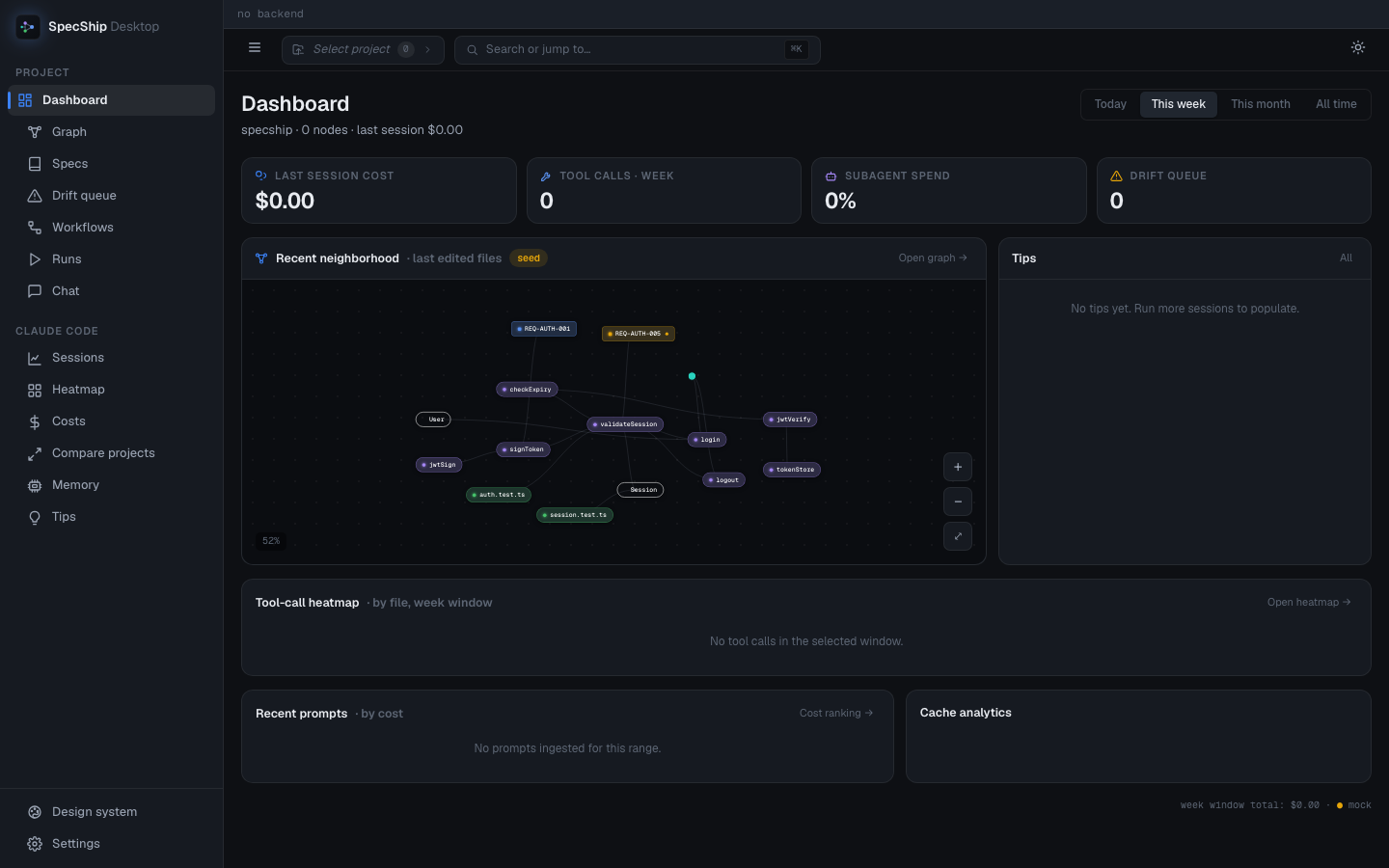
The dashboard is designed to answer four questions in one glance — what is the structural state of my codebase, what needs attention, what did my last session cost, and what should I do about it. The zones, top-to-bottom:
Status strip · top of every page
Project path · backend (better-sqlite3 / node:sqlite) · node count · edge count · drift count · last-index time. Always visible — drift > 0 turns amber, index time pulses red after 30 minutes of staleness.
Project picker · top bar
Auto-discovers every project under ~/.claude/projects/, decodes the slug back to its absolute path, flags each one with initialized / not init / missing, and shows the most-recently-touched first. A live SSE stream pushes new entries the moment you open a project in Claude Code — no refresh. Pick one and every codegraph-scoped surface (status, graph, specs, drift, workflows, memory) switches to that project's data.
Stat tiles · 4 across
| Tile | Surfaces |
|---|---|
| Last session cost | Total $ for your most recent Claude Code session, sourced from the JSONL transcripts ingested in the background. Click → Sessions page with that session focused. |
| Tool calls · range | Count of tool calls in the selected time range (Today / This week / This month / All time, picker top-right). Click → Heatmap. |
| Subagent spend | What % of your token spend went to Task-tool subagents. Hot signal: above ~40 % usually means a workflow is over-delegating. Click → Heatmap → Subagents lane. |
| Drift queue | Spec-link rows in drifted, broken, or orphaned state. Click → Drift queue. The sidebar item also carries this badge so it's visible from any page. |
Recent neighborhood · interactive mini-graph
A small live <app-graph-canvas> panel — pan/zoom, click any node to deep-link into /graph?focus=<id>. By default it shows a 15–25 node slice around the file you most recently edited. When the API returns no rows (fresh dev, no project indexed), it falls back to a seed neighborhood with all four node kinds (purple code / blue spec / green test / teal route) and a drifted spec, so the visual language is always on screen.
Tips panel
Rule-based pattern-matcher over your transcripts. Each tip has a severity bar (error / warn / info), a one-line title, a concrete Fix (often a copyable command), and an estimated saving. Examples that show up in real usage:
You read
auth.ts17 times last session. Same answer viaspecship_explorein 1 call.Bash(grep) returned 82k tokens.
specship_searchcovers this in 600.Cache miss rate on your evening sessions is 91%. Could be your system prompt drifts each turn.
Apply jumps to the related surface; Dismiss snoozes the tip (snooze persistence lands in the next release).
Tool-call heatmap strip
One cell per touched file, sized roughly by path length so longer paths get more room. Color intensity tracks tool-call volume in the selected range. Hover for the path + counts; click to drill into the file's tool breakdown with a sessions list and a "heavy tool" callout (e.g. "Read returned 396 k tokens here — a structural query would cover it in a fraction").
Recent prompts · by cost
Last 8–12 user prompts across your sessions, with a per-prompt cost bar and token rollup. Expensive prompts pop red; cache-hit % shows next to each. Click a row to jump into the Sessions deep-dive scrolled to that prompt — token-split micro-bars, every tool call with its result-token weight, and tagged "heavy tool" rows.
Cache analytics card
One big number — your cache read rate — plus a 2×2 breakdown: creation tokens (with 1h / 5m split), read tokens (charged at ~10 %), estimated dollars saved this week, week-over-week delta. The single biggest controllable knob for keeping Claude Code cheap, surfaced where you can see it without going hunting.
Project & time scope. Every numeric on this page respects the project picker's active selection and the range selector top-right. Switching projects re-fetches without a page reload.
SpecShip Impact · is SpecShip earning its keep?
A dedicated page that puts SpecShip's own token cost next to what it saved, per prompt → session → project → all-projects (the Session Detail page carries the same per-prompt chip and per-session line). Two numbers, deliberately kept apart:
- Spend — measured. The exact tokens SpecShip's own tool calls put into the conversation.
- Saved — estimated. For each code-graph query, the size of the files its symbols live in — what a
Readof them would have cost — deduplicated per prompt.
"Saved" is a conservative lower bound. It credits only a single direct read of the named files, not the multi-call grep + read exploration (re-reads, dead-ends, extra turns) SpecShip actually replaces — the end-to-end win that the benchmarks measure with a with-vs-without comparison. So treat spend as exact and saved as a floor; a fixed per-session tool-definition overhead is shown separately, and every estimate is marked est..
Beyond the dashboard
Same shell, same shortcuts, more depth:
| Surface | What |
|---|---|
| Graph | Full xyflow code explorer — pan/zoom, fuzzy search, kind filters, click-to-recenter, side panel with callers / callees / linked specs / "Reveal in editor". Hierarchical / Force / Spec-anchored layouts. |
| Specs | Doc tree + Markdown spec detail; per-spec linked-code list with state pills and one-click Implement / Verify / Edit spec / Show in graph actions. |
| Drift queue | Filterable list of links needing attention. Bulk re-verify, bulk re-attach via the relink workflow. |
| Workflows + Runs | Run any bundled or project-tier workflow, watch its DAG advance live via SSE, approve / reject pause gates, inspect per-step artifacts (plan.md, diff.md, test_results.md). |
| Chat | A codegraph-aware companion chat with slash commands, collapsible tool calls, and per-turn cost footers. |
| Sessions / Heatmap / Costs / Compare / Tips | The Claude Code analytics suite — sessions deep-dive with per-prompt expand, file/tool/subagent heatmap drilldowns, per-day cost line + by-model donut, cross-project comparison. |
| SpecShip Impact | Measured tokens SpecShip's tools spent vs. an estimated (conservative) count of tokens saved, per prompt / session / project / all-projects, with a spend-vs-saved trend and per-tool breakdown. |
| Memory | The full CLAUDE.md hierarchy (managed / user / project / subdir) plus @import resolution plus ~/.claude/memory/*.md agent-written notes. Sources view + Effective (merged-precedence) view. |
| Design system | The visual reference for the entire app — every token, palette swatch, semantic state, button/pill family, and the 4 px node-color legibility test that the graph relies on. |
A live boot splash animates the Wake logomark assembling on first launch each session — then fades into the dashboard. Subsequent reloads within the same session skip straight to the dashboard.
Framework-aware Routes
SpecShip detects web-framework routing files and emits route nodes linked by references edges to their handler classes or functions. Querying callers of a view/controller now surfaces the URL pattern that binds it.
| Framework | Shapes recognized |
|---|---|
| Django | path(), re_path(), url(), include() in urls.py (CBV .as_view(), dotted paths) |
| Flask | @app.route('/path', methods=[...]), blueprint routes |
| FastAPI | @app.get(...), @router.post(...), all standard methods |
| Express | app.get(...), router.post(...) with middleware chains |
| NestJS | @Controller + @Get/@Post/..., GraphQL @Resolver + @Query/@Mutation, @MessagePattern/@EventPattern, @SubscribeMessage |
| Laravel | Route::get(), Route::resource(), Controller@action, tuple syntax |
| Drupal | *.routing.yml routes (_controller, _form, entity handlers); hook_* implementations in .module/.theme/.install/.inc |
| Rails | get '/x', to: 'users#index', hash-rocket => syntax |
| Spring | @GetMapping, @PostMapping, @RequestMapping on methods |
| Gin / chi / gorilla / mux | r.GET(...), router.HandleFunc(...) |
| Axum / actix / Rocket | .route("/x", get(handler)) |
| ASP.NET | [HttpGet("/x")] attributes on action methods |
| Vapor | app.get("x", use: handler) |
| React Router / SvelteKit | Route component nodes |
Quick Start
npm i -g @selvakumaresra/[email protected]
specship install --yes           # writes ~/.claude.json + ~/.claude/settings.json
cd your-project && specship init -i
# restart Claude Code
The installer:
- Writes Claude Code's MCP server config (
~/.claude.jsonfor global,./.mcp.jsonfor project-local) - Writes the auto-allow permissions list into
~/.claude/settings.json - For local installs, also runs
specship initagainst the current directory
Non-interactive (scripting / CI):
specship install --yes                       # global, auto-allow on
specship install --location=local --yes      # project-local
specship install --print-config              # print snippet, no file writes
specship install --no-permissions            # skip auto-allow list
| Flag | Values | Default |
|---|---|---|
| --location | global, local | prompt |
| --yes | (boolean) | prompt every step |
| --no-permissions | (boolean) skip Claude auto-allow list | permissions on |
| --print-config | dump Claude MCP snippet and exit | — |
Install globally:
npm install -g @selvakumaresra/[email protected]Add to ~/.claude.json:
{
  "mcpServers": {
    "specship": {
      "type": "stdio",
      "command": "specship",
      "args": ["serve", "--mcp"]
    }
  }
}
Add to ~/.claude/settings.json (optional, for auto-allow):
{
  "permissions": {
    "allow": [
      "mcp__specship__specship_search",
      "mcp__specship__specship_explore",
      "mcp__specship__specship_callers",
      "mcp__specship__specship_callees",
      "mcp__specship__specship_impact",
      "mcp__specship__specship_node",
      "mcp__specship__specship_status",
      "mcp__specship__specship_files"
    ]
  }
}
SpecShip's MCP server delivers its usage guidance to Claude Code automatically, in the MCP initialize response — there's no instructions file to manage and nothing is added to your CLAUDE.md. In short, it tells the agent to:
- Answer structural questions directly with SpecShip — it is the pre-built index, so a grep/read loop just repeats work it already did. Treat the returned source as already read.
- Pick the tool by intent:
specship_explorefor almost anything — "how does X work", a flow/"how does X reach Y", or surveying an area (one call returns the relevant symbols' source grouped by file);specship_searchto just locate a symbol;specship_callers/specship_calleesto walk call flow;specship_impactbefore editing;specship_nodefor one specific symbol's full source (it returns every overload for an ambiguous name). - Trust the results — don't re-verify with grep, and check the staleness banner after edits.
- If
.specship/doesn't exist yet, offer to runspecship init -i.
The exact text is src/mcp/server-instructions.ts — the single source of truth.
How It Works
┌───────────────────────────────────────────────────────────────────┐
│                            Claude Code                            │
│                                                                   │
│   "How does a request reach the database?"                        │
│       calls SpecShip tools directly — no Explore sub-agent       │
│                                 │                                 │
└─────────────────────────────────┬─────────────────────────────────┘
                                  │
                                  ▼
┌───────────────────────────────────────────────────────────────────┐
│                        SpecShip MCP Server                       │
│                                                                   │
│       explore · search · callers · callees · impact · node        │
│                                 │                                 │
│                                 ▼                                 │
│                       SQLite knowledge graph                      │
│          symbols · edges · files · FTS5 full-text search          │
└───────────────────────────────────────────────────────────────────┘
Extraction — tree-sitter parses source code into ASTs. Language-specific queries extract nodes (functions, classes, methods) and edges (calls, imports, extends, implements).
Storage — Everything goes into a local SQLite database (
.specship/specship.db) with FTS5 full-text search.Resolution — After extraction, references are resolved: function calls → definitions, imports → source files, class inheritance, and framework-specific patterns.
Auto-Sync — The MCP server watches your project using native OS file events. Changes are debounced (2-second quiet window), filtered to source files only, and incrementally synced. The graph stays fresh as you code — no configuration needed.
CLI Reference
specship                         # Run interactive installer
specship install                 # Run installer (explicit)
specship uninstall               # Remove SpecShip from your agents (inverse of install)
specship init [path]             # Initialize in a project (--index to also index)
specship uninit [path]           # Remove SpecShip from a project (--force to skip prompt)
specship index [path]            # Full index (--force to re-index, --quiet for less output)
specship sync [path]             # Incremental update
specship status [path]           # Show statistics
specship query <search>          # Search symbols (--kind, --limit, --json)
specship files [path]            # Show file structure (--format, --filter, --max-depth, --json)
specship callers <symbol>        # Find what calls a function/method (--limit, --json)
specship callees <symbol>        # Find what a function/method calls (--limit, --json)
specship impact <symbol>         # Analyze what code is affected by changing a symbol (--depth, --json)
specship affected [files...]     # Find test files affected by changes (see below)
specship serve --mcp             # Start MCP server
specship affected
Traces import dependencies transitively to find which test files are affected by changed source files.
specship affected src/utils.ts src/api.ts         # Pass files as arguments
git diff --name-only | specship affected --stdin   # Pipe from git diff
specship affected src/auth.ts --filter "e2e/*"     # Custom test file pattern
| Option | Description | Default |
|--------|-------------|---------|
| --stdin | Read file list from stdin | false |
| -d, --depth <n> | Max dependency traversal depth | 5 |
| -f, --filter <glob> | Custom glob to identify test files | auto-detect |
| -j, --json | Output as JSON | false |
| -q, --quiet | Output file paths only | false |
CI/hook example:
#!/usr/bin/env bash
AFFECTED=$(git diff --name-only HEAD | specship affected --stdin --quiet)
if [ -n "$AFFECTED" ]; then
  npx vitest run $AFFECTED
fi
MCP Tools
When running as an MCP server, SpecShip exposes these tools to Claude Code:
| Tool | Purpose |
|------|---------|
| specship_explore | Primary. Answer almost any question in one call — "how does X work", a flow ("how does X reach Y"), or surveying an area — returning the relevant symbols' verbatim source grouped by file, plus a relationship map and blast radius. Surfaces dynamic-dispatch hops (callbacks, React re-render, interface→impl) grep can't follow. |
| specship_search | Find symbols by name across the codebase |
| specship_callers | Find what calls a function |
| specship_callees | Find what a function calls |
| specship_impact | Analyze what code is affected by changing a symbol |
| specship_node | Get one specific symbol's details + full source (returns every overload for an ambiguous name) |
| specship_files | Get indexed file structure (faster than filesystem scanning) |
| specship_status | Check index health and statistics |
Library Usage
SpecShip can be embedded directly. The npm package re-exports its programmatic
API, so both import and require resolve the SpecShip class in your own
process — handy for embedding it in an app (e.g. an Electron main process).
import SpecShip from '@selvakumaresra/specship';
// CommonJS works too:
//   const { SpecShip } = require('@selvakumaresra/specship');

const cg = await SpecShip.init('/path/to/project');
// Or: const cg = await SpecShip.open('/path/to/project');

await cg.indexAll({
  onProgress: (p) => console.log(`${p.phase}: ${p.current}/${p.total}`)
});

const results = cg.searchNodes('UserService');
const callers = cg.getCallers(results[0].node.id);
const context = await cg.buildContext('fix login bug', { maxNodes: 20, includeCode: true, format: 'markdown' });
const impact = cg.getImpactRadius(results[0].node.id, 2);

cg.watch();   // auto-sync on file changes
cg.unwatch(); // stop watching
cg.close();
Lower-level building blocks are exported from the same entry point for callers
that drive the graph directly: DatabaseConnection, QueryBuilder,
getDatabasePath, initGrammars / loadGrammarsForLanguages, and FileLock.
Embedding requirements
- Install from npm (
npm i @selvakumaresra/[email protected]) so the matching per-platform package — which carries the compiled library and its dependencies — is fetched alongside the shim. - The API runs on your runtime, so it needs Node 22.5+ for the built-in
node:sqlite(Electron qualifies when its bundled Node is 22.5+). The CLI and MCP server are unaffected — they run on the self-contained bundled runtime. - TypeScript types ship with the package. As with any Node-targeting library,
keep
@types/nodeavailable andskipLibCheck: true(the common default).
Configuration
There isn't any — SpecShip is zero-config, with no config file to write or keep in sync. Language support is automatic from the file extension; there's nothing to wire up per language.
What it skips out of the box:
- Dependency, build, and cache directories —
node_modules,vendor,dist,build,target,.venv,Pods,.next, and the like across every supported stack — so the graph is your code, not third-party noise. This holds even with no.gitignore. - Anything in your
.gitignore— honored in git repos via git, and in non-git projects by reading.gitignoredirectly (root and nested). - Files larger than 1 MB — generated bundles, minified JS, vendored blobs.
To keep something else out, add it to .gitignore. To pull a default-excluded
directory back in (say you really do want a vendored dependency indexed),
add a negation — !vendor/. The defaults apply uniformly, so committing a
dependency or build directory doesn't force it into the graph; the .gitignore
negation is the explicit opt-in.
Supported Platforms
Every release ships a self-contained build (bundled Node runtime — nothing to compile) for all three desktop OSes, on both Intel/AMD (x64) and ARM (arm64):
| Platform | Architectures | Install | |----------|---------------|---------| | Windows | x64, arm64 | PowerShell installer or npm | | macOS | x64, arm64 | shell installer or npm | | Linux | x64, arm64 | shell installer or npm |
See Get Started for the one-line install commands.
Supported Languages
| Language | Extension | Status |
|----------|-----------|--------|
| TypeScript | .ts, .tsx | Full support |
| JavaScript | .js, .jsx, .mjs | Full support |
| Python | .py | Full support |
| Go | .go | Full support |
| Rust | .rs | Full support |
| Java | .java | Full support |
| C# | .cs | Full support |
| PHP | .php | Full support |
| Ruby | .rb | Full support |
| C | .c, .h | Full support |
| C++ | .cpp, .hpp, .cc | Full support |
| Objective-C | .m, .mm, .h | Partial support (classes, protocols, methods, @property, #import, message sends; .mm ObjC++ may parse incompletely) |
| Swift | .swift | Full support |
| Kotlin | .kt, .kts | Full support |
| Scala | .scala, .sc | Full support (classes, traits, methods, type aliases, Scala 3 enums) |
| Dart | .dart | Full support |
| Svelte | .svelte | Full support (script extraction, Svelte 5 runes, SvelteKit routes) |
| Vue | .vue | Full support (script + script-setup extraction, Nuxt page/API/middleware routes) |
| Liquid | .liquid | Full support |
| Pascal / Delphi | .pas, .dpr, .dpk, .lpr | Full support (classes, records, interfaces, enums, DFM/FMX form files) |
| Lua | .lua | Full support (functions, methods with receivers, local variables, require imports, call edges) |
| Luau | .luau | Full support (everything in Lua, plus type/export type aliases, typed signatures, and Roblox instance-path require) |
Troubleshooting
"SpecShip not initialized" — Run specship init in your project directory first.
Indexing is slow — Check that node_modules and other large directories are excluded. Use --quiet to reduce output overhead.
MCP hits database is locked — current builds shouldn't: SpecShip bundles its own Node runtime and uses Node's built-in node:sqlite in WAL mode, where concurrent reads never block on a writer. If you still see it:
- You're on an old (pre-0.9) install. Reinstall:
npm i -g @selvakumaresra/[email protected].
specship status shows Journal: other than wal — WAL couldn't be enabled on this filesystem (common on network shares and WSL2 /mnt), so reads can block on writes. Move the project (with its .specship/ folder) onto a local disk.
MCP server not connecting — Ensure the project is initialized/indexed, verify the path in your MCP config, and check that specship serve --mcp works from the command line.
Missing symbols — The MCP server auto-syncs on save (wait a couple seconds). Run specship sync manually if needed. Check that the file's language is supported and isn't inside a .gitignored or default-excluded directory (e.g. node_modules, dist).
License
MIT
Made for Claude Code