
@shield-agent/kya
v0.9.1
Published
Audit trail & traceability for AI agents — local MCP gate (Allow/Review/Deny), live receipt dashboard, trust-baseline certification.

Maintainers
 cc-or-bb
Readme
@shield-agent/kya






Audit trail & traceability for AI agents. Every tool call your coding agents make — gated (Allow / Review / Deny), recorded on a live local dashboard, and certifiable against the Agent Trust Baseline. One command. Free forever under MIT.
npm i -g @shield-agent/kya@latest && kya startRequires Node.js 24+. Restart Cursor / Claude Code / Codex once so MCP loads. Hosted desk: shield-agent.com.
CLI and local MCP gate for Shield’s Know Your Agent path.
If an agent can change a real system, it has to ask Shield first. You register the agent, wrap the tool, and get Allow, Review, or Deny. Review waits for a person. This package does not scan your network. Agents that never call evaluate stay invisible on purpose.
Walkthrough: how you use it.
npx @shield-agent/kya@latest --helpRequires Node.js 24+ (engines.node: >=24). On an older Node the CLI offers to install 24 for you (via volta / fnm / nvm / brew), reinstall itself, and finish the command — declining just prints a warning and continues.
It works with any host that speaks MCP or OpenAPI. Vertical packs are optional. Shield is the only policy decision point: this gate never auto-approves an irreversible side effect.
If KYA_API_KEY is empty against an authenticated plane, network commands exit non-zero. eval-tool, wrap, and invoke exit 0 on ALLOW, 4 on REQUIRE_APPROVE, and 1 on DENY or unknown, so a line like eval-tool && write cannot skip the gate.
--offline runs sample evaluate without a paid cloud (useful for DENY and REQUIRE_APPROVE demos). Creating an agent is itself a tool: offline, kya.agent.register comes back REQUIRE_APPROVE. Allow, break-glass, and approve mint modes live on the control plane.
One liner
npm i -g @shield-agent/kya@latest && kya startRun it in your project directory. (From a clone of this repo, ./scripts/install-local.sh replaces the npm install.)
That inits .kya/, wires local MCP (.mcp.json, mcp.json, .cursor/mcp.json → kya serve-mcp --stdio), also wires user-level configs for every installed host it detects (~/.claude.json, ~/.kimi-code/, ~/.grok/, ~/.cursor/, …), and opens the live activity report. The report runs in the background — you get your terminal back; kya stop stops it, kya receipt --open reopens it. Cursor, Kiro, Qwen, Amp, Droid, Cline, and Grok pick the server up live with no restart (Kimi: just a new session); Claude Code, Codex, OpenCode, Gemini, Copilot CLI, and Kilo CLI load it on next launch — claude --resume keeps your conversation.
kya start --no-open   # wire only
kya start --force     # rewrite MCP blocks
# Receipt change previews (clipped + redacted): on by default for writes
# KYA_DIFF_PREVIEW=0 to disable
One command per host
kya start covers Claude Code, Cursor, and any host that reads .mcp.json — and auto-wires the user-level config of every installed host it detects. For the rest, kya connect writes the host's own config dialect directly:
kya connect claude              # ~/.claude.json (merges mcpServers only)
kya connect grok                # ~/.grok/config.toml (appends [mcp_servers.shield-kya])
kya connect opencode            # ~/.config/opencode/opencode.json
kya connect qwen                # ~/.qwen/settings.json
kya connect amp                 # ~/.config/amp/settings.json
kya connect qwen --project      # project scope instead of global
kya connect kiro --force        # overwrite an existing shield-kya entry
Connect merges — it never rewrites a host config it can't parse, and it keeps your other servers and keys. Supported hosts: claude, grok, opencode, kilo, kiro, qwen, kimi, mastracode, amp, copilot, cursor. Each wires serve-mcp --stdio with KYA_OFFLINE=1 so the gate starts keyless; set KYA_API_KEY in the host env when you point at an authenticated plane.
Hosts without a connect target still work: kya wrap --offline -- <agent command> puts the same evaluate gate in front of any CLI. Per-host recipes with verify steps and troubleshooting live in docs/hosts/.
Hook interception
kya start also wires a PreToolUse hook into every installed hook-capable host it detects: Claude Code (~/.claude/settings.json, merge-only), Grok (~/.grok/hooks/shield-kya.json, kya-managed file), and Kimi Code (~/.kimi-code/config.toml, [[hooks]] append). Every tool call the agent makes then passes through kya hook first: evaluated locally (offline, sub-second, no network) and recorded on the global trail.
Decision mapping: a local never-list DENY blocks the tool call (exit 2 plus hookSpecificOutput deny JSON with permissionDecision: "deny"). ALLOW and REQUIRE_APPROVE are recorded on the trail as advisory and the call proceeds. Manual wiring can pass --strict on the hook command to also block REQUIRE_APPROVE.
Hooks are fail-open: any hook error or timeout allows the call. They are alerts plus local never-list enforcement, not the sole barrier — plane enforcement remains the MCP kya.policy_evaluate path. Hooks take effect in new sessions; all three hosts load hooks at session start.
kya connect claude --hooks   # wire the PreToolUse hook by hand
kya connect grok --hooks
kya connect kimi --hooks
Longer path (optional)
# Offline sample evaluate
kya eval-tool --offline --tool-id org.sample.never.event --irreversible
kya wrap --offline --tool-id Write --irreversible --args '{"path":"src/x.ts","content":"hi"}'
kya receipt --open
# Org Hold: KYA_HOLD=1 kya wrap …
kya dash --once --offline
Install hub: https://shield-agent.com/install
Activity trail (global)
One trail for all projects: ~/.kya/trail.jsonl (KYA_HOME overrides ~). kya receipt --open from any directory shows activity from every project. Each event carries its project folder name — the report adds a Projects rollup once two or more projects appear, and shows the project on each feed entry. Older per-project <project>/.kya/trail.jsonl files are still read and merged; no migration. The trail is capped at 1 MB (tail-read: oldest events drop away), shared across all projects.
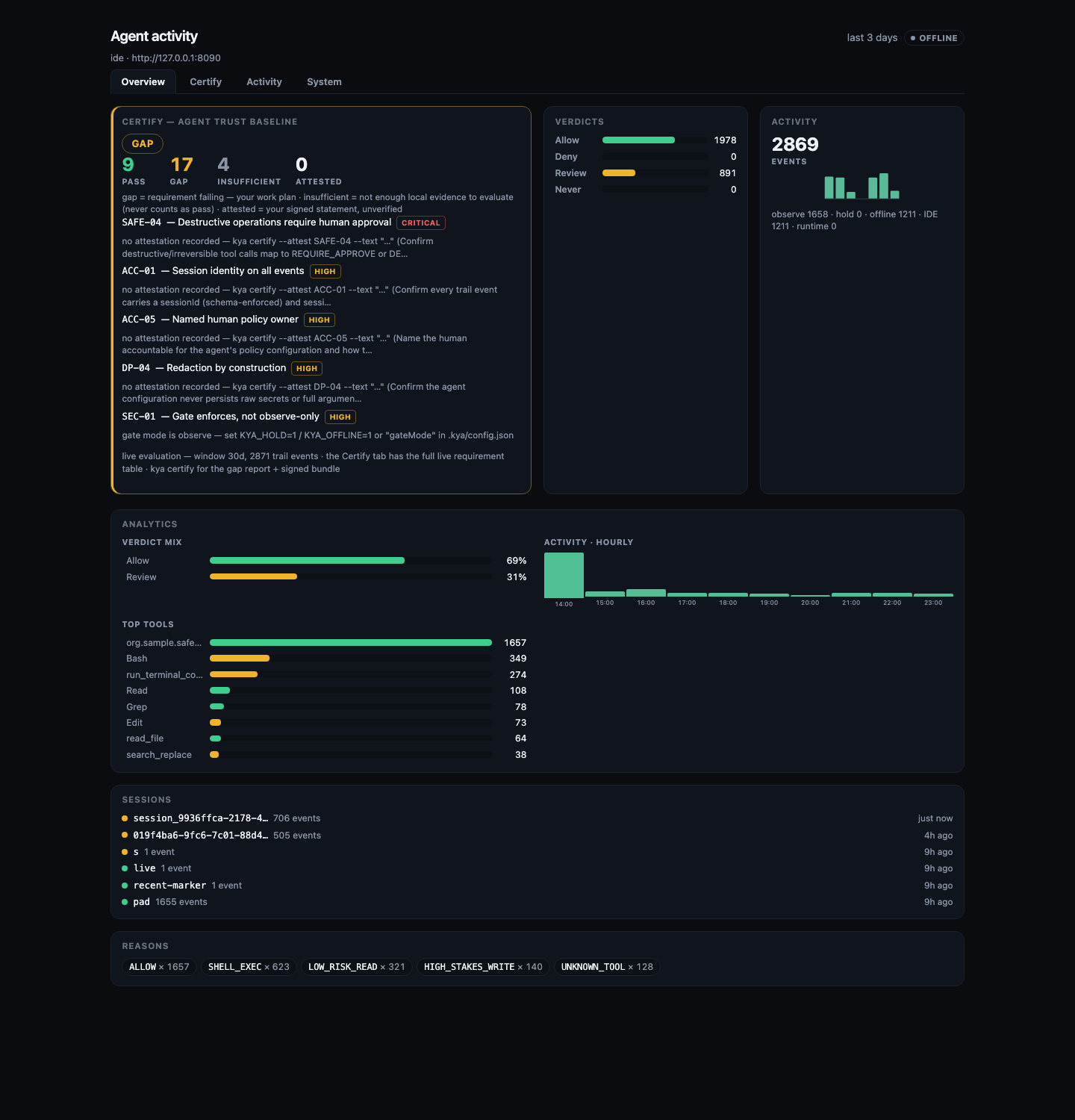
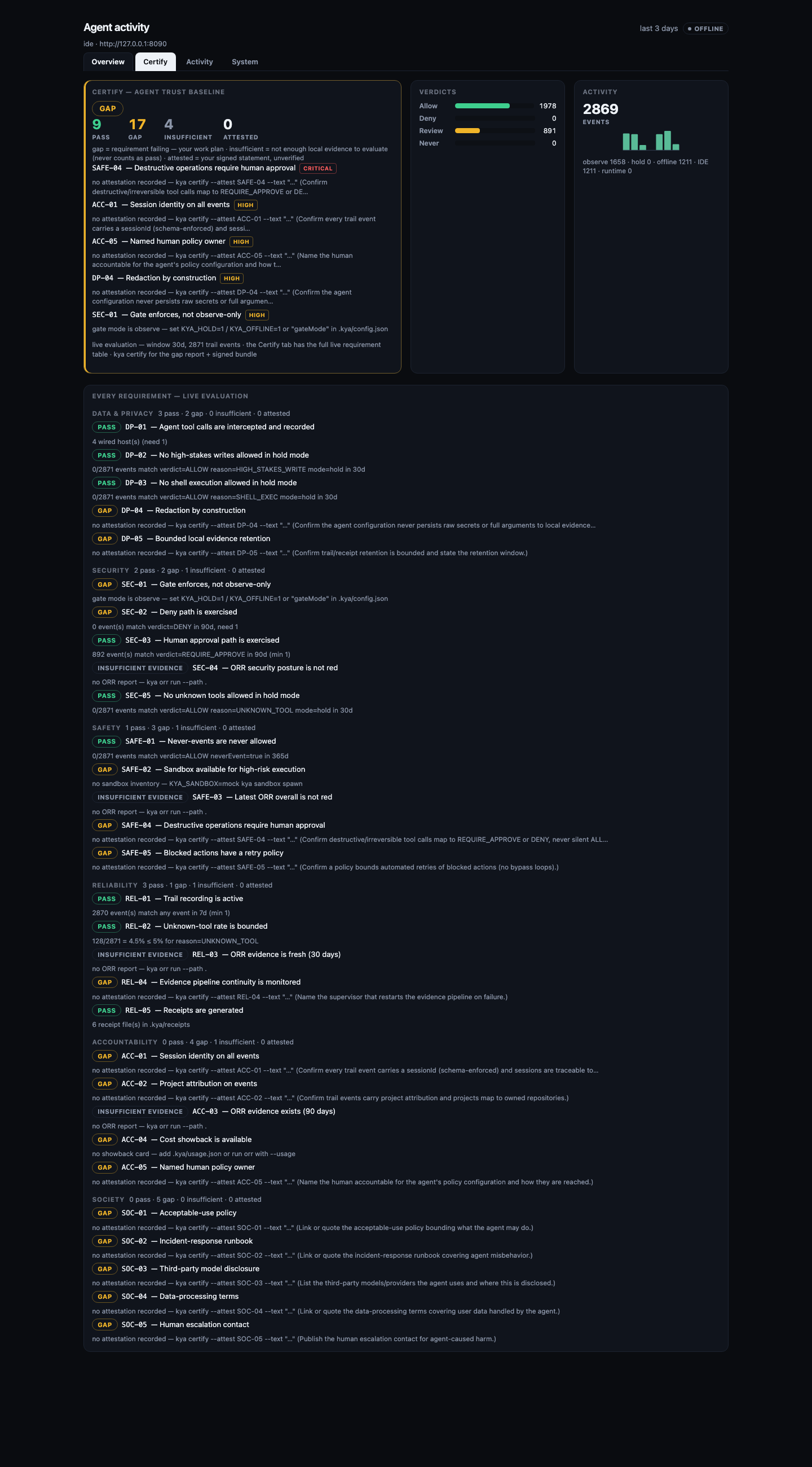
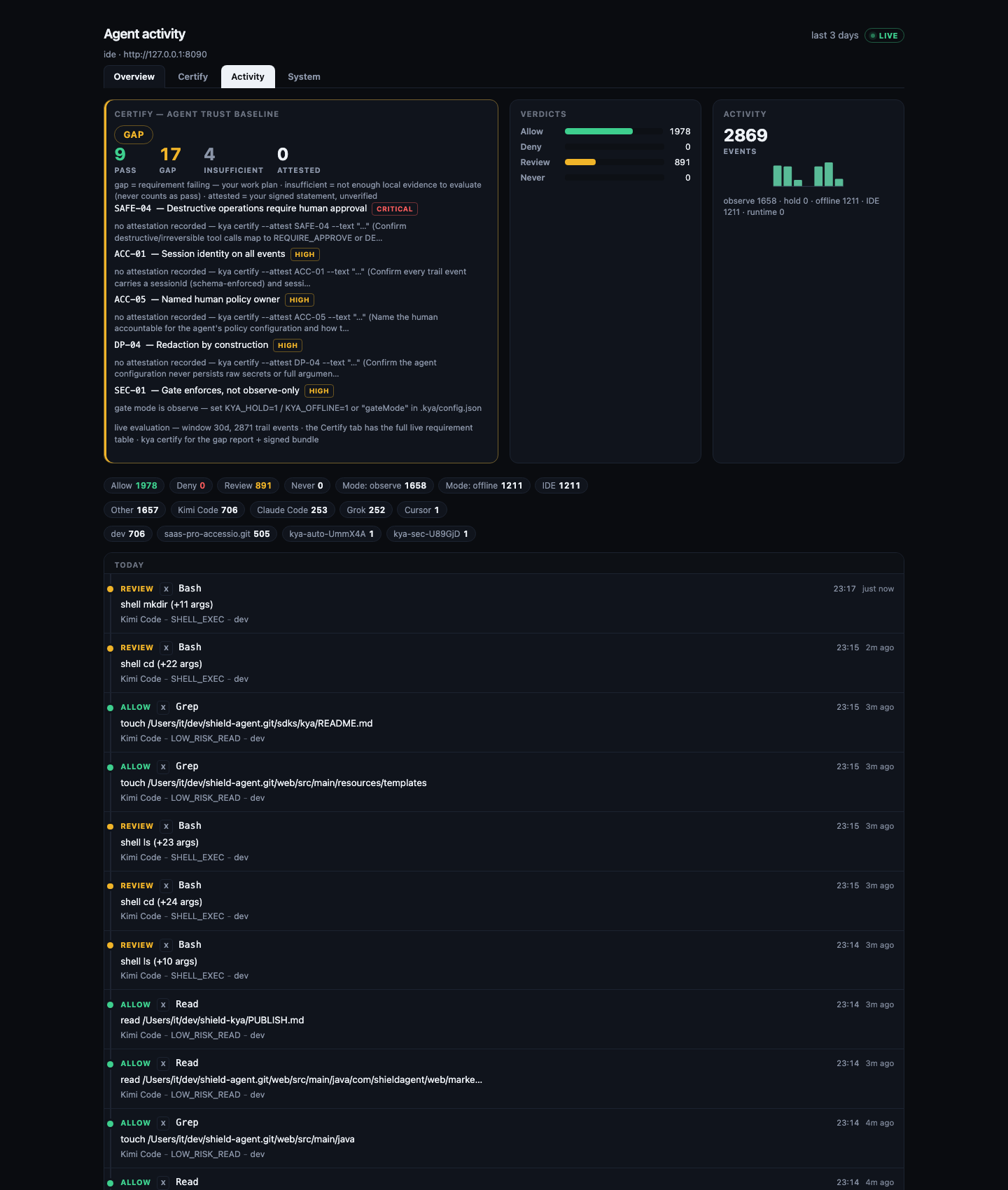
The report itself is a dashboard: a hero row on top (live Certify result, verdict mix, activity sparkline, showback) with tabbed sections below — Overview (analytics, sessions, reasons), Certify (the full live requirement table — every requirement grouped by domain with status, evidence, and attestation), Activity (the filterable event feed), System (wired hosts, sandboxes, ORR). Everything is one standalone offline HTML page; the live daemon from kya start re-renders it on every event.
Dual plane
 host=ide (authoring)          host=runtime (production)
        │                              │
        └────────── same agent ────────┘
                    identity
                    policy evaluate  → ALLOW | DENY | REQUIRE_APPROVE
                    approval + trail
Tag sessions with KYA_HOST=ide or KYA_HOST=runtime. Same policy path either way.
Environment
| Variable | Required | Meaning |
|----------|----------|---------|
| KYA_BASE_URL | Yes (network cmds) | Control plane origin |
| KYA_API_KEY | When auth is on | API key (or Bearer JWT for decide verbs) |
| KYA_HOST | No (default ide) | ide | runtime |
| KYA_AGENT_ID | After register | Agent principal id |
| KYA_MCP_PORT | No (default 3920) | HTTP MCP listen port |
| KYA_OFFLINE | No | 1/true for sample evaluate |
| KYA_HOLD | No | 1/true for the org Hold path (REQUIRE_APPROVE opens a human ticket) |
| KYA_DASH_PLAN | No | enterprise unlocks licensed TUI panes |
| KYA_DIFF_PREVIEW | No | 0 disables clipped change previews on the receipt |
| KYA_RECEIPT_AUTO | No | 0 disables auto-open receipt after wrap; 1 forces |
Gate mode can also be pinned in the project's .kya/config.json:
{"gateMode": "hold"} or {"gateMode": "offline"} (exact values only —
anything else is ignored). The gate itself (wrap / hook / eval) honors it
with the precedence flags > env > config > observe, and kya certify
reports through the same resolver, so a certify pass on gate mode always
reflects how the gate actually runs.
MCP tools
| Tool | Role |
|------|------|
| kya.policy_evaluate | ALLOW | DENY | REQUIRE_APPROVE |
| kya.session_ingest | Observe / raise-only risk |
| kya.request_approval | Open a human Hold. Does not execute the side effect |
MCP Registry entry: server.json plus package mcpName io.github.The-Pixel-Boys/shield-kya.
{
  "mcpServers": {
    "shield-kya": {
      "command": "npx",
      "args": ["--no-install", "@shield-agent/[email protected]", "serve-mcp", "--stdio"],
      "env": {
        "KYA_BASE_URL": "http://127.0.0.1:8090",
        "KYA_API_KEY": "${KYA_API_KEY}",
        "KYA_HOST": "ide"
      }
    }
  }
}
Wrap and decide
npx @shield-agent/kya wrap --offline --tool-id org.sample.data.write --irreversible
npx @shield-agent/kya approve --id <approval-id>
npx @shield-agent/kya reject --id <approval-id>
wrap evaluates and may open a pending ticket. It never executes the side effect. invoke asks the live plane to authorize after Allow or APPROVED. It does not run the write on this machine. The TUI (dash) can a/x decide only after y confirm with a JWT (sk_* refused).
Claude connector
Desktop / Claude Code (local stdio):
# Prefer a preinstalled package (no registry auto-install):
npx --no-install @shield-agent/[email protected] serve-mcp --stdio
# Or after npm i -g / local install:
kya serve-mcp --stdio
Copy claude/claude_desktop_config.example.json into Claude Desktop MCP settings, or use .mcp.json for Claude Code. Pack a Desktop extension with npx @anthropic-ai/mcpb pack (see manifest.json). That pack runs the packed dist/cli.js, not npx -y.
Claude.ai / Cowork (hosted): add a custom connector at https://shield-agent.com/mcp with request header Authorization: Bearer <KYA_API_KEY> (or X-API-Key). It is not Directory-listed yet (API-key auth, no OAuth DCR).
OpenAI (Codex / Responses)
Codex CLI / IDE: copy openai/codex.config.example.toml into ~/.codex/config.toml. Local stdio uses npx --no-install @shield-agent/[email protected] serve-mcp --stdio. Hosted Codex uses url = "https://shield-agent.com/mcp" with bearer_token_env_var = "KYA_API_KEY".
Responses API: see openai/responses-mcp.example.json (server_url + Authorization: Bearer <KYA_API_KEY>).
ChatGPT Apps (chatgpt.com): deferred. Developer Mode wants OAuth. Use Codex until then.
Gemini CLI
Merge gemini/settings.example.json (stdio) or gemini/settings.hosted.example.json (httpUrl + Bearer) into ~/.gemini/settings.json or .gemini/settings.json. Do not enable both at once.
Grok
Grok CLI (local): kya connect grok appends a [mcp_servers.shield-kya] table to ~/.grok/config.toml (serve-mcp --stdio, keyless offline sample evaluate). In a running session, press r in /mcps to refresh.
grok.com (hosted): custom connector at https://shield-agent.com/mcp (see grok/README.md). Grok rejects localhost. Prefer a Bearer machine key when the UI offers a request header.
More hosts
Each ships a copy-paste example in its own directory; kya connect <host> writes the same thing for the starred ones. Full recipes (verify, uninstall, troubleshooting): docs/hosts/.
| Host | Setup | Example |
|------|-------|---------|
| Claude Code | kya connect claude (or kya start) | — (merges ~/.claude.json / .mcp.json) |
| Grok CLI | kya connect grok | — (appends [mcp_servers.shield-kya] to ~/.grok/config.toml) |
| OpenCode | kya connect opencode | opencode/opencode.example.json |
| Kilo Code | kya connect kilo | kilo/kilo.example.json |
| Kiro | kya connect kiro | kiro/mcp.example.json |
| Qwen Code | kya connect qwen | qwen/settings.example.json (+ settings.hosted.example.json) |
| Kimi Code | kya connect kimi | kimi/mcp.example.json |
| MastraCode | kya connect mastracode | mastracode/mcp.example.json |
| Amp | kya connect amp | amp/settings.example.json |
| GitHub Copilot CLI | kya connect copilot | copilot/mcp-config.example.json |
| Cline | copy into VS Code globalStorage | cline/cline_mcp_settings.example.json |
| Droid | droid mcp add (schema unverified) | droid/mcp.example.json |
| Pi · OMP · Devin · Hermes · Qoder · Maki · Muse · Antigravity | kya wrap --offline -- <cmd> | docs/hosts/ |
Cursor plugin
The package includes .cursor-plugin/plugin.json, mcp.json, and a wrap skill. Public listing repo: https://github.com/The-Pixel-Boys/shield-kya
ORR (reporting only)
npx @shield-agent/kya orr run --path . --out ./orr-report --skip-optional-producers
npx @shield-agent/kya orr run --path . --out ./orr-report --scorecard ./scorecard.json --producer openssf.scorecard
npx @shield-agent/kya orr run --path . --out ./orr-report --producer harness.agentshield --agentshield-json ./agentshield-report.json
ORR is a reporting board. Scanners, --scorecard, and harness.agentshield are evidence. They never ALLOW a high-stakes side effect, so they are not a second policy gate. AgentShield is optional and read-only: no --fix, no MiniClaw, no runtime hook. This package does not depend on ecc-agentshield. If you pass --producer harness.agentshield and have neither --agentshield-json nor an agentshield binary, ORR records a coverage gap and still exits 0. Explicit --producer always attempts; --skip-optional-producers only skips producers you did not ask for.
Certify (continuous agent assurance)
kya certify evaluates the open Agent Trust Baseline catalog (catalog/agent-trust-baseline-v0.json — 30 requirements across Data & Privacy, Security, Safety, Reliability, Accountability, Society) against local evidence: the global trail, ORR output, wired hosts, sandbox inventory, receipts, showback, and your recorded attestations. It writes a gap report to .kya/certify/ (JSON + Markdown + HTML). The gap list is your work plan. The receipt report shows the same state live: a Certify panel recomputed on every render (so kya start's live report updates as events stream in), plus a dedicated Certify tab with the full live requirement table — run kya certify for the full gap report + signed evidence bundle.
npx @shield-agent/kya certify                  # gap report; exit 1 when gaps exist (CI-friendly)
npx @shield-agent/kya certify --open           # open the HTML report
npx @shield-agent/kya certify --fail-on never  # report only, always exit 0
npx @shield-agent/kya certify --attest SOC-01 --text "Acceptable-use policy: https://example.com/aup"
npx @shield-agent/kya certify --sign           # also emit a signed evidence-bundle.json
Certify is evidence-only. It never ALLOWs, DENYs, or blocks anything — the sole PEP remains Shield KYA. Trail-based machine checks never pass on an empty trail (they report insufficient_evidence). What a machine cannot check is covered by explicit local attestations (--attest), recorded in .kya/attestations.json — unverified operator statements, labeled as such.
--sign emits evidence-bundle.json: canonical JSON, ed25519-signed by a locally generated key (~/.kya/keys/evidence-ed25519.json, mode 0600, auto-created on first use). Each --sign run prints the signing key fingerprint; when the key was just created the CLI notes that key continuity resets there (earlier bundles stay verifiable only under the old pubkey). A self-signed developer key proves bundle integrity and continuity of a key — not identity. Identity binding and the verified badge are the hosted verification product (separate). The bundle format is open and documented in docs/certify.md; anyone can verify a bundle offline with the embedded pubkey.
Everything here is local, free, and offline: no account, no network calls, no license check. The catalog is MIT-licensed and PRs are welcome.
Optional sandbox wrap (Firecracker)
Beside the gate, not inside MCP. Opt-in only:
KYA_SANDBOX=mock kya sandbox spawn
KYA_SANDBOX=mock kya sandbox exec --sandbox-id <id> --cmd "true"
KYA_SANDBOX=mock kya sandbox kill --sandbox-id <id>
org.sample.sandbox.exec without --sandbox-id is DENY MISSING_SANDBOX_ID. Real Firecracker needs firecracker + jailer on PATH and kernel/rootfs env (KYA_SANDBOX_KERNEL, KYA_SANDBOX_ROOTFS). We do not ship those binaries. serve-mcp still exposes only evaluate / ingest / request_approval.
Cost showback (observe only)
kya orr run --usage ./usage.json (or .kya/usage.json) adds a showback section: tokens and estimated USD by agent and run. Subagents nest under parentRunId. That section is not a billing meter and not a policy gate. Hosted metrics show the same rollup when usage is ingested with a session.
Enterprise (separate tier)
Pin, private registry, multi-tenant density, ORR board ops, and support are not required for the day-1 npx path above.
Develop
pnpm install
pnpm test
pnpm build
Docs
- Install hub
- How KYA works
- Per-host recipes (23 hosts)
- OTLP metrics (OSS + hosted)
- OWASP MCP governance map
- kya certify — Agent Trust Baseline gap reports
- Hosted operator SSO / SCIM (not in OSS CLI)
- See also
LIMITATIONS.mdin this repo
OTLP (optional)
Opt-in. Default off.
OSS CLI: set KYA_OTLP_ENDPOINT (or OTEL_EXPORTER_OTLP_ENDPOINT) to export thin evaluate latency (kya.client.evaluate.latency) with tags verdict and host only. No tool args or API keys.
Hosted plane: richer Micrometer gauges and timers when KYA_OTLP_ENABLED=true.
Full env, Grafana/Datadog notes, forbid list, and a Collector sample: docs/otlp.md.