
@si-ic/thisone
v3.2.1
Published
Point at any element in your dev preview and hand your AI agent its exact source location and a screenshot. Vite, webpack, Rspack, Rollup, esbuild.
Downloads
592

Maintainers
 si-ic
si-icReadme
thisone
Point at it. Your AI agent gets the file, the line, and the pixels.


dev-only · zero runtime · no network
The problem
You can see the bug. Your agent can't.
"The button in the third card is 2px off" is a perfectly clear sentence to a human looking at the same screen, and nearly useless to an agent that has to guess which of your 40 components renders that card. So it greps, opens the wrong file, patches the wrong rule, and you spend three messages narrowing down a thing you could have pointed at in half a second.
The gesture that would fix this — this one, right here — is exactly what a chat window doesn't have.
The fix
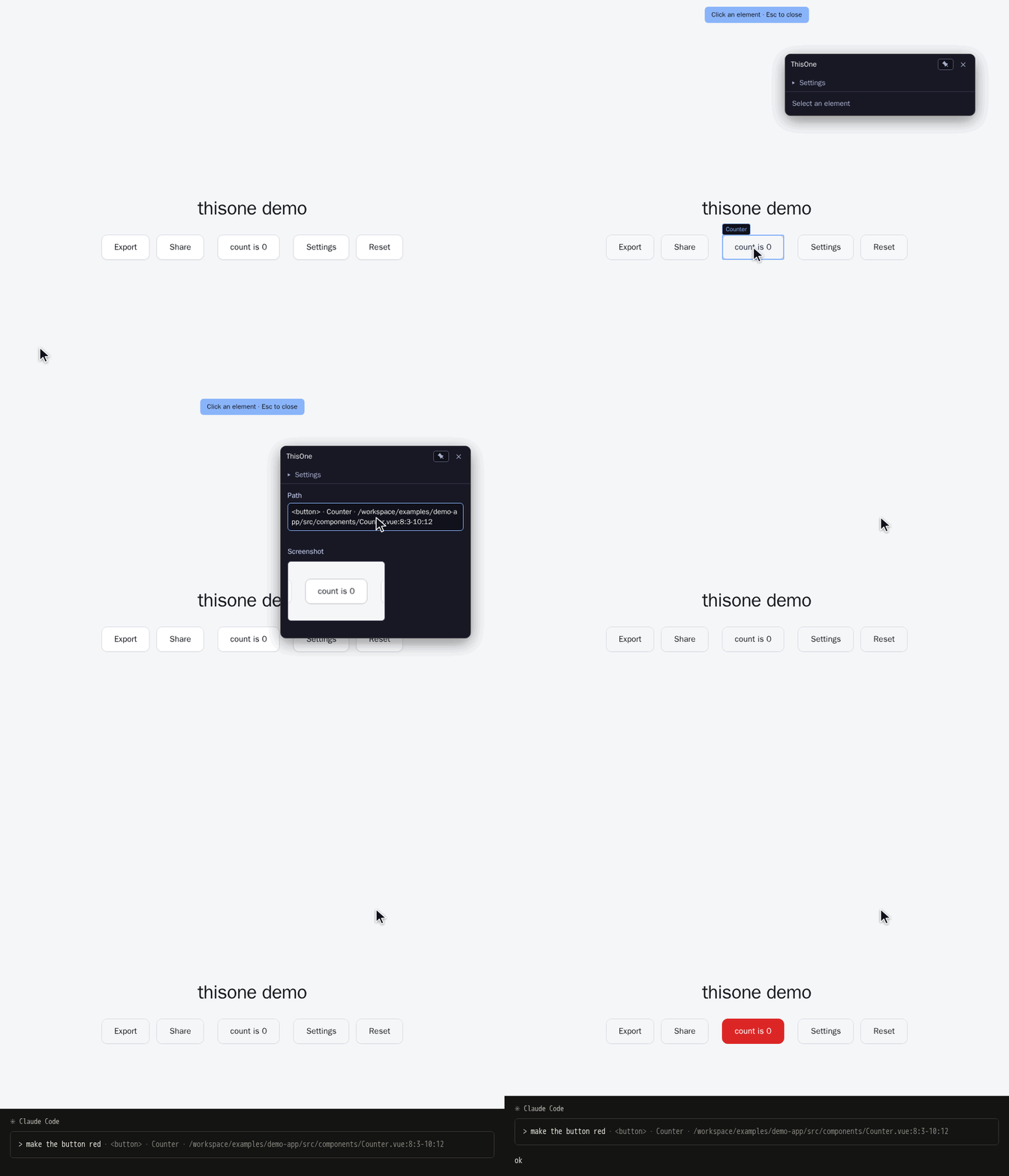
Press Alt+C, click the element, press Ctrl+V in your agent's chat. That's it.
What lands in the paste:
<button> · Counter · /home/you/shop/src/components/Counter.vue:8:3-10:12Tag, component name, and the exact source span — file, start line:column, end line:column. One click on the screenshot instead, and you paste the element as a PNG with (by default) 30px of real surrounding page on each side — configurable in Settings — so the agent sees the misalignment rather than reading about it.
Quickstart
npm i -D @si-ic/thisoneVue:
// vite.config.ts
import { defineConfig } from "vite";
import vue from "@vitejs/plugin-vue";
import thisone from "@si-ic/thisone/vite";

export default defineConfig({
  plugins: [vue(), thisone()],
});
React:
// vite.config.ts
import { defineConfig } from "vite";
import react from "@vitejs/plugin-react";
import thisone from "@si-ic/thisone/vite";

export default defineConfig({
  plugins: [react(), thisone()],
});
Svelte:
// vite.config.ts
import { defineConfig } from "vite";
import { svelte } from "@sveltejs/vite-plugin-svelte";
import thisone from "@si-ic/thisone/vite";

export default defineConfig({
  plugins: [svelte(), thisone()],
});
Preact — no framework plugin required:
// vite.config.ts
import { defineConfig } from "vite";
import thisone from "@si-ic/thisone/vite";

export default defineConfig({
  plugins: [thisone()],
});
Using webpack, Rspack, Rollup, or esbuild instead of Vite? Swap the import for
@si-ic/thisone/webpack, @si-ic/thisone/rspack, @si-ic/thisone/rollup, or
@si-ic/thisone/esbuild — same plugin, same clipboard payload. (Rollup and esbuild don't own an
HTML pipeline, so those two entries inject the client script as a JS banner into your entry chunk
instead of a <script> tag — no extra setup either way.)
Already on vite-plugin-thisone? It still works — that package now re-exports
@si-ic/thisone/vite unchanged.
Start your dev server and press Alt+C.
What lands on your clipboard
The path text is built from three parts, in order:
| Part | Example | Where it comes from |
| ----------- | ------------------------- | --------------------------------------- |
| Tag | <button> | the picked DOM element |
| Component | Counter | the Vue or React component that owns it |
| Source span | …/Counter.vue:8:3-10:12 | injected at transform time, dev only |
It degrades instead of disappearing. No resolvable source location, but a known component and file:
<button> · Counter (…/Counter.vue). No component at all: <button> · main > div > button.
Clicking the screenshot copies a PNG of the element to the clipboard, padded with 30px of the real page around it by default (configurable in Settings) — enough context to judge spacing and alignment, cropped tight enough to stay about one element.
Both are plain clipboard writes. Nothing is uploaded, nothing is stored.
Options
thisone({ hotkey: "KeyB" }); // Alt+B instead of Alt+C| Option | Type | Default | Meaning |
| --------- | --------- | -------- | --------------------------------------------------------------------------------------------------------------------------------------------------------- |
| hotkey | string | "KeyC" | KeyboardEvent.code that opens the picker together with Alt |
| enabled | boolean | dev only | Overrides the dev detection below in both directions |
Production output
The overlay and the data-src-loc source transform only run when the bundler says the build is a
development one — an unknown mode counts as production, so nothing leaks by accident:
| Bundler | Runs when | Notes |
| --------------- | ------------------------------------------------------------ | --------------------------------------------------------- |
| Vite | dev server (apply: "serve") | enabled: true cannot force it into vite build |
| webpack, Rspack | mode === "development" | unset mode and mode: "none" are treated as production |
| Rollup | NODE_ENV === "development", or watch mode when it is unset | rollup -c -w counts as dev, a one-shot build does not |
| esbuild | NODE_ENV === "development" | esbuild exposes no watch signal to plugins |
A Rollup one-shot build or an esbuild build that doesn't set NODE_ENV prints a one-line warning
and stays off — pass enabled: true for those dev builds, enabled: false to switch the plugin off
anywhere.
The panel is draggable and remembers where you left it. The icon button in its header enables an edge-docked quick-access button — off by default, always on screen once enabled, right-click-drag to move it around the viewport perimeter. Both survive a reload.
Click "Settings" to expand or collapse a panel of picker options; the expanded/collapsed state is remembered. It holds:
- Path mode — "File tree" shows the path from the project root; "From root component" adds the
component chain after it —
<div> · /home/you/shop/src/Counter.vue:12:3-12:45 · in App › Counter— so the agent gets the file to edit first and the surrounding component tree as context. - Show element screenshot — on by default; turning it off skips capture entirely. When on, the padding around the element (default 30px) is configurable.
The "Click an element" hint above the page can be right-click-dragged horizontally; its position is remembered and clamped to stay inside the viewport.
Works with
- Vue 3 — component name and source span via the SFC compiler.
- React —
.jsx/.tsx, includingmemo()-wrapped and default-exported components. No dependency on@vitejs/plugin-react, and verified compatible when it's installed too. - Preact — function components via the
options.diffedhook, includingmemo()-wrapped (preact/compat). No framework Vite plugin required. - Svelte — components via the
__svelte_metadev-stack chain, verified with@sveltejs/vite-plugin-svelte. - Vite 5, 6, 7 — HTML-pipeline injection via
transformIndexHtml. - webpack 5, Rspack — HTML-pipeline injection via
html-webpack-plugin(webpack) or the built-inHtmlRspackPlugin(Rspack). - Rollup, esbuild — JS-banner injection into the entry chunk (no HTML pipeline to hook into).
Every entry is dev-only. A production build contains none of it — no overlay, no injected attributes, no bytes shipped to your users.
Why not just…?
| | What it does | What you get | | ------------------------------------------------------------------------------------ | ----------------------------------------------------- | -------------------------------- | | LocatorJS | jumps you to the source in your editor | a cursor in a file | | click-to-component | same, React-specific | a cursor in a file | | vite-plugin-vue-inspector | same, Vue-specific | a cursor in a file | | thisone | puts the location and a picture on your clipboard | something to paste into an agent |
Those tools optimize for you opening the file. This one optimizes for handing the file to someone who can't see your screen. No editor integration, no protocol handler, no daemon — it works the same whether your agent lives in a terminal, an IDE, or a browser tab.
Privacy
No server, no network calls, no telemetry, no analytics. The picker runs in your page and writes to your clipboard. That is the whole data flow.
Development
pnpm install
pnpm run setup-hooks   # one-time: installs the husky git hooks
pnpm build             # -> dist/{index,webpack,rspack,rollup,esbuild}.{js,d.ts}, dist/client.js
pnpm build:watch       # rebuilds dist/client.js on save, for live overlay dev
pnpm test:run                 # unit tests
bash scripts/e2e.sh               # e2e against examples/demo-app (Vue)
bash scripts/e2e-react.sh         # e2e against examples/demo-app-react (bare, no @vitejs/plugin-react)
bash scripts/e2e-react-plugin.sh  # e2e against examples/demo-app-react-plugin (with @vitejs/plugin-react)
bash scripts/e2e-preact.sh        # e2e against examples/demo-app-preact
bash scripts/e2e-svelte.sh        # e2e against examples/demo-app-svelte
bash scripts/e2e-webpack.sh       # e2e against examples/demo-app-react-webpack
bash scripts/demo.sh              # re-record docs/demo.gif
bash scripts/dev-demo.sh          # browse both demos live on one port — see tests/e2e/README.md
scripts/demo.sh records the picked element's absolute module path into the GIF, so run it from a
checkout whose path you are willing to publish — a personal /home/<you>/… would end up in the
committed asset.
Versioning is automatic: a husky pre-commit hook bumps the patch version, rebuilds dist/ and
stages it whenever src/ changes; a post-commit hook tags v<version>. For a larger bump run
pnpm release minor (or major) before committing.
setup-hooks is deliberately not wired to prepare — consumers who install straight from git would
otherwise have their package manager install our full devDependencies to run it, which can
recursively trigger pnpm install in their workspace root.
Design notes live in docs/superpowers/specs/.
Contributing
Issues and pull requests are welcome. Before opening a PR, run pnpm test:run and all scripts/e2e*.sh
scripts (Vue, React bare, React with @vitejs/plugin-react, Preact, Svelte) — all must be green. Bug
reports are most useful with the framework, the Vite version, and the copied path text the panel
produced.
License
MIT