
@simplesmoothsafe/pptb-access-checker
v1.2.2
Published
Why can (or can't) a user do X on a record? Verdict per access right with the chain that produced it: roles, teams, business unit, ownership, shares, hierarchy, column security.

Maintainers
 dataverse-mcp-pro
Readme
Access Checker
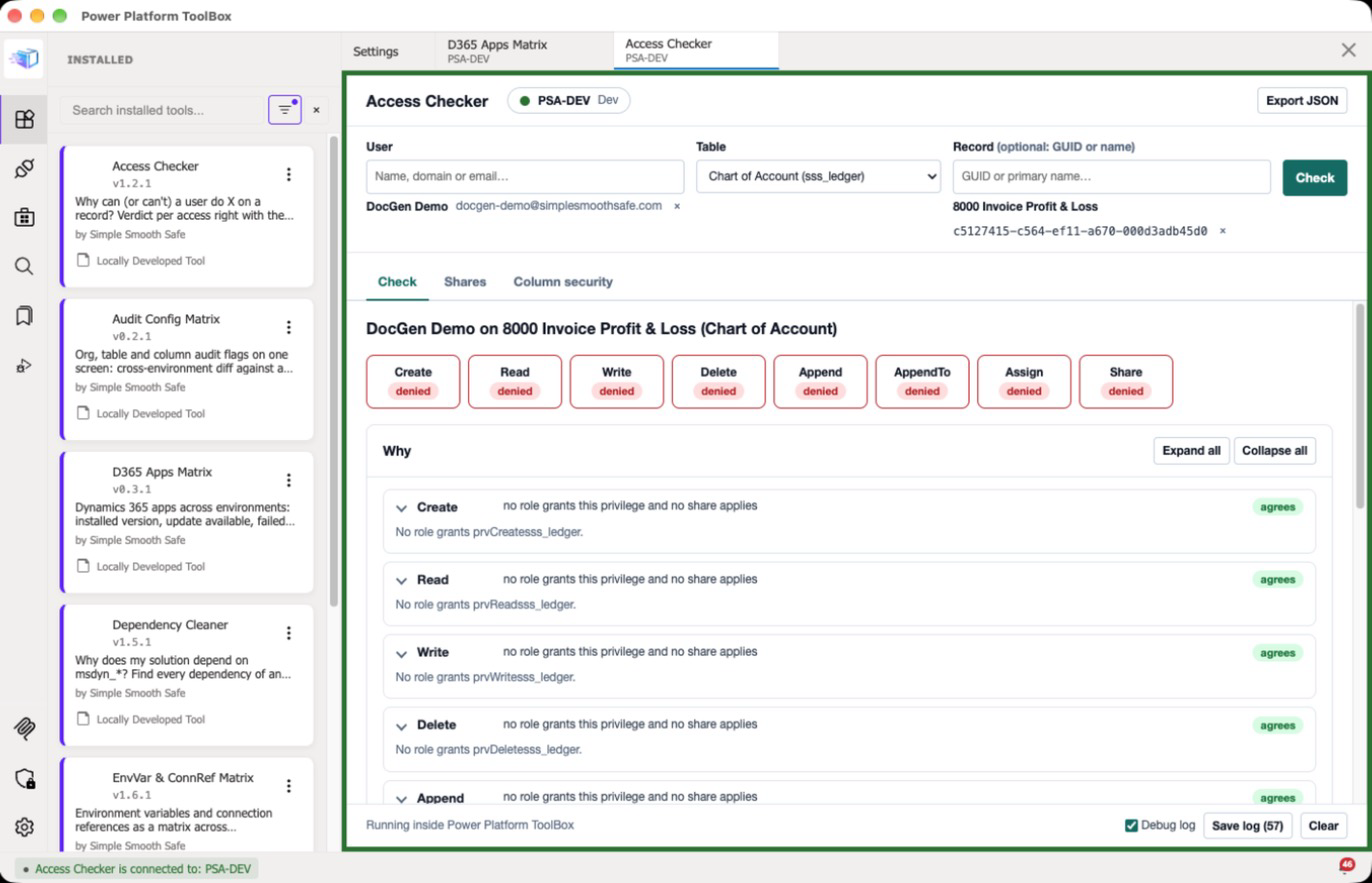
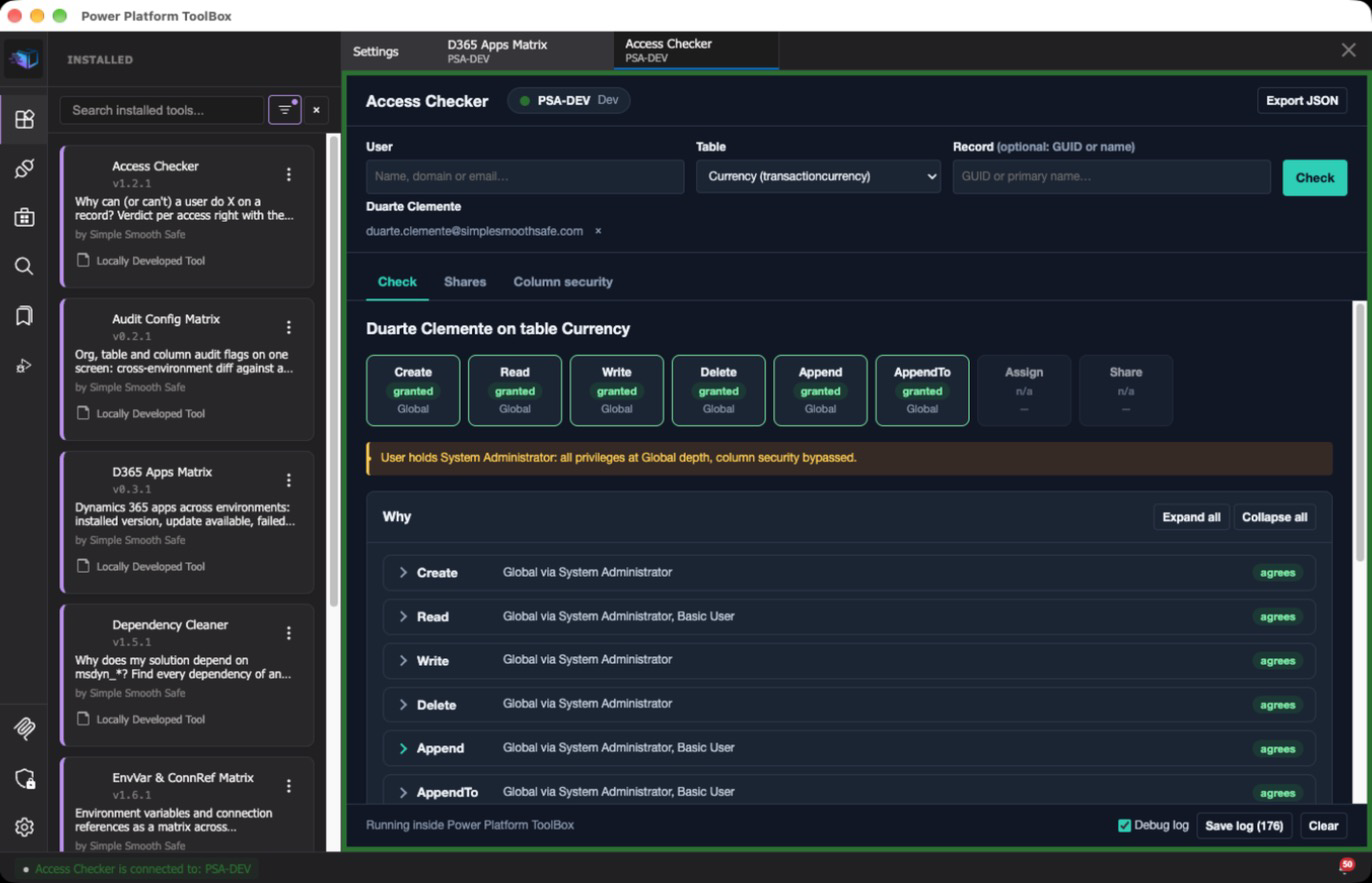
Why can (or can't) a user do X on a record? Pick a user, a table and optionally a record inside Power Platform ToolBox and get the verdict per access right together with the chain that produced it: security roles (direct and through teams), privilege depth, business unit position, ownership, shares and manager hierarchy. Plus the record's share list and the user's effective column security on the table.
What it does
- Check — eight chips (Create, Read, Write, Delete, Append, AppendTo, Assign, Share) with the platform verdict:
RetrievePrincipalAccessfor a record,RetrieveUserPrivilegeByPrivilegeName(effective depth, team roles included) for each of the table's privileges in a table-level check. Under them, one "why" line per right: the winning role and how it reaches the record (Deep depth: record BU Sales is under Sales), or why the best role falls short (Local depth covers only Sales; record is in Root), or the share that grants it. A share only counts when the user also holds the privilege at Basic depth or more through some role, as the platform requires; a share without it is shown as having no effect. The tool's explanation is markedagrees/platform says otherwiseagainst the platform verdict and never overrides it. - Roles — every role the user holds, how (direct or via which team, with the team type and whether the role is Team privileges only) and its depth for each right on the chosen table, straight from
RetrieveRolePrivilegesRole. Privilege names come from the table's metadata (EntityDefinitions(...)/Privileges), so activities (prvReadActivity), notes (prvReadNote) and users (prvReadUser) resolve correctly. - Ownership & business unit — owner, owning BU, user BU and the relation between them (owns, same BU, child BU, outside subtree).
- Shares — all principals the record is shared with (
RetrieveSharedPrincipalsAndAccess), their rights, and whether each share affects the checked user (directly or through one of their teams). - Column security — secured columns of the table × effective Read / Update / Create for the user, naming the field security profile that grants each, held directly or through a team. System Administrator is called out as bypassing column security.
- Hierarchy — when hierarchy security is on and the user is above the record owner in the manager chain, within the organization's hierarchy depth, the possible extra access is noted, not asserted.
- Export — JSON of the whole check, CSV of shares and of column security.
What this tool changes
Nothing in Dataverse or Power Platform: the tool is read-only. It never creates, updates, deletes, assigns, shares or unshares records, and never changes security roles, team membership, business units, field security profiles or organization settings. Every call it makes is a read: OData queries (queryData), table and column metadata, and the read-only functions RetrievePrincipalAccess, RetrieveUserPrivilegeByPrivilegeName, RetrieveRolePrivilegesRole and RetrieveSharedPrincipalsAndAccess. Because nothing is written, there is no confirmation dialog and nothing to undo. What it can read is limited to what the connection's user can read.
Files saved to disk, only when you click an export button and only where you choose in the ToolBox save dialog:
- Export JSON —
<user>_<table>[_<record id>].access.json: the whole check (user, table, roles, teams, verdicts and their explanation, ownership, hierarchy, notes) and the environment name. - Export CSV on the Shares tab —
<table>_<record id>_shares.csv. - Export CSV on the Column security tab —
<table>_<user>_columns.csv. - Save log (only when the Debug log is on) —
access-checker-debug-<timestamp>.txt, see Debug log.
Browser storage (localStorage of the tool's ToolBox view, per viewer, never sent anywhere):
sss-view:access-checker— the display toggles Hide roles with no privilege on this table, Only shares affecting (the checked user) and Only columns with a denied right. Search text in the filters is kept only for the session.sss-debug:access-checker— whether the Debug log switch is on.
Nothing else: no other files, no settings outside the tool, no network calls other than the ToolBox dataverseAPI bridge.
Screenshots
Captured in Power Platform ToolBox against a Dataverse Sandbox environment, with demo users.
Install
From the ToolBox marketplace — search for "Access Checker" once listed.
From npm (ToolBox Debug menu) — Settings → enable Show Debug Menu → Debug → Install from npm → @simplesmoothsafe/pptb-access-checker.
From source
cd tools/access-checker
npm install
npm run build
Then in ToolBox: Debug → Load Local Tool → select the tools/access-checker folder.
Usage
- Pick a primary connection in ToolBox. The tool needs one connection and reads with the rights of that connection's user.
- User — type part of a name, domain name or email and pick from the list. Application users are excluded.
- Table — user, team, BU or organization-owned tables; intersect and private tables are hidden.
- Record (optional) — paste a GUID or search by the table's primary name. Leave empty for a table-level check.
- Check. Switch tabs for shares and column security of the same user / table / record.
Notes:
- The explanation covers roles, teams (owner, access, Entra group teams as returned by team membership), privilege depth, BU chain, ownership, explicit shares and manager hierarchy. Local/Deep depth is evaluated against the role's business unit for direct roles (so a role from another BU under record ownership across business units is handled) and against the team's BU for team roles. A team role set to Team privileges only (
isinherited= 0) gives Basic access to records owned by that team only, not to the user's own records. System Administrator is recognised by its role template, so a renamed or localized copy still counts. - The hierarchy hint reads
ishierarchicalsecuritymodelenabledandmaxdepthforhierarchicalsecuritymodel(default 3) from the organization row, and walks the manager chain only that deep; if the setting is not readable the hint is skipped and a note says so. - Depth codes: Basic (user), Local (BU), Deep (BU and children), Global (organization).
Limitations (the platform verdict is always shown alongside and is right when the two differ):
Tested on 2026-10-06 against a Dataverse Sandbox environment with a single business unit: user search (including a disabled user), table-level checks for a user with no role and for a System Administrator, an organization-owned table (Assign / Share not applicable), Task and Note (activity and note privilege names), a record-level check, the Shares and Column security tabs when the record has no shares and the table no secured column, all three exports, light and dark theme. Every verdict agreed with the platform.
Not yet verified against a live environment (the environment had no such data): a user with a mix of direct and team roles, Local / Deep depth across business units, records shared with a user or a team, field security profiles on a secured column, Team privileges only team roles, and hierarchy security.
Access-team templates and position hierarchy are not modelled; roles inherited from a team in another BU are approximated against the team's BU.
Entra group teams (security or Office group) list only members Dataverse has synced so far: a group member is added just in time, when they first sign in to the environment, so someone who has never signed in does not appear as a member and their team roles are missing here.
Nested Entra groups are not resolved: only direct members of the group behind the team are considered.
Only explicit shares on the record are listed. Access that reaches it through a share of a related record (cascaded or inherited sharing through a parental relationship) may not appear.
Debug log
For troubleshooting, tick Debug log in the footer, reproduce the problem, then Save log: a access-checker-debug-<timestamp>.txt file with every ToolBox, Dataverse and Power Platform API call the tool made (the exact query or request, the response or error, timing), notifications, connection events and uncaught errors. The switch is remembered for this tool; ?debug=1 also turns it on. Off, nothing is recorded.
The file is written only where you save it. Secrets (keys named like password, secret, token, authorization) are redacted, and long strings, arrays and binary payloads are truncated, but responses still contain record data such as names and ids: review the file before you share it.
Privacy
All data stays between ToolBox and your Dataverse environment: the tool talks to Dataverse only through the ToolBox dataverseAPI bridge, requests no CSP exceptions, and sends nothing anywhere else. Exports are written to files you choose.
Release notes
- 1.2.2 — Live test on a Sandbox: Check refuses to run when a record name is typed but not picked (it used to run a table-level check under that name). Real screenshots.
- 1.2.1 — Marketplace review: display name without publisher prefix, 'What this tool changes' section, AI assistance disclosure, synthetic screenshots removed.
AI Assistance
Substantial parts of this tool's code and documentation were generated with Claude Code (Anthropic) and reviewed, tested and maintained by the contributors listed in package.json. Testing status against real Dataverse environments is stated per feature under Limitations.
Credits
Built and maintained by Duarte Clemente (Simple Smooth Safe).