
@siposdani87/expo-rich-text-editor
v1.3.0
Published
This rich text editor written in TypeScript and use React Hooks structure. This component use the HTML ContentEditable div feature and React communicate and send data to native JavaScript via WebView.

Maintainers
 siposdani87
Readme
@siposdani87/expo-rich-text-editor



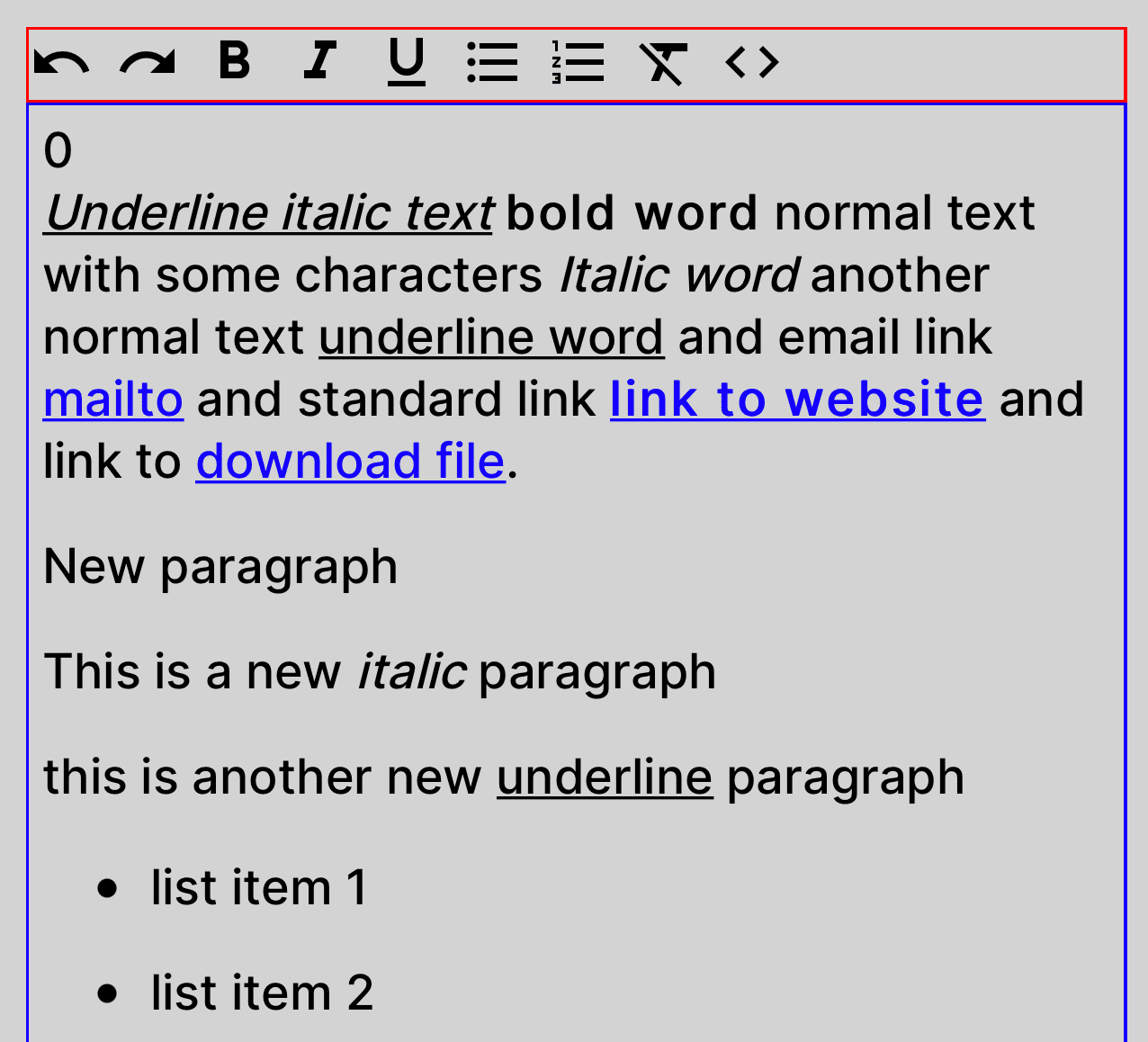
This rich text editor written in TypeScript and use React Hooks structure. This component use the HTML ContentEditable div feature and React communicate and send data to native JavaScript via WebView. It has base editing options.
Supported Platforms
| Platform | Supported | Notes |
| -------- | --------- | ----- |
| iOS | Yes | Via react-native-webview |
| Android | Yes | Via react-native-webview |
| Web | Yes | Via <iframe> with contentEditable |
Compatibility
| Dependency | Required Version | | ---------------------- | ---------------- | | Expo SDK | >= 55 | | React | >= 19 | | React Native | >= 0.83 | | react-native-webview | >= 13 (iOS/Android only) |
New Architecture (Fabric) is required (Legacy Architecture is no longer supported by Expo SDK 55).
Getting Started
Installing
npm install @siposdani87/expo-rich-text-editorBasic Usage
Check example directory for more samples and options.
import { MaterialIcons } from '@expo/vector-icons';
import { RichTextEditor, RichTextViewer, ActionMap, ActionKey } from '@siposdani87/expo-rich-text-editor';

const htmlStr = '<p><i><u>Underline italic text</u></i> <b>bold word</b> normal words</p>';

export const RichTextComponents = () => {
    const [value, setValue] = useState<string>('');

    const getColor = (selected: boolean): string => {
      return selected ? 'red' : 'black';
    };

    const getActionMap = (): ActionMap => {
        return {
            [ActionKey.bold]: ({ selected }) => (
                <MaterialIcons
                    name="format-bold"
                    size={14}
                    color={getColor(selected)}
                />
            ),
        };
    };

    const onValueChange = (v: string): void => {
        console.log('onValueChange', v);
        setValue(v);
    };

    return (
        <>
            <RichTextEditor
                minHeight={150}
                value={value}
                selectionColor="green"
                actionMap={getActionMap()}
                onValueChange={onValueChange}
                linkStyle={styles.link}
                textStyle={styles.text}
                containerStyle={styles.editor}
                toolbarStyle={styles.toolbar}
            />
            <RichTextViewer
                value={htmlStr}
                linkStyle={styles.link}
                textStyle={styles.text}
                containerStyle={styles.viewer}
            />
        </>
    );
};

const styles = StyleSheet.create({
    text: {
        // fontFamily: 'Inter_500Medium',
        fontSize: 18,
    },
    link: {
        color: 'green',
    },
    viewer: {
        borderColor: 'green',
        borderWidth: 1,
        padding: 5,
    },
    editor: {
        borderColor: 'blue',
        borderWidth: 1,
        padding: 5,
    },
    toolbar: {
        borderColor: 'red',
        borderWidth: 1,
    },
});
Props
RichTextEditor
| Prop | Type | Description | | --------------- | ----------------------- | ----------- | | value * | string | HTML string with standard tags e.g.: p, b, strong, i, em, u, a, br | | onValueChange * | (value: string) => void | Call this function on value changed | | onFocus | () => void | Call this function on component focus | | onBlur | () => void | Call this function on component blur | | onClickLink | (href: string) => void | Call this function on link clicked | | selectionColor | string | Color of text selection | | actionMap | ActionMap | Action config for toolbar component | | minHeight | number | Min height of container | | textStyle | StyleProp | Style of base text | | linkStyle | StyleProp | Style of link (a tag) | | containerStyle | StyleProp | Style of content container | | toolbarStyle | StyleProp | Style of toolbar container | | disabled | boolean | Disable editing on component | | autoFocus | boolean | Auto focus on component | | debug | boolean | Print debug information to console |
RichTextViewer
| Prop | Type | Description | | --------------- | ----------------------- | ----------- | | value * | string | HTML string with standard tags eg.: p, b, strong, i, em, u, a, ul, ol, li, br | | onClickLink | (href: string) => void | Call this function on link clicked | | textStyle | StyleProp | Style of base text | | linkStyle | StyleProp | Style of link (a tag) | | containerStyle | StyleProp | Style of content container | | debug | boolean | Print debug information to console |
Available Toolbar Actions
The ActionKey enum defines all available formatting actions:
| ActionKey | Description |
| --------------- | -------------------------- |
| undo | Undo last action |
| redo | Redo last action |
| bold | Toggle bold formatting |
| italic | Toggle italic formatting |
| underline | Toggle underline formatting|
| unorderedList | Insert unordered list |
| orderedList | Insert ordered list |
| clear | Remove formatting |
| code | Toggle HTML source editing |
Advanced Usage
Custom Toolbar with All Actions
import { ActionKey, ActionMap } from '@siposdani87/expo-rich-text-editor';

const getFullActionMap = (getColor: (selected: boolean) => string): ActionMap => ({
    [ActionKey.undo]: ({ selected }) => (
        <MaterialIcons name="undo" size={14} color={getColor(selected)} />
    ),
    [ActionKey.redo]: ({ selected }) => (
        <MaterialIcons name="redo" size={14} color={getColor(selected)} />
    ),
    [ActionKey.bold]: ({ selected }) => (
        <MaterialIcons name="format-bold" size={14} color={getColor(selected)} />
    ),
    [ActionKey.italic]: ({ selected }) => (
        <MaterialIcons name="format-italic" size={14} color={getColor(selected)} />
    ),
    [ActionKey.underline]: ({ selected }) => (
        <MaterialIcons name="format-underlined" size={14} color={getColor(selected)} />
    ),
    [ActionKey.unorderedList]: ({ selected }) => (
        <MaterialIcons name="format-list-bulleted" size={14} color={getColor(selected)} />
    ),
    [ActionKey.orderedList]: ({ selected }) => (
        <MaterialIcons name="format-list-numbered" size={14} color={getColor(selected)} />
    ),
    [ActionKey.clear]: ({ selected }) => (
        <MaterialIcons name="format-clear" size={14} color={getColor(selected)} />
    ),
    [ActionKey.code]: ({ selected }) => (
        <MaterialIcons name="code" size={14} color={getColor(selected)} />
    ),
});
Programmatic Control via Toolbar Ref
import { useRef } from 'react';
import { RichTextToolbar, RichTextToolbarHandle, ActionKey } from '@siposdani87/expo-rich-text-editor';

const toolbarRef = useRef<RichTextToolbarHandle>(null);

// Trigger bold programmatically
toolbarRef.current?.click(ActionKey.bold);
Message Protocol
The editor communicates between React Native and the embedded HTML editor via JSON messages with {type, data} pairs.
Editor → React Native (EditorToRNMessage):
| Type | Data Type | Description |
| -------------- | --------- | ------------------------------ |
| changeHtml | string | HTML content changed |
| changeHeight | number | Editor height changed |
| onClickLink | string | Link was clicked (href) |
| onFocus | - | Editor gained focus |
| onBlur | - | Editor lost focus |
| log | string | Debug log message |
React Native → Editor (RNToEditorCommand):
| Type | Data Type | Description |
| ------------------- | --------- | ----------------------------- |
| setHtml | string | Set editor HTML content |
| setColor | string | Set text color |
| setFontFamily | string | Set font family |
| setFontSize | number | Set font size |
| setLinkColor | string | Set link color |
| setSelectionColor | string | Set selection/caret color |
| setDisabled | boolean | Enable/disable editing |
| setAutoFocus | boolean | Set auto focus |
| bold, italic, etc. | string | Toggle formatting commands |
Migration Guide
From 1.2.x to 1.3.x
- Expo SDK 55 is now required (was SDK 54)
- React Native 0.83+ is now required (was 0.81)
- New Architecture (Fabric) is now mandatory — Legacy Architecture is no longer supported
- No breaking API changes — drop-in upgrade
react-native-webview>= 13 requirement unchanged
From 1.1.x to 1.2.x
- Expo SDK 54 is now required (was SDK 52)
- React 19 is now required (was React 18)
- React Native 0.81+ is now required
- New Architecture (Fabric) is now supported
- Web platform support added via
<iframe>(no changes needed if using iOS/Android only)
From 0.x to 1.x
ActionMapkeys changed from string toActionKeyenumviewerStyleprop renamed tocontainerStyle- Minimum Expo SDK version is now 50+
Preview
Bugs or Requests
If you encounter any problems feel free to open an issue. If you feel the library is missing a feature, please raise a ticket. Pull request are also welcome.
Development
See CONTRIBUTING.md for setup instructions and contribution guidelines.
npm ci          # Install dependencies
npm run build   # Build the library
npm run lint    # Check for lint errors
npm run format  # Format source code
Developer
Sponsors
This project is generously supported by TrophyMap, I18Nature, and several other amazing organizations.