
@sixi/upload
v1.1.2
Published
upload是将信息(网页、文字、图片、视频等)通过网页发布到七牛云存储服务器上的组件。


Readme
upload 上传
upload是将信息(网页、文字、图片、视频等)通过网页发布到七牛云存储服务器上的组件。同时整合图片预览、视频播放、列表文件选择功能。
代码演示
最基础的文件上传
<template>
  <div>
    <el-form :model="formData" label-width="80px">
      <el-form-item label="文件">
        <upload
          :token="token.video"
          :domain="domain"
          :maxSize="2"
          :mustExt="['png', 'jpg']"
          @change="onUploadChange"
          @error="onUploadError">
        </upload>
      </el-form-item>
      <el-form-item>
        <el-button type="primary" @click="onSubmit">提交</el-button>
      </el-form-item>
    </el-form>
  </div>
</template>
<script>
export default {
  data () {
    return {
      formData: {
      },
      domain: 'https://forum01.jiaoliuqu.com/',
      token: undefined
    }
  },
  mounted () {
    this.getUploadToken('forum', 1, '1')
  },
  methods: {
  	getUploadToken (bucket, isWater, appCode) {
    	// ... 获取上传token
    },
    // 上传错误处理
    onUploadError (msg) {
      this.$message.error(msg)
    },
    // 上传结果接收
    onUploadChange (files, checked) {
      console.log(files, checked)
    },
  }
}
</script>
用于编辑的表单时,我们上传文件可能有默认的数据,可以通过defaultList 属性传入默认已上传的文件,这里要注意defaultList 是一个数组, defaultList 拥有 以下属性:
| 属性 | 说明 | 类型 | 是否必需/ 默认值 | | --- | --- | --- | --- | | key | 取消按钮文字 | String | 是 | | width | 确认按钮文字 | Number | 否, 默认0 | | height | 标题 | Number | 否, 默认0 | | duration | (声音,视频)时长 | Number | 否, 默认0 | | size | 资源大小 | Number | 否, 默认0 |
下面是一个带默认值的例子:
<template>
  <div>
    <el-form :model="formData" label-width="80px">
      <el-form-item label="文件">
        <upload
          :token="token.video"
          :domain="domain"
          sortable
          multiple
          multipleChooice
          :maxSize="2"
          :mustExt="['png', 'jpg']"
          @change="onUploadChange"
          @error="onUploadError"
          :defaultList="images"
          :selected="cover"
          selectLabel="附件"
          selectable>
        </upload>
      </el-form-item>
      <el-form-item>
        <el-button type="primary" @click="onSubmit">提交</el-button>
      </el-form-item>
    </el-form>
  </div>
</template>
<script>
import SoaClient from '@/lib/SoaClient'
export default {
  data () {
    return {
      formData: {
      },
      domain: 'https://forum01.jiaoliuqu.com/',
      token: {
        forum: undefined,
      },
      images: [
        { key: '215735410480009464.png', width: 800, height: 600 },
        { key: '215735410480009464.png', width: 800, height: 600 }
      ],
      cover: ['215735410480009464.png', '015735410950009081.png']
    }
  },
  mounted () {
    this.getUploadToken('forum', 1, '1')
  },
  methods: {
    onSubmit () {
      console.log('submit!')
    },
    onUploadError (msg) {
      this.$message.error(msg)
    },
    onUploadChange (files, selected) {
      console.log(files, selected)
    },
    getUploadToken (bucket, isWater, appCode) {
      // ...
    }
  }
}
</script>
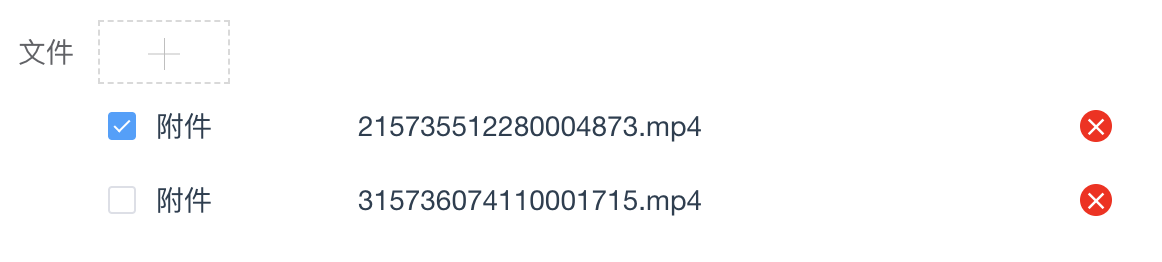
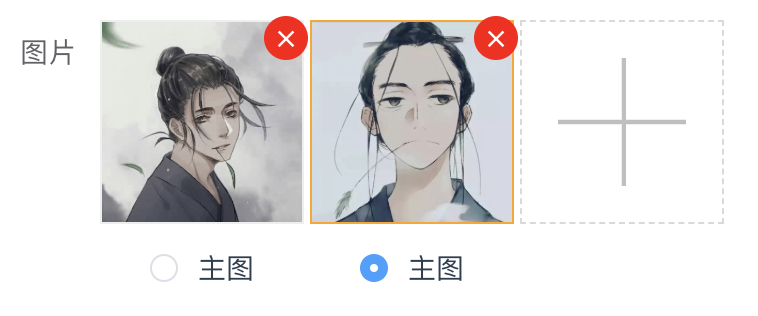
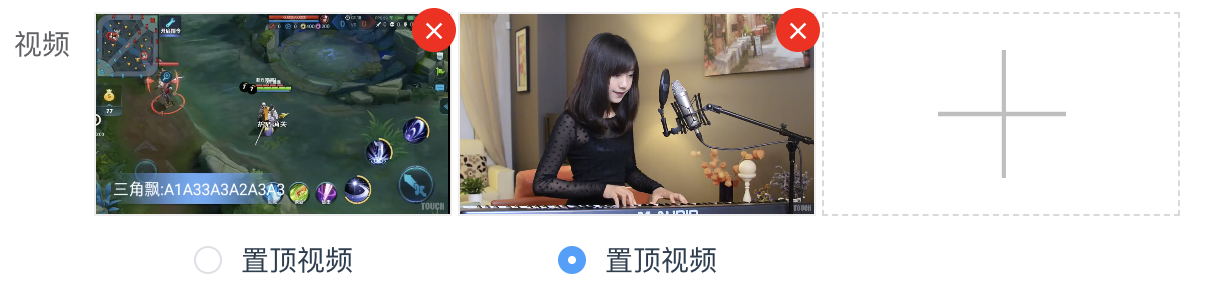
listType 决定了上传后的展示类型以及文件上传的类型:
默认listType="file"时, 类型只受mustExt参数限定, 效果如下:
当listType="img"时, 类型只支持(jpg, jepg, png, gif), 同时受mustExt参数限定, 效果如下:
当listType="video"时, 类型只支持(mp4), 同时受mustExt参数限定, 效果如下:
API
| 参数 | 说明 | 类型 | 默认值 | | | --- | --- | --- | --- | --- | | listType | 文件展示类型, 可选值为file, img, video | String | file | | | token | 上传文件的token | String | '' | | | domain | 上传空间绑定的域名 | String | '' | | | sortable | 文件列表是否可拖拽排序 | Boolean | false | | | multiple | 是否允许多文件上传 | Boolean | false | | | selectable | 是否对列表可选择 | Boolean | false | | | selectLabel | 列表可选择时的文案 | String | '' | | | selected | 列表默认已选中的key数组 | String[] | [] | | | multipleChooice | 列表可选是否支持多选 | Boolean | false | | | maxSize | 单个文件最大允许的尺寸,单位是兆(MB),默认0表示无限制 | Number | 0 | | | defaultList | 默认的文件列表 | Object[] | [] | | | mustExt | 默认的文件类型,默认无限制 | String[] | [] | |
事件
| 事件名称 | 说明 | 回调参数 | | :--- | :--- | :--- | | change | 上传文件改变时的状态 | function(fileList, selected) | | error | 上传文件时出错返回的错误内容 | function(message) |