
@sky390/pi-desktop-questionnaire
v0.1.0
Published
Pi extension (fork of @juicesharp/rpiv-ask-user-question). A structured questionnaire the model can put to you when it would otherwise guess, with typed options instead of free-form replies. Works in both Pi CLI (full TUI) and Pi Desktop (native questionn

Maintainers
 sky390
Readme
@sky390/pi-desktop-questionnaire

Fork of @juicesharp/rpiv-ask-user-question that adds full-questionnaire support for Pi Desktop. MIT — original upstream work by juicesharp.
Let the model ask you instead of guessing. This extension gives Pi Agent one tool — questionnaire — that opens a terminal dialog of up to four questions with written-out options, and hands your choices back as structured data. Install it if you would rather spend fifteen seconds picking than an hour undoing a wrong assumption.
Install
pi install npm:@sky390/pi-desktop-questionnaireRestart your Pi session.
Pi Desktop
Pi Desktop reports ctx.mode === "rpc", so the upstream package degrades to one
native select/input dialog per question — no tabs, no side-by-side previews,
and multi-select by typing numbers. This fork upgrades that path: when the host
exposes a questionnaire method on its UI context (Pi Desktop ≥ the commit that
adds it), the whole questionnaire renders at once in a single native dialog with
the same capabilities as the terminal TUI:
- per-question tabs plus a Submit review tab (multi-question runs)
- single- and multi-select with the same
QuestionAnswershapes - side-by-side option previews (markdown in a monospace box)
- the "Type something." custom-answer escape on every question
- per-question notes
Esc(or Cancel) abandons the whole questionnaire, matching the TUI
Hosts without the questionnaire method (VSCode pendant, Zed, Paseo, …) keep
the upstream sequential select/input walker unchanged, and Pi CLI still renders
the full terminal TUI. Nothing about the tool schema changes — the model-facing
contract is identical in every host.
Quick start
Nothing to set up — the tool is live as soon as Pi restarts. Hand the model a task with a real decision buried in it:
Add caching to the API client.
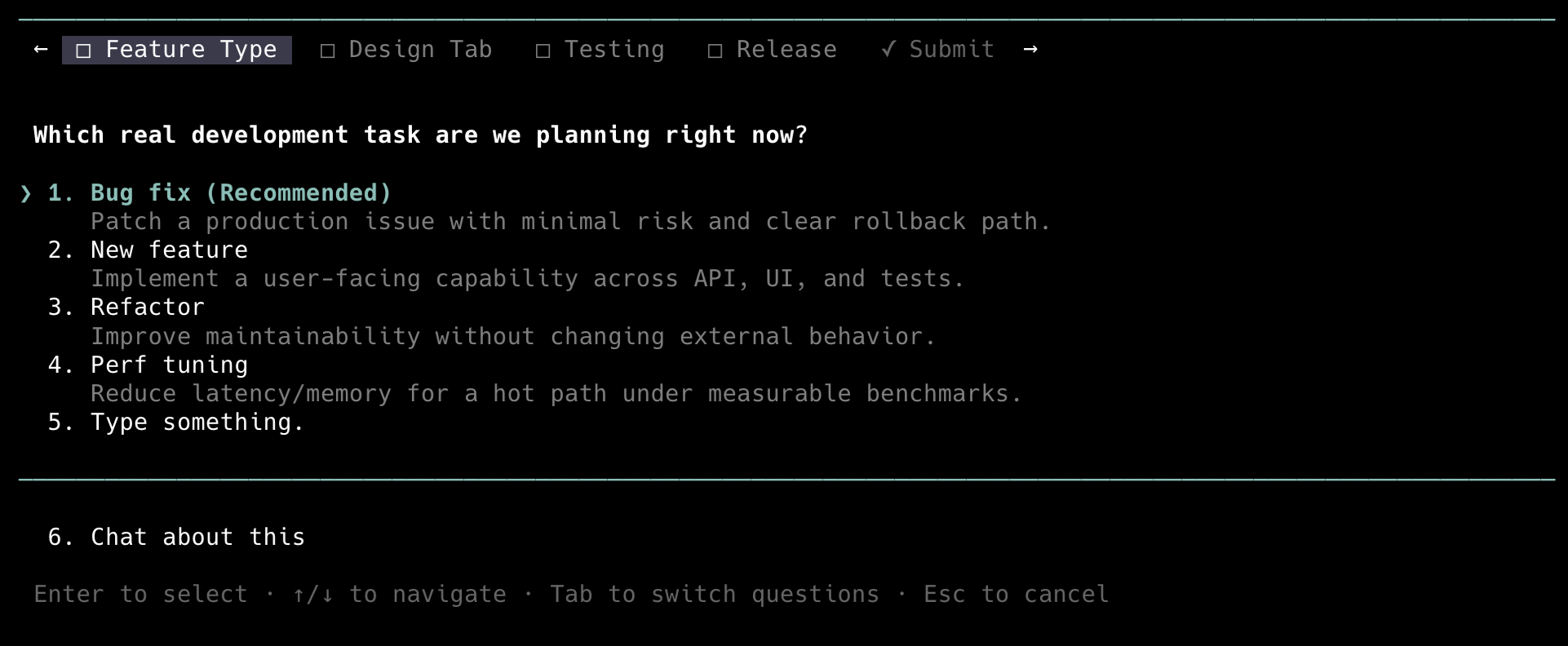
Rather than picking a strategy on your behalf, the model calls questionnaire and a dialog takes over the bottom of your terminal. Move with ↑/↓, choose with Enter, press n to attach a note, or land on the Type something. row to answer in your own words. While typing, Shift+Enter adds a line, Ctrl+G opens Pi's configured external editor, and Ctrl+U clears the draft; browsing another option and returning keeps what you wrote. Esc abandons the questionnaire entirely.
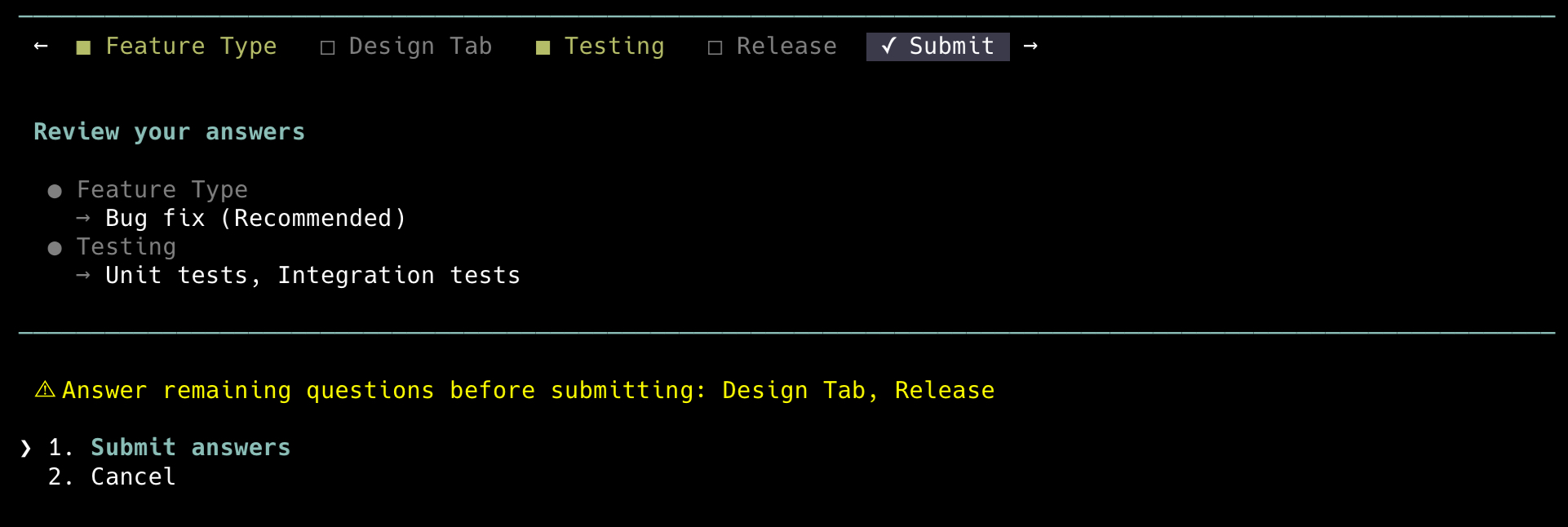
When the model asks several things at once, Tab moves between them and a Submit tab reviews everything before it goes back:
What you get
- Typed options instead of a wall of prose — each question carries 2-4 authored choices, and every choice comes with a description of what it means or what it costs you.
- You can always answer in your own words — a
Type something.row is appended to every question, single- or multi-select, widens to the full pane while you type, keeps its multiline draft visible in that row while you browse, and supports Pi'sShift+Enternewline andCtrl+Gexternal-editor flows. - Compare real artifacts, not just labels — an option can carry a markdown
preview(ASCII mockup, code, diagram, config) that renders in a bordered box beside the option list. - One interruption, not five — up to four questions arrive in a single tabbed dialog, and the Submit tab lists your answers and names anything still blank before you commit.
- Notes on any answer —
nopens a multiline note editor on any question tab; the note travels back to the model alongside the choice without marking the question answered. - Read the transcript behind the dialog —
Ctrl+]collapses the overlay so you can scroll the conversation, then brings it back with your answers intact. - Works outside the terminal too — in RPC and ACP hosts such as the VS Code pendant or Zed the questionnaire walks through the host's native dialogs, and in non-interactive runs the tool is removed from the model's tool list instead of failing every call.
Configuration
Optional. Settings live in ~/.config/rpiv-ask-user-question/config.json; the file is read, never written.
| Setting | What it does | Default |
| --- | --- | --- |
| collapseKey | Key that collapses and expands the dialog. Accepts Pi keybinding ids such as alt+o; "off" disables the shortcut. | "ctrl+]" |
| guidance.promptSnippet | One-line description of the tool in the system prompt — tune how eagerly the model asks. | built-in snippet |
| guidance.promptGuidelines | Usage guidelines given to the model, as a list of strings. | 4 built-in guidelines |
{ "collapseKey": "alt+o" }Malformed JSON falls back to the defaults with a warning; an individual unusable value is silently dropped back to its default. Never an error.
Reference
- Tool schema — parameters, limits, reserved labels, validation errors, the result envelope, and the
rpiv:ask-user:promptevent. - Keyboard and layout — every key, the rows the dialog appends, notes, collapse mode, and how previews and overflow adapt to terminal size.
- Configuration — file lookup and
XDG_CONFIG_HOME, thecollapseKeygrammar, theguidance.*prompt overrides, and how invalid values are handled. - Hosts and runtime behavior — terminal vs RPC vs non-interactive, what degrades in each, and the load-failure envelopes.
- Localization — the nine shipped languages, how the locale is chosen, and how to add one.
Requirements
- Node.js 22 or newer.
- Pi Agent, with an interactive terminal or an RPC/ACP host. Non-interactive runs never see the tool.
- A terminal at least 100 columns wide for side-by-side previews; narrower terminals stack the preview under the options.
No native dependencies, no compiler, no API keys — the extension makes no model calls of its own.
Troubleshooting
The model says the questionnaire UI failed to load and asks its questions as chat text. The dialog's modules were replaced on disk while Pi was running, usually by a package-manager install touching the store. Repair the install if it is broken, then restart Pi; the failure is not recoverable inside the running process.
Ctrl+] does nothing. On keyboard layouts where ] sits on the shifted layer (Latin American among them) the default is unreachable. Set collapseKey to something you can type, for example "alt+o".
Related
@juicesharp/rpiv-i18n— optional; installing it renders the dialog chrome in your language and adds/languages.@juicesharp/rpiv-pi— the umbrella package whose workflow skills usequestionnaireas their developer checkpoint./rpiv-setupoffers to install this extension.
License
MIT — see LICENSE.