
@skywize-gmbh/backstage-home-visit-tracker-widget
v0.1.3
Published
Backstage frontend plugin: "Top Visited" and "Recently Visited" homepage widgets plus a shared, extensible "Local data" settings tab. Supports both the classic and the New Frontend System.

Maintainers
 jumenke
Readme
@skywize-gmbh/backstage-home-visit-tracker-widget
A small, self-contained Backstage frontend plugin that tracks the catalog entities a user opens and surfaces them again:
- Top Visited — a homepage widget listing entities by how often they are opened.
- Recently Visited — a homepage widget listing entities by most recent visit.
- Local data — a user-settings tab for clearing the browser-local data the plugin stores. The tab is an extensible surface: every plugin that keeps per-browser data contributes one row to it (this plugin contributes the "Visited entities" row).
Everything is stored in the browser (localStorage) per user — no backend,
database, or API is required.
| Recently Visited | Top Visited |
| --- | --- |
| 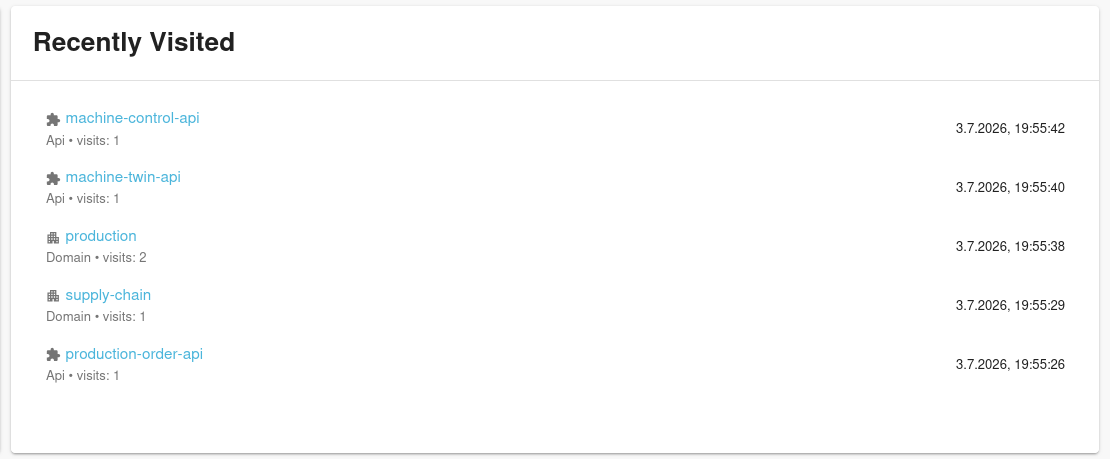 |
| 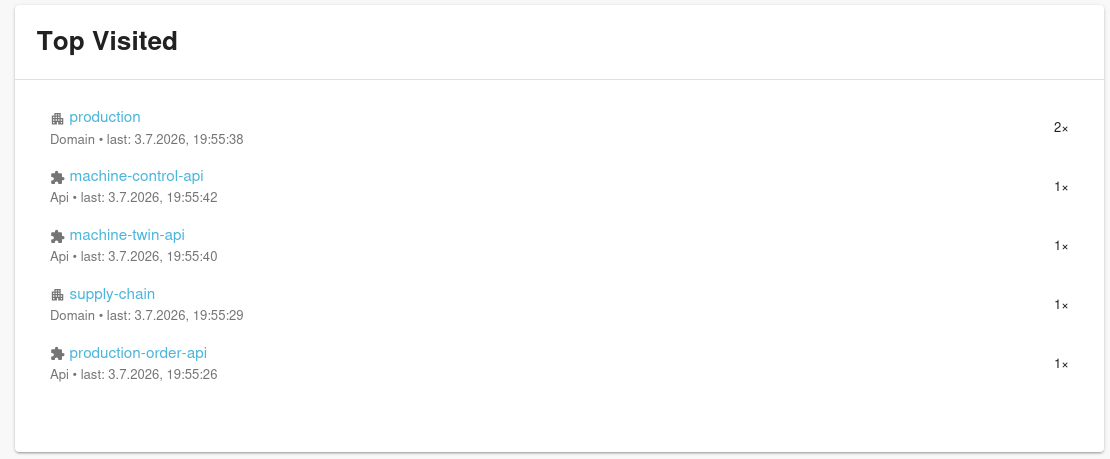 |
|
The plugin ships for both frontend systems:
| Frontend system | Import from |
| --- | --- |
| Classic (legacy) | @skywize-gmbh/backstage-home-visit-tracker-widget |
| New Frontend System | @skywize-gmbh/backstage-home-visit-tracker-widget/alpha |
Verified against Backstage 1.50.x (@backstage/frontend-plugin-api ^0.16,
@backstage/plugin-home-react ^0.1.37).
Prerequisites
This plugin adds widgets/cards to your app's home page — it does not create
one. A clean @backstage/create-app scaffold has no home page by default, so
you need @backstage/plugin-home
installed and set up first:
yarn --cwd packages/app add @backstage/plugin-home- Classic (legacy) frontend system: install
@backstage/plugin-homeand mount a<HomePageGrid>(inside a<HomePage>) on your home route — that's what<MostVisitedCard />/<RecentlyVisitedCard />render into. - New Frontend System: add
@backstage/plugin-home/alphato yourfeaturesincreateApp— that's what provides the home page and the widget catalog this plugin's widgets register themselves into.
Without one of the above, installing this plugin alone won't show anything.
Installation
From your Backstage repo root:
yarn --cwd packages/app add @skywize-gmbh/backstage-home-visit-tracker-widgetOr, with npm:
npm install @skywize-gmbh/backstage-home-visit-tracker-widget -w packages/appNew Frontend System (recommended)
1. Install the plugin
// packages/app/src/App.tsx
import { createApp } from '@backstage/frontend-defaults';
import visitedPlugin from '@skywize-gmbh/backstage-home-visit-tracker-widget/alpha';

export const app = createApp({
  features: [
    visitedPlugin,
    // ...your other features
  ],
});
This registers, out of the box:
- two home-page widgets (Top Visited, Recently Visited) available in the home page widget catalog, and
- a Local data tab under Settings, pre-populated with the "Visited entities" row.
2. Record visits
Mount the tracker on your entity page so visits are recorded as users browse.
In the New Frontend System this is typically done with an entity-page card or
content extension that renders <VisitTracker /> (it renders nothing):
import { VisitTracker } from '@skywize-gmbh/backstage-home-visit-tracker-widget';If you keep a custom EntityPage, simply render <VisitTracker /> once inside
it (see the legacy example below).
Classic (legacy) frontend system
1. Homepage widgets
Add the cards to your custom home page:
// packages/app/src/components/home/HomePage.tsx
import { MostVisitedCard, RecentlyVisitedCard } from '@skywize-gmbh/backstage-home-visit-tracker-widget';

// inside your <HomePageGrid> / layout:
<MostVisitedCard />
<RecentlyVisitedCard />
2. Local data settings tab
// packages/app/src/App.tsx
import { SettingsLayout } from '@backstage/plugin-user-settings';
import { LocalDataSettingsContent } from '@skywize-gmbh/backstage-home-visit-tracker-widget';

const settingsPage = (
  <SettingsLayout>
    {/* ...existing routes... */}
    <SettingsLayout.Route path="local-data" title="Local data">
      <LocalDataSettingsContent />
    </SettingsLayout.Route>
  </SettingsLayout>
);
3. Record visits
Drop the tracker into your entity page:
// packages/app/src/components/catalog/EntityPage.tsx
import { VisitTracker } from '@skywize-gmbh/backstage-home-visit-tracker-widget';

const entityPage = (
  <>
    <VisitTracker />
    <EntitySwitch>{/* ... */}</EntitySwitch>
  </>
);
The "Local data" tab is shared and extensible
The tab does not hard-code its rows. Each row is a LocalDataResetEntry
registered through a small, framework-agnostic API. This plugin registers its
own row on import:
import { registerLocalDataReset } from '@skywize-gmbh/backstage-home-visit-tracker-widget';

registerLocalDataReset({
  id: 'visited-entities',
  title: 'Visited entities',
  description: 'The data behind the “Top Visited” and “Recently Visited” widgets.',
  action: () => clearEntityVisits(),
});
The LocalDataSettingsContent component renders every registered row plus a
"Reset all local data" action, and reacts live as rows register.
The registry lives in this package for now. As the number of contributing plugins grows it can be lifted into a shared
*-local-data-commonpackage without any change to the contribution API.
LocalDataResetEntry
| Field | Type | Description |
| --- | --- | --- |
| id | string | Stable unique id (also the React key / de-dupe key). |
| title | string | Row heading, e.g. "Visited entities". |
| description | string | One-line explanation of what gets cleared. |
| action | () => void \| Promise<void> | Runs on click. |
| successMessage | string? | Toast text. Defaults to `${title} cleared.`. |
| buttonLabel | string? | Defaults to "Clear". |
| order | number? | Ascending sort hint. |
Public API
| Export | Available from | Purpose |
| --- | --- | --- |
| default (frontend plugin) | /alpha | NFS plugin with both widgets + settings tab. |
| visitedPlugin | root | Legacy plugin instance. |
| MostVisitedCard, RecentlyVisitedCard | root | Legacy homepage cards. |
| LocalDataSettingsContent | root | The Local data tab UI. |
| VisitTracker, useRecordEntityVisit | root | Record visits from an entity page. |
| MostVisitedEntities, RecentVisitedEntities | root | Raw list components. |
| recordVisit, readEntityVisits, clearEntityVisits | root | Storage primitives. |
| registerLocalDataReset, useLocalDataResets, getLocalDataResets | root & /alpha | Local data contribution API. |
| DEFAULT_KINDS, DEFAULT_LIMIT | root | Widget defaults. |
Data & privacy
All state is kept in the visitor's browser under the entity-visits:v1
localStorage key (capped at 500 entries). Nothing is sent to a server. Users
can clear it at any time from the Local data settings tab.
Development
yarn install
yarn tsc      # type-check
yarn lint
yarn test
yarn build    # produces dist/ (root + alpha entry points)
License
Apache-2.0